foundry_qs
NOTE: This file (after the full page line below) is test #1 (26.1027_0920) of GPT generation of markdown/png’s from a docx source file based on my instructions (there is still much room for improvement).
- Source file is #695 docx on the Gdrive.
- This page does not include
- 0xx sub-stages (~90% of the content of the docx).
- many formatting details (I will gradually refine my prompt to get better results)
ziptieai.com
#695_pal_foundry_qs_ZAI_version_v11_26.1027_ss
This docx is my working notes for a future step-by-step Foundry QS (quick start) guide. This docx is meant as a long-term template/basis for a QS that can be easily updated and maintained (a living document). I plan to generate markdown for a QS web version from this docx using AI (I’ve done this before, and it works well).
The following summarizes the gist of my take on Foundry/ontology.
The topics covered in each stage of this QS demo are shown below. The organization of this first version of the QS was suggested by GPT. I might create my own version in the future. In any case, this current version is still an excellent QS. You can follow it to train yourself how to navigate the dialogs and perform core basic tasks.
Contents
- Ch1 — Reasons to train on Foundry even if you wont be a Foundry programmer
- Ch2 — Using AI assistants (GPT/FDE) to do this QS
- Ch3 — Understanding the Ontology through familiar backend concepts
- Stage 1 — Ontology / UI
- S1 Workflow overview
- Stage 2 — Logic and automation
- S2 Workflow overview
- Stage 3 — Data and external systems
- S3 Workflow diagram
- Stage 4 — AI External
- S4 Workflow diagrams
- (S1-S4) Final summary
Ch1 — Reasons to train on Foundry even if you wont be a Foundry programmer
-
Using AI in the enterprise is risky. Palantir is making a lot of money from Foundry because there is a real market for such tools. There will be competing products soon.
-
The concepts you learn will apply to AI in the enterprise in general.
-
Foundry has a very generous free tier which makes it practical to learn (if you live in one of the very few countries in which the Foundry trial is available).
-
Palantir’s FDE (forward depoyed engineer) AI assistant. FDE drastically lowers the bar of expertise required to use Foundry effectively.
For details about Foundry sign up search for “1b Foundry free tier sign up” at https://ziptieai.com/pal/.
Ch2 — Using AI assistants (GPT/FDE) to do this QS
The challenge with Foundry is the learning curve even for the basics demo’d in this QS (just navigating the UI can be quite a challenge). And since Foundry functionality is very broad, you will always be learning. That means that the most important skill for Foundry is knowing how to effectively use FDE. Built-in AI for apps like FDE in Foundry points to how humans will interact with complex apps in the future.
FDE
-
can “see” screenshots (a game-changer). This is why its important for the QS to contain accurate diagrams (even if they are not perfectly formatted). These diagrams are input you can use in conversations with FDE.
-
has accurate internal picture of how Foundry operates and
-
can access to the project you are building in Foundry (FDE can analyze your project).
The following are some example prompts (partial response shown sometimes) .
Your prompt 1: Can you explain the attached diagram?
(enter the prompt but dont click ENTER).
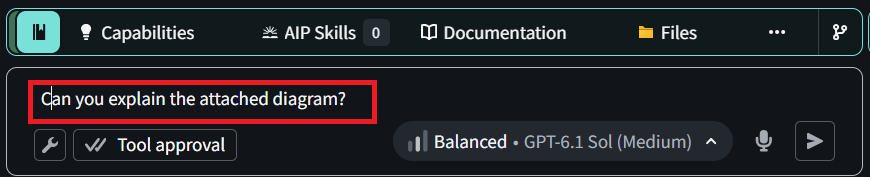
(paste the following diagram into the FDE prompt box and and press ENTER).
FDE response 1
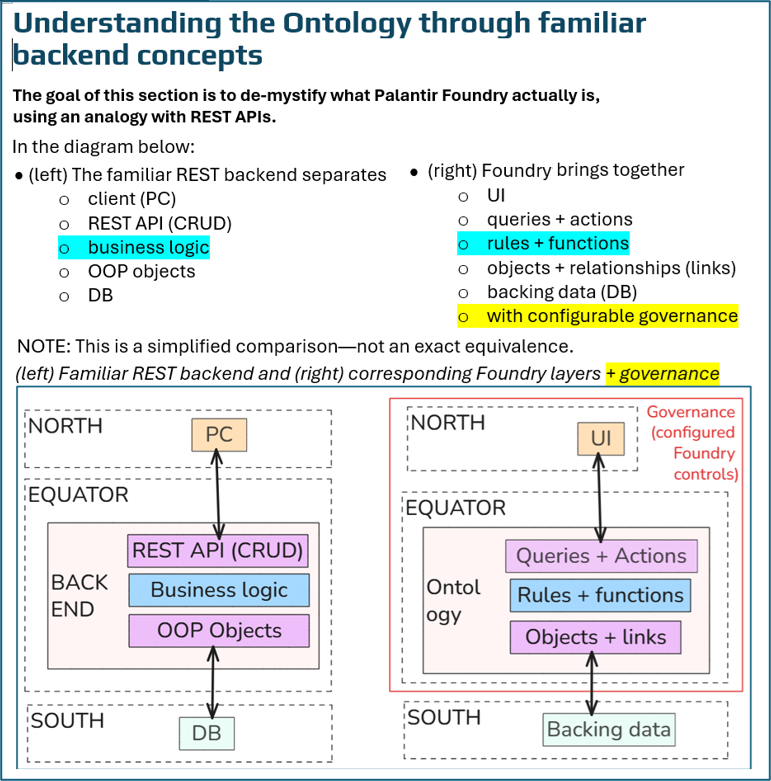
What the diagram shows
The diagram compares a familiar application backend with Foundry. It uses concepts a programmer may already know—APIs, business logic, objects, and a database—to explain Foundry’s building blocks.
……………………………
A small example
Suppose an object represents an item with a quantity of 10.
A UI table displays the item.
The user clicks Set quantity.
The button opens an Action form.
The user enters 15.
The Action checks its configured conditions and runs its logic.
The object’s quantity becomes 15, and the UI can display the updated value.
The button is not the Action, and the Action is not a method owned by that object. The button invokes a separately defined Action, passing the object and new quantity as inputs.
What “governance” adds
The red boundary emphasizes that these components have controls, such as:
Who can open or edit the application?
Who can access the object data?
Who may submit an Action?
Which input values are permitted?
Access to the UI does not automatically grant access to everything it uses. Those permissions and conditions must be configured.
How to read NORTH, EQUATOR, and SOUTH
These are the diagram author’s teaching labels, not official Foundry deployment layers:
NORTH: user interaction.
EQUATOR: data access, operations, logic, and business objects.
SOUTH: supporting data.
“South” does not necessarily mean outside Foundry: backing data can be stored in Foundry datasets.
The main takeaway
Foundry brings together familiar application-building components: a UI, queries, controlled operations, business logic, and linked business objects—with integrated, configurable governance.
The analogy is useful, but not exact: conventional applications can also have governance, REST APIs can do more than CRUD, and Foundry objects are not simply OOP class instances.
My comments about response1
-
The idea of comparing FDE to REST backends is my own original. FDE (which uses a LLM such as GPT internally) is a great tool, but can only repeat topics that it (and the LLM) has been programmed to repeat or scraped from the internet or previous conversations.
-
NORTH and SOUTH are Foundry concepts (not my original idea). Those appear in systems overview diagrams in official Foundry docs.
-
EQUATOR is my original idea. In the official diagram, this layer is called “ONTOLOGY”. However, I think this layer should contain much more (and should have a different name).
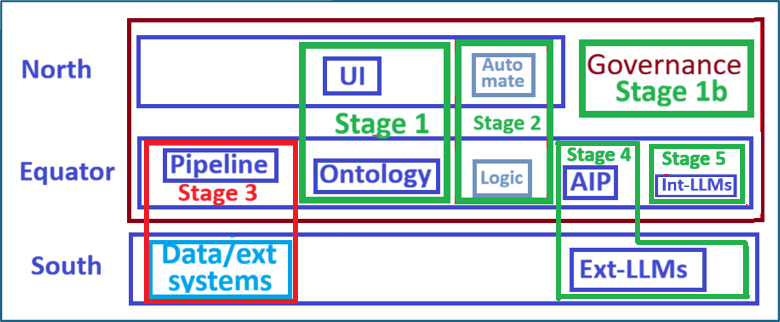
Your prompt 2: Please explain briefly the attached diagram.
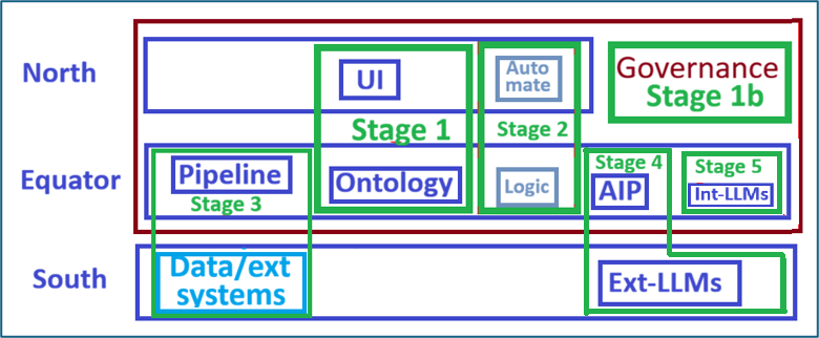
FDE response 2
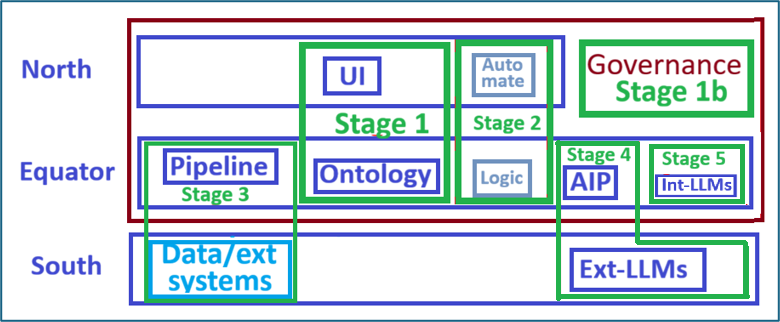
This diagram is a learning roadmap for Foundry. The green boxes show which capabilities each stage introduces:
Stage Focus
1 — UI + Ontology Display business objects and interact with them through an application.
1b — Governance Control access, permitted operations, and accountability.
2 — Logic + Automate Add business logic and trigger operations automatically.
3 — Data + Pipelines Bring in external data and prepare it for the Ontology.
4 — AIP + external LLMs Use language models in Foundry workflows.
5 — Internal LLMs Explore models hosted internally, if that is the intended scope.
The three horizontal bands provide a simplified orientation:
North: applications and workflow orchestration.
Equator: data processing, the Ontology, logic, and AI capabilities.
South: external systems and services.
The large red boundary emphasizes governance across the Foundry workflow. It does not mean Foundry automatically controls direct access to external systems.
The sequence teaches useful workflows before adding AI. “North,” “Equator,” and “South” are teaching labels—not a physical deployment diagram.
Your prompt 3: Please briefly explain what I should do based on the following diagram.
(paste the following diagram into the FDE prompt box and and press ENTER).
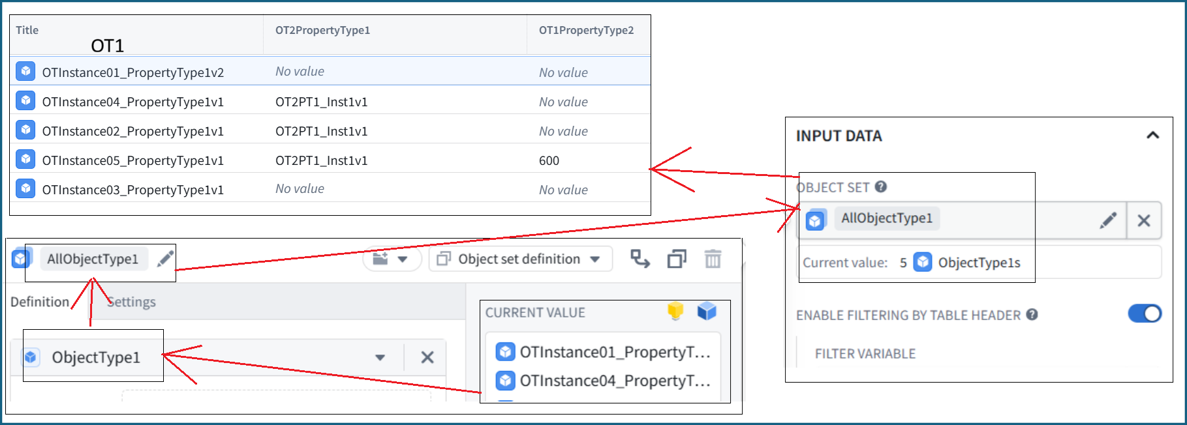
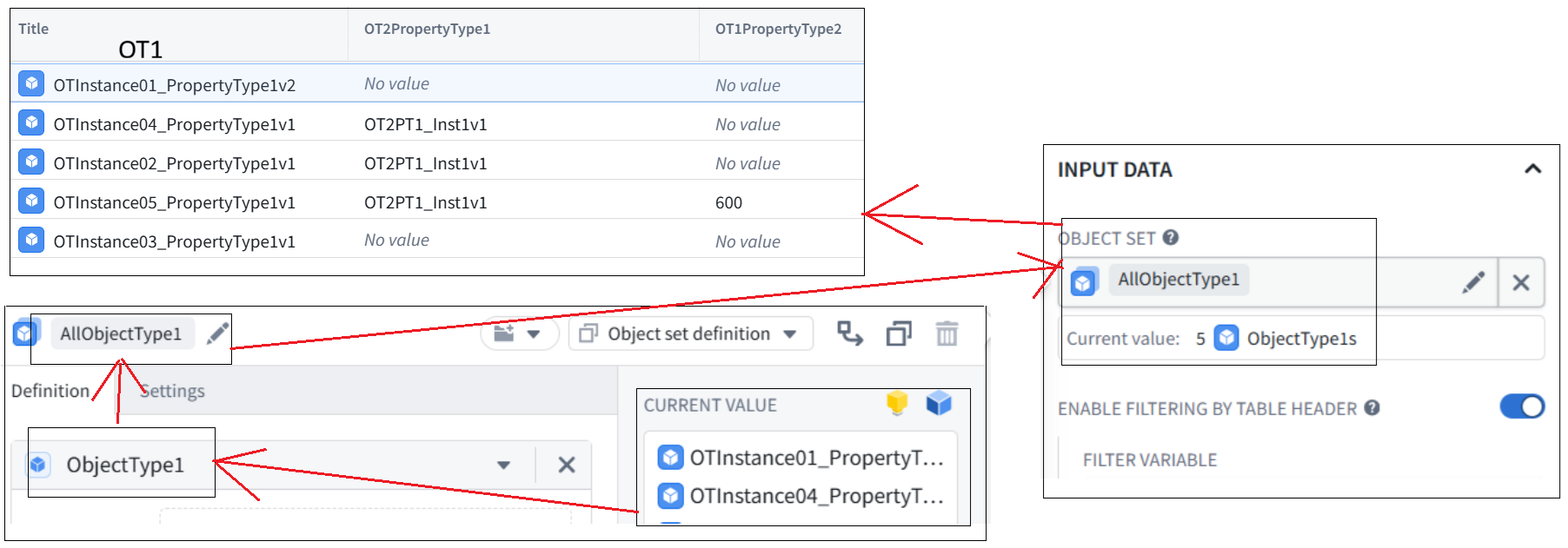
FDE response 3: The diagram shows how to populate a Workshop Object Table with ObjectType1 instances.
In Workshop Edit mode, select the Object Table.
Under Input data → Object set, create or select an object-set variable named AllObjectType1.
In that variable’s Definition, select ObjectType1. Leave it unfiltered to include all instances.
Confirm the variable shows 5 ObjectType1s and the table displays five rows.
Under Column configuration, display:
Title
Linked ObjectType2 → OT2PropertyType1
OT1PropertyType2
The connection is: ObjectType1 → object-set variable → table. The variable supplies the objects; the table’s column settings determine what is displayed.
Example chat from this doc
FDE: …………
- If prompted for a repository name, use:
OntologyDemoFunctions
Send a screenshot of the template-selection screen before creating it. ………..
ME: (I pasted a screenshot with no prompt)
FDE: Your repository setup is correct
The screenshot confirms ……………
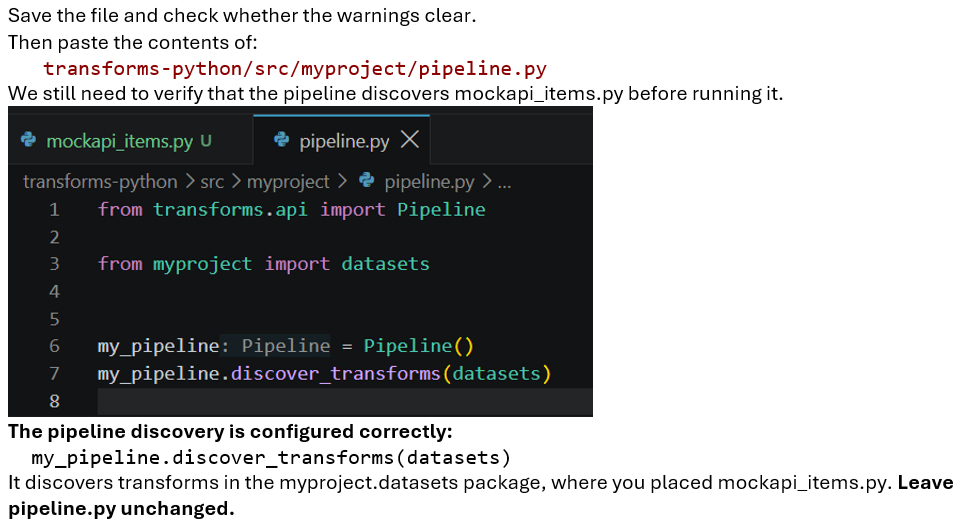
Another example
(all I did was paste a screenshot of the code)
Ch3 — Understanding the Ontology through familiar backend concepts
Foundry manages
-
business objects, relationships, queries, and operations together
-
under a common governance model.
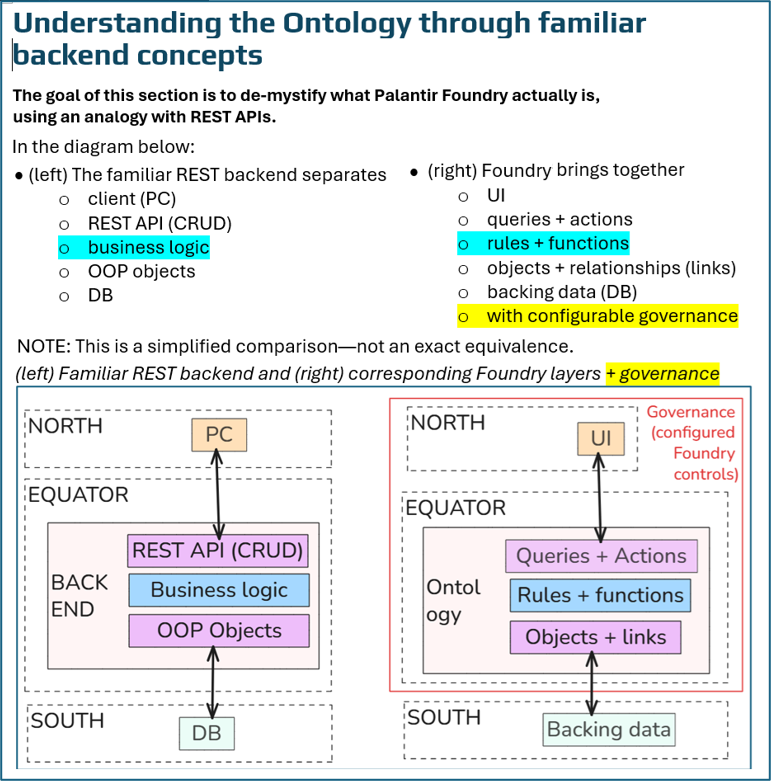
The goal of this section is to de-mystify what that actually means. In particular what an ontology is. One of the best ways to do this is by comparing Foundry and client–server, database, and REST API concepts.
TOC
-
1 Comparison of a REST backend and Foundry layers
-
2 Analogies between REST CRUD and Foundry query/actions
-
3 Analogies between DB links and Foundry links
1 Comparison of a REST backend and Foundry layers
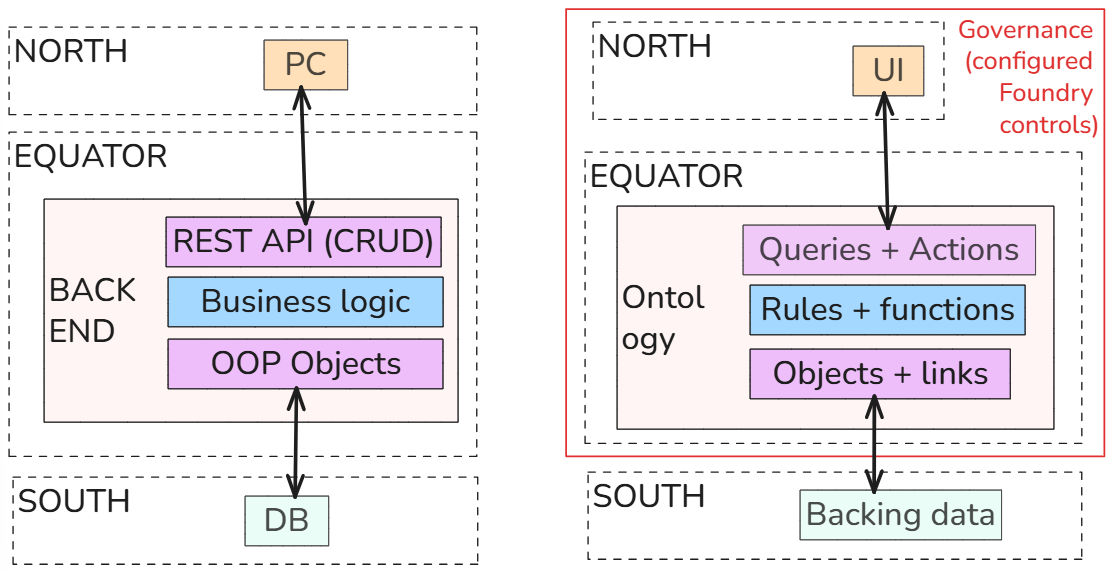
In the diagram below:
-
(left) The familiar REST backend separates
-
client (PC)
-
REST API (CRUD)
-
business logic
-
OOP objects
-
DB
-
(right) Foundry brings together
-
UI
-
queries + actions
-
rules + functions
-
objects + relationships (links)
-
backing data (DB)
-
with configurable governance
(left) Familiar REST backend and (right) corresponding Foundry layers + governance
2 (WIP) Analogies between REST CRUD and Foundry query/actions
TOC
-
2.1 GET (query)
-
2.2 CREATE (action)
-
2.3 MODIFY/PATCH (action)
-
2.4 DELETE (action)
2.1 GET (query)
The Foundry Workshop UI is used to perform a GET of (for example) an object type. An example is shown below.
The REST equivalent might be GET /api/v2/ontologies/{ontology}/objects/ObjectType1.
Diagram of the workflow required for the Foundry UI (Workshop) to GET an object instance property. This workflow is subject to governance (access control).
2.2 CREATE (action)
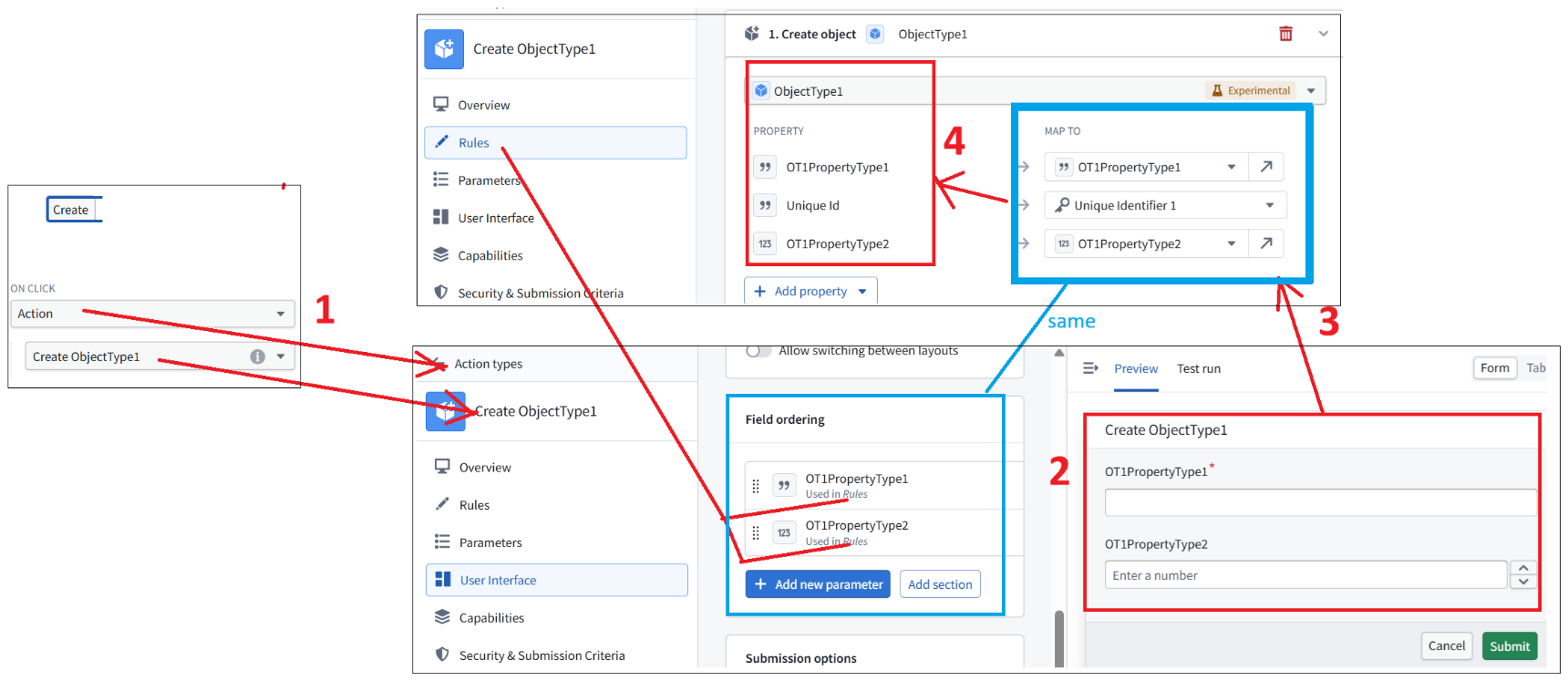
Examples of create (POST) in Foundry
-
Workshop — Create button. Invokes Create ObjectType1 Action
-
Action UI — Input form. User enters property values and submits
-
Action Rules — Parameter mapping. Submitted parameters mapped to object properties
-
Ontology — ObjectType1. Creates and persists a new object instance
The REST equivalent might be
POST /api/objects
{ “id”: 101,
“OT1PropertyType1”: “Instance01”,
“OT1PropertyType2”: 123 }
Create a new object type instance (an object) in Foundry
2.3 MODIFY/PATCH (action)
A UI example of modifying an obect type in Foundry
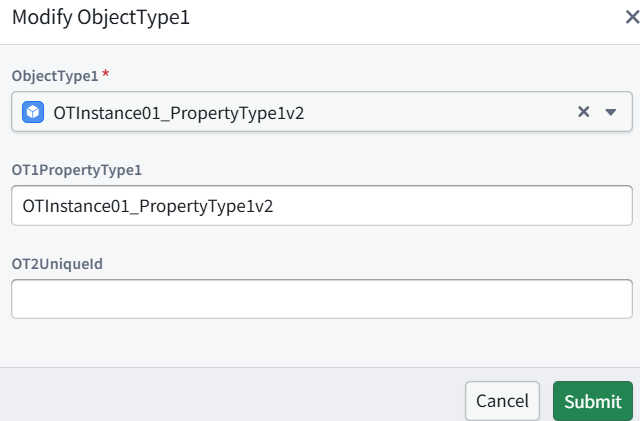
The REST equivalent might be
PATCH /api/objects/ObjectType1/OTInstance01
{ “OT1PropertyType1”: “OTInstance01_PropertyType1v2”,
“OT2UniqueId”: “” }
GPT: These are conceptual REST examples, not literal Foundry API endpoints. In Foundry, your Modify Action is normally executed through an Ontology Action API, typically using an HTTP POST request. The semantic operation is still UPDATE, even though Foundry uses POST to invoke the Action.
2.4 DELETE (action)
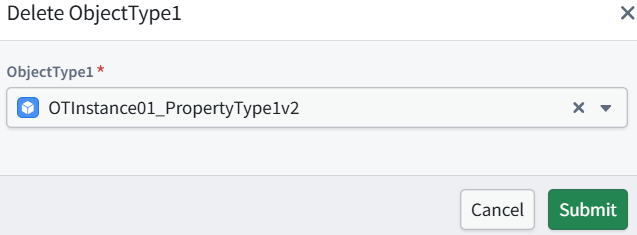
Foundry Ontology API equivalent (Foundry executes your configured Delete Action through an HTTP POST)
POST /api/v2/ontologies/{ontology}/actions/deleteObjectType1/apply
{ “parameters”: {
“ObjectType1”: “{uniqueId}” } }
The Action API name and parameter API name must match your actual Foundry configuration.
The REST equivalent might be
DELETE /api/objects/ObjectType1/{uniqueId}
Here {uniqueId} is the actual primary key of OTInstance01_PropertyType1v2.
3 Analogies between DB links and Foundry links
ME: About links between Object Types and governance
Foundry cannot directly enforce governance inside external databases. So Foundry maintains an internal representation of object relationships in its Ontology, where it can enforce governance. Correct?
GPT: Yes. That is essentially correct.
Foundry represents entities and their relationships in the Ontology, where it can govern:
Definitions: Who can inspect or modify Object Types, Link Types, and Action Types.
Data and operations: Who can access objects and relationships, and which Actions they can execute.
For example, our demo defined:
ObjectType1.OT2UniqueId → ObjectType2.Unique Id
Foundry interprets this foreign-key relationship as an Ontology Link. It does not necessarily store a separate link record; the relationship can be established through matching property values.
Important limitation: Foundry’s governance applies to access and operations through Foundry. Someone accessing the external database directly is subject to that database’s own security controls, not automatically to Foundry’s. Likewise, changes to Ontology objects or links do not automatically update external databases unless writeback is configured.
Conclusion: Foundry provides a governed representation of business entities and relationships, including those originating in external systems. Its governance controls do not automatically extend into those external systems.
Stage 1 (OK) — Ontology / UI
Stage 1 focuses on the basics of the UI and Ontology (in red in the diagram below).
Note that this is the first draft version of this QS, so the structure of this stage will be improved later.
The main thing is this version gets you working hands-on with the basics.
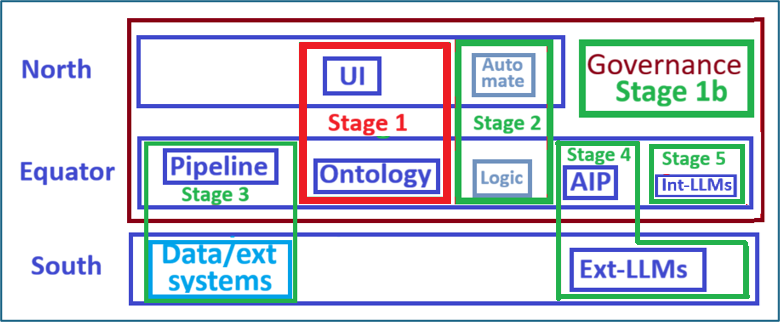
S1 Workflow overview
Basic workflow
-
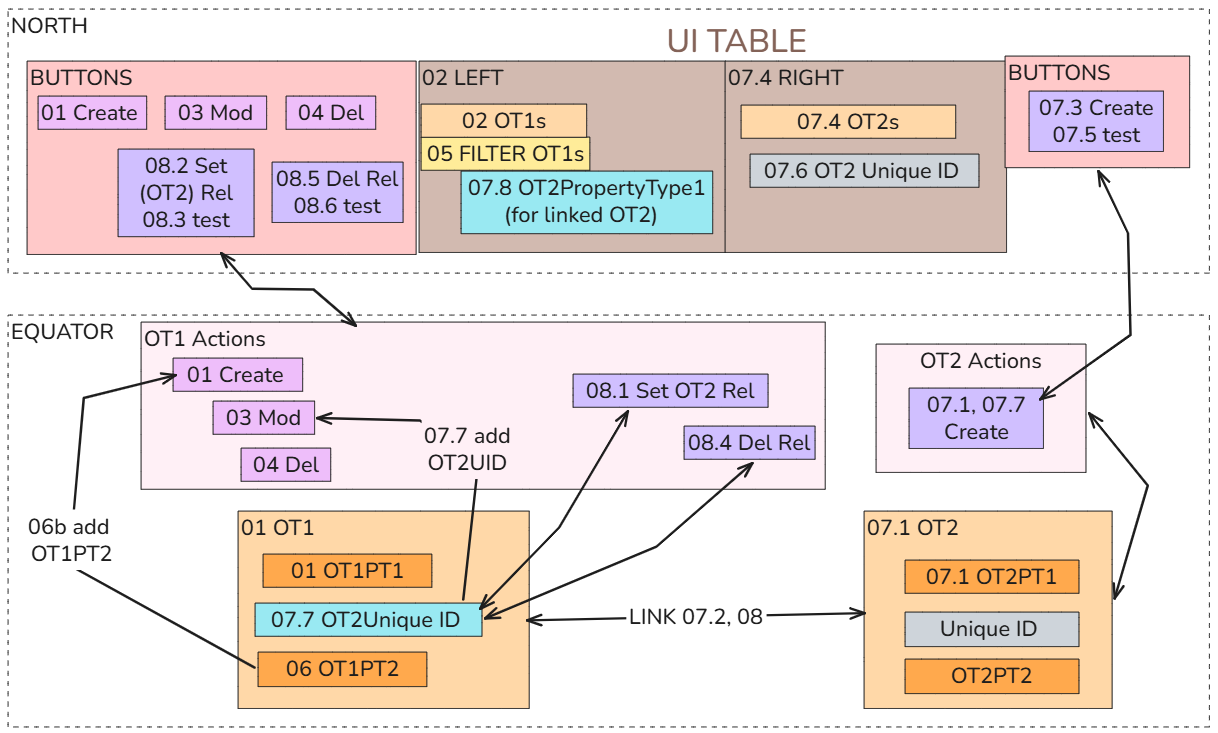
001-004 demo CRUD. Add the following UI buttons (read does not required a button).
-
005 Filter displayed objects
-
006 Add update action
-
007-008 Link actions / relationships. Add the following UI buttons.

The following diagram shows the main steps (001…008 are written as 01…08 in this diagram).
OT = ObjectType, PT = Property Type.
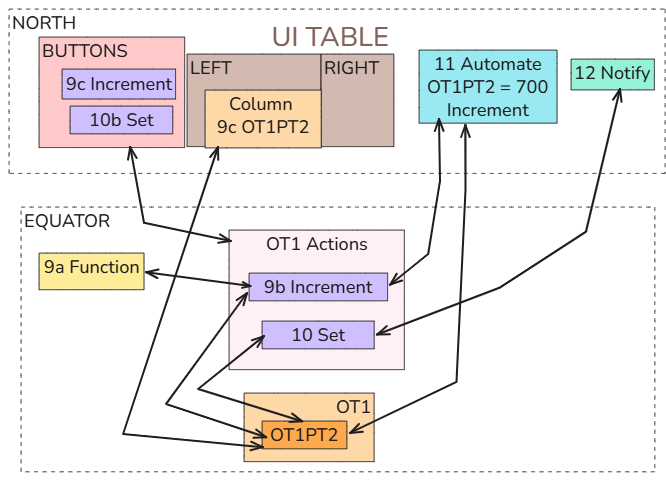
Stage 2 (OK) — Logic and automation
Stage 2 focuses on core Objects + Properties + Links + Actions abstractions.
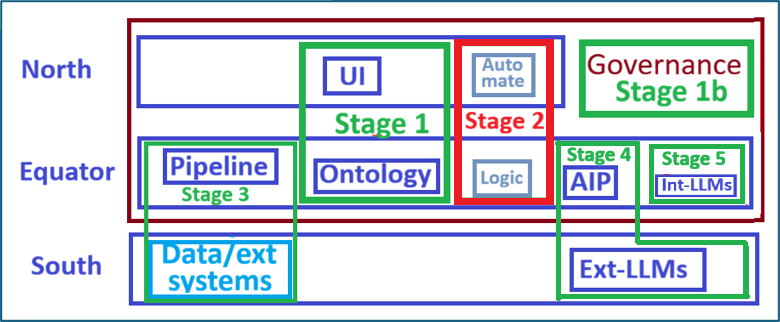
S2 Workflow overview
Basic workflow
-
009a-009c Create function, action and button to increment OT1PropertyType2
-
010-010b Create Action/validation + button to set OT1PropertyType2
-
011 Create an Automation (that triggers Action “Increment OT1PropertyType2”)
-
012 Send a notification when Action “Set OT1PropertyType2” executes
The following diagram shows the main steps (009…012 are written as 09…12 in this diagram).
OT = ObjectType, PT = Property Type.
Stage 3 (OK) — Data and external systems
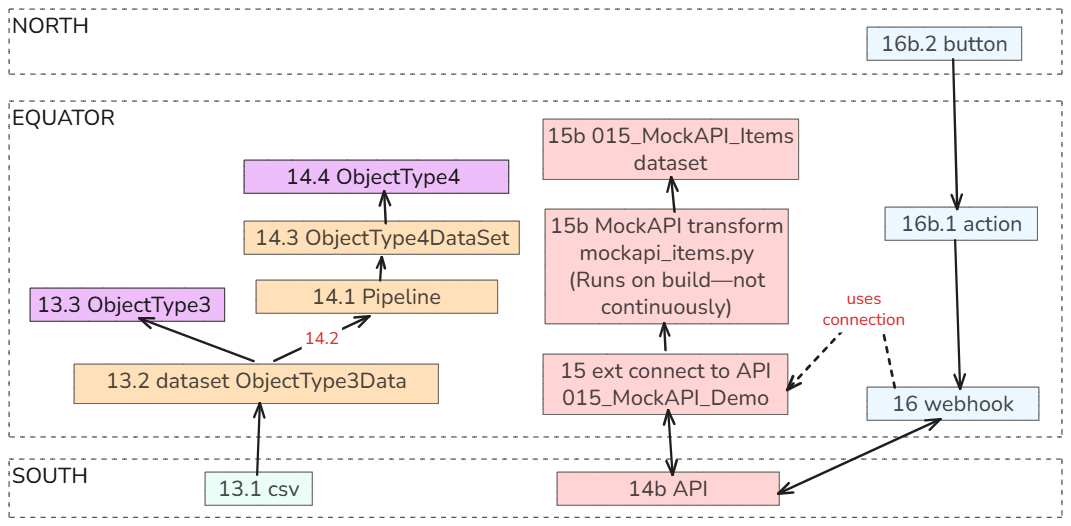
Stage 3 focuses on
-
Pipelines
-
Datasets
-
External connection to API (mockapi.io)
-
Webhook writeback
-
Reingest external system updates
S3 Workflow diagram
Basic workflow
-
013 Dataset-backed Objects
-
014 Pipeline Builder: Transform data before it becomes objects
-
014b MOCKAPI.IO (GPT)
-
015a-015b External API connection
-
016-016b Webhook Writeback
-
017 Re-ingest external system updated state
The following diagram shows the main steps (013…017 are written as 13…17 in this diagram).
OT = ObjectType, PT = Property Type.
Stage 4 (OK) — AI External
Stage 4 focuses on
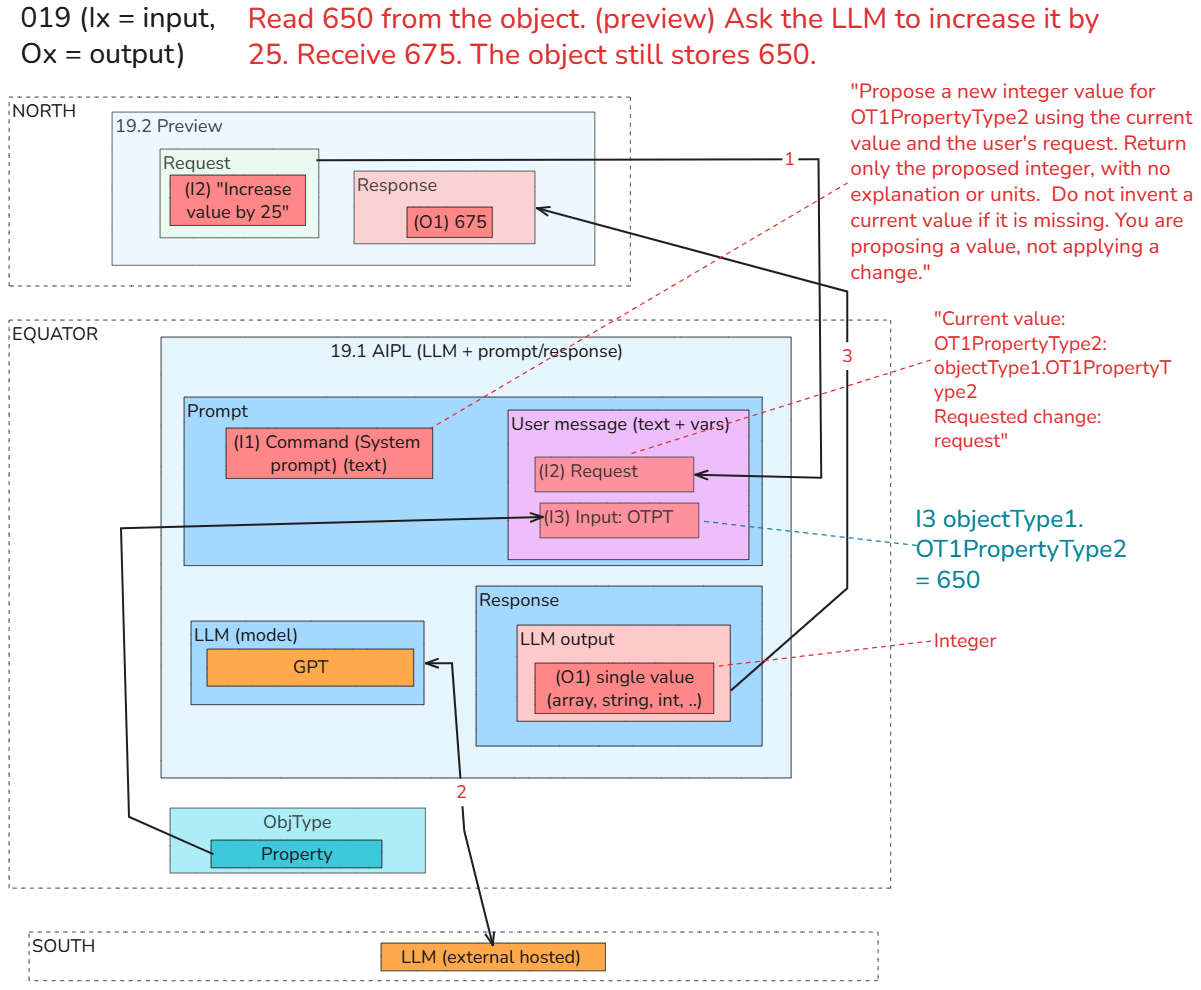
018: Give an available model one object property; inspect its response.
019: Use AIP Logic to return a proposed property change—without applying it.
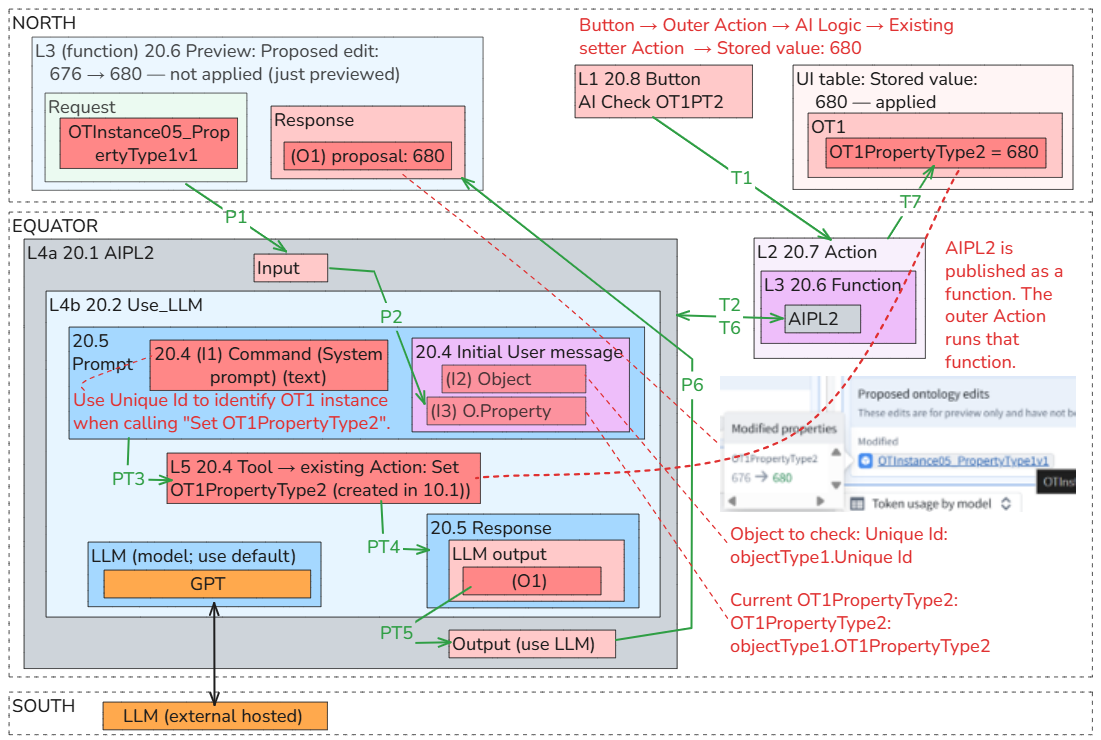
020: Let the user review the proposal and submit a controlled Action.
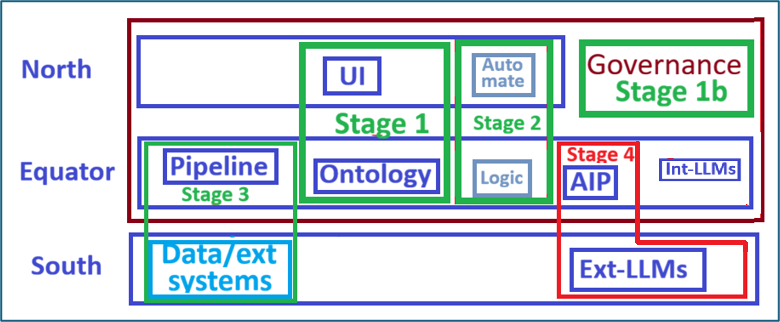
S4 Workflow diagrams
018/019 Workflow diagram
Basic workflow (for 019; 018 is basically the same)
-
19.1 Create AIPL (for this demo: AIPL = LLM + prompt + response).
-
19.2 Using Preview: Send a prompt (request) and view the response
The following diagram shows the main steps (019 is written as 19 in this diagram).
020 Workflow diagram
Basic workflow
-
20.1 L3 Create AIPL / input
-
20.2 L4 ADD LLM BLOCK
-
20.3 L5 ADD (ACTION) “TOOL” (create ref to the action)
-
20.4 L3 Config rest of Use_LLM block (SYS prompt / request)
-
20.5 L3 Preview Use_LLM block
-
20.6 L3 Publish AIPL as function
-
20.7 L2 Create Action (for function)
-
20.8 L1 Add Workshop button
-
20.9 Save/version/publish/TEST
Command sequence
L1 Workshop button
→ L2 Action type: AI Check and Correct OT1PropertyType2
→ L3 Published AIP Logic function
→ L4a AIPL
→ L4b Use LLM block
→ L5 Tool: Set OT1PropertyType2
The following diagram shows the main steps (020 is written as 20 in this diagram).
P1-P6 = Preview workflow; T1-T7 = Test workflow.
(S1-S4) Final summary
ME: this was a very good demo
-
mechanistic… teaching how to use functions, dialogs, etc.
-
this fills a big gap in existing (as far as i know) foundry docs. the hardest part of getting started with foundry are all the dialogs. after 2 months i am finally starting to get used to them.. the problem is when doing the demos, little is explained about the dialogs, and the complicted “real life” demos are overwhelming (demo 2 has an objecttype with 19 (!) properties).
-
“what we built” summary is good… that helps me create diagrams. these diagrams are another big missing gap in existing docs.
-
your included links to Foundry doc webpages are very help. i am adding those to my docs.
-
later when QS stabilizes, i want to add links to demos/examples that are good for more complex demos.
i write all the above to help you understand the priorities.
i will now focus for the next day or 2 on reviewing, and creating diagrams.
long term i will reorg this QS after i understand things better.
this will be the best way to learn foundry.
FDE: That makes the priorities clear: teach the mechanics first, using examples small enough that the mechanics remain visible.
For Foundry Foundations with FDE, we’ll keep this pattern:
One new capability at a time, with minimal data and properties.
Explicit dialog instructions: where to click, what a field means, what to leave unchanged, and whether a button saves, publishes, previews, or executes.
Observable verification: inspect the actual result, not just a success message.
“What we built” summaries that map directly into diagrams.
Relevant Foundry documentation citations alongside the practical walkthrough.
More complex examples as follow-on material, rather than prerequisites.
Your point about the dialogs is important: a learner may understand the goal yet still be unable to navigate the configuration. Explaining that configuration is substantive teaching—not incidental detail.
Reviewing and diagramming now makes sense. We’ll keep the current QS as the tested working version and let the eventual reorganization follow what you learn from studying it. No need to impose another structure prematurely.