2.2 Foundry capstone project
- This “Capstone Project” tutorial builds on the 2.1 ZAI quick start (QS).
- Docx #694 is my working version of the capstone project.
- A detailed description of the Capstone Project follows the screenshot below of the workflow.
Capstone project TOC (not simple, but it worked, thanks to FDE)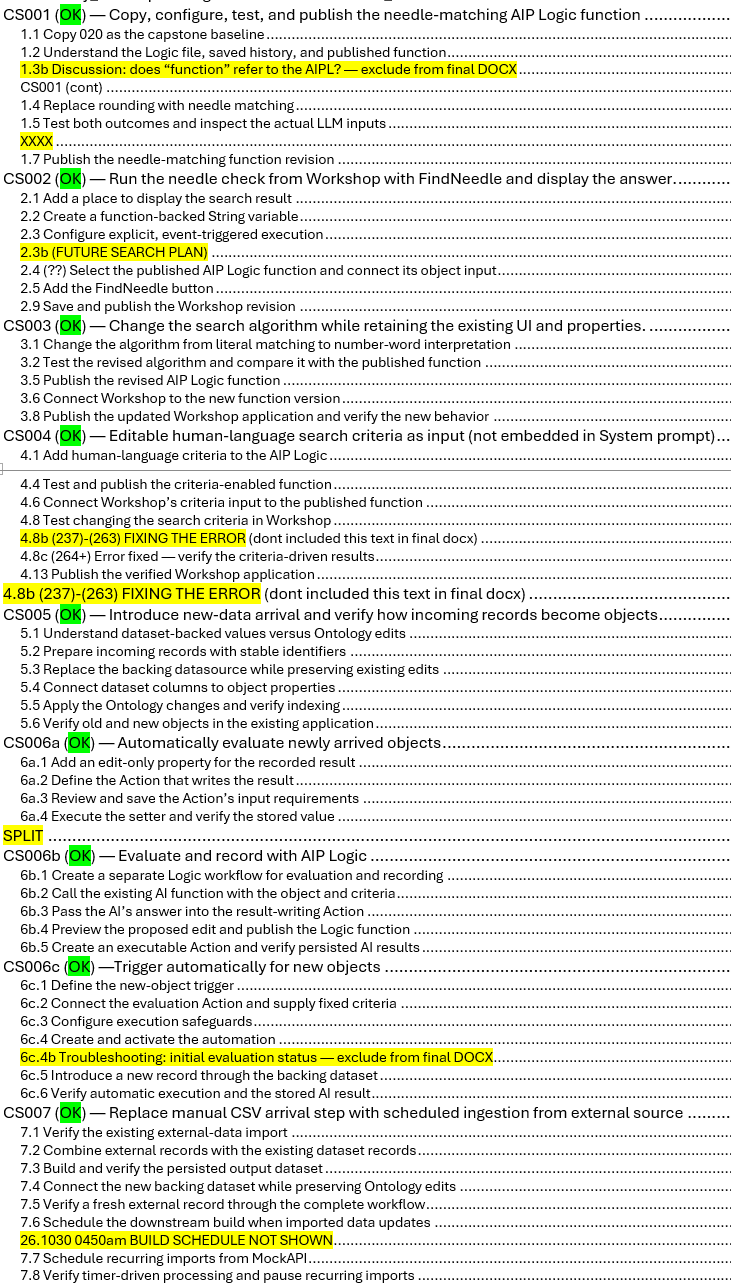
Foundry Foundations with FDE — Capstone Project Summary
99% of the text below was generated by Foundry FDE (Forward Deployed Engineer AI) from my description of the required content. AI is awesome.
1 Why Foundry?
Working through this demo offers a practical understanding of Foundry’s appeal—and why it has been successful. Data ingestion, objects, Actions, applications, automation, and AI fit together into a working operational system, rather than remaining disconnected demonstrations. Despite the learning curve of its configuration dialogs, the completed workflow simply works: data arrives, processing runs, and results are recorded where they belong. The same foundation supports both conventional logic and AI, letting you use each where it makes sense.
2 Why “capstone”?
A capstone brings previously learned skills together into one connected project. Rather than introducing every feature in isolation, it demonstrates how those features cooperate to accomplish a complete task.
This capstone follows 2.1, the ZiptieAI Quick Start, which built a working foundation across:
- Ontology objects, properties, links, and Actions.
- Workshop tables and buttons.
- Functions, validation, notifications, and Automate.
- Dataset-backed objects and Pipeline Builder.
- External API reads, webhook updates, and data refresh.
- AIP Logic prompts, AI responses, and AI-assisted Ontology edits.
The Quick Start culminated in 020: a Workshop button invoked an Action backed by a published AIP Logic function. The LLM checked a numeric property and could request an existing setter Action to correct it. The capstone starts from that working implementation instead of beginning from scratch.
3 Goal and teaching approach
- The goal was to build a small “needle in the haystack” workflow:
- New records arrive from an external source, become Ontology objects, are evaluated by AI against human-language criteria, and receive a stored result.
- The first “needle” was deliberately mechanical: does an object’s String property contain its Integer property expressed as digits?
- We then changed the algorithm to interpret numbers written in English, introduced editable search criteria, and connected evaluation to ingestion and automation.
- The simplicity is intentional. The project focuses on Foundry mechanics and AI integration, not domain realism. Readers can briefly consider applications such as expense review or report screening without having to learn a business domain before understanding the platform. Palantir and other sites already provide domain-oriented demonstrations.
4 Quick Start style
The course uses:
- Low-level, step-by-step instructions.
- Small, independently verified changes.
- Screenshots of the actual enrollment’s UI.
- Explicit distinctions between Preview, Save, Publish, Build, and Execute.
- Short explanations of what each dialog means—not just which button to press.
A central objective is teaching newcomers to navigate Foundry’s many configuration dialogs without getting stuck. For example, readers learn that an × may close an editor or remove a variable binding, depending on where it appears.
This is currently a rough first draft, not a polished reference manual. Its strength is that the main workflows were built, tested, and documented with visible evidence. Troubleshooting exchanges also identify places where final instructions need clearer terminology or stronger verification.
5 Major tasks
- CS001 — Copy and adapt the existing AIP Logic.
Duplicate 020, understand the relationship between editable Logic and published function versions, replace rounding with matching, and verify both FOUND and NOT FOUND. - CS002 — Connect the search to Workshop.
Pass the table’s active object into the published function, run it through a FindNeedle button, and display its String answer in a Markdown widget. - CS003 — Change the search algorithm without rebuilding the interface.
Replace literal matching with number-word interpretation. Publish the revised function and explicitly update Workshop’s version binding. - CS004 — Make search criteria a runtime input.
Add a human-language criteria field. Demonstrate that changing the criteria changes the answer without editing or republishing the function between searches. - CS005 — Bring dataset records into the existing Ontology.
Upload synthetic records, map their columns to existing properties, and migrate existing edits while replacing the backing datasource. - CS006a — Create result storage.
Add the edit-only CS006Result property and a setter Action. Verify that the Action stores supplied text without changing source properties. - CS006b — Evaluate and record.
Create a separate AIP Logic workflow that calls the existing AI function and passes its answer to the setter Action. Publish it and test actual persisted results through an outer Action. - CS006c — Trigger evaluation automatically.
Configure Automate to invoke that Action for newly added objects, supplying fixed criteria and recording the AI’s answer. - CS007 — Automate external ingestion.
Reuse the MockAPI import, combine external and existing records, connect the resulting dataset to the Ontology, and configure timed ingestion plus a downstream build trigger.
6 Verified result
The completed chain is:
New record added in MockAPI
    → scheduled API import
    → downstream dataset build
    → Ontology indexing
    → Automate detects the new object
    → AI evaluates the supplied criteria
    → Action stores the answer on the object
The final timer-only test used:
| Field | Verified value |
|---|---|
| Object ID | CS007-5 |
| Description | CS007 timer-only test |
| Integer | 245 |
| Automated criterion | Integer greater than 500 |
| Stored CS006Result | NOT FOUND |
The record reached the Ontology and received its result without a manual Foundry build, FindNeedle click, or evaluation-Action submission.
- After verification, the 2-minute import schedule was paused to prevent unnecessary recurring work. The configuration remains available for reuse.
- One important boundary remains: the manual Workshop search accepts editable criteria, while the automation uses criteria configured in its Action effect. It does not read someone’s open Workshop text box.
7 A window into the future of programming
In my view, this project illustrates a shift from writing every implementation detail toward directing and verifying an implementation process.
In this walkthrough, the interaction was largely:
Human states intent
    → FDE explains a small step
    → human performs it
    → human supplies a screenshot
    → FDE interprets the result
    → both refine the next step
That is still labor-intensive. Much of the communication consists of text, screenshots, and manual UI operations.
FDE already has capabilities to perform Foundry operations directly; we deliberately used a mostly guided, human-operated approach here. A plausible next stage is more conversational interaction—including voice—with the assistant carrying out more of the implementation and returning evidence for review.
8 The human role does not become trivial. It moves upward.
It increasingly involves:
- Choosing worthwhile goals.
- Providing direction and inspiration.
- Defining boundaries and acceptable consequences.
- Resolving ambiguity.
- Deciding what evidence counts as success.
- Recognizing when an apparently correct answer proves little.
- Authorizing deployment and managing ongoing operation.
This demands substantial intelligence and judgment. Our criteria test demonstrated why: an old function initially returned the expected answer by coincidence. Only changing the criteria and inspecting execution history exposed the version mismatch.
An assistant can accelerate implementation. It cannot make a poorly specified goal or weak test into a sound engineering decision.
9 What this means for documentation
The likely future is two complementary documentation layers, not the elimination of detailed documentation.
9.1. Precise implementation references for AI and humans
Assistants need reliable, detailed information about:
- APIs, types, and parameter contracts.
- Actual UI controls and their behavior.
- Permissions and execution identities.
- Versioning, publication, and migration semantics.
- Failure conditions, diagnostics, and recovery procedures.
These references must be accurate and maintained. An assistant reasoning from an obsolete UI label can confidently send a newcomer to the wrong place—as this walkthrough sometimes demonstrated.
9.2. Intent-first workflow guides for humans
Human-facing lessons can increasingly organize themselves around:
- What we want to accomplish.
- What the system should and should not change.
- The prompt sequence used to direct FDE.
- The conceptual distinctions the user must understand.
- The evidence required before proceeding.
- How to recover when observed behavior differs.
The prompts should be detailed task specifications—not “magic wording.” They should identify resources, constraints, approval boundaries, and expected results.
Low-level screenshots and click instructions still matter, particularly for beginners and recovery. But they can become supporting material around the main workflow rather than the entire organizing structure.
10. ZiptieAI’s distinctive opportunity is to teach this collaboration
How a newcomer directs an AI assistant, understands the system being built, and verifies that it actually works.
26.1030 (v1 26.1026)