3.4.3 Filesystem tool
← 3.4 Agentic TF semantic demos
3 Filesystem tool
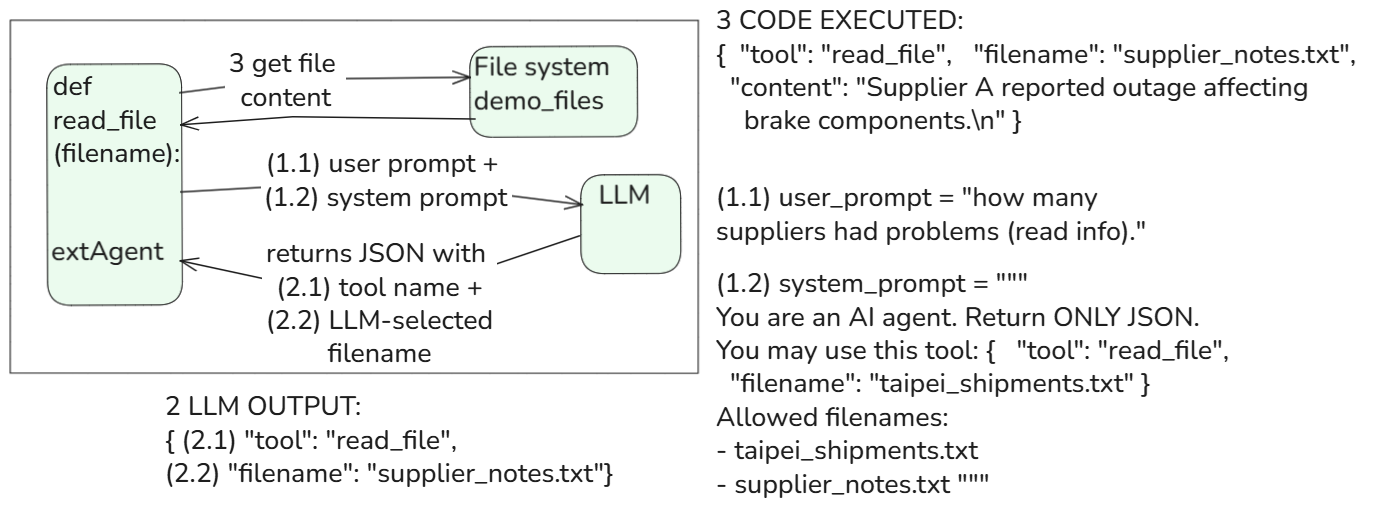
This demo is important because it begins demonstrating:
- TF/UFA semantic capabilities
- controlling access to external context. That is conceptually VERY close to:
- RAG
- MCP
- agentic retrieval systems. You are now very near the critical conceptual bridge.
Core idea: User asks for file
- → LLM proposes read_file JSON
- → Python validates filename
- → Python reads local file
- → result returned
3.1 py script
# ai_demo_03_filesystem.py
# LLM = propose
# Code = executes filesystem tool

import json
import os
from pathlib import Path

from dotenv import load_dotenv
from openai import OpenAI

# -----------------------------------
# Load API key
# -----------------------------------

load_dotenv()
client = OpenAI(api_key=os.getenv("OPENAI_API_KEY"))

# -----------------------------------
# Demo file setup
# -----------------------------------

DATA_DIR = Path("demo_files")
DATA_DIR.mkdir(exist_ok=True)

(DATA_DIR / "taipei_shipments.txt").write_text(
    "Truck 12 delayed in Taipei due to flooding.\n"
    "Truck 18 on schedule in Taipei.\n",
    encoding="utf-8"
)

(DATA_DIR / "supplier_notes.txt").write_text(
    "Supplier A reported outage affecting brake components.\n",
    encoding="utf-8"
)

# -----------------------------------
# Filesystem tool
# -----------------------------------

def read_file(filename):
    safe_path = DATA_DIR / filename

    if not safe_path.exists():
        raise FileNotFoundError(f"File not found: {filename}")

    return safe_path.read_text(encoding="utf-8")

# -----------------------------------
# Prompt
# -----------------------------------

user_prompt = "Read the Taipei shipment file."

system_prompt = """
You are an AI agent.
Return ONLY JSON.
You may use this tool:
{
  "tool": "read_file",
  "filename": "taipei_shipments.txt"
}
Allowed filenames:
- taipei_shipments.txt
- supplier_notes.txt
"""

# -----------------------------------
# LLM proposes tool call
# -----------------------------------

response = client.chat.completions.create(
    model="gpt-4.1-mini",
    messages=[
        {"role": "system", "content": system_prompt},
        {"role": "user", "content": user_prompt}
    ],
    temperature=0
)

llm_output = response.choices[0].message.content

print("\nLLM OUTPUT:")
print(llm_output)

# -----------------------------------
# Code executes tool
# -----------------------------------

action = json.loads(llm_output)

if action["tool"] == "read_file":
    file_content = read_file(action["filename"])

    result = {
        "tool": "read_file",
        "filename": action["filename"],
        "content": file_content
    }

    print("\nCODE EXECUTED:")
    print(json.dumps(result, indent=2))
3.2 test
user_prompt = “Read the Taipei shipment file.” (OK)
$ python ai_demo_03_filesystem.py

LLM OUTPUT:
{"tool": "read_file", "filename": "taipei_shipments.txt"}

CODE EXECUTED:
{
  "tool": "read_file",
  "filename": "taipei_shipments.txt",
  "content": "Truck 12 delayed in Taipei due to flooding.\nTruck 18 on schedule in Taipei.\n"
}
user_prompt = “I need info about suppliers.” (FAIL)
$ python ai_demo_03_filesystem.py

LLM OUTPUT:
{
  "request": "Please specify the type of information you need about suppliers. For example, details about supplier names, contact information, shipment records, or any other specific data."
}
Traceback (most recent call last):
  File "C:\Users\terry\Downloads\d1_agent\ai_demo_03_filesystem.py", line 98, in <module>
    if action["tool"] == "read_file":
       ~~~~~~^^^^^^^^
KeyError: 'tool'
user_prompt = “read info about suppliers.” (OK)
$ python ai_demo_03_filesystem.py

LLM OUTPUT:
{"tool": "read_file", "filename": "supplier_notes.txt"}

CODE EXECUTED:
{
  "tool": "read_file",
  "filename": "supplier_notes.txt",
  "content": "Supplier A reported outage affecting brake components.\n"
}
user_prompt = “how many suppliers had problems (read info).” (same answer)
$ python ai_demo_03_filesystem.py

LLM OUTPUT:
{"tool": "read_file", "filename": "supplier_notes.txt"}

CODE EXECUTED:
{
  "tool": "read_file",
  "filename": "supplier_notes.txt",
  "content": "Supplier A reported outage affecting brake components.\n"
}
3.3 TF/UFA capabilities
MORE TF/UFA capabilities are now involved. This is important because: the TF is now interacting with external semantic context.
3.3.1 Strongly involved
@7 Structured constrained output generation
Very important. TF generated: {“tool”: “read_file”, “filename”: “taipei_shipments.txt”} Machine-readable structure.
@8 Semantic interpretation / inference
Very important. TF understood: “Read the Taipei shipment file” means: filename = taipei_shipments.txt This is semantic interpretation.
@1 Latent pattern generalization / approximation
Moderately important. TF can likely also handle: “open the Taiwan shipment document” “show the Taipei truck file” “display shipment notes” without exact matching. That is generalization.
@2 Contextual token dependency tracking
Now somewhat involved. Because the TF must:
- maintain awareness of: o available filenames o tool schema o user request
- connect them properly. This is small-scale contextual dependency tracking.
3.3.2 Weak/minor involvement
@4 Human-language robustness
Minor. Would help with typos: “reed taipei shipmnt file”
@6 Explanation/summarization synthesis
Very weak here. Would become important later if: LLM summarizes file contents.
3.3.3 NOT really involved
@3 Semantic feature abstraction
Underlying mechanism, but not directly visible.
@5 Ontology alignment
Not really. No synonym normalization/ontology mapping yet.
@9 Hierarchical planning/workflow synthesis
Not really. Single-step action only.
26.0521