Concepts
This page summarizes the basic concepts introduced in the hands-on QS demos.
TOC
- 2 NN (NN, CNN, TF)
- 2b Model
- 3 External agent
- 3b Workflow (framework)
- 3c Enterprise
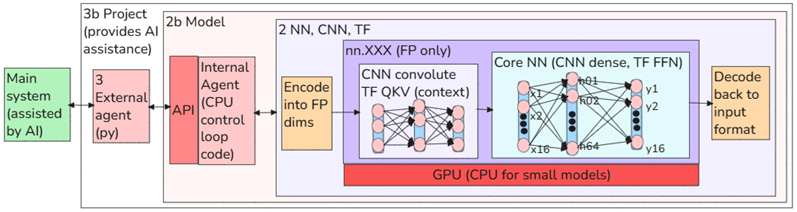
Right to left: 2 NNs, 2b Model, 3 External agent, 3b Workflow framework (need to add 3c Enterprise platform)
2 NN concepts
The NN is the core of AI “intelligence”. A NN provides a pattern matching algorithm. The the NN is controlled by Python code (“agent”).
- 2.0 Modern architectures are evolutionary (not revolutionary)
- 2.1 NN (Inference)
- 2.3 Training
- 2.4 Convolution (CNN)
- 2.5 Transformer (TF)
- 2.6 Comparison of NN, CNN, and TF architectures
- 2.7 Why scaling works
2.0 Modern architectures are evolutionary (not revolutionary)
The latest architectures are not introducing anything radically different. I recently saw a video where one of the author’s of the original paper “Attention is all you need” (attention is a core functionality of LLM transformers) stated that no other ground-breaking architecture has appeared since the paper was pubished. So the concepts learned from basic demos apply to the latest foundation models.
2.1 Concepts – NN (inference)
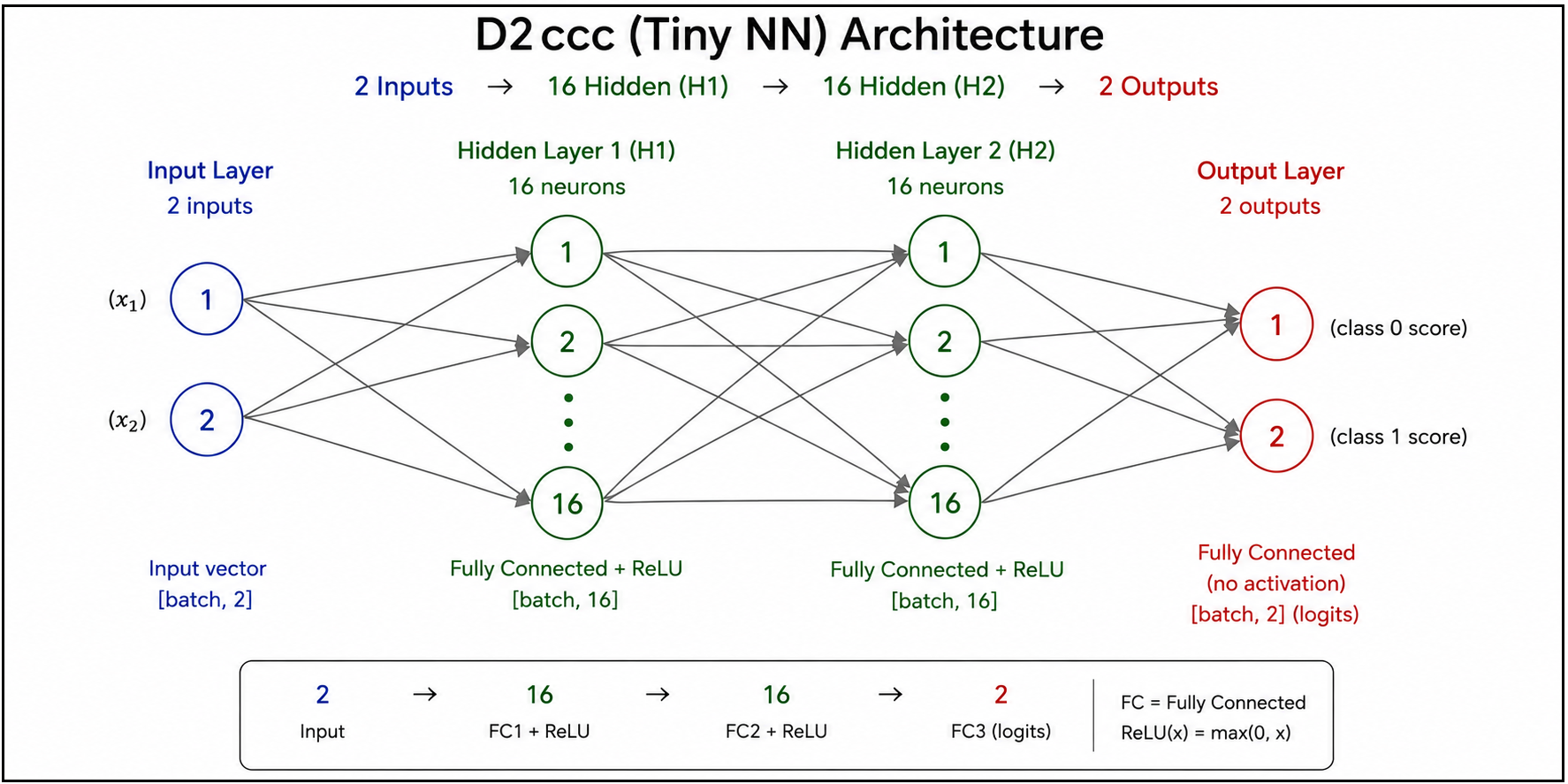
Inference is when the TF is used to recognize the pattern of the some never before encountered input (not matching exactly anything the TF was trained on). The TF computes the probabilities of all possible outputs (usually 50K vocab tokens) and the best token is selected.
NN demo D2ccc overview (first draft diagram generated by GPT)
2.3 Concepts – Training (NN)
Tiny NN demo (demo D2ccc)
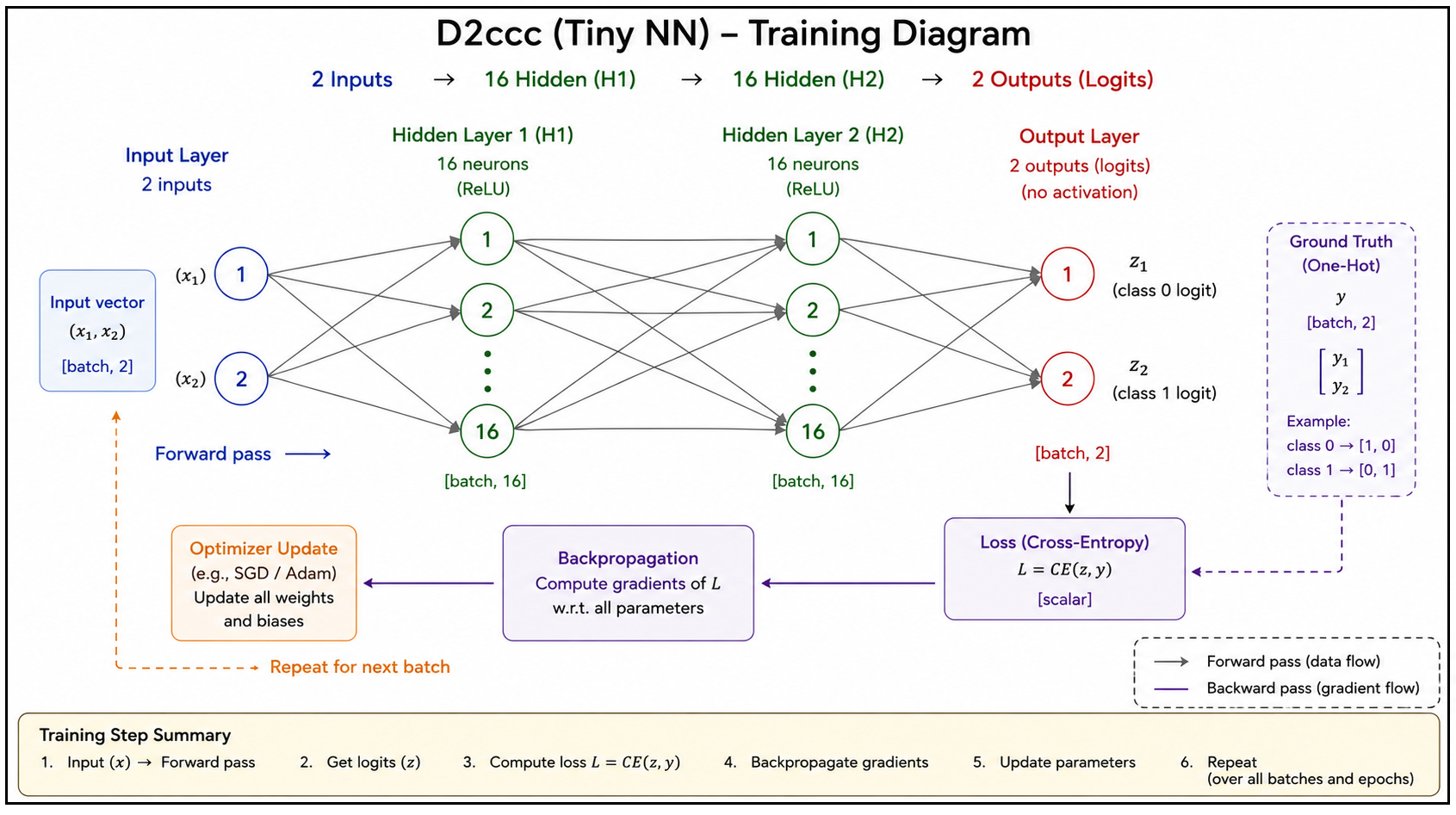
“Training” = programming a NN (not teaching; a NN does not learn). The process:
- Feed FP numbers to the NN.
- Compare the output to expected output.
- Adjust the internal parameters of the NN every so slightly so that the error from the expected output is reduced (without messing up significantly other already trained inputs).
- Repeat with enought test data to get satisfactory results.
- Hope that the training succeeds (for these simple demos no problem).
Training demo D2ccc overview (first draft diagram generated by GPT)
2.4 Concepts – Convolution
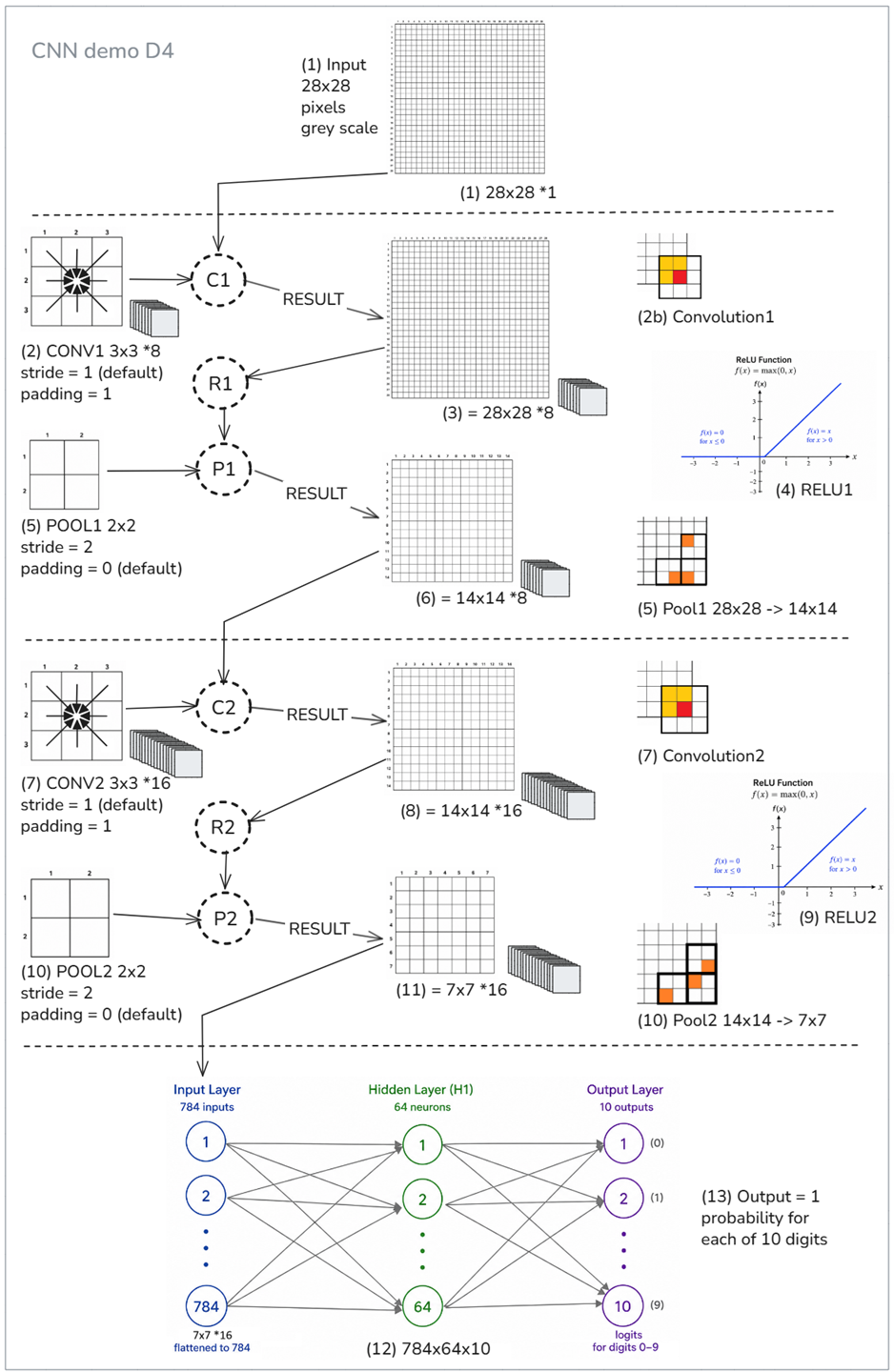
Convolution is an extension of the simple NN. Detecting simple patterns (classification) worked fine with a simple NN. But for images, some extra “pre-processing” is required for classification. Convolution is matrix math performed before the core classification NN (the “dense layers”). This is required because of the nature of recognizing pixelated input (pixels are convoluted with neighboring related pixels).
CNN demo D4 overview
2.5 Concepts – Transformer
Detecting simple patterns (classification) worked fine with a simple NN. But for text, some extra “pre-processing” is required for classification. This requires a transformer with QKV attention (left below) and **FFN feature detection (right below).
QKV attention and FFN NNs
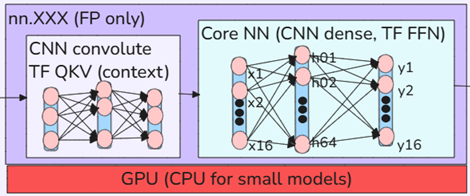
- “Attention” basically computes the real meaning of the original tokens based on the “neighboring” (by meaning) tokens using QKV computation. QKV computes the real meaning of words based on context. Its called “attention” (a marketing term) to give the impression of intelligence.
- FFNs detect higher level meaning (“features”) in the 12288 FP #s of each token embedding (what FFN stands for is meaningless).
- The tokens adjust each other in QKV (attention) and the FFN (separate for each token) for many layers. The classification “percolates” into the FP numbers (12288 for each token in GPT-3) of the last token (the new token is actually based on a classification of all input tokens.
- How exactly those features are encoded is determined apparently fairly randomly by the HW architecture, the training SW, and the training data (it is not specified by humans or algorithms).
- This is why the computational layers between (1) the initial prompt token embedding and (2) the output token unembedding are called “hidden layers” (12288 FP numbers that represent features in a way that can not be determined by analyzing the programmed parameters).
QKV and FFN details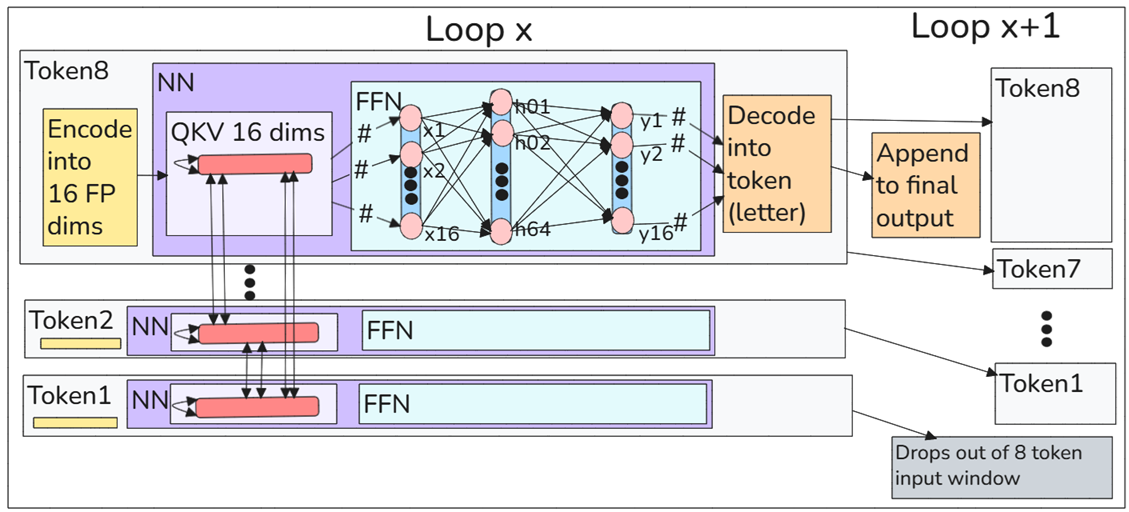
- The core of AI is not rapidly evolving. Thats one reason why AI continues to focus on ramping up brute-force computation (“scaling”), because that is the main hope for improvement (a larger TF means more and bigger patterns to match against). The pic below is from a video I was watching on 26.0629. That one line “key-value (KV) caches need to be maintained” explains (part of) the reason why AI needs so much memory. Google “what is a kv cache” for details.
QKV is still the core of LLM AI (video)

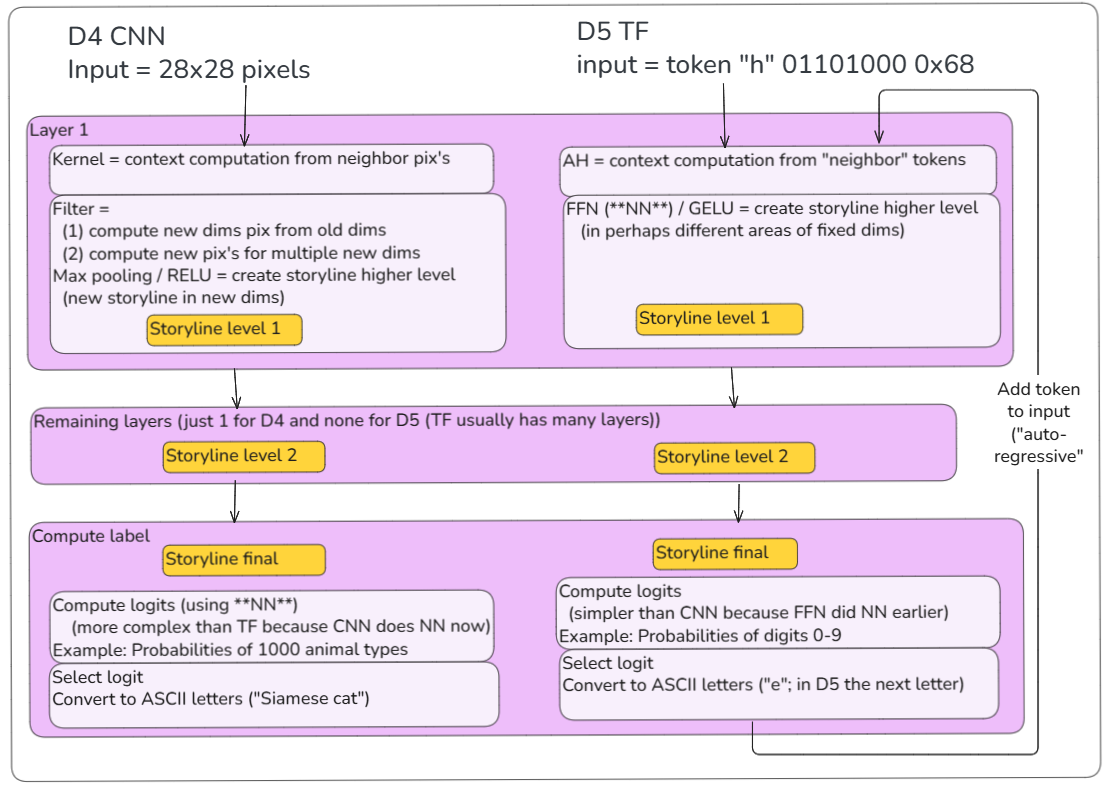
2.6 Comparison of NN, CNN, and TF architectures
The similarities of the CNN and TF algorithms
2.7 Why scaling works
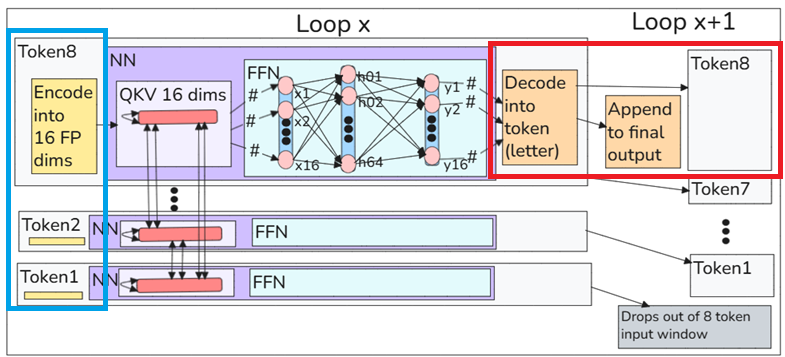
- NN, CNN, and TF are pattern classifiers.
- Larger models have more weights.
- More weights allow more complex classification boundaries (red square below).
- Therefore larger models can classify patterns more accurately.
For example, for the Tiny TF demo, the new token is for all practical purposes the classifier of the entire input. In this case only 8 tokens (blue square below). Scaling increases the number and complexity of patterns that the model can distinguish and classify.
Scaling for more tokens (blue) and more weights (red) makes the pattern to be matched much more precise
2b Model concepts
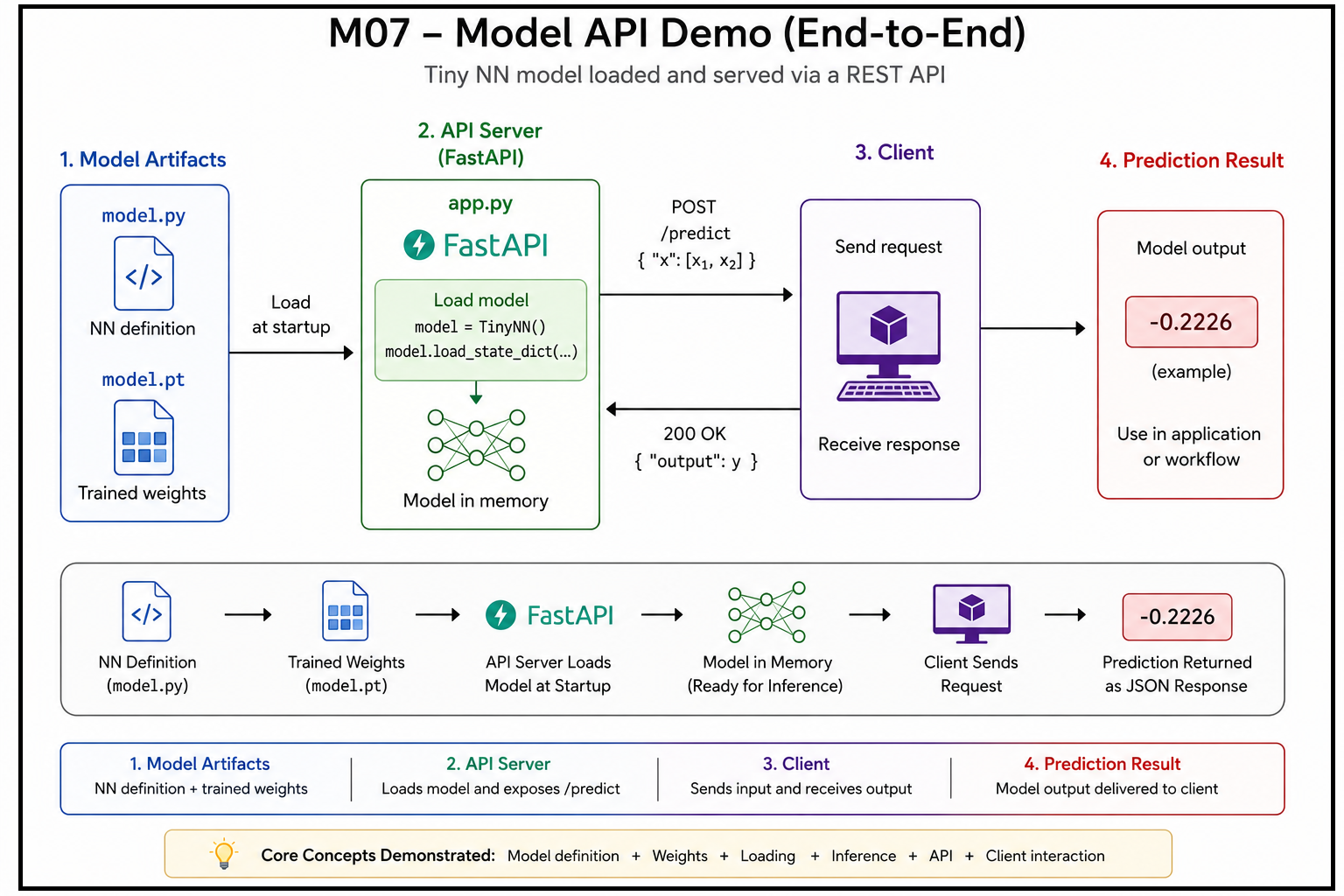
The agent and the NN are typically packaged into a model that has an API that makes it possible for existing software to access the model via API. The model code that controls the TF NN is the “internal agent” (iAgent). Discusses
- 2b.1 What is a Model?
- 2b.2 Internal Agent (iAgent) is a procedural program that is designed to closely work together with a specific trained TF and is the only path for data into and out of the TF.
- 2b.3 The API allows external agents (programs you write) to use the model.
- 2b.4 Local vs Cloud Models
- 2b.5 Building Models
- 2b.6 Modifying Models
This is a first draft diagram generated by GPT
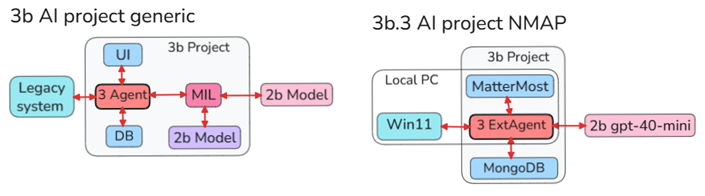
3 Agent concepts
External agents access the model via API. This supports (1) reliable workflows built around models, tools, and automation and (2) tolerance of AI faults and unpredictable outputs. This section discusses
Agents on this site are organized as follows:
- 3.1 Code-first. Demos of core agent functionality.
- 3.2 Frameworks (Langchain, OpenAI Agents SDK, CrewAI, etc).
- 3.3 Projects (standalone AI apps) have no existing enterprise application to integrate with. The AI agent is the primary application. It may use external APIs, databases, files, or enterprise software as tools or data sources.
In 3 Agents you create the infrastructure.
- 3.4 Integration demos. An existing application is the primary system. The AI is integrated to assist the application’s users and workflows. The 4 stages (S1-S4):
- S1 The traditional UI and ESW (#1). You use a browser to access the system.
- S2 Native/Managed AI (#4). This is easiest to do with AI. An existing AI agent is connected to the target system. You configure the connection rather than build the agent. For example
- S2a Claude + MCP → Slack ✅ (current demo)
- S2b Claude Tag in Slack ✅ (future demo)
- S3 Integrated AI agent (#3).
- Your agent works INSIDE the target.
- Official plugin, extension, app, webhook, API integration, etc.
- Users interact through the target application’s UI.
- S4 External AI agent / works OUTSIDE the target (#2).
- Users interact with your external agent rather than the target application’s UI.
- The target application is unaware of your agent.
- External AI. Most difficult to setup.
3b Project ecosystem for stages S1-S4 (add S4 DB?)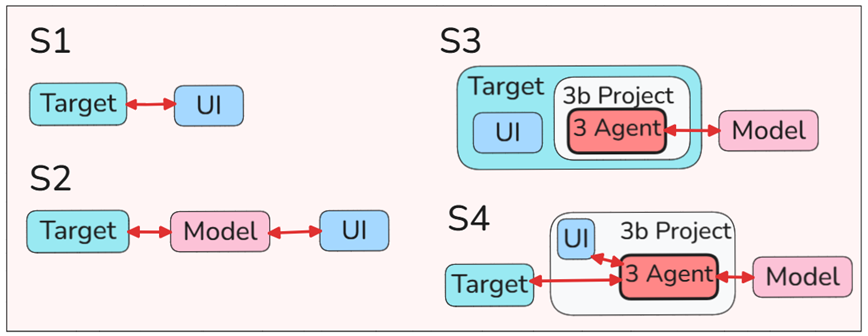
- 3.5 Lab demos (tests).
3b Workflow (frameworks) concepts
“Spinning up” real-world projects quickly with minimal code analysis or manual coding (only n8n demos for now).
3c Enterprise AI concepts
Provides the infrastructure needed to create production systems. I started out with Palantir demos in early July 2026. It is my core focus now. Seems to be a very effective way to create practical Enterprise AI. Palantir started out 25 years ago before AI was useful. They built data analysis tools that worked. And recently they started adding AI as a helpful assistant.
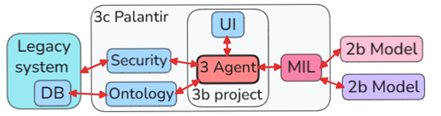
FDE/GPT:
That diagram is a solid high-level mental model.
Interpreting it with your page labels:
Legacy system / DB
        ↔
3c Palantir platform boundary
        ├─ Security
        ├─ Ontology
        └─ 3b Project
              ├─ UI
              └─ 3 Agent
                    ↔ MIL
                         ↔ 2b Models
A few observations:
- 3c Palantir is the overall Foundry/AIP environment.
- Security and Ontology sit inside Palantir as platform-level layers.
- The 3b project contains the concrete application/workflow implementation.
- The 3 Agent is your project-level AI workflow/function/app logic.
- MIL looks like your model-integration layer / model inference layer / model interface layer.
- 2b Models are outside or adjacent to Palantir, depending on how you’re presenting them.
- The legacy system DB feeds Palantir via integration, and Palantir can potentially write back.
For the speedrun specifically, I’d map it like this:
| Your diagram node | Speedrun equivalent |
|---|---|
| Legacy system DB | Source data / installed demo datasets |
| Security | Foundry permissions, markings, ontology access |
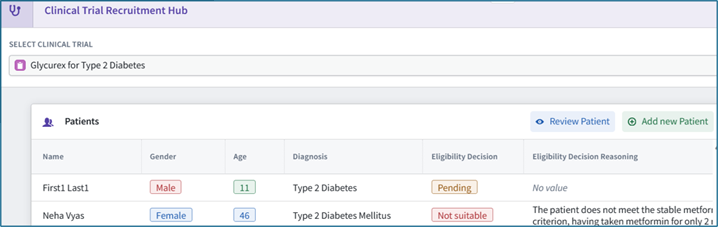
| Ontology | Patient, Clinical Trial, links, actions |
| 3b project | Installed speedrun project/folder |
| UI | Clinical Trial Recruitment Hub Workshop app |
| 3 Agent | Review Patient for Clinical Trial Logic function |
| MIL | The Use LLM block / model invocation layer |
| 2b Model | The underlying LLM selected by AIP Logic |
The main caveat is that in Foundry, Ontology and Security are not just passive boxes. They strongly shape what the agent can see and do:
- Ontology defines the object types, links, actions, and semantic vocabulary.
- Security constrains which objects/properties/actions/models are accessible.
- The Logic function operates through those layers rather than directly against the raw DB.
So if your goal is to explain “where the agent is,” this diagram helps: the speedrun’s “agent” belongs inside the 3b project, uses the Ontology, is governed by Security, and calls out through MIL to an LLM/model.
PAL-DEMO-2: Palantir AIP “speedrun” (quick start)
My second Palantir demo. Quite a challenge. What impressed me the most was I was able to get a complex data pipeline running. The actual AI portion of the app was very small. This is way to do things. You must simple the world that AI has to deal with to increase reliablity.
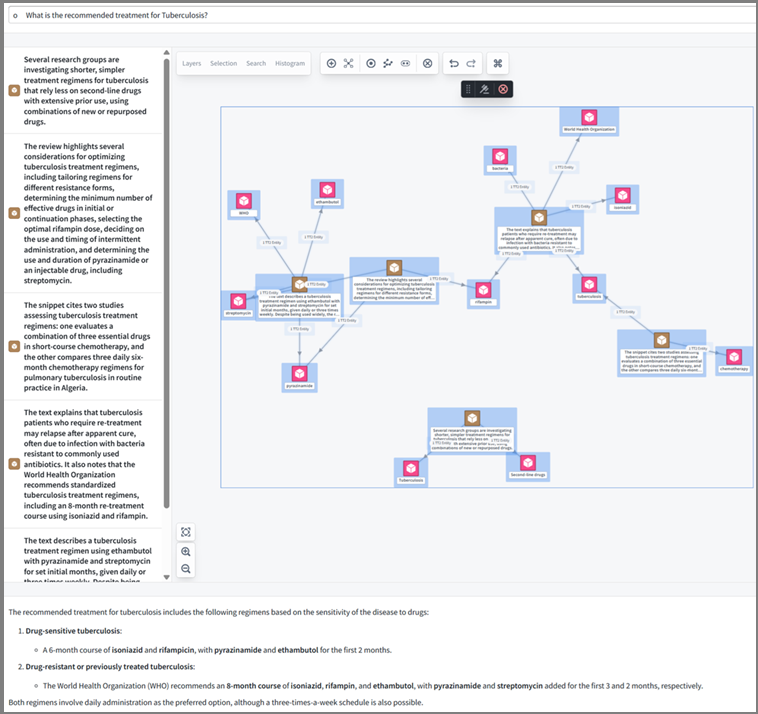
PAL-DEMO-3: Palantir agentic AI
This was an interesting demo. Not sure it was a good example of an agent. But still, I like Palantir’s approach.
26.0716 (0628, v1 26.0611)