3 Agents
Reorganized 26.0715.. WIP
You control the application.
This section describes agent demos.
- An (external) agent is software that contains the main control loop.
- The agent uses tools, APIs, and databases to perform useful work.
- AI is an optional add-on.
- AI-assisted agents call one or more model APIs as part of their workflow.
3 Agents in the master diagram
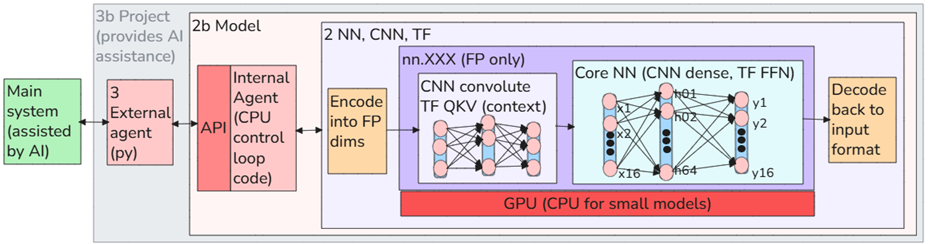
TOC
- 3.0 Concepts
- 3.1 Code-first. Most of the demos start out without AI to verify.
- 3.2 Frameworks. (no AI / automation). These are designed for any application, whether it uses AI or not. Examples: FastAPI, Flask, Django, Express.js, Spring Boot. LangChain, LangGraph, CrewAI, OpenAI Agents SDK, PydanticAI. These assume that one or more models/LLMs are part of the application. Note that LangChain, CrewAI, etc don’t provide much value without AI. Their purpose is to orchestrate AI models, tools, memory, and workflows.
- 3.3 Projects
- 3.4 Integration demos
- 3.5 Lab demos
3.0 Concepts
3.1 Code-first
- 3.1.1 Agent PAL_core demos (docx #603). PAL_CORE demos focus on the core functions of an AI-assisted control system, including detection, prediction, allocation, planning, optimization, and external tool integration. The control loop itself is traditional deterministic software, with AI used only where it adds value.
- 3.1.2 PAL demos (openAI/Gemma) (docx #603). PAL demos focus on Palantir-style data intelligence systems that combine ontologies, deterministic workflows, structured data analysis, and LLM-assisted planning. The emphasis is on reliable execution rather than autonomous AI behavior.
- 3.1.3 TF semantic demos (AI) (docx #606). These simple demos show how deterministic agents can use TF/UFA semantic capabilities. The focus is not on autonomous AI, but on how traditional software can leverage language models for tasks such as tool use, file analysis, retrieval, and tool selection.
3.2 Frameworks
- 3.2.1 OpenAI Agents SDK
- 3.2.2 Pydantic AI
- 3.2.3 LangChain
- 3.2.4 LangGraph
- 3.2.5 CrewAI
- 3.2.6 AutoGen
3.3 Projects
Practical AI applications that provide useful functionality.
- 3b.2 JobRadar (what it does so far 26.0506). Ingests data from different sources and uses LLM to find matching data and summarize. The results are then sent by email, google docs, etc. Runs locally and on Cursor. Spun up in 4 days. I did not even look at the code (not necessary). This is probably how such apps will be done in the future. I will create 1/2 functional/ecosystem diagrams in future (after app design stabilizes).
- 3b.3 (NMAP) Security Assistant (26.0621). This project began as a simple Nmap demo: scan localhost, parse the XML output, and post a summary to Mattermost. The long-term goal is to build a controlled local AI assistant for learning PC security and maintenance. The assistant will inspect only approved local targets, explain findings in plain English, track results in an append-only ledger, and help the user understand problems such as open ports, unused services, unused apps, and low disk space.
- 3b.4 Ledger (TODO). Stores messy human text in an append-only encrypted ledger, then uses AI to search, summarize, and generate new entries without requiring a rigid database schema. The ledger stays immutable. Then the AI/agent produces the current “view”. So nothing is edited in place. The system only appends.
- 3b.5 DITA assistant (TODO). I have done this before (need to find the wiki page): Maintaining a DITA site but by using AI instead of the DITA tools. For this next demo, I’d like to do something clean.. conforms to DITA, but uses only AI. DITA was created when there was no other way to maintain text reuse that with complex DITA tools (its analogous to the UI’s that required strict data entry so that the backend logic could handle the input).
- (future) Inventory Assistant
- (future) Compliance Assistant
3.4 Integration demos
Demonstrations of integrating the central AI agent with existing software and enterprise systems.
Integration stages
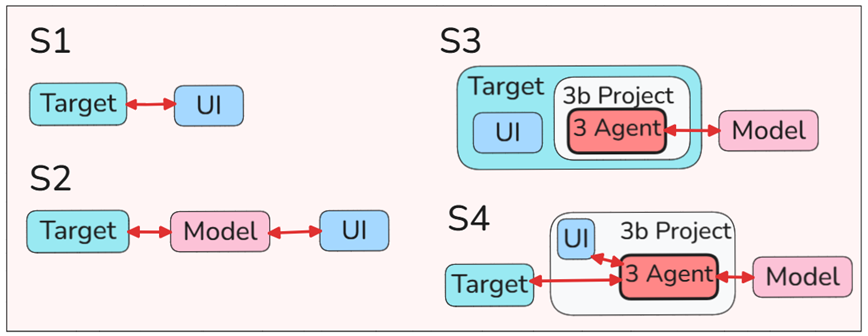
- 3b.11 Slack (26.0627). (GPT) Slack is a representative enterprise software (ESW) application used to demonstrate several approaches to integrating AI into an existing system. Rather than focusing on Slack itself, the goal is to understand the different architectural patterns for adding AI capabilities to enterprise software.
- The demos progress from using Slack as a normal application (S1), to connecting an existing AI agent such as Claude through MCP (S2), to creating a custom Slack App/Bot that integrates an external AI agent directly into the Slack user interface (S3). Together these demos illustrate the evolution from simply using AI to building AI-assisted enterprise applications.
- 3b.12 Odoo (26.0701). (GPT) Odoo is a representative enterprise software (ESW) platform used to demonstrate how AI can be integrated into real business applications and workflows. Rather than focusing on Odoo itself, the goal is to understand practical techniques for adding AI to existing enterprise systems, such as analyzing business data, automating workflows, generating summaries, detecting unusual activity, and assisting users within ERP applications. These demos illustrate how external AI agents can augment complex enterprise software while preserving the existing business logic and user interface.
- 3b.13 Github (CI/CD) (TODO)
3.5 Lab demos
Experimental prototypes used to develop, test, and evaluate new AI techniques.
- Lab 001 – Non-AI rules (what you just built)
- Lab 002 – Same loop, but GPT explains why the activity is suspicious.
- Lab 003 – GPT recommends an action (“freeze product”, “notify manager”, etc.).
- (TODO) Lab 003b… use fake vocab / 1) add to prompt or 2) fine tune
GTP: I think that's an excellent next lab. TODO: Lab 003b – Domain Vocabulary Demo Create fake enterprise terms (e.g., ZARK, MIBO, TULP). Show that the base model does not understand them. Option 1: Add a glossary to the prompt → model succeeds. Option 2: Fine-tune the same model → model succeeds without the glossary. It's a clean demonstration of the difference between prompt engineering and fine-tuning, using a realistic enterprise scenario rather than a generic benchmark. - Lab 004 – User replies in Mattermost (“approve”), and the agent updates Odoo.
- Lab 005 – Add logging to MongoDB and the ledger.
- Lab 006 – Generate a DITA report.