3.4.6c MCP-connected tool LLM
← 3.4 Agentic TF semantic demos
6c MCP-connected tool (with LLM choosing tool) (BINGO)
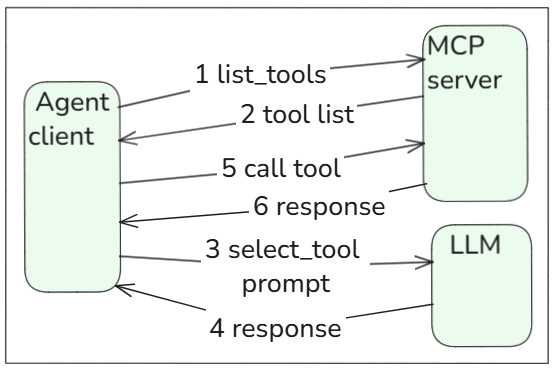
Perfect. That demo now proves the real MCP + LLM pattern:
- MCP server exposes tools
- → extAgent gets dynamic tool list
- → extAgent injects tool metadata into prompt
- → LLM chooses correct tool + args
- → extAgent executes MCP tool
Key lesson:
- MCP = dynamic tool infrastructure
- LLM = semantic tool selection
- extAgent = validation/execution
This is much stronger than 6b.
Main insight:
- MCP alone = tool infrastructure
- MCP + LLM = semantic tool selection
- MCP + extAgent = controlled execution
6c.1a server py script
# ai_demo_06c_mcp_llm_server.py
from mcp.server.fastmcp import FastMCP
mcp = FastMCP("DemoTools")

@mcp.tool()
def read_shipment_status(truck_id: str) -> str:
    """Use this tool to get shipment status. Valid truck_id values: truck_12, truck_18."""

    if truck_id == "truck_12":
        return "Truck 12 is delayed in Taipei due to flooding."
    if truck_id == "truck_18":
        return "Truck 18 is on schedule in Taipei."
    return f"No shipment status found for {truck_id}."

@mcp.tool()
def read_supplier_status(supplier_id: str) -> str:
    """Use this tool to get supplier status. Valid supplier_id values: supplier_a, supplier_b."""

    if supplier_id == "supplier_a":
        return "Supplier A has an outage affecting brake components."
    if supplier_id == "supplier_b":
        return "Supplier B is operating normally."
    return f"No supplier status found for {supplier_id}."

if __name__ == "__main__":
    mcp.run()
6c.1b client py script
# ai_demo_06c_mcp_llm_client.py
# MCP exposes tools dynamically.
# LLM chooses the correct tool.
# Code executes.
import asyncio
import json
import os
from dotenv import load_dotenv
from openai import OpenAI
from mcp import ClientSession, StdioServerParameters
from mcp.client.stdio import stdio_client
load_dotenv()
client = OpenAI(api_key=os.getenv("OPENAI_API_KEY"))

def build_tools_text(tools):
    lines = []
    for tool in tools.tools:
        lines.append(f"- {tool.name}: {tool.description}")
    return "\n".join(lines)

async def main():
    server_params = StdioServerParameters(
        command="python",
        args=["ai_demo_06c_mcp_llm_server.py"]
    )
    async with stdio_client(server_params) as streams:
        async with ClientSession(streams[0], streams[1]) as session:
            await session.initialize()
            tools = await session.list_tools()
            tools_text = build_tools_text(tools)
            print("\nDYNAMIC MCP TOOL LIST:") #>2
            print(tools_text)
            user_prompt = "What is the status of supplier A?"
            system_prompt = f"""
You are an AI agent.
Available MCP tools:
{tools_text}
Return ONLY JSON in this format:

{{
  "tool": "tool_name_here",
  "arguments": {{
    "argument_name_here": "argument_value_here"
  }}
}}
"""
            response = client.chat.completions.create(
                model="gpt-4.1-mini",
                messages=[
                    {"role": "system", "content": system_prompt},
                    {"role": "user", "content": user_prompt}
                ],
                temperature=0
            )
            llm_output = response.choices[0].message.content

            print("\nLLM OUTPUT:") #>4
            print(llm_output)

            action = json.loads(llm_output)
            result = await session.call_tool(
                action["tool"],
                action["arguments"]
            )

            print("\nMCP TOOL RESULT:") #>6
            print(result)

asyncio.run(main())
6c.2 Test
python ai_demo_06c_mcp_llm_client.py
#1,2 DYNAMIC MCP TOOL LIST:
- read_shipment_status: Use this tool to get shipment status. Valid truck_id values: truck_12, truck_18.
- read_supplier_status: Use this tool to get supplier status. Valid supplier_id values: supplier_a, supplier_b.

#3,4 LLM OUTPUT:
{
  "tool": "read_supplier_status",
  "arguments": {
    "supplier_id": "supplier_a"
  }
}

#5,6 MCP TOOL RESULT:
meta=None content=[TextContent(type='text', text='Supplier A has an outage affecting brake components.', annotations=None, meta=None)] structuredContent={'result': 'Supplier A has an outage affecting brake components.'} isError=False
For Step 6c — MCP + LLM tool choice, the key @1–@9 capabilities used are:
Strongly used
@7 Structured constrained output generation
LLM generated valid tool-call JSON:
{
  "tool": "read_supplier_status",
  "arguments": {
    "supplier_id": "supplier_a"
  }
}
@8 Semantic interpretation / inference LLM understood:
- “What is the status of supplier A?” means use:
- read_supplier_status not:
- read_shipment_status
@2 Contextual token dependency tracking LLM used the dynamically injected MCP tool list:
- read_shipment_status
- read_supplier_status
- valid ids…
- and connected it to the user request.
Also used
@1 Latent pattern generalization / approximation. It mapped “supplier A” to supplier_a after the valid IDs were provided.
**@9 Hierarchical planning / workflow synthesis. Lightly used. The workflow was simple:
- choose tool → fill args → return JSON
- Not central here
@3 Semantic feature abstraction. Underlying TF mechanism, not directly visible.
@4 Human-language robustness. Would matter if input had typos.
@5 Semantic normalization / ontology alignment. Lightly present in mapping “supplier A” → supplier_a.
@6 Explanation/summarization synthesis. Not used yet because the demo stops at tool result.
26.0521