Concepts
TOC:
- C1 About the ZAI version of demo D3 and this online doc
- C2 Workflow diagrams
C1 About the ZAI version of demo D3 and this online doc
(FDE) This document recreates Palantir’s “Speedrun: Your First Agentic AIP Workflow” while making its architecture and resource lifecycle more explicit.
The original demo is primarily a sequence of UI instructions. This ZAI version reorganizes those instructions around the system being built:
AIP Logic → Action → published Function → Automation
The Marketplace installation supplies the underlying data, pipeline, Ontology, Actions, and UI. This document concentrates on creating and testing a new AIP Logic, publishing it as a Function, and invoking it through a new Automation. The Evaluation Suite is treated as an optional final stage.
This is a working, screenshot-driven guide. Text and terminology are intentionally brief and can be refined as Foundry’s UI and documentation change.
C2 Workflow diagrams
(FDE) The following diagrams provide a system-level view before the detailed UI procedure begins.
The first diagram places Demo D3 within the standard Foundry workflow. The second expands the analysis stage to show the components of the operational agent. Numbered arrows and labels correspond to the major stages used throughout this document.
- C2.1 Main workflow diagram
- C2.2 Agent workflow diagram
C2.1 Main workflow diagram
The diagram below shows the overall workflow:
- The grey background components are installed in P1.
- (4a), (4b), (3), (2) are the main content of this demo (P2, P3, P4, P5).
(FDE) The main diagram shows the complete Demo D3 flow across the data, Ontology, analysis, and UI layers.
A user adds a Patient through the UI. The Patient is written to the Ontology and enters the object set monitored by Automate. Automate invokes the published AIP Logic, which reads the Patient and Clinical Trial, calls an external LLM, and uses a governed Action to produce Ontology edits. With automatic execution enabled, the edits are committed and the updated Patient is displayed in the UI.
Staff can subsequently review and, if necessary, override the AI-generated eligibility decision.
Add Patient
→ Ontology
→ Automate
→ published AIP Logic
→ external LLM
→ governed Action
→ updated Ontology
→ UI review
Overall workflow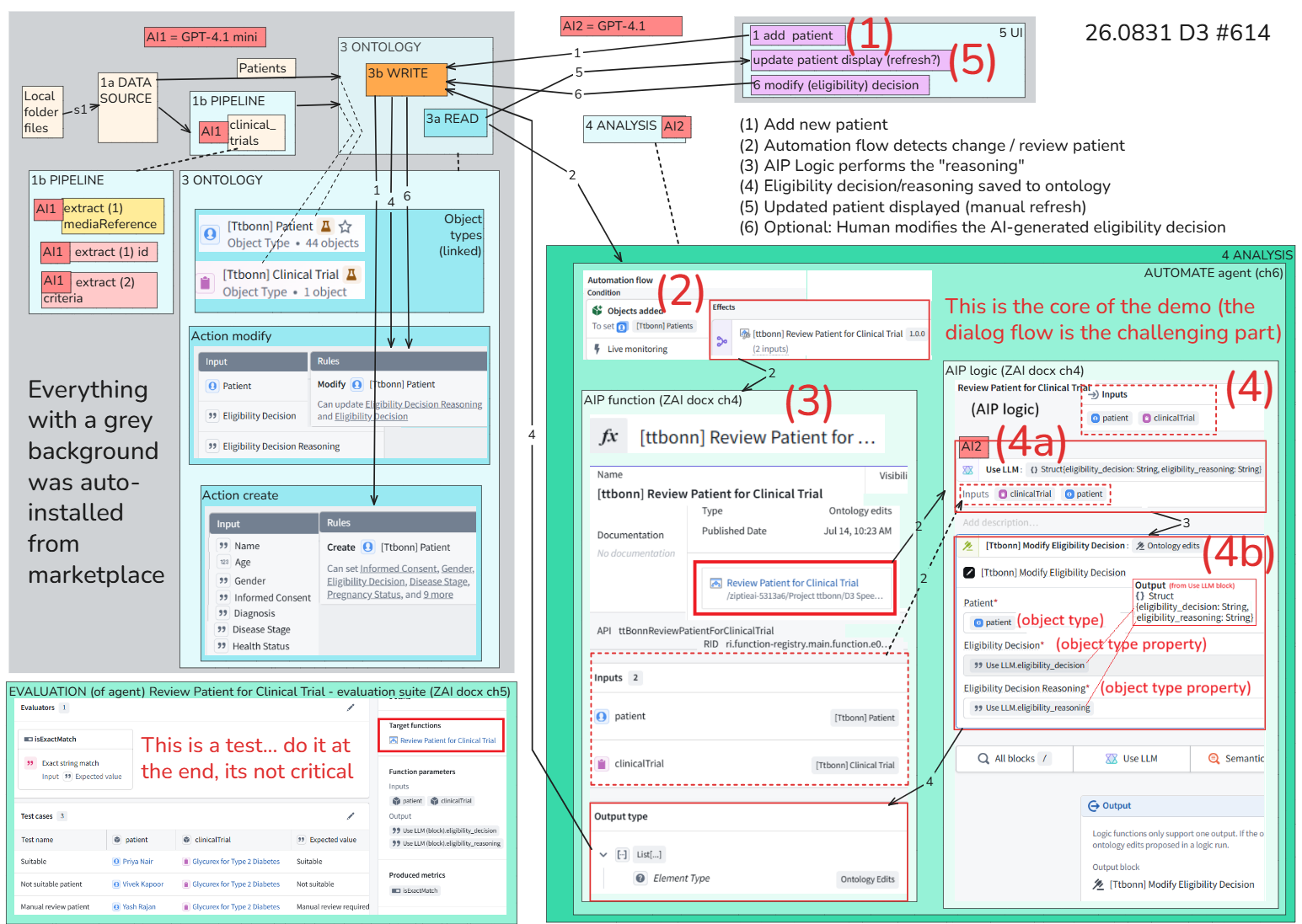
C2.2 Agent workflow diagram
D3 “Agentic” AIP workflow
Has
- (2) Foundry automation (main detection loop)
- (3) Foundry AIP – Use LLM (LLM call)
- (4) Foundry AIP – Action (modifies Ontology)
Foundry did not invent a fundamentally different architecture. It distributed the familiar agent components across named, governed platform resources.
(FDE) The agent is the complete operational system—not the LLM alone.
Its principal Foundry components are:
- Ontology: operational state and context
- (2) Automate: persistent event and invocation loop
- (3) Published AIP Logic Function: one execution of the agent program
- (4a) Use LLM: call to the external AI service
- (4b) Ontology Action: governed mechanism for producing changes
- UI: human input, observation, and optional correction
For each Patient that newly enters the monitored object set, Automate invokes the published Logic once. The Logic reads the required objects, calls the LLM once, produces the Action edits, and terminates. Automate commits those edits and resumes monitoring for the next qualifying event.
Automate:
    wait for event
    run AIP Logic once
    commit returned edits
    wait for next event
Thus, AIP Logic defines a one-execution reasoning-and-action program, while Automate turns repeated executions of that program into a persistent event-driven agent.
[3] Demo D3 Foundry agent (the content of this diagram has been worked out with FDE/GPT; its a bit messy looking, but accurate)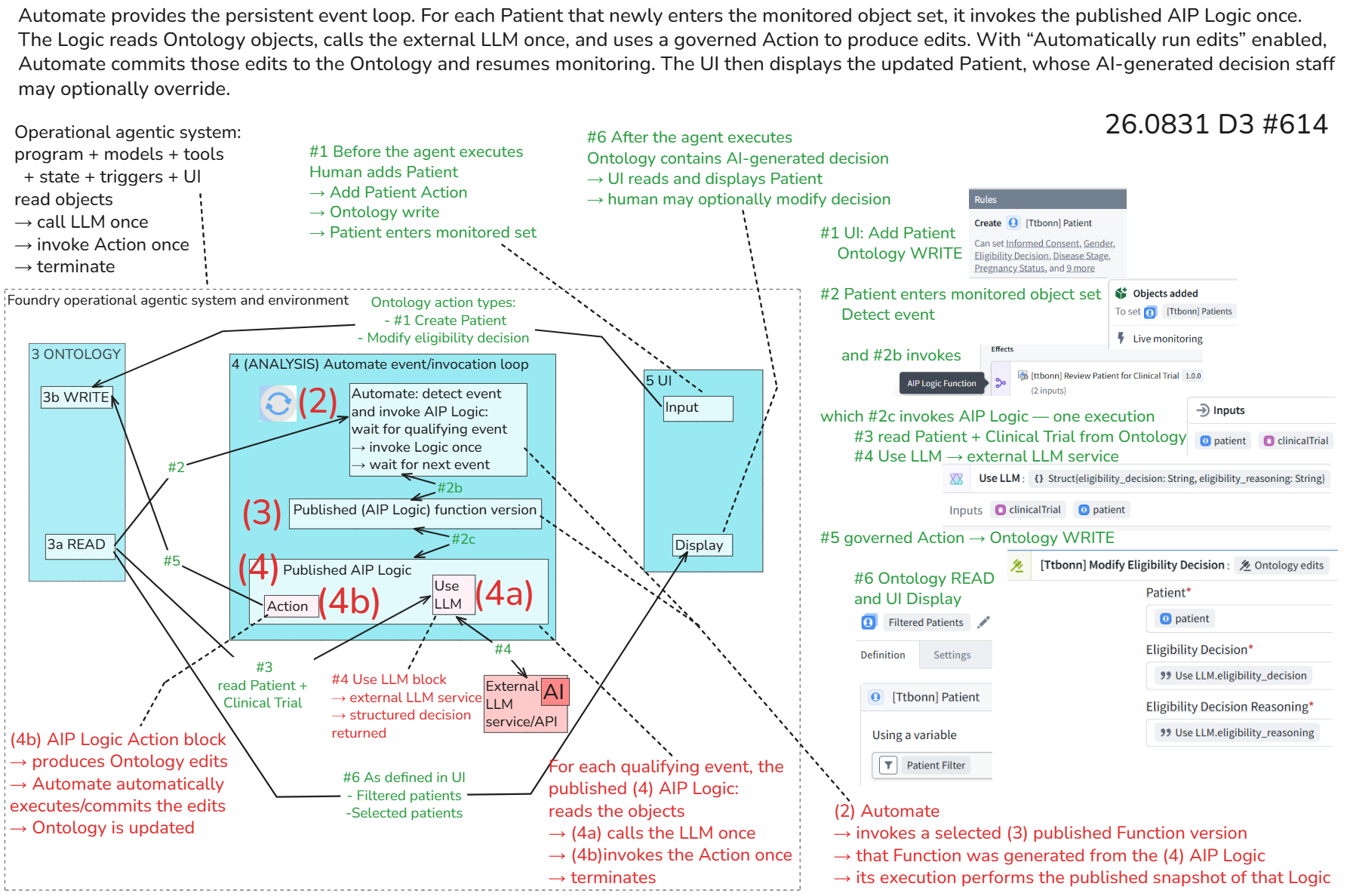
26.0903 (v1 26.0830)