(5) AI dev tools
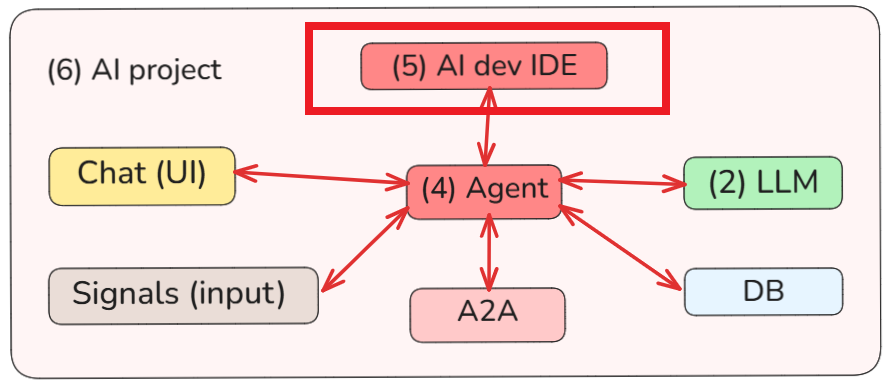
The focus in this section (5) will be on exploring
- using (5) AI dev IDE tools / plugins
- to create (4) AI agents
- that connect to various external systems.
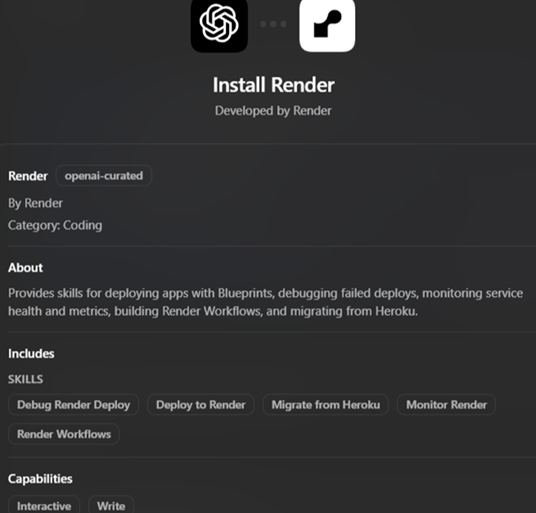
And to do this with minimal coding. For example, I recently started using Codex desktop with Render plugin to manage Render.
1 The true AI IDE (Cursor)
The video below is gold. I’ve heard about Cursor, but watching this video I realized the genius behind it. This is the future. The Real Reason SpaceX is Buying Cursor is such a video.
Cursor seems (I have yet to use it) to solve a problem that I was painfully aware of: How can a programmer using AI tools manage a massive code base that the AI tools wrote? How can the programmer go through massive codebase (like I do in my small demos), figuring out what needs to be changed? The brilliant answer: The AI IDE does it. Cursor presents the code to the developer organized not by keywords, but but meaning (in the same way that Google search crushed AltaVista because Google search by meaning, whereas AltaVista just by keywords).
The idea is revolutionary. You use a model (preferably custom trained) that does to your codebase what LLMs do to your language base. A NN is trained to recognize the gist of your code, just like an LLM NN (transformer) recognize the gist of your input text. Brilliant. Wow. I knew the problem, but never thought of the answer. This page will focus on such tools and their plugins. Page (6) AI projects will (WIP) focus on spinning up demos and techniques. Actual working demos.
@3:00
1.1 Add Oauth to login flow @1:40
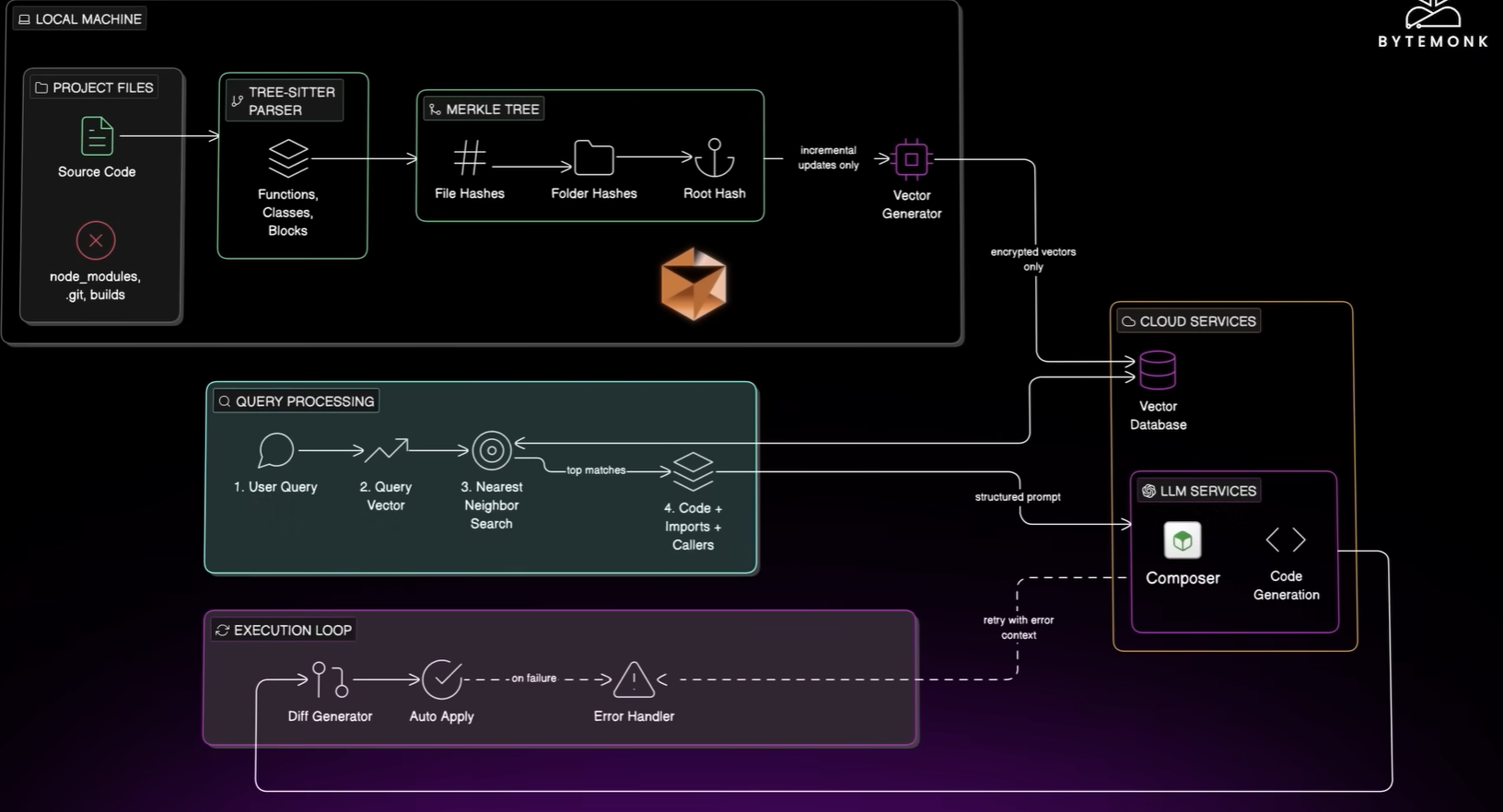
(audio from video) It touches 8 files. Updates controller, mware, fixes test, shows a clean diff. Click apply and its done. Feels like an actual engineer sitting next to you. Use common models.
1.2 How you work on a codebase @2:20
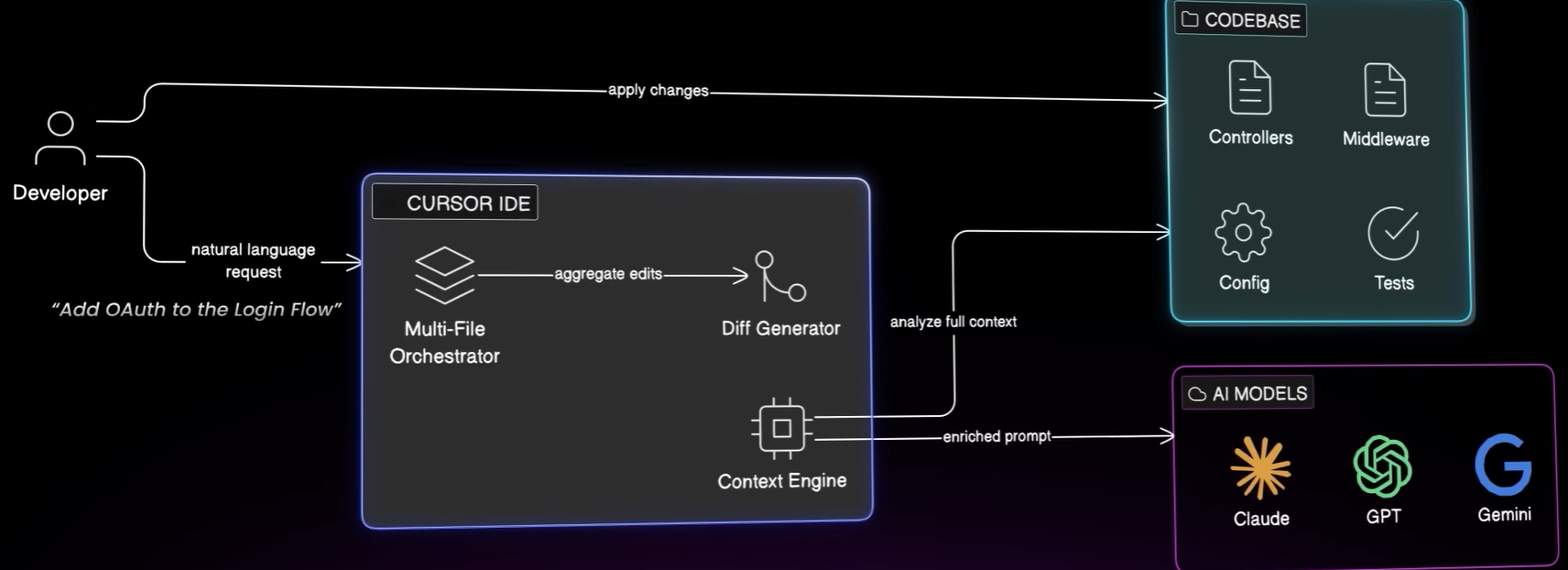
You know where to look. But you cant expect the model to find stuff. The context window is too small. So how to pick the right files to show the model? Thats the key.
1.3 Cursors reads the repo @3:00
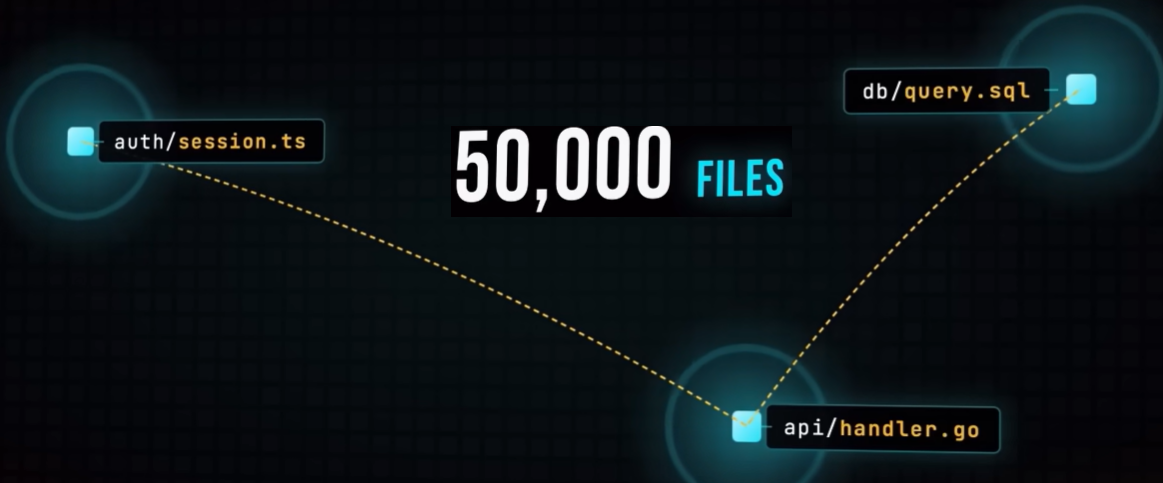
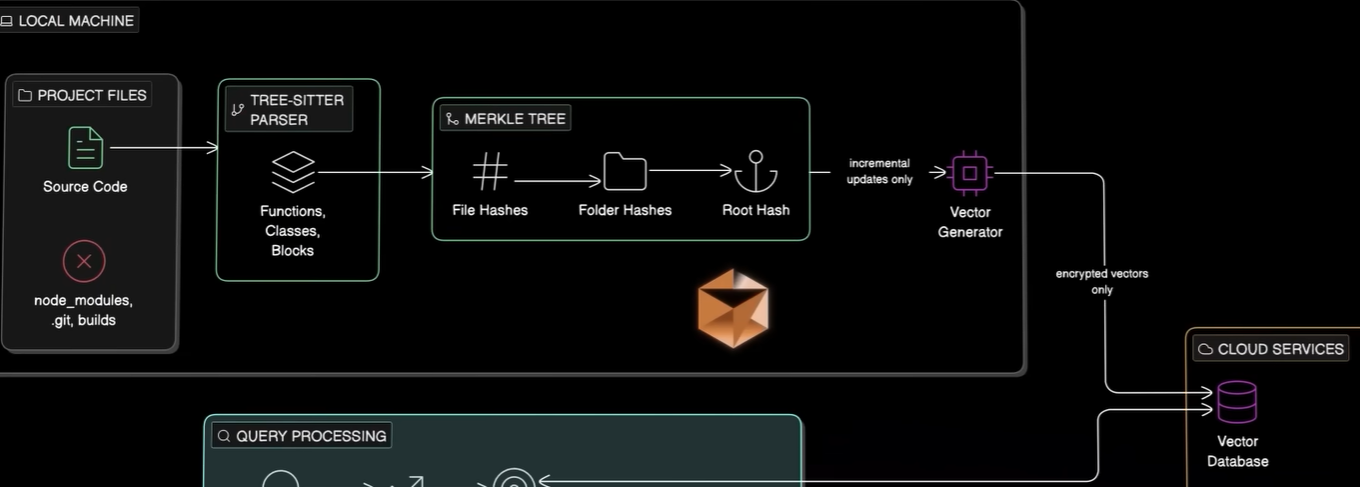
- Tree sitter understands code structure. Breaks the files up into semantic logical blocks.
- Builds Merkle tree. When you change files, only the modified are tracked.
- Make chunks searchable by meaning (not text). “login” is related to “authenticate.ts”. Text search is too literal. Cursor converts each chunk into a vector, a list of numbers that captures the meaning of the code (like an embedding captures token meaning?). Authentication code lands in one neighborhood of this number space. Payment code lands in different area. These are the vector database. Turbopuffer, Google for your code base, by meaning. Raw code never leaves the machine. (?). Only vectors go to the server. File names obfuscated, chunks encrypted, source code stays with you (?). Now repo is indexed. (?) ME: This like Google search indexing.
1.4 Nearest neighbor search @5:00
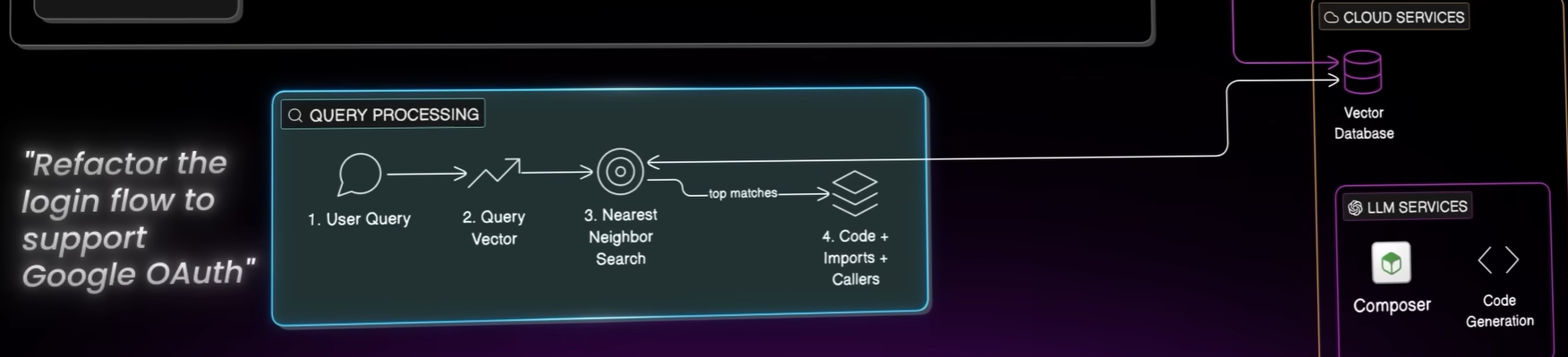
1.4a Type in “refactor the login flow to support google oauth”. Cursor turns your question into a query vector. Question and code now live in same number space. Nearest neighbor search “which chunks live closest to your question?” If a match, Cursor follows the code. Pulls in all related code. This is how senior engineer thinks. You trace the flow. ME: This is like Google search.
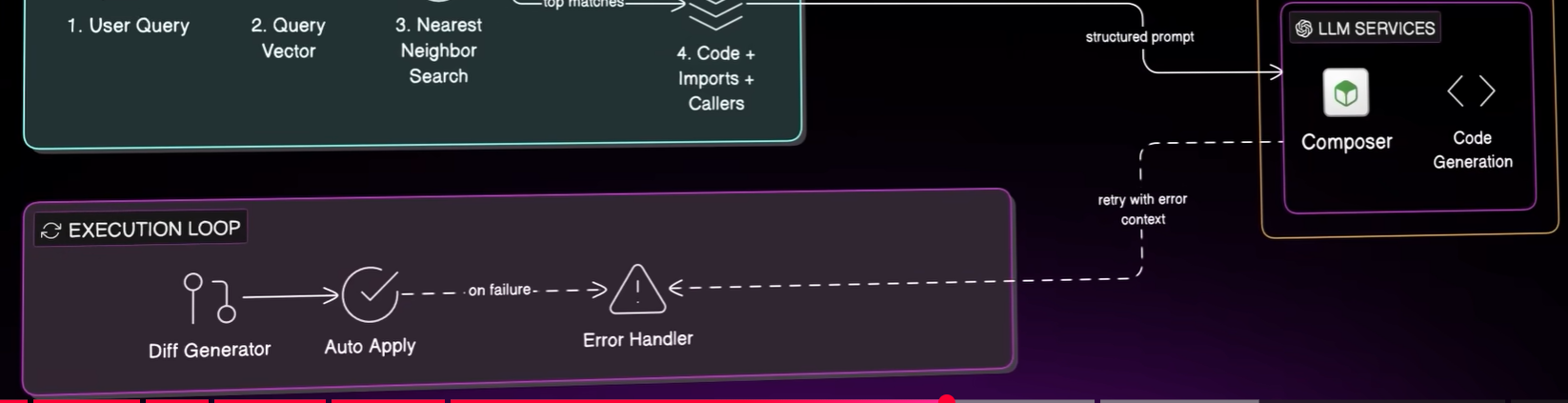
1.4b Cursor then builds a structure prompt. Your question on top, the relevant code next. Project sends this focused brief to the model (?? dont understand English; I think this is (1) the prompt (requested change) and (2) relevant code). The model is reading only the slice of code it needs. ME: This is like a prompt submission with requested change + code.
1.5 Last piece: Execution loop @6:00
Cursor generates diff. ME: This is where the code is changed by Cursor.
You click apply, edit goes in. If error, Cursor reads error and tries again. With 2.0, added model “Composer” trained for this job. To write code, use tools, search, edit, run. Trained inside real code bases using reinforcement learning until it learned to “behave like an engineer who really ships”. This is why most Cursor task finish in under 30 secs. (1) Retrieval is fast, (2) the model is tuned for this task, and () loop runs independently. ME: This is Cursor autotest and fix.
1.6 About the deal @7:00



2 Other IDEs (that have to play catchup)
3 Plugins
Rather than manually having to manage Render, I simply use the Codex Render plugin. Nice.
The goal of this section is to explore such dev tool / plugin combinations. Techniques. The required step to really be a “spin developer” who can quickly come up with complex solutions.
26.0428 (v1 26.0428)