Short overview of all chapters (TOC)
← Why this is the best QS for Foundry / ↑ 3.3 Foundry QS1 / → 0 First steps
26.1111 07:59 (converted from docx source file to markdown+PNGs by ChatGPT)
This chapter provides a short overview of each remaining chapter. Just click on the webpage heading link to go to that chapter.
TOC
- About the diagrams
- Ch0 First steps (Foundry sign up, FDE, project/folder, applications)
- Ch1 Fetch MockAPI records and display in UI (“Workshop”)
- Ch2 Create (1) AIPLF to detect matching digits in object text/integer properties / (2) UI to display result
- Ch3 Modify AIPL prompt to detect matching letter-only-text and integer-digits (display result in UI)
- Ch4 Enter AI matching criteria (configure only AIPL+F and UI)
- Ch5 Add an object property and Action to save the LLM response (use in Ch6)
- Ch6 Add an AIPL call for text-save action (A1/Ch5) / “wrap” with AIPLF / create “wrapper” action (A2) for AIPLF (for Ch7)
- Ch7 Add automation: “(new) object added to set” inits automation
- Ch8 Schedule (Data Lineage)
- Ch8a (7b) (WIP) Add processing of updated objects to automation
- Ch8b (8a) Governance
- Ch9 (WIP) Continuing your Foundry education (where to go from here)
About the diagrams

- The boxes represent applications, tools, and resources such as datasets, object types, and functions. The box numbers are the section numbers of this demo.
- Your configuration/testing tasks are show in bold **boxes with bold **numbered **text**.
- The horizontal chain provides workflow context. Numbered, bold-bordered boxes identify this chapter’s configuration and testing steps.** **
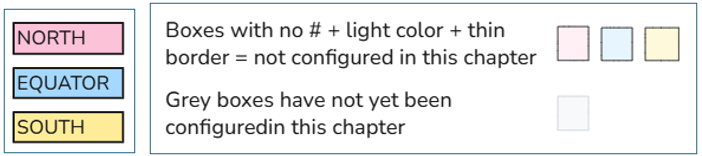
This demo uses background color to classify Foundry apps into 3 groups.
- North.** **User-facing applications and interactions (Workshop UI, etc)
- Equator. Foundry’s integration, data, Ontology, and logic layer. This quick start puts far more into this layer than just Ontology.
- South. External systems outside Foundry (MockAPI).
The following shows the color coding
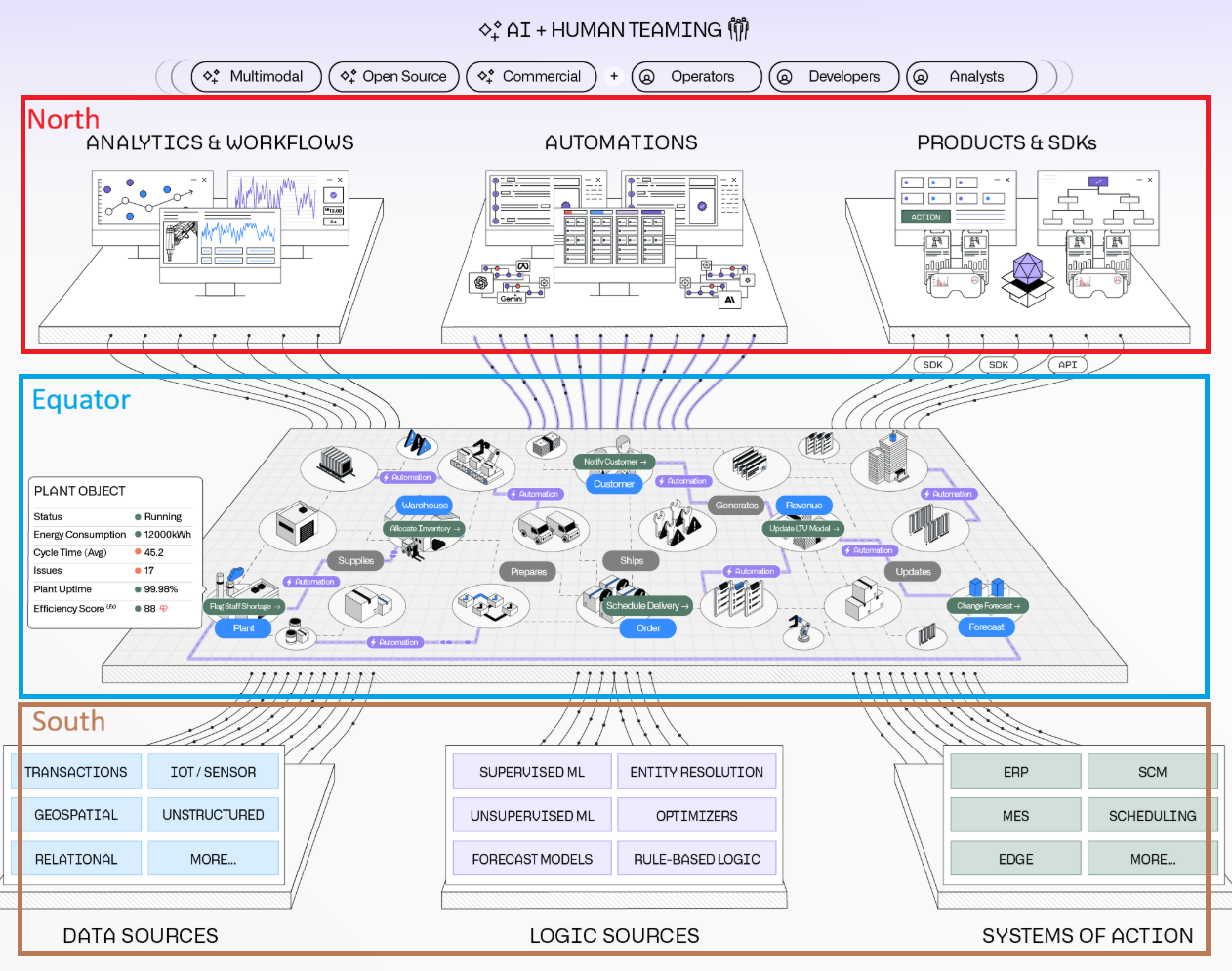
This is simplified version of the original Foundry diagram ( ) that had the following classifications:
- North. User-facing applications and interactions.
- Ontology (only Ontology).
South. External systems.
Ch0 First steps (Foundry sign up, FDE, project/folder, applications)
The diagram below shows the first steps.

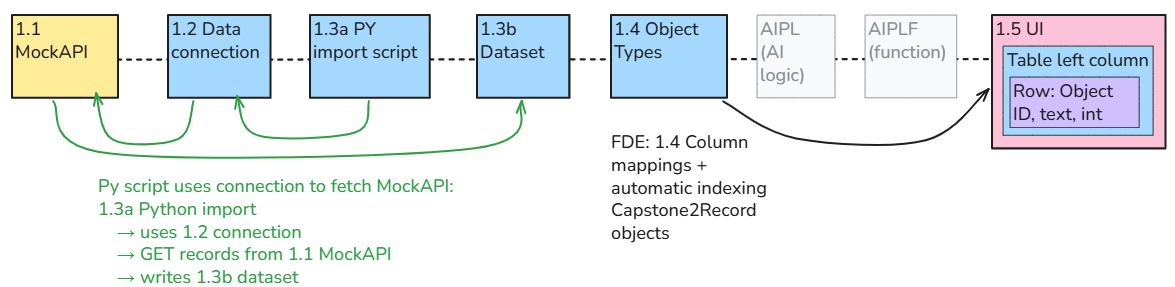
Ch1 Fetch MockAPI records and display in UI (“Workshop”)
Bring in a few records from MockAPI and display the record text and numbers in a table. No AI.
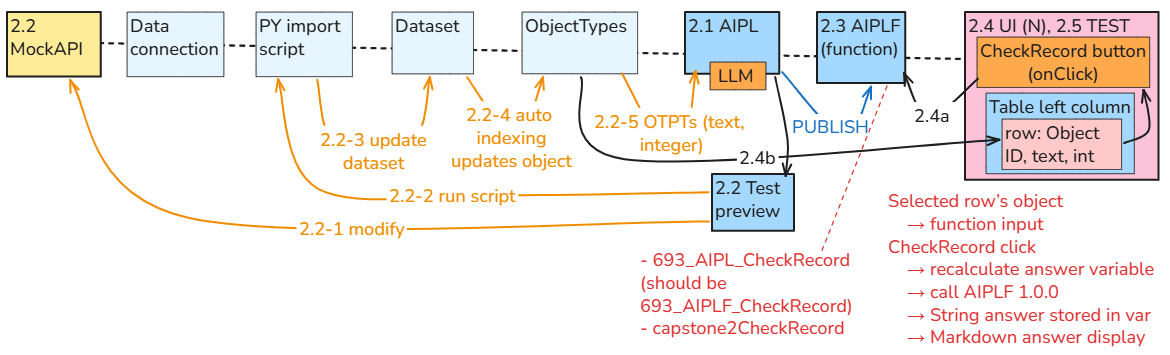
Ch2 Create (1) AIPLF to detect matching digits in object text/integer properties / (2) UI to display result
Select a record in the table, press a button, and display the AI’s answer. Leave the record unchanged.** **Ordinary code could perform this check without AI. We use AI here to learn the connection mechanics with an answer that is easy to verify. Chapter 3 will change what the AI checks.
Ch3 Modify AIPL prompt to detect matching letter-only-text and integer-digits (display result in UI)
You change the prompt in AIPL (AIPL structure/connectiosn DO NOT CHANGE… see diagram for ch3 above).
that requires a lot of modifications in the data chain.
(new MockAPI record to test, new build to dataset, AIPLF (must reference new AIPL version), and UI (must ref new AIPLF version)

Ch4 Enter AI matching criteria (configure only AIPL+F and UI)

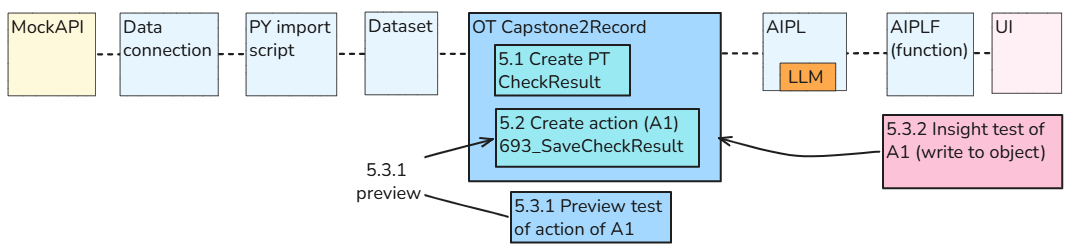
Ch5 Add an object property and Action to save the LLM response (use in Ch6)
In this chapter, we prepare and test the saving operation.
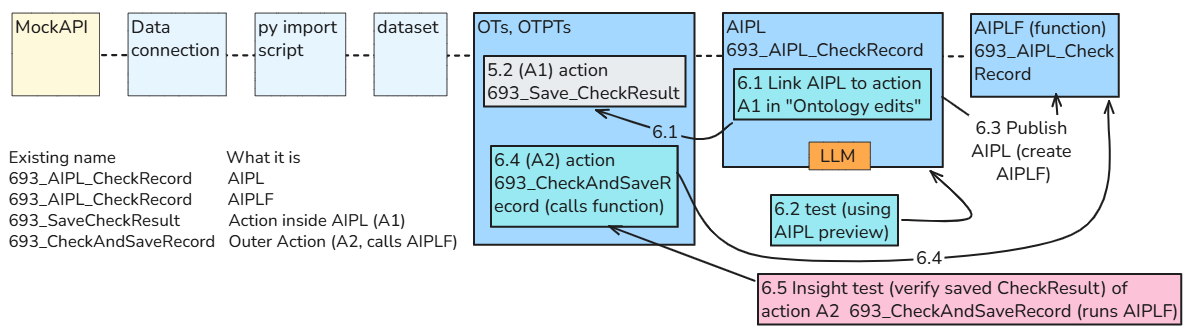
Ch6 Add an AIPL call for text-save action (A1/Ch5) / “wrap” with AIPLF / create “wrapper” action (A2) for AIPLF (for Ch7)
Configuration diagram (shows the MockAPI to UI chain… UI not shown).
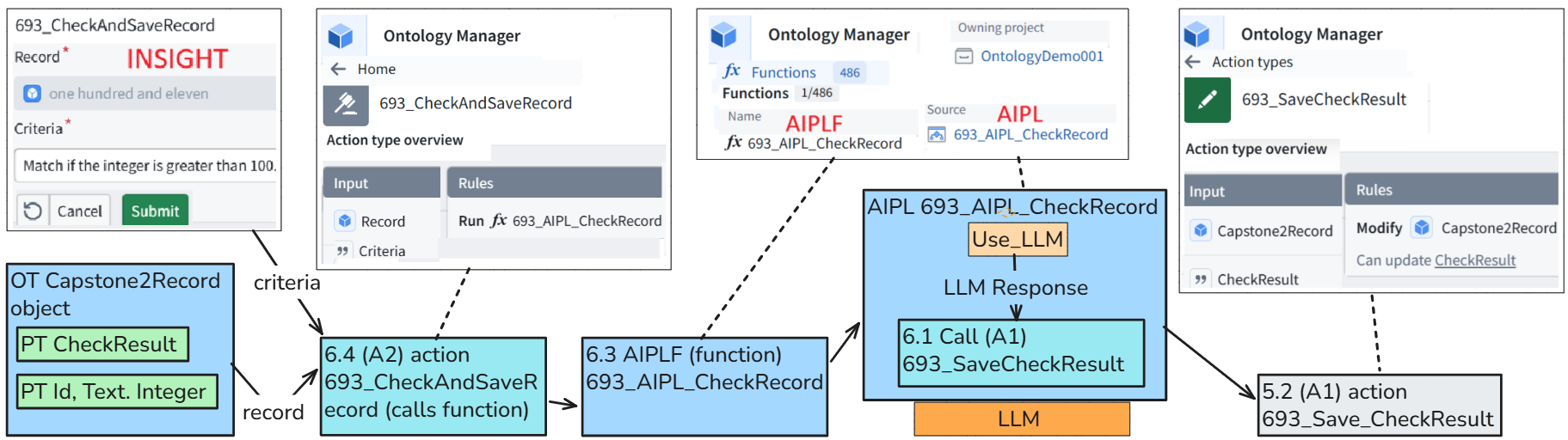
Here is a different perspective thats shows the ontology flow clearly.
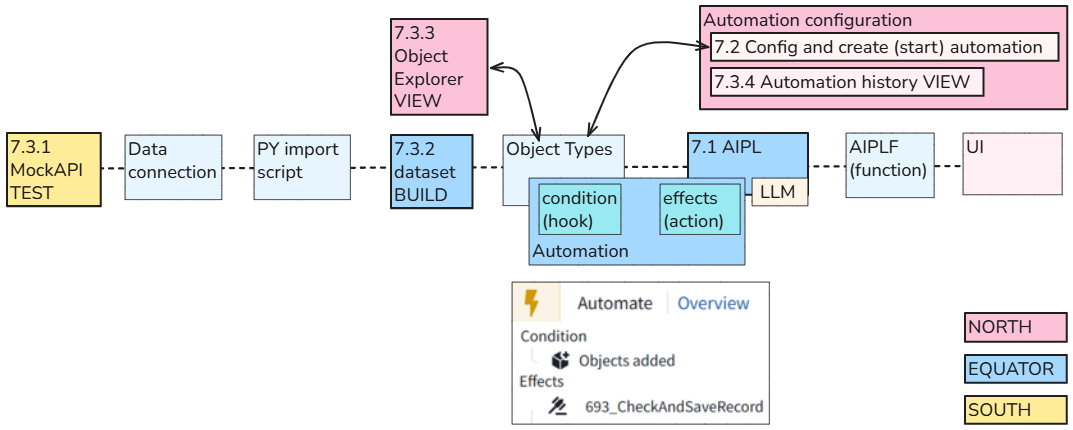
Ch7 Add automation: “(new) object added to set” inits automation
In Ch6, you selected a record (in Insight) and clicked Submit.
This ran 693_CheckAndSaveRecord manually.
Now We’ll use Automate to run that Action when a new Capstone2Record appears.
Ch8 Schedule (Data Lineage)
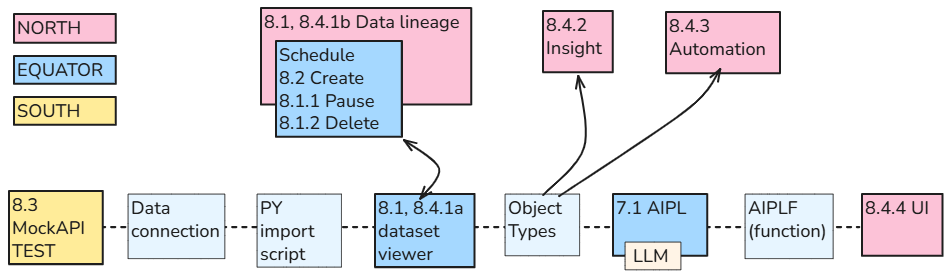
Schedule the Python import to fetch MockAPI records into 693_MockAPI_Items** (dataset)** every two minutes.
NOTE: **Limitation:** the import fetches new and updated records, but the Chapter 7 automation processes only newly added objects. Updating an existing object does not trigger another AI operation.
Ch8a (7b) (WIP) Add processing of updated objects to automation
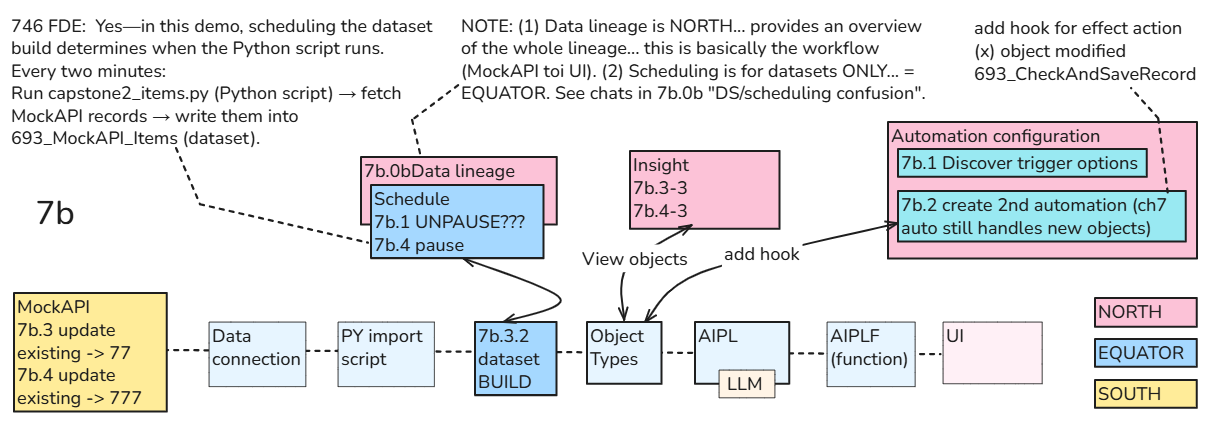
(This was 7b. I need to update diagrams) The Chapter 7 automation processes only newly added objects. Updating an existing object does not trigger another AI operation. modify in 7b so that automation processes updated objects.
Ch8b (8a) Governance
Note: This was 8a. I need to update diagrams.
8b.1 Security policy

8b.2 Action access
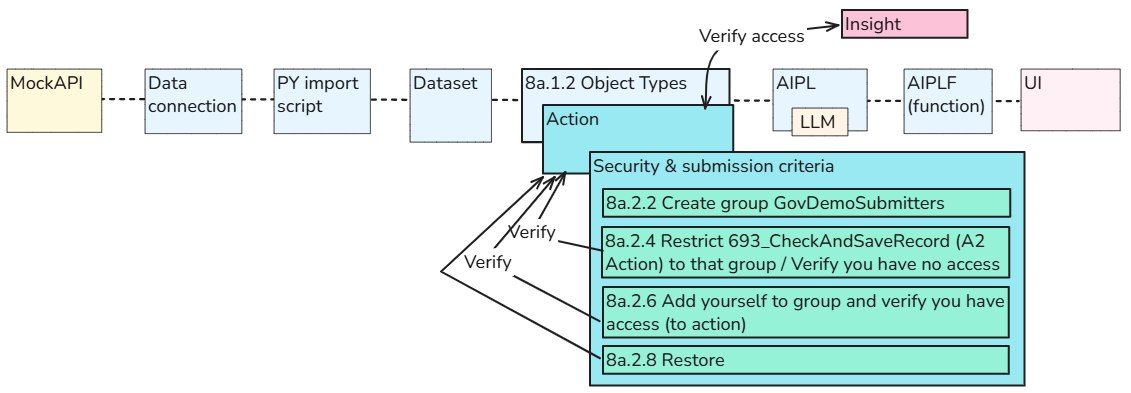
8b.3 Inspect Action config/execution history

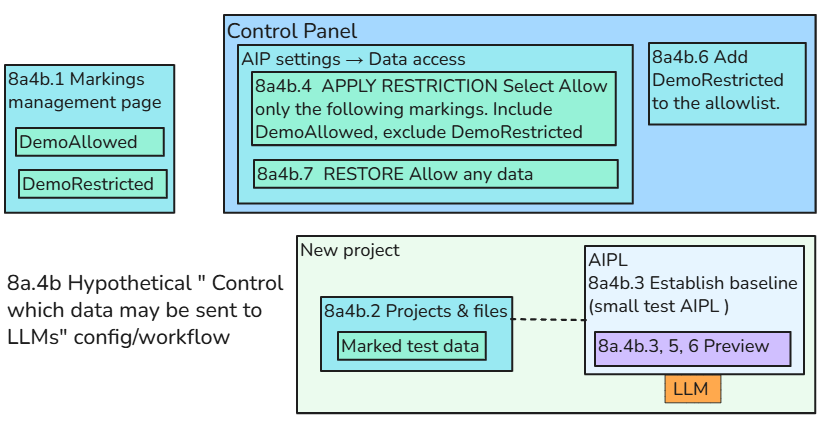
8b.4b Hypothetical “Control which data may be sent to LLMs” config/workflow
A trial user does not have access to this functionality. So this section simply describes the hypothetical (untested) config/workflow proposed by FDE.
Ch9 (WIP) Continuing your Foundry education (where to go from here)
There will be some kind of diagram for this section in the near future. The following shows the current proposed sections.
