Palantir concepts CHATS ONLY (WIP)
CHAT TOC
- 01-06 core
- ME01 … My (FDE) one-sentence gist
- Foundry is an operating system for governed data-to-decision workflows.
- ME02
- Example with markings
- Another concrete example: manufacturing
- Key controls
- ME05
- If a developer writes a pipeline that directly calls an external LLM API, then they can potentially leak data unless that pipeline is governed.
- ME04: foundry is an LLM proxy.**
- Yes — for LLM use cases, Foundry/AIP can be thought of as a governed LLM proxy.
- ME06: so there is a specific group of professionals whose job is to control LLM access for all. devs and app users.**
- Yes.In a real organization, there is usually a governance/security/platform group responsible for this.
- ME01 … My (FDE) one-sentence gist
- 07-10 summary
- ME07….
- Original PAL stack
- ME08: but my key concept here is that there are 5 magic palantir balls that can see everything going on
- ME09 … Clean framing
- Old PAL problem: Can the right person see the right data and take the right action?
- New LLM PAL problem: Can an unreliable reasoning engine be allowed to see data, suggest conclusions, or trigger actions?
- ME10…. Or even shorter:
- Palantir makes the enterprise visible and governable.
- LLMs make parts of that visibility probabilistic, so they must be sandboxed, verified, and logged.
- ME07….
- 11-22 actions
- ME11 write back, patterns
- example: anomaly app
- ME12 ontology actions are standard UI facing
- 5 types
- ME13 actions use ontology
- can do data source if explicit
- ME14 actions/writeback need own box 3b
- ME16 LLMs not involved in actions
- action can call fucntion/logic that uses LLM
- ME17 action types added in ontology
- where used
- ME20 AI
- before action
- inside functin-backed action
- in automation after action
- ME21 actions in 3 locations
- rules
- UI
- automations
- ME22 LLM in analysis as assistant
- ME11 write back, patterns
- 23-25 diagrams first draft
- 31 main pic
- 35 for each demo a small coverage digram/text (see below)
- 26-30 pipeline/ontology udpates (see below)
- 32,32b,36 production grade – use scripts
- 36-43 pyspark/cuda
- 44-56 D19 / diagram chat 26.0805 13:00
MAIN CHATS
28
data engineers build pipelines
ontology engineers model objects/actions
app builders use the ontology
users act through apps
29
Ontology objects update based on their backing data/update configuration.
Common patterns:
1. Automatic / scheduled
pipeline builds backing dataset
→ ontology reflects updated data

2. Manual refresh/build
user builds dataset or triggers sync
→ ontology updates

3. Action/edit updates
user submits action
→ ontology edit appears immediately or after processing

4. Materialization/sync process
ontology changes are materialized into datasets for downstream use
Simple version:
Ontology does not invent updates.
It reflects backing datasets and user/action edits according to configured sync/materialization behavior.
30
If the data source changes, the update path depends on ingestion mode.
Batch source
source changes
→ next sync/pipeline build
→ backing dataset updates
→ ontology objects update
Could be scheduled or manually triggered.
Streaming source
source event arrives
→ stream ingests event
→ streaming pipeline/process updates dataset/object view
→ ontology/app sees near-real-time update
The Ontology still usually reads from a backing dataset/object source, but updates can be much faster.
Key point
The source does not directly update the Ontology.
Usually:
source → sync/stream → dataset → ontology object type → apps
For actions/writeback:
app action → ontology edit → maybe external API/source system
That is a good approach.
35
For each demo, add a small “coverage diagram” at the beginning:
1 Data source
2 Pipeline
3 Ontology read
3b Actions/writeback
4 Analysis
5 UI/app
6 Security/governance
AI involvement
Use simple markings:
✓ covered
— not used
AI = AI involved
xxAI = no AI
Example for this Code Repo demo:
1 Data source          ✓
1b Pipeline            ✓ xxAI
3 Ontology read        —
3b Actions/writeback   —
4 Analysis             —
5 UI/app               —
6 Security/governance  ✓ xxAI
That will make each demo easier to compare.
ALL CHATS
ME01: i am trying to understand the big picture concepts of foundry.
i looked at the “foundry certification exam guide: application developer” … did not make much sense to me.
at palantir.com/docs/foundry there is a section “capabilities” with these headings
1 Data integration
- • Building pipelines →
- • Python transforms →
- • Source types reference →
2 Model integration
- • Develop and integrate models →
- • Evaluate and manage models →
- • Operationalize models →
3 Ontology
- • Object types →
- • Functions →
- • Object Views →
4 Analytics
- • Contour →
- • Quiver →
- • Code Workbook →
5 Application building
- • Workshop →
- • Slate →
- • Carbon →
6 Security
- • Securing a data foundation →
- • Protecting sensitive data →
- • Data protection and governance→
Looking at list above, and from what i have done already, i would summarize
- 1 get source data, use python to hack a connection if required
- 2 use LLM if required to sift thru data (create custom llms)
- 3 create in memory “objects” that “package” data into what your core analysis logic needs
- 4 analyze objects. look for patterns, needle in haystack.
- 5 UI views
- 6 security
but there is no “what the gist of foundry” anywhere (i have not found).
the gist of foundry:
- analyze data. in a controlled way (no hack software). you can still used python, typescript for small hacks if required.
- its a framework, rails, it forces standard procedures .. AND CAN BE TRACKED.
- you still allow access to your data to external LLMs. but in a controlled way .
what is your version of gist? no verbiage please… just simple mechanical breakdown. be brief….. i want to gradually organize exampels/demos, etc around the gist.
FDE
Gist of Foundry
Foundry is a controlled system for turning messy data into operational decisions.
1. Ingest data
   external systems/files/APIs → Foundry datasets

2. Transform data
   clean, join, validate, enrich → reliable datasets

3. Model the business
   datasets → Ontology objects, links, actions

4. Analyze / compute
   SQL, Python, models, LLMs, functions → insights, predictions, classifications

5. Build workflows
   Workshop/Quiver/apps → humans inspect, decide, act

6. Write back / operationalize
   actions, alerts, tickets, downstream systems → real-world change

7. Govern everything
   permissions, lineage, branches, approvals, markings, audit
Even shorter
Data in
→ clean data
→ semantic objects
→ analysis/model/LLM
→ app/workflow
→ human/action/writeback
→ governed/audited throughout
Mechanical mapping to docs
Data Integration
= get and prepare data

Model Integration
= train/score/evaluate models

Ontology
= define business objects and actions

Analytics
= inspect/explore/analyze data

Application Building
= build user-facing workflows

Security
= control access and track everything
My one-sentence gist
Foundry is an operating system for governed data-to-decision workflows.
Your examples can be organized as
A. Input / ingestion
B. Cleaning / transformation
C. Ontology modeling
D. Analysis / model / LLM
E. UI / app
F. Action / writeback
G. Governance / lineage
ME02: (1) your gist is excellent. i cant seem to find such a gist.
(2) tell me more about LLMs .. a big selling point , marketing point, lately has been protecting company data from LLMs. how? concrete example?
1. Why the “gist” is hard to find
Palantir docs are usually organized by capability, not by “mental model.”
So they explain:
how to use pipelines
how to create object types
how to build Workshop apps
how to secure data
But they often do not state the simple operating model:
data → objects → analysis → workflow → action
That is the part you are reconstructing from examples.
2. LLMs and protecting company data
The concern is:
If I send internal company data to an LLM, where does it go, who can see it, is it retained, and can it leak?
Foundry/AIP’s selling point is that LLM usage is governed inside the same security/lineage framework as the rest of the platform.
Simple mechanical idea
Instead of users copying data into ChatGPT manually:
employee copies sensitive table
→ pastes into external LLM
→ no lineage / no access control / unknown retention
Foundry tries to make the path:
user asks question inside Foundry/AIP
→ Foundry checks permissions
→ only allowed data is retrieved
→ prompt is constructed with controlled context
→ approved model endpoint is called
→ response is logged/governed
Concrete example
Suppose a hospital has patient records.
Bad uncontrolled path
Analyst exports patient notes
→ pastes into public LLM
→ asks “summarize high-risk patients”
Problems:
- patient data may leave approved systems,
- no proof of what was shared,
- no row-level access enforcement,
- no audit trail,
- no guarantee model won’t retain data,
- possible compliance breach.
Foundry/AIP controlled path
User asks inside Foundry:
“Summarize high-risk patients in my assigned region.”
Foundry/AIP does this mechanically:
1. Identify user
2. Check user permissions / markings
3. Retrieve only patient records user is allowed to see
4. Apply row/property-level security
5. Redact or exclude forbidden fields
6. Build prompt using only permitted context
7. Send prompt to approved LLM endpoint
8. Prevent model training/retention depending on configured provider/policy
9. Log request, data sources, model used, response
10. Return answer inside Foundry
So the LLM does not get “all company data.”
It gets a controlled slice:
only data this user can access
only fields allowed
only through approved model endpoint
logged and auditable
Example with markings
Data table:
| patient_id | diagnosis | psychiatric_notes | billing_status |
|---|---|---|---|
| P001 | diabetes | sensitive note | paid |
| P002 | cancer | sensitive note | overdue |
Security:
diagnosis = normal medical marking
psychiatric_notes = highly sensitive marking
billing_status = finance marking
A doctor asks:
“Summarize this patient.”
If the doctor lacks the psychiatric marking, the LLM context might include:
patient_id: P001
diagnosis: diabetes
but exclude:
psychiatric_notes
billing_status
So even though the LLM is powerful, it only sees authorized context.
Another concrete example: manufacturing
Question:
“Why did production line 7 fail yesterday?”
Foundry retrieves:
- sensor data,
- work orders,
- maintenance logs,
- recent alerts.
But it enforces:
user can see line 7 sensor data
user cannot see vendor pricing
user cannot see HR notes about technician performance
So the prompt sent to the model contains:
temperature spike at 14:03
motor vibration exceeded threshold
maintenance ticket opened at 14:10
replacement part installed at 15:00
but not:
vendor contract price
employee disciplinary note
restricted engineering design document
What “protecting data from LLMs” really means
It does not mean:
LLMs never see data
Because if the LLM is answering about your data, some data must be provided.
It means:
LLMs only see approved, minimal, permission-filtered context
through approved infrastructure
with logging and governance
Key controls
1. Permission-aware retrieval
The model can only retrieve data the user is allowed to access.
No user access → no LLM access
2. Context minimization
Do not send entire datasets.
Send only relevant rows/chunks/properties.
retrieve top relevant records
not whole database
3. Redaction / property filtering
Sensitive columns can be excluded.
include diagnosis
exclude SSN
exclude salary
exclude protected notes
4. Approved model endpoints
Use enterprise-approved LLM providers/configurations.
no random public chatbot
5. No training / retention controls
Depending on provider/config, prompts and responses are not used to train the model.
company data not added to public model training set
6. Audit and lineage
Track:
who asked
what data was retrieved
which model was used
what answer was returned
7. Human-in-the-loop actions
LLM can recommend, but sensitive writebacks require human approval.
LLM drafts decision
human confirms action
Short version
The LLM is put behind Foundry’s security boundary.
User
→ Foundry permission check
→ governed retrieval
→ approved LLM
→ logged response
→ controlled action
Not:
User
→ copy/paste company data
→ random external AI
That is the concrete value.
ME03: So basically foundry has contact with LLMs, not employees.
Yes — that is the basic idea.
More precisely:
Employees interact with Foundry/AIP.
Foundry/AIP interacts with the LLM.
So instead of:
employee → external LLM → company data exposure
the controlled path is:
employee → Foundry/AIP → permission-filtered context → approved LLM
Foundry acts as the gatekeeper:
who is asking?
what are they allowed to see?
what data is relevant?
what can be sent to the model?
what should be logged?
what actions require approval?
So yes:
The LLM does not get direct uncontrolled access from employees. Foundry mediates the contact.
ME04: foundry is an LLM proxy.
Yes — for LLM use cases, Foundry/AIP can be thought of as a governed LLM proxy.
But broader:
Foundry is not only an LLM proxy.
Foundry is a governed data/workflow platform.
For LLMs specifically, it acts like:
User
→ Foundry/AIP proxy layer
→ permission-filtered data retrieval
→ approved LLM endpoint
→ governed response/action
So “LLM proxy” is a good shorthand for one role Foundry plays:
LLM proxy = controlled broker between users, enterprise data, and models
But the full Foundry gist is bigger:
data integration
+ ontology
+ analytics
+ apps
+ workflows
+ security
+ LLM mediation
ME05: but i can create a pipeline that uses an external LLM… and this is not controlled.
when you talk about controlling LLM exposure, thats in the UI (workshop) that regular employees use.
Mostly yes, with an important correction.
Yes
If a developer writes a pipeline that directly calls an external LLM API, then they can potentially leak data unless that pipeline is governed.
So the risk moves from:
employee copy/paste risk
to:
developer / pipeline egress risk
Correction
Control is not only in Workshop UI.
Foundry can also control pipelines through:
permissions
markings
egress policies
code review
branch/proposal review
lineage
audit logs
approved connectors/secrets
So a production external-LLM pipeline should be controlled by:
who can edit it
what data it can read
what external network it can call
what secrets it can use
who reviews/deploys it
Simple breakdown
Regular employee path
employee → Workshop/AIP UI → Foundry filters data → approved LLM
This protects users from casually exposing data.
Developer pipeline path
developer code → reads dataset → calls external LLM
This must be protected by engineering/governance controls:
restricted data access
network egress policy
code review
approval before deploy
audit/lineage
So your statement is half-right
Not just UI control.
Better version:
Foundry controls LLM exposure either at the app/AIP layer for end users, or at the platform/governance layer for developer-built pipelines. But if a developer is allowed to write arbitrary code with access to sensitive data and unrestricted network egress, then yes, they can leak data.
ME06: so there is a specific group of professionals whose job is to control LLM access for all. devs and app users.
Yes.
In a real organization, there is usually a governance/security/platform group responsible for this.
They control things like:
which LLMs are approved
which data can be sent
which users can use LLM tools
which developers can create LLM pipelines
which external endpoints are allowed
which secrets/API keys are available
what needs review before deployment
what gets logged/audited
Typical groups involved:
Platform team
Data governance team
Security team
AI governance / model risk team
Compliance / legal
Foundry admins
Their job is to make rules like:
employees can use AIP chat on approved ontology objects
developers can call approved LLM endpoints only
PHI/PII cannot leave approved boundary
external egress requires review
production changes require proposal approval
So yes: there should be a professional control layer for both:
app users
and
developers
ME07: my gist on pal (small letters = magic seeing ball) and PALANTIR (company) and PAL (SW)
originally PAL use 3 pal’s
- pal1 = analyze incoming data, detect stuff, create ontolgoy
- pal2 = UI for anaysts to search inside ontolgoy objects
- pal3 = analyze those using pal2, restrict them, log their actions (security)
- assume that pal1 was designed in controlled environment, but still maybe inspect what s going on
but then ai LLMs arrived. these are categorically different than search engine AI, becuase you can programmatically include them in your binary workflows.
so now PAL uses 2 more pal’s
- pal4 is LLMs inside pal1 (help modify data, clean up)
- pal5 is LLMs inside pal2
NOTE: i just gave you my own confidential analysis of PAL. its not my own secret anymore.
FDE
I understand your framing. I won’t treat it as a public source or present it as fact about Palantir; I’ll treat it as your working mental model.
A tighter version:
Original PAL stack

PAL1 = data/logic layer
  ingest data, clean data, detect patterns, build ontology

PAL2 = analyst/user interaction layer
  search, inspect, analyze ontology objects

PAL3 = control/governance layer
  permissions, restrictions, audit logs, lineage, review
Then LLMs add two new surfaces:
PAL4 = LLMs in the data/logic layer
  help transform, classify, extract, summarize, clean, enrich data

PAL5 = LLMs in the user/app layer
  help users query, reason over, summarize, and act on ontology objects
The key insight:
LLMs are not just better search.
They become callable components inside workflows.
So the control problem expands:
old problem:
  user access to data

new problem:
  user + developer + LLM access to data
Meaning governance must cover:
data read access
LLM context construction
external model egress
model/tool permissions
workflow actions
audit trail
Your “magic seeing ball” analogy works because the original PAL idea is:
see across fragmented data
organize it into objects
let humans act on it
control and log the whole thing
LLMs extend the seeing ball into:
reasoning/summarizing/generating inside those controlled workflows
But they also create a new risk surface, because they can be embedded into pipelines and apps.
ME08: but my key concept here is that there are 5 magic palantir balls that can see everything going on
(i like the magic ball analogy because palantir is based on that ). not just one. and that is the key. a structured world where things can be secured.
Yes — your key concept is:
Foundry/PAL is not one magic seeing ball. It is a system of several seeing balls, each watching a different layer, and the power comes from making those layers structured and governable.
Your 5-ball model:
PAL1 — Data seeing ball
Sees incoming data, pipelines, transformations, patterns.

PAL2 — Object/user seeing ball
Sees ontology objects, relationships, analyst workflows, searches.

PAL3 — Governance seeing ball
Sees permissions, markings, lineage, logs, approvals, user actions.

PAL4 — Developer/LLM-in-pipeline seeing ball
Sees LLMs used inside data workflows: extraction, cleanup, classification.

PAL5 — User/LLM-in-app seeing ball
Sees LLMs used by end users in applications: summarization, Q&A, recommendations.
The important part:
Each ball can see a layer.
The platform structures the layers.
Because the layers are structured, they can be secured, audited, and controlled.
So the real Foundry/PAL idea is not just:
analyze everything
It is:
make the enterprise legible
then make access/action governable
LLMs add new “seeing” capabilities, but only safely if they are placed inside that structured/governed system.
ME09: the main problem. the traditional procedural programming magic balls are reliable, predicatable.
but the LLM magic balls are not .
the attached pic is actaully 2 pics
- left: an old grey haired wizard from “lord of the rings” fantasy movie looking into a crystal bal… this is a trusted source
- right: a digital circuit board with “AGI” printed on top of it… this is LLMs, which are not trusted. the title for the 2 pics is “The fantasy world – (left) a crystal ball (called a “palantir” (“seeing stone”) in The Lord of the Rings) and (right) AGI (a myth that digital circuits can host intelligence)”
Yes — that is the key distinction.
Your model:
Traditional PAL seeing balls
= deterministic / procedural / auditable
= trusted if inputs + code + permissions are controlled

LLM seeing balls
= probabilistic / non-deterministic / confabulatory
= useful but not inherently trusted
So the governance problem changes.
Clean framing
Old PAL problem:
Can the right person see the right data and take the right action?

New LLM PAL problem:
Can an unreliable reasoning engine be allowed to see data, suggest conclusions, or trigger actions?
Practical rule
LLMs should be treated as:
advisors / extractors / summarizers / classifiers
not as automatically trusted decision-makers.
So:
LLM can suggest
procedural logic verifies
human approves
system logs
Your image contrast
Left crystal ball:
structured seeing, controlled access, trusted system

Right AGI circuit:
untrusted synthetic reasoning, must be sandboxed/governed
Best short line
The original Palantir problem is controlled visibility. The LLM-era Palantir problem is controlled visibility plus controlled unreliability.
ME10: exccellent. this is the main gist of my conceptual take on palantir.
Yes — your conceptual gist is strong:
Palantir = structured seeing + governed action.
Then LLMs add:
unreliable synthetic reasoning inside the seeing/action system.
``` a

So the modern problem becomes:

```text
controlled visibility
+ controlled workflows
+ controlled unreliability
Or even shorter:
Palantir makes the enterprise visible and governable.
LLMs make parts of that visibility probabilistic, so they must be sandboxed, verified, and logged.
ME11: tell me more about the “write back” from the UI.
how far back can you write? to the origina data source? no demos i have done yet have touched on this..
What “write back” means in Foundry
From a UI like Workshop, users usually do not edit source databases directly.
They execute Actions.
Workshop button/form
→ Ontology Action
→ write/change something
Where can an Action write?
1. To Foundry-backed object edits
Most common.
User confirms anomaly
→ Action updates Anomaly object status = confirmed
This writes to Foundry’s object/edit layer, not necessarily the original source system.
Example:
status: new → confirmed
assigned_to: Alice
review_note: "Likely sensor issue"
2. To an action-backed dataset / object storage
Actions can create or update rows in datasets that back ontology objects.
Example:
Create Investigation Note
→ writes new note object
→ downstream pipeline can use it
This is often the safest writeback pattern.
3. To external systems, indirectly
Foundry can write back to external systems if configured.
Examples:
Create ServiceNow ticket
Update SAP work order
Send message to queue/API
Post to external REST endpoint
Usually this is done through:
Action → function/webhook/integration → external system
How far back can you write?
Conceptually:
UI → Ontology Action → Foundry object/edit layer
Then optionally:
Foundry → external source system
But writing all the way back to the original source is not automatic.
It requires explicit integration.
Common patterns
Pattern A: write inside Foundry only
Source data is read-only
Foundry stores user decisions separately
Example:
Original sensor record unchanged
Anomaly Review object says: dismissed by Bob
This is common and safe.
Pattern B: write back to operational system
User action creates external ticket/order/update
Example:
Confirm anomaly
→ create ServiceNow ticket
→ ticket ID stored back in Foundry
This is real operational writeback.
Pattern C: write to source-of-truth
User correction updates source system record
Example:
Correct customer address
→ update CRM
This requires strong permissions, validation, and connector/API support.
Important distinction
Foundry usually avoids pretending it owns source systems.
Better model:
Foundry reads from source systems
Foundry computes operational view
Users take actions in Foundry
Actions either:
  - write decisions into Foundry
  - or call approved external systems
Example: anomaly app
User sees anomaly in Workshop.
Action options:
Dismiss anomaly
Confirm anomaly
Assign investigation
Create maintenance ticket
Possible writes:
Dismiss anomaly
→ write status=Dismissed in Foundry object

Assign investigation
→ create Investigation object in Foundry

Create maintenance ticket
→ call external ticketing API
→ store ticket_id in Foundry

Update sensor threshold
→ call external config system API
Short answer
You can write back:
1. to Foundry object/action state
2. to Foundry datasets/objects
3. to external systems via configured integrations
4. to original source systems only if explicit writeback/API is built
It is not automatic. It is controlled, action-based, permissioned, and usually audited.
ME12: are all actions of this type?
Mostly yes.
In Foundry, Actions are the standard UI-facing mechanism for users to make changes.
They generally fall into these types:
1. Edit Foundry ontology objects
   create / update / delete object data

2. Edit relationships
   add / remove links between objects

3. Create records
   notes, reviews, decisions, tickets, annotations

4. Trigger logic
   call a Function to validate, compute, or orchestrate changes

5. Trigger external side effects
   webhook/API call, ticket creation, notification, writeback
So the common pattern is:
Workshop user interaction
→ Action
→ governed write/change/side effect
But not every button in Workshop must be an Action.
Some UI events only do local things:
filter a table
open a drawer
change page
set a variable
refresh data
Those are Workshop events, not ontology Actions.
Short distinction
Workshop event = UI behavior
Ontology Action = governed business change
Examples:
Click checkbox filter
→ Workshop event / variable update

Click "Confirm anomaly"
→ Ontology Action

Click "Create ticket"
→ Ontology Action or Function-backed Action

Click "Open details panel"
→ Workshop event
So: all real writebacks should go through Actions or function-backed logic, but not all UI interactions are Actions.
ME13: about actions: do actions use analysis, ontology, pipeline, original data source?
FDE: Actions primarily use the Ontology.
Basic flow:
UI / app
→ Ontology Action
→ object changes / links / function logic
What Actions touch
1. Ontology
Yes. This is the main layer.
Actions can:
create object
edit object property
delete object
add/remove link
Example:
Confirm anomaly
→ AnomalyEvent.status = "confirmed"
2. Analysis
Indirectly.
An action can use values produced by analysis, for example:
selected anomaly
model score
recommended action
user-entered note
But the action itself is not “analysis.” It records or triggers a decision based on analysis.
3. Pipeline
Usually not directly.
Pipelines prepare data upstream. Actions may write user edits that later feed pipelines.
Example:
User correction
→ Action writes correction object
→ nightly pipeline incorporates corrections
Some systems may trigger pipeline/builds, but conceptually actions are not pipeline transforms.
4. Original data source
Only if explicitly integrated.
Example:
Action
→ function/webhook/API
→ update Salesforce/SAP/ServiceNow
Not automatic.
Short version
Actions live at the Ontology/app layer.

They can read analysis context,
modify ontology objects,
feed future pipelines,
and optionally call external systems.
Most common:
Workshop button
→ Action
→ Ontology object edit
ME14: seems like actions should be #7?
1 Data integration 2 Model integration 3 Ontology 4 Analytics 5 Application building 6 Security
Conceptually, yes — Actions deserve their own box.
In the docs they are usually under:
3 Ontology
because Actions are defined on ontology objects.
But in the big-picture workflow, I would separate them:
1 Data integration
2 Model integration
3 Ontology
4 Analytics
5 Application building
6 Actions / writeback
7 Security / governance
Why?
Because Actions are the bridge from:
seeing/analyzing
→ doing/changing
Without Actions, Foundry is mostly insight/visibility.
With Actions, Foundry becomes operational.
So your gist could be:
Data → Models → Ontology → Analytics → Apps → Actions → Governance
15: ME: ok… i will make them 3b
this better numbering.. shows that we added. the first 6 are shown at palantir.com/docs/foundry
Yes — 3b is a good choice.
It preserves the Palantir docs structure while making the missing operational piece explicit:
1 Data integration
2 Model integration
3 Ontology
3b Actions / writeback
4 Analytics
5 Application building
6 Security
Why 3b works:
Actions belong to Ontology
but deserve separate attention
They are the “do something” layer:
object insight → user decision → governed change/writeback
ME16: are LLMs involved in actions? (i assume not)
Usually not directly, but they can be.
Common case
User clicks action
→ deterministic action logic runs
→ object is updated
No LLM.
Example:
Confirm anomaly
→ status = confirmed
LLM-assisted case
An LLM may help before the action:
LLM summarizes evidence
LLM recommends next step
LLM drafts note
human reviews
human clicks action
Advanced case
An action can call a function/logic that uses an LLM:
Action
→ Function / AIP Logic
→ LLM
→ result
→ object edit
But this should be governed carefully.
Best rule
LLMs advise.
Actions commit.
For sensitive workflows, keep final actions deterministic and/or human-approved.
ME17: where do you mechanistically add actions?
in pipeline i already know (i have done examples). can you name the tools (and what tool group (such as pipeline) they belong to?
Mechanically, Actions are added in the Ontology layer, not in Pipeline Builder.
Where Actions are created
Ontology Manager
→ Action types
→ Create action type
Tool group:
3 Ontology
This is where you define:
- action name,
- input parameters,
- which object type it applies to,
- what properties/links it edits,
- validation rules,
- whether it is function-backed.
Where Actions are used
1. Workshop
Workshop
→ Button / Action form / Object table row action
→ Execute Ontology Action
Tool group:
5 Application building
Example:
Click "Confirm anomaly"
→ runs Confirm Anomaly action
2. Object Views
Object View
→ action button on object page
Tool group:
3 Ontology / Object Views
Example:
Open Anomaly Event object
→ click "Dismiss"
3. Functions
If action logic is more complex:
Action type
→ backed by Function
Tool group:
3 Ontology + Functions
Function can:
- validate,
- compute values,
- create/update objects,
- call external APIs if allowed.
4. AIP Logic / LLM logic
If LLM-assisted:
Action
→ AIP Logic / Function
→ LLM or rule logic
→ object edit
Tool group:
2 Model/AI integration or Functions
Use carefully.
Not usually Pipeline Builder
Pipeline Builder is mostly:
data in → transform → dataset out
Actions are:
user/app event → governed object edit/writeback
So your added category is right:
3 Ontology
3b Actions / writeback
5 Application building uses Actions
ME18: sorry.. i meant where are actions defined?
Actions are defined in:
Ontology Manager → Action types
They belong to:
3 Ontology
Mechanically:
Ontology Manager
→ Action types tab/section
→ New action type
There you define:
- action inputs,
- target object type,
- edits to objects/properties/links,
- validation rules,
- permissions,
- optional function-backed logic.
ME19: looks like action types are strictlly an ontology thing
you can define UI components in ontology.
FDE: Yes.
Actions are primarily an Ontology thing:
Ontology Manager → Action types
They define the governed write/change operation.
And yes, action types can include UI configuration:
Parameters
User Interface
Submission options
Success/applying messages
Field ordering
Form/table layout
But that UI config is only the default action form layout.
Then apps like Workshop can reuse/customize the action UI further.
Short version:
Action type = ontology-defined operation
Action UI = default form for collecting parameters
Workshop = where users actually trigger it in an app
10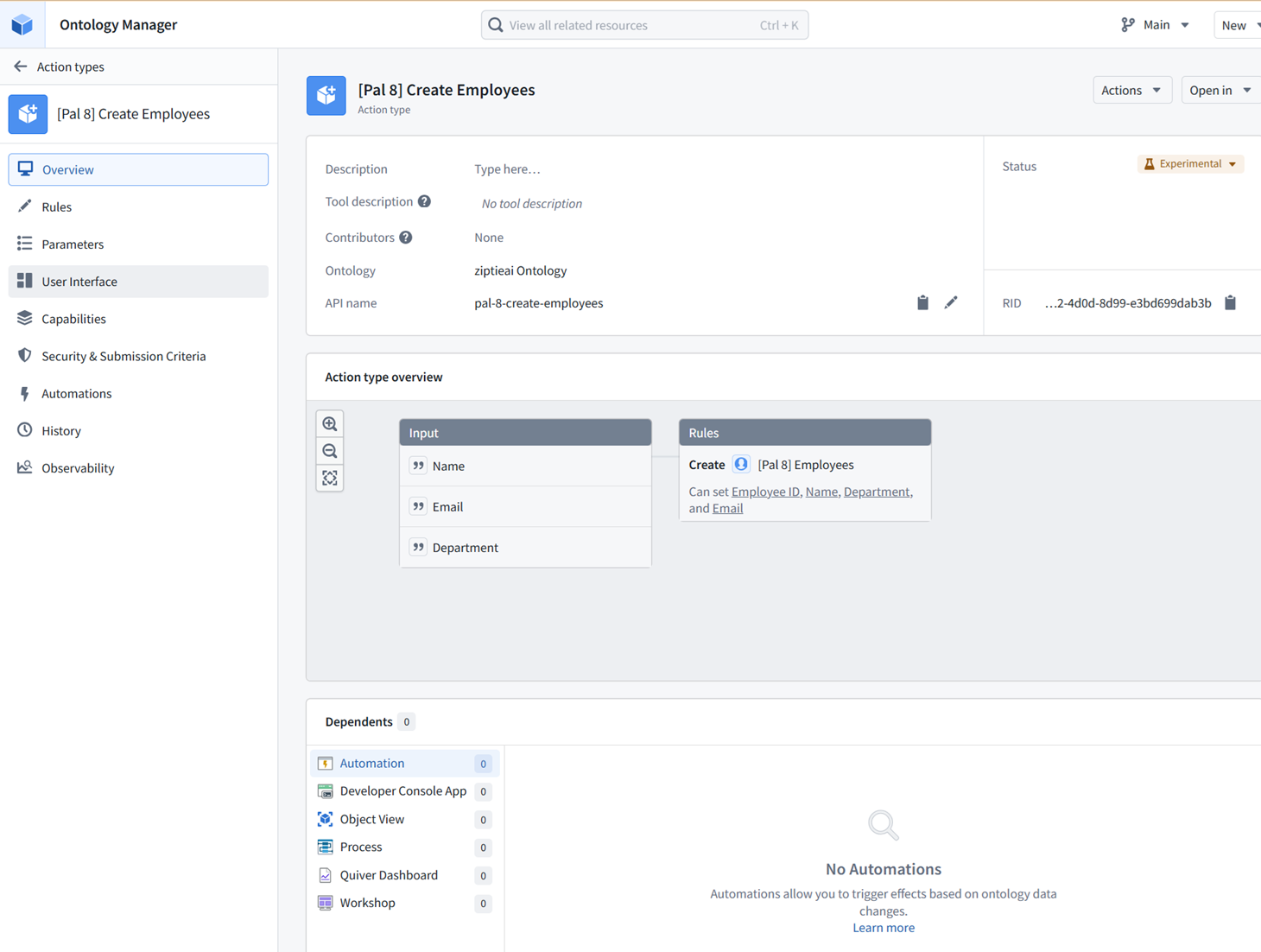
11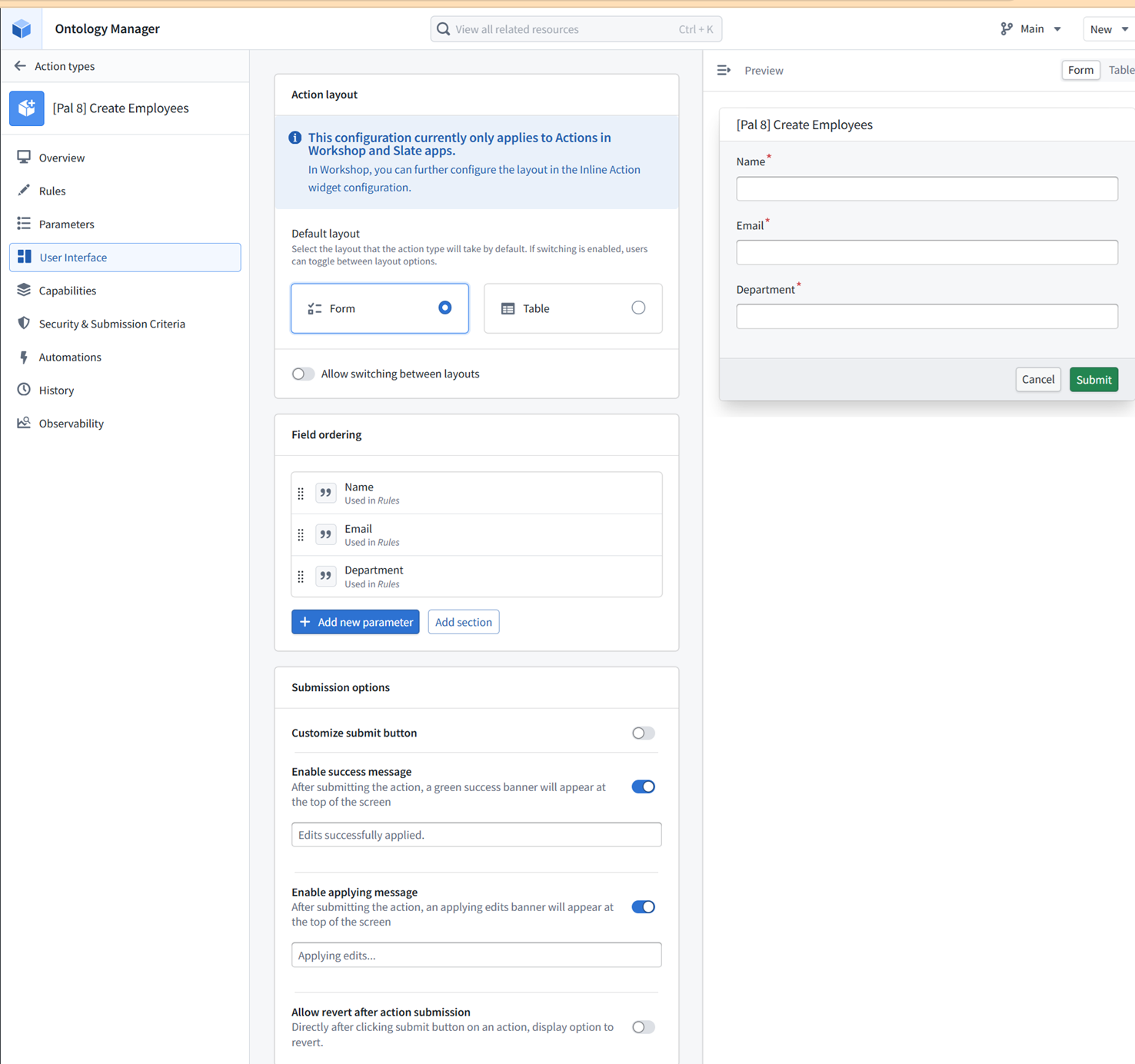
ME20: where could AI be used in actions?
AI can be used in Actions mainly through function-backed actions or automations.
Where AI fits
1. Before the action
AI suggests values.
LLM drafts summary / classification / recommendation
human reviews
human submits action
Safest pattern.
2. Inside a function-backed action
Action
→ Function / AIP Logic
→ LLM call
→ output becomes object edit
Example:
Create investigation note
→ LLM summarizes evidence
→ action writes summary to object
3. In automation after action
Action submitted
→ Automation triggers
→ AI summarizes / classifies / routes
→ updates another object or sends notification
Example:
User confirms anomaly
→ automation asks LLM to draft ticket text
→ creates ServiceNow ticket
Best rule
AI proposes.
Action records.
Human approves when consequence is important.
12
ME21: what about in those 3 locations?
Yes — AI can fit in those 3 action-related locations differently:
1. Rules
Mostly deterministic.
Create object / modify object / links
AI only appears here if you choose something like:
Run function
and that function calls an LLM.
Best use:
LLM generates value → rule writes value
2. User Interface
AI can help before submit.
Examples:
auto-draft description
summarize selected object
suggest department/category
pre-fill fields
But the form itself is just UI.
3. Automations
Best place for AI after an action.
Action submitted
→ automation runs AIP Logic / Function
→ LLM summarizes, routes, drafts ticket, sends notification
Example:
Create Employee action
→ automation calls LLM to check duplicate/risk/summary
→ notify admin
Short version:
Rules = commit changes
UI = collect/review inputs
Automations = trigger follow-up AI/workflows
13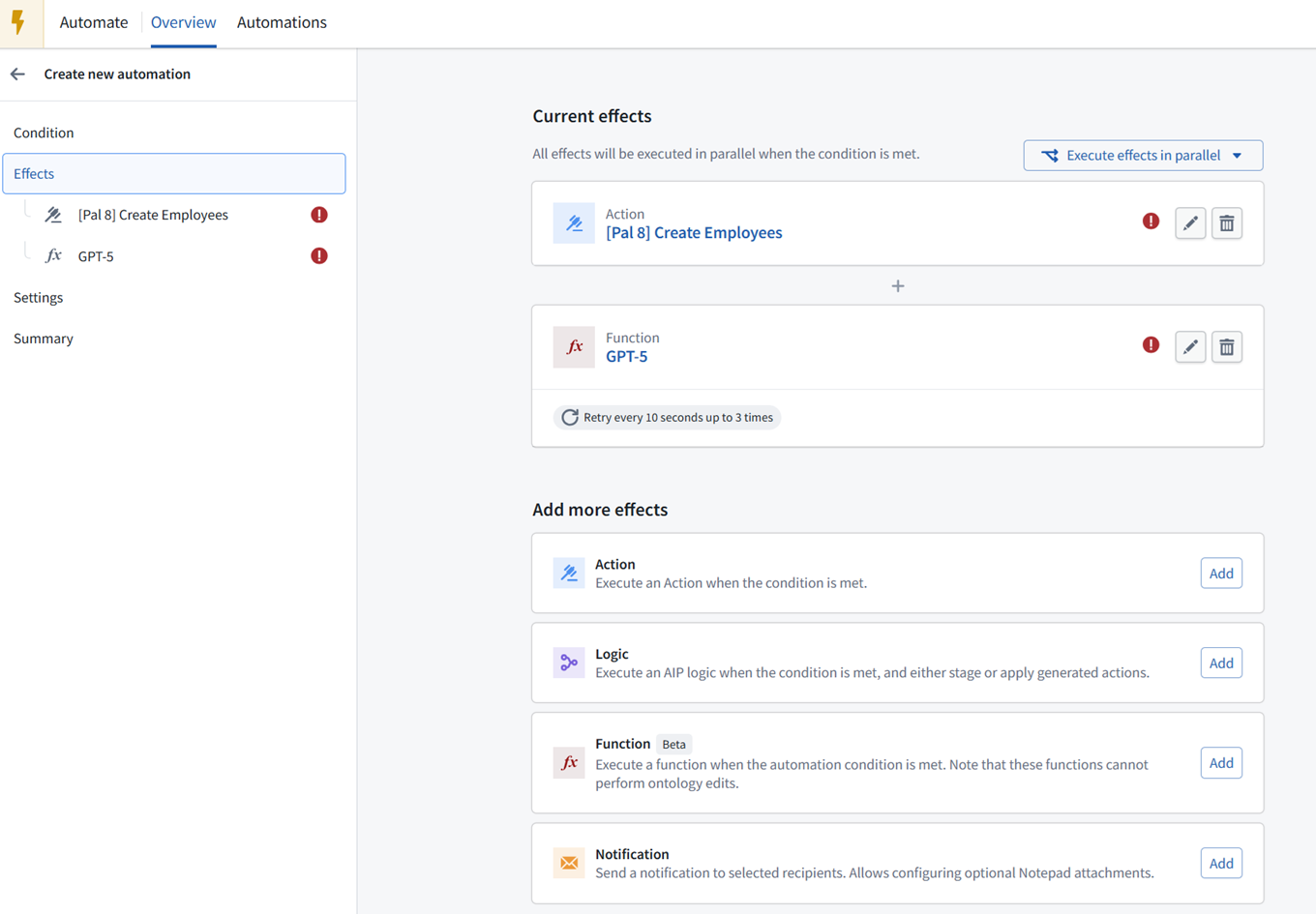
14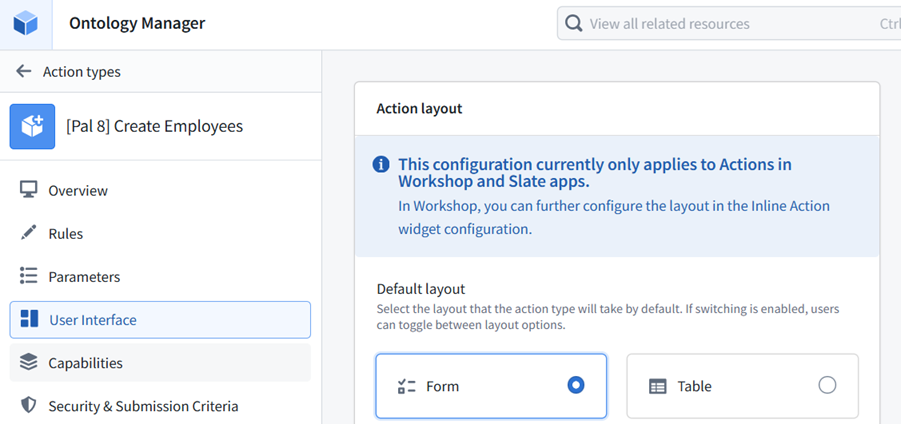
15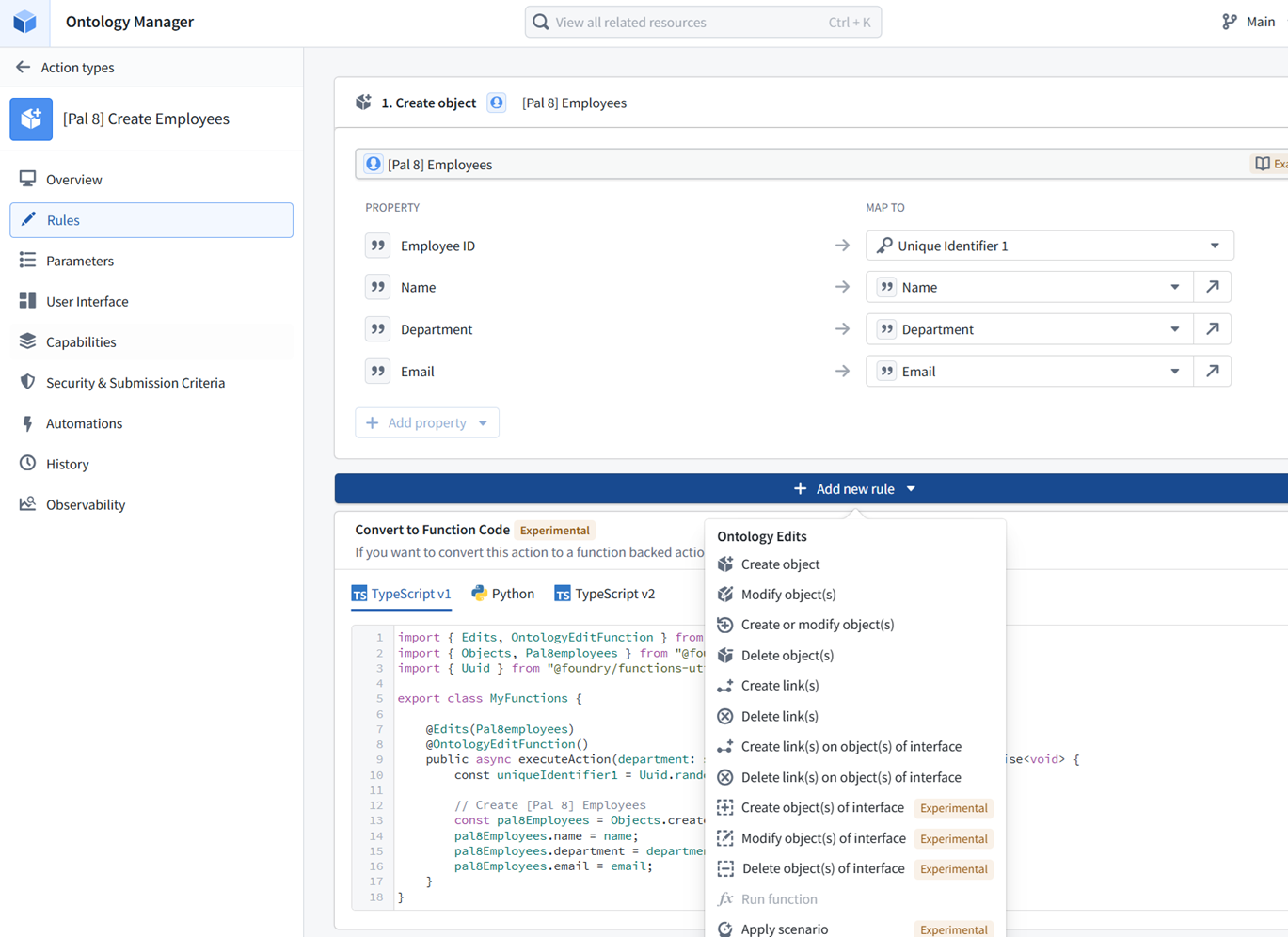
22 tell me again.. are LLM used in analysis
Yes.
LLMs can be used in analysis, but they should usually be treated as assistive, not authoritative.
Examples:
summarize documents
extract entities
classify records
find patterns in text
explain anomalies
generate hypotheses
draft SQL/Python
compare cases
rank likely causes
Where:
Analytics tools: Quiver, Contour, Code Workbook
LLM layer: AIP / functions / logic / assistants
Best rule:
LLM helps interpret or extract.
Deterministic analysis verifies.
Human decides.
23: first draft of my concepts section main diagrams
This is a strong first draft. The structure is clear.
I would make only a few tweaks:
1. Rename 3a READ / 3b WRITE
Good idea. Maybe label as:
3a Ontology read / objects
3b Actions / writeback
Because 3b WRITE is really Actions.
2. Make Security wrap everything
Your diagram already does this well with the pink outer region. Keep that.
Foundry’s key idea is:
security/governance surrounds every layer
not just the final UI.
3. Distinguish deterministic vs AI
In the AI diagram, maybe use:
AI assist
instead of just AI.
And for untrusted/controlled AI:
AI*
Legend:
AI = probabilistic helper, must be governed/verified
xxAI = external/untrusted AI, requires special controls
4. In UI box, separate two concepts
Your UI box says:
workflows
write back
Maybe:
5 UI / Apps
- inspect
- decide
- trigger actions
The writeback itself is your 3b Actions.
5. Simple final flow
Your underlying flow is:
1a Data source
→ 1b Pipeline
→ 3 Ontology read
→ 4 Analysis
→ 5 UI / workflow
→ 3b Actions / writeback
→ source or Foundry state
That is excellent.
Suggested labels
1a Data sources
1b Pipelines / transforms
3 Ontology
  3a Objects / read model
  3b Actions / writeback
4 Analysis
5 Apps / workflows
6 Security / governance
For AI version:
AI can assist at:
- pipelines
- ontology read/search
- analysis
- UI/app interaction
- actions/writeback, but carefully
- governance monitoring, carefully
Key caption
Foundry turns enterprise data into governed objects, analysis, workflows, and actions. AI can assist at multiple points, but security/governance must control what AI can see and what it can change.
16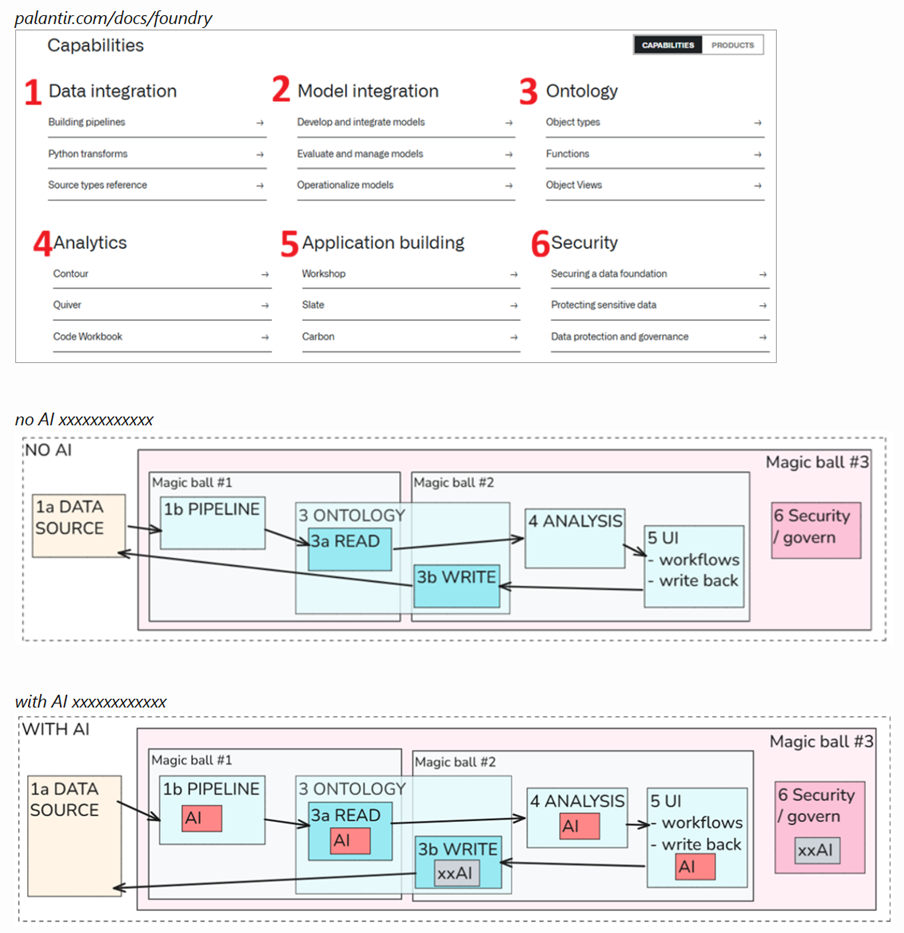
24 xxAI meant that no AI is used…
you are saying AI is used as assistant.
Got it.
Then use legend:
AI = LLM/AI used directly in that layer
xxAI = no LLM/AI used in that layer
And yes: in many places AI is assistant, not controller.
Better labels:
AI-assist = helps user/developer
AI-runtime = used inside workflow/pipeline/action
xxAI = no AI used
So for your diagram:
Pipeline: AI-runtime possible
Ontology read: AI-assist possible
Analysis: AI-runtime / AI-assist possible
UI: AI-assist possible
Writeback/actions: usually xxAI or human-approved AI-assist
Security: mostly xxAI, though AI-assisted monitoring is possible
Key principle:
AI can assist many layers.
AI should rarely be final authority for writeback/actions.
25 PS: “magic ball #3” covers everything except data sources.
“6 security” is only block in #3..
the idea is that you have overseers #1 and #2 being overseen by #3
Yes — that framing works.
Your structure is:
Magic ball #1 = pipeline/data transformation overseer
Magic ball #2 = ontology/app/analysis/action overseer
Magic ball #3 = governance overseer
And:
Magic ball #3 oversees #1 and #2
It does not directly “own” the external data sources, but it governs what Foundry does with them once connected.
So the diagram logic is:
Data source outside
    ↓
Magic ball #1: controlled ingestion/transformation
    ↓
Magic ball #2: controlled objects/analysis/UI/actions
    ↓
Magic ball #3: controls/logs/governs #1 and #2
Security block inside #3 is fine because #3 is the wrapper/oversight layer.
Diagram below is the typical Palantir diagram (not mine) with lots of “fluff” and little substance. I post it just to show that AI is not the center of PAL. Its only a helpful assistant. That makes PAL no more of a “Skynet” than your PC with ChatGPT installed.
The real world – An enterprise system that provides the infrastructure and safeguards so that AI can be a practical “helpful assistant” (diagram source)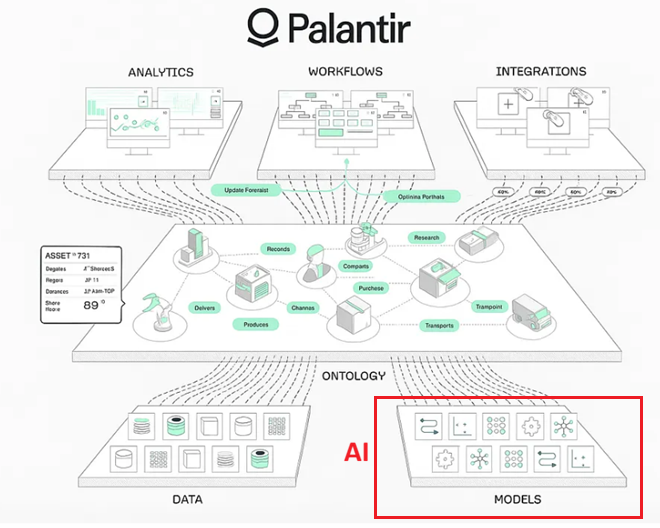
26.0805 ############################################
26 i forgot.. how does a pipeline normaly intiate update of data to ontology
Normally:
Pipeline builds dataset
→ object type is backed by that dataset
→ Ontology sync/materialization updates objects
More mechanically:
- Pipeline outputs a dataset.
- Ontology object type maps to that dataset.
- Dataset columns map to object properties.
- When the dataset updates/builds, the object type refreshes/syncs.
- Apps then see updated ontology objects.
So the pipeline does not usually “call the Ontology.”
It updates the backing dataset, and the Ontology reads/syncs from that dataset.
Short version:
Pipeline output dataset → backing dataset for object type → ontology objects update
26b how does pipeline intiate itself to update?
A pipeline updates when a build/schedule/trigger runs.
Common ways:
1. Manual build
   user clicks Build

2. Scheduled build
   runs hourly/daily/etc.

3. Upstream dependency update
   input dataset changes → downstream dataset marked stale → build system rebuilds dependent outputs

4. Branch/commit build
   code changes committed → checks/builds run

5. External/stream trigger
   new data arrives from connector/stream → downstream process updates
Mechanically:
trigger occurs
→ Foundry job/build starts
→ pipeline reads current inputs
→ transform code runs
→ output dataset transaction is written
→ ontology sees refreshed backing dataset
So the pipeline does not run continuously unless configured to. It runs when built or scheduled/triggered.
27 and ontology does the writeback…. so ontology is kind of the core loop
Yes.
The Ontology is the core operational loop:
pipelines → backing datasets → ontology objects → apps/users → actions → ontology edits/writeback → downstream systems/pipelines
So it is both:
read model = structured view of the enterprise
write model = governed way to change/record decisions
That’s why your split is useful:
3a Ontology read
3b Actions/writeback
Ontology is the middle layer where data becomes operational.
28 i dont remember reading about ontology being the core loop initiator….. i always thought of it as being built by someone else.
You’re right to question that.
More precise:
Ontology is not usually the initiator.
Pipelines or actions initiate changes.
Pipeline build → updates backing dataset → Ontology reflects new objects
or:
User action → edits ontology object/action state → downstream systems/pipelines react
Ontology is the core hub, not the engine.
It is the semantic center:
data comes in through pipelines
users/apps act through ontology
writebacks/actions are defined on ontology
So better wording:
Ontology is the operational hub / contract layer.
Not:
Ontology initiates everything.
It is “built by someone else” in the sense that:
data engineers build pipelines
ontology engineers model objects/actions
app builders use the ontology
users act through apps
But once built, it becomes the central interface between data, analysis, apps, and actions.
29 so ontology must be configurd to auto update or can be manually commanded to update
Yes.
Ontology objects update based on their backing data/update configuration.
Common patterns:
1. Automatic / scheduled
pipeline builds backing dataset
→ ontology reflects updated data

2. Manual refresh/build
user builds dataset or triggers sync
→ ontology updates

3. Action/edit updates
user submits action
→ ontology edit appears immediately or after processing

4. Materialization/sync process
ontology changes are materialized into datasets for downstream use
Simple version:
Ontology does not invent updates.
It reflects backing datasets and user/action edits according to configured sync/materialization behavior.
30 and if the datasource changes… or if it is a stream?
If the data source changes, the update path depends on ingestion mode.
Batch source
source changes
→ next sync/pipeline build
→ backing dataset updates
→ ontology objects update
Could be scheduled or manually triggered.
Streaming source
source event arrives
→ stream ingests event
→ streaming pipeline/process updates dataset/object view
→ ontology/app sees near-real-time update
The Ontology still usually reads from a backing dataset/object source, but updates can be much faster.
Key point
The source does not directly update the Ontology.
Usually:
source → sync/stream → dataset → ontology object type → apps
For actions/writeback:
app action → ontology edit → maybe external API/source system
31 (main pic discussion)
Basic PAL diagram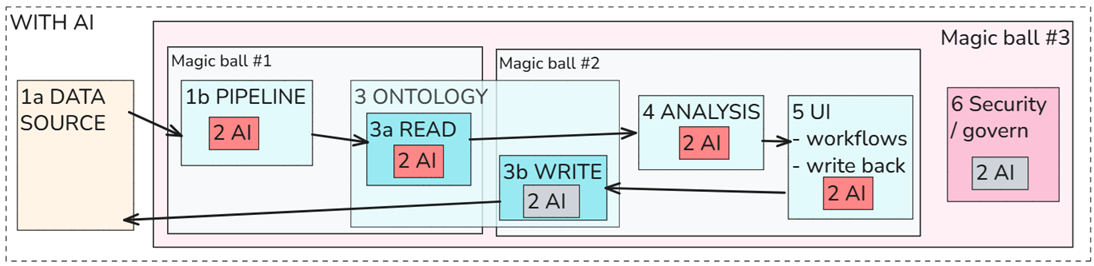
The following is
- the toc and
- the partial text of a demo i am doing now. i want to end my day soon, but wanted to ask you first to look at this. Could you summarized (gues on what you little info you have) this demo in the terms of the diagrams we have been discussing (see pic)
4 Data Transformation	20
4.1 Introduction	20
4.2 Create a New Repository	21
4.3 Create Your First Transform	29
4.4 Clean Your Dataset	37
4.5 Join in Another Dataset (TUE ######################)	47
4.6 Build Your Dataset	52
5 Collaboration via Branching	54
5.1 Introduction	54
5.2 Protecting Master Branch	55
5.3 Performing a Transform on Your Branch	57
5.4 Merge Your Branch into Master	61
5.5 Build Your Dataset	67


GIST OF DEMO (ask FDE)


In the next 60 minutes :)))))))))))))))))))))
you will learn how to build your first data transformation in Foundry’s Code Repositories.
________________________________________
What is Code Repositories in Foundry?
Code Repositories provides a web-based integrated development environment (IDE) for writing and collaborating on production-ready code in Foundry. With Code Repositories, data engineers can create efficient pipelines in bulk.
Example workflows that are a good fit for Code Repositories include:
•	A daily pipeline at high data scale which requires incremental compute.
•	A high-visibility pipeline with strict governance requirements to be able to revert to previous versions of historical code, or gate code changes on unit tests passing.
________________________________________
Learning objectives of the course
You will complete this course being able to create and manage code repositories, perform data transformations, and collaborate effectively.
By the end of this course, you will have
created a PySpark Transform including casting and filtering,
used joins and aggregations,
worked collaboratively with other people using Branching,
seen how Code Repositories interact with other Foundry tools like Data Lineage and Job Tracker.
We advise to plan on spending 60 mins running through this course.


In this section you will install the marketplace bundle that contains the datasets and create your Code Repository including the cleaning transformations to prepare your datasets. All the code you will be writing in this tutorial will be located in this repository.
•	claims_raw.csv: A raw csv file containing all claims submitted by insurance customers in the years 2023 and 2024.
•	policies_raw.csv: A raw csv file containing all policies the insurance has held in the years 2023 and 2024 together with the allocation to the respective line of business.

1.	Search for the Deep Dive: Transforming your data with Code Repositories product in the top search bar labeled Search products... (not the lower search bar labeled Search stores...)


Scenario
For this tutorial we assume the role of claims handler in a global insurance company. Your task is to present to the Chief Financial Officer the annual results of each line of business. Using code repository, you will process two main datasets, one containing each historic claim over the past years, and the other containing the corresponding policies, including the lines of business.
At the end of this section you will have implemented a cleaning pipeline using Python Transforms.

4.2 Create a New Repository
In your training folder Code Repo Training, you will first create a dedicated folder called logic where your Code Repository will live, followed by the Code Repository itself.

4.3 Create Your First Transform
In this step, you will create your first data transformation using Code Repositories. You will add the claims_raw dataset as your input and create an identity transform. You will preview your dataset at the end of this lesson.

4.4 Clean Your Dataset
In this lesson, you will clean your input dataset by applying a simple cast and filter transformation and output a transformed dataset.
________________________________________
As a first transformation, we want to cast the date column from String to Date. In addition, we will filter by the Boolean column is_accepted.

4.5 Join in Another Dataset (TODO ######################)
In preparing the financial overview for the CFO, you need to add the lines of business for each claim to your dataset. This information is contained in the second dataset we uploaded previously, policies_raw.
We will use the JOIN operation to include the new column(s) to our existing claims dataset. We perform this transformation in the same code file which we used for our cast and filter operation.


4.6 Build Your Dataset
Previously, we only previewed our results and committed them to save our code.
•	Preview produces a sample output without committing changes, running checks, or materializing any datasets in Foundry.
•	Committing saves our work and triggers Checks, but it doesn’t build the defined outputs as datasets.
•	Build actually builds the dataset(s) which you define as your output in the code file(s). It also commits the latest code changes and runs checks as part of this.

6.	Verify that the dataset now exists in the prepared folder.

Congratulations. You have built your first dataset using Code Repositories.
FDE
Demo summary in your “magic ball” diagram terms
This demo is mostly about:
Magic ball #1 = Data source → Pipeline
It is a data transformation / code repository demo, not really an Ontology/UI/Action demo.
Where it fits in your diagram
1a DATA SOURCE
    claims_raw.csv
    policies_raw.csv
        ↓
1b PIPELINE
    Code Repository
    PySpark transforms
    cast date
    filter accepted claims
    join policies
    aggregate / prepare CFO output
        ↓
prepared output dataset
So the main Foundry capability is:
1 Data integration
Specifically:
Python transforms / Code Repositories / branching / build
What the demo teaches mechanically
1. Install Marketplace bundle
2. Create Code Repository
3. Add raw claims dataset as input
4. Create identity transform
5. Clean claims:
   - cast date string → date
   - filter is_accepted = true
6. Add policies dataset
7. Join claims to policies
8. Build output dataset
9. Use branching:
   - work on branch
   - merge to master
   - build again
In diagram language
NO AI version

1a DATA SOURCE
  - claims_raw.csv
  - policies_raw.csv

→ 1b PIPELINE
  - Code Repo
  - PySpark transform
  - cast / filter / join / aggregate

→ output dataset
  - prepared claims / CFO-ready data

6 SECURITY / GOVERN
  - branches
  - commits
  - checks
  - merge to master
  - lineage
  - job tracker
What is not really involved
This demo does not mainly involve:
2 Model integration
3 Ontology
3b Actions/writeback
4 Analysis
5 UI/app building
AI/LLMs
At most, analysis is implied because the output is meant for CFO reporting, but the tutorial itself is focused on building the data foundation.
Magic ball classification
Magic ball #1: YES
  controls data preparation via code repository and pipeline

Magic ball #2: mostly NO
  no real ontology/app/action layer yet

Magic ball #3: YES
  branching, commits, checks, lineage, build history, job tracker
So this is:
Data source → governed pipeline → prepared dataset
Not yet:
prepared dataset → ontology → analysis/app/action
Honest assessment
This is a foundational Foundry engineering demo.
It shows how Foundry makes data transformation controlled and trackable:
code is versioned
changes happen on branches
outputs are built deliberately
lineage is visible
jobs are tracked
master branch can be protected
The business story is:
raw insurance claims + policies
→ cleaned/joined dataset
→ financial overview by line of business
But the actual learning goal is not business analysis. It is:
how to create production-style data pipelines in Foundry Code Repositories
One-line gist
This demo teaches Magic Ball #1: how raw datasets become governed, reproducible, production-ready transformed datasets using Code Repositories, PySpark transforms, branching, checks, and builds.
32 so this is how you do it when using the pipeline UI is not specialized or fast enough?
Yes.
Use Code Repositories / Python transforms when Pipeline Builder is not enough.
Typical reasons:
more complex logic
large-scale production pipelines
custom Python/PySpark code
joins/aggregations at scale
unit tests/checks
version control
branching/collaboration
reusable code
incremental computation
stricter governance
Pipeline Builder is good for:
visual / low-code / simpler transforms
Code Repositories are better for:
production-grade data engineering
32b so in production gradue not normally use pipeline transforms?
or just use them as proof of concept?
Pipeline Builder can be production-grade too.
Better distinction:
Pipeline Builder
Good for:
visual / low-code transforms
standard cleaning/joining
faster prototyping
transparent business logic
smaller/medium complexity pipelines
non-code users
Can be production if logic is simple and maintainable.
Code Repositories
Better for:
complex logic
large-scale PySpark
custom libraries
unit tests
branching/code review
reusable code
incremental transforms
many transforms maintained by engineers
So:
Pipeline Builder = not just POC
Code Repo = preferred when engineering complexity grows
Practical rule:
Use Pipeline Builder until visual logic becomes awkward.
Use Code Repos when code/testing/reuse/scale matter.
33 what about ch5 ?
Chapter 5 is Magic Ball #3: governance/collaboration around pipelines.
It teaches:
branching
protecting master
making changes on your branch
merging back to master
building after merge
In your diagram terms:
Magic Ball #1 = pipeline logic
Magic Ball #3 = controls how pipeline logic changes
So Ch. 4 is:
build the transform
Ch. 5 is:
govern/collaborate on changes to the transform
It shows that Foundry pipelines are not just scripts; they are controlled, reviewable, trackable production assets.
34 no ai involved?
Correct — no AI is inherently involved in this demo.
It is:
raw data
→ PySpark transforms
→ output dataset
→ branching/governance
You could use AI Assist to help write/debug code, but that is optional assistant use, not part of the pipeline logic.
So in your diagram:
1b Pipeline = xxAI
4 Analysis = not used
5 UI = not used
6 Governance = xxAI
35 i will go back thru some old demos and start trying to understand them based on the diagrams
great tomorrow i will go back thru some old demos and start trying to understand them based on the diagrams. i want to add a diagram to beginning of each example/demo showing what is covered..
That is a good approach.
For each demo, add a small “coverage diagram” at the beginning:
1 Data source
2 Pipeline
3 Ontology read
3b Actions/writeback
4 Analysis
5 UI/app
6 Security/governance
AI involvement
Use simple markings:
✓ covered
— not used
AI = AI involved
xxAI = no AI
Example for this Code Repo demo:
1 Data source          ✓
1b Pipeline            ✓ xxAI
3 Ontology read        —
3b Actions/writeback   —
4 Analysis             —
5 UI/app               —
6 Security/governance  ✓ xxAI
That will make each demo easier to compare.
36 you should note that the pipeline is code based??
Yes — definitely note that.
For this demo:
1b Pipeline = code-based pipeline
Tool = Code Repository / Python Transform / PySpark
So the coverage should say:
1 Data source          ✓ raw CSV datasets
1b Pipeline            ✓ code-based PySpark transforms
3 Ontology read        —
3b Actions/writeback   —
4 Analysis             —
5 UI/app               —
6 Security/governance  ✓ branching, commits, checks, build
AI                     xxAI, except optional AIP Assist
Short label:
Magic Ball #1: code-based pipeline, not visual Pipeline Builder
PYSPARK —————————————————————-
36 what is pyspark (mechanistic explanation)
PySpark = Python interface to Apache Spark.
Mechanically:
your Python code
→ Spark query plan
→ distributed execution engine
→ many worker machines process data partitions
→ output dataset
You write Python like:
claims.filter(...)
claims.join(...)
claims.groupBy(...)
But Spark does not process it row-by-row in normal Python.
Instead it builds a plan:
read dataset
→ filter
→ join
→ aggregate
→ write output
Then Spark executes that plan at scale across a cluster.
Why use it
For data too large for one machine:
millions/billions of rows
large joins
aggregations
production pipelines
In this demo
claims_raw + policies_raw
→ PySpark transform
→ cast date
→ filter accepted claims
→ join policy data
→ output dataset
So PySpark is the code engine doing the pipeline transformation.
37 so its kind of like cuda
Kind of, but at a different level.
CUDA = parallel compute on GPUs
PySpark = distributed data processing across machines
CUDA:
one/few machines
GPU cores
numeric/ML/math kernels
PySpark:
cluster of machines
CPU/memory/disk partitions
tables, joins, filters, aggregations
Similarity:
you write high-level code
engine parallelizes execution
Difference:
CUDA parallelizes math operations on GPU cores.
PySpark parallelizes data transformations over large distributed datasets.
38 so why use in palantir demo D19 (what we talkd about above)
Because D19 is teaching production data engineering, not just small-data cleaning.
PySpark is used because it is the standard engine for:
large datasets
joins
filters
date casts
aggregations
repeatable pipeline builds
In D19:
claims_raw + policies_raw
→ PySpark transform
→ clean/join/prepare CFO dataset
Even if the demo data is small, the pattern scales to enterprise data.
So the lesson is:
Use PySpark when the same logic may need to run on millions/billions of rows in production.
39 ok… so you cant use gpus for pyspark because its not simple matrix math…. you need procedural code at scale
Mostly yes.
PySpark is for dataframe/table operations at scale:
filter
join
group
aggregate
cast
window
deduplicate
write dataset
That is not mainly matrix math.
It is distributed data processing.
Small correction:
You can use GPUs with some Spark workloads, but it is not the usual mental model and only helps certain operations.
Normal PySpark:
cluster CPUs + memory + disk
CUDA/GPU:
numeric kernels / matrix math / ML training
So your practical summary is right:
PySpark is procedural/table transformation logic at enterprise scale, not primarily GPU matrix computation.
40 (GEMINI) (pyspark = CUDA)
ME: what you wrote is exactly what i meant.. you have branching, decisions, etc… but you must do them in parallel. for AI its just Wx + b
GEMINI: Exactly, you hit the nail on the head. For classic deep learning AI, the core operation is literally just repetitive matrix multiplication ((Wx + b)) across billions of parameters, which is the ultimate sweet spot for CUDA and GPUs.
When you move into PySpark’s territory, you are dealing with MIMD (Multiple Instruction, Multiple Data)—where every parallel worker is a fully independent brain solving a completely different puzzle, rather than thousands of tiny gears turning in perfect unison.
To see why this distinction matters in practice, consider what happens when you scale up a data pipeline:
The Two Halves of Modern Data Engineering
[ Raw Data ] ──> [ PySpark Cluster ] ──> [ Cleaned Matrices ] ──> [ GPU / CUDA ] ──> [ AI Model ]
                  (Complex Branching,                               (Repetitive Math,
                   Parsing, Analytics)                                  Wx + b)
- The PySpark Phase (The “Messy” Work)
Before the AI can calculate (Wx + b), someone has to prepare the (x). PySpark handles the chaotic, unpredictable parallel tasks:
- Parsing billions of raw user comment strings, stripping out HTML, and handling missing data fields (if/else).
- Tokenizing and mapping words to ID numbers based on giant lookup tables.
- Grouping data by user ID, which forces machines to dynamically talk to each other to sort the data.
- The CUDA Phase (The “Pure Math” Work)Once PySpark has cleaned, filtered, and converted that mountain of messy data into a pristine, uniform matrix of floating-point numbers, it hands it off to CUDA.
- The GPU takes that matrix and passes it through the neural network layers.
- Because the data is now perfectly uniform, the GPU can blindly execute (Wx + b) across thousands of cores simultaneously without a single if/else statement slowing it down.
Summary of the Logic
- AI (CUDA): Does one relatively simple thing ((Wx + b)) billions of times simultaneously.
- PySpark: Does thousands of complex, unpredictable things (branching text and data logic) billions of times simultaneously by giving each task its own dedicated CPU power plant.
If you want, let me know:
- Are you looking to build an end-to-end pipeline that does both?
- Do you need an example of how PySpark prepares data for an AI model?
I can share a code snippet showing how they hand off work to each other.
41 this is what gemini wrote about my pyspark/cuda comparison. you agree?
Yes — mostly agree.
A few refinements:
What is right
The big distinction is correct:
PySpark = messy distributed data engineering
CUDA/GPU = dense numeric parallel math
PySpark handles:
joins
filters
parsing
grouping
branching
deduping
schema cleanup
data movement/shuffle
GPU handles:
matrix multiply
tensor operations
neural network training/inference
And yes:
PySpark often prepares x.
CUDA/GPU often computes Wx + b.
Small correction
Modern AI is not only:
Wx + b
It also includes:
attention
normalization
activation functions
sampling
tokenization
But the heavy compute is still mostly tensor/matrix operations, so the CUDA comparison is valid.
Another correction
PySpark is not always “every worker solving a completely different puzzle.”
Often the same logical operation runs over partitions:
same filter/join/aggregation plan
applied to different chunks of data
But compared with GPU math, it has much more:
branching
I/O
data movement
schema logic
shuffle
fault tolerance
Best short version
PySpark = distributed table/data workflow engine.
CUDA = parallel numeric/tensor math engine.
In Foundry D19:
claims_raw + policies_raw
→ PySpark cleans/joins/filter data
→ output dataset
No GPU needed because the work is data engineering, not tensor math.
42 so pyspark “cleans up” or “prepares” the data so that it can run on a GPU.
sounds a lot like the the initial parts of CUDA that prepare the data for running on a GPU.
Yes, conceptually similar:
prepare messy input → convert to uniform structure → feed parallel engine
But different scale/layer.
CUDA preparation
Usually prepares data for GPU memory:
CPU arrays/tensors
→ copy to GPU memory
→ launch kernel
→ copy result back
Low-level compute preparation.
PySpark preparation
Prepares enterprise data for downstream use:
raw files/tables/logs
→ clean schemas
→ join sources
→ filter bad rows
→ aggregate features
→ output dataset/features
High-level data preparation.
Relationship
PySpark may prepare the training/inference dataset.
CUDA may run the model math.
So yes:
PySpark = upstream data preparation layer
CUDA = downstream numeric execution layer
But PySpark is not usually preparing memory for GPU; it is preparing the data meaning/shape/quality.
43 but in the end what pyspark outputs is run on GPU/CUDA/
Sometimes, but not always.
If the pipeline is for AI/ML
Then yes:
PySpark output = cleaned/features dataset
→ model training/inference
→ GPU/CUDA may run the model
Example:
raw claims
→ PySpark creates feature table
→ neural network trains on GPU
If the pipeline is normal business analytics
Then no GPU.
PySpark output
→ dashboard / ontology / report / SQL / Workshop
Example D19:
claims_raw + policies_raw
→ PySpark cleaned/joined dataset
→ CFO reporting dataset
No CUDA needed.
Short version
PySpark output can feed GPU/AI,
but often it just feeds datasets, ontology, analytics, or apps.
DIAGRAM 26.0805 CHAT —————————————-
44 D19 is not really “Security & Governance”
(1) i think you said that D19 “By the end of this course, you will have created a PySpark Transform including casting and filtering, used joins and aggregations, worked collaboratively with other people using Branching, seen how Code Repositories interact with other Foundry tools like Data Lineage and Job Tracker. “ deals with “security” …
(2) i dont think so. it mainly about code and git. using code to clean datasets. join to another dataset. the attached pic shows what “security and governance” are in foundry.
(3) here is TOC of palantir deep dive doc ……………….
(4) are datasets part of pipeline or ontology? this demo seems to be only about datasets, not pipeline or ontology
Short label:
D19 is a Code Repository data transformation demo: raw datasets are cleaned and joined with PySpark, then built into an output dataset, with branching/PR workflow for code collaboration.
Yes — your correction is right.
1. D19 is not really “Security & Governance”
D19 is mainly:
Data Integration
→ Code Repository
→ PySpark transforms
→ datasets
→ branching / PR / build
The branching part is governance-like, but not really Foundry’s full Security & Governance capability.
Better label:
code collaboration / change control
not:
security
So I would classify D19 as:
1 Data integration: YES
   - code-based pipeline / PySpark transforms
   - clean, cast, filter, join
   - build output dataset

6 Security/Governance: only lightly
   - branch protection
   - PR/merge workflow
   - checks/build history
Not the full security topics like markings, permissions, data protection, auditing, Cipher, etc.
2. D19 is about code + datasets
Your summary is accurate:
raw datasets
→ code repository transform
→ cleaned/joined output dataset
It teaches:
use code to clean datasets
join another dataset
build output dataset
use branches/PRs
It does not really touch:
Ontology
Actions
Workshop
Quiver
LLMs
production security controls
3. Are datasets part of pipeline or ontology?
Datasets are their own thing: data layer.
But they are used by both pipelines and ontology.
Dataset = stored data/table/files
Pipeline = process that reads/writes datasets
Ontology = semantic layer that can be backed by datasets
Mechanically:
pipeline reads dataset → writes dataset
ontology object type maps to dataset
So:
| Thing | Role |
|---|---|
| Dataset | Data storage / table/files |
| Pipeline | Transform logic that creates/updates datasets |
| Ontology | Business object model backed by datasets |
| App/analysis | Consumes ontology objects or datasets |
4. Is this demo about pipelines?
Yes, but specifically code-based pipelines.
Not visual Pipeline Builder.
Code Repository + Python Transform = pipeline logic
So D19 is:
datasets + code-based pipeline
Not:
ontology app
Best classification for your diagram
1a Data source YES: claims_raw, policies_raw
1b Pipeline YES: code-based PySpark transform
3 Ontology read NO
3b Actions/writeback NO
4 Analysis minimal / implied only
5 UI NO
6 Security/governance light: branching, PR, checks
AI NO
Short label:
D19 is a Code Repository data transformation demo: raw datasets are cleaned and joined with PySpark, then built into an output dataset, with branching/PR workflow for code collaboration.
45 (5) i think i understand now… hte code is same as a custom pipeline transform. and it creates the output dataset.
(6) so the dataset is a part of the pipeline… no need to add “dataset” to diagram (except maybe as an internal box in pipeline)
Yes — you’ve got it.
5. Code repo transform = custom pipeline transform
This code:
@transform_df(
Output("claims"),
claims_raw=Input("claims_raw"),
policies_raw=Input("policies_raw"),
)
def compute(claims_raw, policies_raw):
...
return claims_aggregated
means:
input datasets
→ code transform
→ output dataset
So yes:
Code Repository transform = code-based pipeline node
6. Dataset in diagram
For your big conceptual diagram, you do not need a separate top-level “dataset” category.
Better:
1a Data source
→ 1b Pipeline / transforms
- reads input datasets
- writes output datasets
→ 3 Ontology, if used
Datasets are the material flowing through the pipeline, not a separate capability box.
So for D19:
1a Data source
claims_raw, policies_raw
1b Code-based pipeline
PySpark transform
cast / filter / join / aggregate
output dataset: claims
3 Ontology
not used
Dataset can be shown as a small internal label inside Pipeline:
input datasets → transform code → output dataset
17
46 i am not a big data pro… but a simple diagram makes everything clear.
PS: (7) i dont see anthing about code security in “security and governance” ….. so i would say that git in this demo is all part of pipeline. its acutally kind of a plugin used in pipeline.
Yes — for your diagram, that’s a reasonable simplification.
For D19:
Git/branching = part of the code-based pipeline workflow
Not a separate Security/Governance demo.
So draw it inside:
1b Pipeline
as:
Code Repo
- PySpark transform
- Git branch
- commit
- PR/merge
- build
Security/Governance only lightly surrounds it in the background, but the demo is not teaching:
markings
permissions
data protection
audit
egress
Cipher
sensitive data scanner
So your classification:
D19 = pipeline demo
Git = pipeline/code workflow component
Security = not materially covered
is clean and accurate for organizing examples.
47 (8) the diagram has 3 magic balls…. the idea is
(8) the diagram has 3 magic balls…. the idea is #1 pipeline and ontology reading from pipeline #2 analysis and UI and UI writing to ontology #3 coveres all of palantir. secuirty and governance. #1-3 are all just one thing, but in this case #1 and #3 are watching, but the demo did not set any of this securiy/governance up.
Yes — good refinement.
For D19:
Magic ball #1 = active
Because the demo is about:
data source → code-based pipeline → output dataset
Maybe ontology read is not active yet, but pipeline is.
Magic ball #2 = not active
Because no real:
ontology objects
analysis app
UI workflow
actions/writeback
Magic ball #3 = present but not configured by demo
Foundry still provides background governance infrastructure:
branches
commits
build history
lineage
job tracking
permissions inherited from project
But the demo does not teach/set up:
markings
security policies
data governance controls
auditing configuration
egress controls
So label D19 as:
#1 active: code pipeline
#2 inactive
#3 background only
And yes: #1–#3 are conceptual views of one Foundry system, not separate products.
09
48 i think i will do it this way…
- the git etc is a plugin basically
- its not part of #3 sec&gov.
- but lets say i#1 is ACTIVE in this demo.
#1 is about those things that the system watches but are not labeled as part of #3. (so basically i invented #1-2 magic balls becuase of a limitations to palantir’s definition of #3) #1 is a whole set of control (including the git plugin) to control workflows. its not in #3, but its a vital part of the guardrails foundry has set up.
Yes — that works.
Your framing:
Magic ball #1 = pipeline/workflow control layer
It watches/controls things like:
code repo
branches
commits
PR/merge
builds
job tracker
lineage
dataset outputs
This is not the formal “Security & Governance” docs bucket, but it is still a guardrail/control system.
So for D19:
#1 ACTIVE
code-based pipeline
git-like workflow
commits
build
lineage/job tracker
#2 inactive
no ontology/app/action loop
#3 background only
formal security/governance exists, but demo does not configure it
Your insight is good:
Palantir’s formal category “Security & Governance” is narrower than the broader control/guardrail machinery spread across the platform.
So your magic balls can represent:
#1 controls data/pipeline construction
#2 controls ontology/app/action operations
#3 controls formal security/governance over everything
49 i forgot …. how is “4 ANALYSIS” (from the diagram) done… ? is that code noly?
No — 4 Analysis is not code only.
In Foundry, analysis can be done with several tools:
Contour = visual/no-code data analysis
Quiver = visual/time series + graph-style analysis
Code Workbook = notebook/code-based analysis
SQL console = query-based analysis
Functions = reusable computed logic
Models/LLMs = predictive or text analysis
So:
4 Analysis = inspect, compute, compare, detect patterns
It can be:
no-code
low-code
code
model-based
LLM-assisted
Examples:
Contour: explore tables visually
Quiver: analyze time series/anomalies
Code Workbook: Python/SQL analysis
Model: score risk/anomaly
LLM: summarize/extract/classify
50 so “5 UI” is workshop. slate and carbon?
Yes.
In the docs, 5 Application building / UI includes:
Workshop
Slate
Carbon
For your diagram:
5 UI / Apps
means user-facing interfaces and workflows.
Examples:
Workshop = main low-code operational app builder
Slate = older/custom app/dashboard framework
Carbon = application framework/product area
Quiver embedded views can also feed UI
Object Views = object-specific UI, though listed under Ontology
So yes:
5 UI = Workshop / Slate / Carbon / app layer
51 and those can have functinos included,,, but not any py scripts?
Mostly yes.
UI apps like Workshop can include/call:
Ontology Actions
Functions
AIP Logic
Object sets
Variables
Charts/tables/widgets
They usually do not run arbitrary Python scripts directly inside the UI.
If Python is needed:
Workshop button/widget
→ Function or Action
→ Python/TypeScript logic runs server-side
Or:
Pipeline/Code Repo runs Python upstream
→ UI displays result
So:
UI does not run raw py scripts.
UI calls governed backend logic.
52 can “4 ANALYSIS” or “5 UI” use AI?
Yes.
4 Analysis can use AI
Examples:
LLM summarize/extract/classify
model scoring
anomaly detection
root-cause suggestions
generate SQL/Python
search over documents
Tools:
AIP Logic
Functions
Code Workbook
Models
Quiver/analysis with AI assistance
5 UI can use AI
Examples:
chat assistant in app
summarize selected object
draft action note
recommend next step
classify user-entered text
explain anomaly
Mechanically:
Workshop/UI
→ Function or AIP Logic
→ AI/LLM
→ result shown or used in action
Best rule:
AI assists; humans/actions commit.
53 but you can have a mixed UI+code pipeline?
in this demo the pipeline was just code. but you can have a mixed UI+code pipeline? can code only pipeline have ai?
Yes.
Mixed UI + code pipeline
You can have:
Pipeline Builder steps
→ code transform
→ more Pipeline Builder steps
or separate connected pipelines:
visual pipeline output dataset
→ code repo transform
→ visual pipeline
So pipeline logic can be mixed.
Code-only pipeline can have AI
Yes, if the code calls or uses AI/model logic.
Examples:
Python transform
→ call approved LLM/model
→ classify text
→ write output dataset
or:
Python transform
→ run ML model inference
→ write predictions
But for external LLMs, it should be controlled by:
approved model endpoint
egress policy
secrets management
permissions
code review
54 dataset itself has no ai.
Correct.
A dataset itself has no AI.
Dataset = stored data
AI can be applied by something that reads/writes the dataset:
pipeline
model
function
analysis tool
UI app
So:
dataset → passive storage
AI → active computation around it
55 can “4 analyssis” perform writeback to the dataset?
Usually no.
4 Analysis tools mostly read/explore data.
They may create derived outputs, but writeback is normally handled by:
Pipeline / transform
Actions
Functions
notebooks/code outputs
Examples:
Contour/Quiver analysis → mostly read/visualize
Code Workbook → can write a new dataset if configured
Model scoring → writes prediction dataset
But true operational writeback should be:
5 UI → 3b Action/writeback
or:
Pipeline/function → output dataset/external system
So:
Analysis may produce outputs,
but writeback/change-of-record belongs elsewhere.
56 can analysis feed into UI? i assume it can.
Yes.
Common flow:
Analysis output
→ dataset / ontology object / metric / function result
→ UI
Examples:
Quiver chart embedded in app
model prediction displayed in Workshop
Code Workbook output dataset shown in Object Table
analysis-derived anomaly score shown on object
So:
4 Analysis → 5 UI
is a normal path.
57 dataset / datasource confusion 1
This picture makes it clearer.
In your diagram, those left boxes are:
1a DATA SOURCE / input datasets
More precisely:
ELINT Example = raw input dataset
CV ATR GEOINT Example = raw input dataset
Then the rest is:
1b PIPELINE
Marketplace transforms
Cast to H3
H3 Geospatial Join
Adjust dates/filter
output: Correlated Intelligence dataset
So for this Gaia/geospatial demo, the map is:
1a input datasets
ELINT Example
CV ATR GEOINT Example
→ 1b Pipeline Builder pipeline
clean/cast
convert to H3 geospatial index
join by H3
adjust/filter
→ DS output dataset
Correlated Intelligence
→ likely 3a Ontology / 5 UI Gaia map
Thus: they are datasets, but they function as the data source inputs for the demo.

58 dataset / datasource confusion 2
i am totally confused here… this term “dataset”…. what is 1a and what is the output of the pipeline in 1b?
Think of it this way:
Dataset = stored table/file in Foundry
A dataset can be either:
input to a pipeline
or
output from a pipeline
Same object type: dataset. Different role.
1a DATA SOURCE
In your diagram, 1a means:
where the demo starts
Often this is already a Foundry dataset.
Example:
ELINT Example
CV ATR GEOINT Example
These are datasets, but their role is:
source/input data
1b PIPELINE output
The pipeline also writes a dataset.
Example:
Correlated Intelligence
This is also a dataset, but its role is:
prepared/output data
Short version
Dataset = thing
Source/input/output = role
So:
1a = input datasets / starting data
1b output = output dataset / prepared data
In the Gaia example:
1a input datasets:
ELINT Example
CV ATR GEOINT Example
1b pipeline:
H3 join / filter / transform
1b output dataset:
Correlated Intelligence
59 1a DATA SOURCE/SET
1a DATA SOURCE/SET
- Original data outside (SOURCE) or inside (SET) Foundry.
FDE: Yes — good wording.
Maybe slightly cleaner:
1a DATA SOURCE / INPUT DATASET
Original starting data for the demo.
Can be:
- outside Foundry source system/file/API/stream
- already imported into Foundry as a raw dataset
Role:
- input to the first pipeline/analysis step
Key distinction:
source = where data originates
dataset = Foundry-stored form of data
60 MAIN DIAGRAM for Example 11
(1) pic1 = main diagram for example 11 (as a template) (2) pic2 = section “B4 test a small change” final result for example 17 (detect anomalies time series code workspace). in that section we made some modifications to verify operation. the example was not a start-to-finish smooth flowing exmple, but rather we had to intervene in a few places. (3) from the limited info I just gave you, could you suggest what the main diagram should be? I am only interested in
- what should be highlighted in the workflow blocks
- what test below should be highlighted (or added if not there)
Yes. For Example E17: Detect anomalies in time series data with Code Workspaces, I would highlight these workflow blocks:
Main diagram highlights for E17
Highlight 1a Starting data
Because the demo starts with raw/imported Foundry datasets:
art_daily_jumpsup
art_daily_small_noise
manual key/series table
These are the starting time series inputs.
Highlight 1b Pipeline
Use two separate highlights inside pipeline:
1b Pipeline #1: Initial Data Cleaning
This creates:
[Anomaly Detection] Testing_data
[Anomaly Detection] Training Data
[Anomaly Detection] Data
Then later:
1b Pipeline #2: Create Series
This creates Quiver-friendly time series/object outputs:
[Anomaly Detection] Metrics
[Anomaly Detection] Prediction
So E17 uses Pipeline Builder, not mainly PySpark pipeline.
Highlight 2 AI / Model integration
This is central.
Prophet model
model training notebook
model adapter
manual model publishing
manual scoring
This is the part where expected values and anomaly labels are produced:
value
yhat
yhat_upper
yhat_lower
prediction
This should be strongly highlighted.
Highlight 3a Ontology READ
Quiver reads ontology/time-series-backed objects such as:
[Anomaly Detection] Data
[Anomaly Detection] Metrics
[Anomaly Detection] Prediction
So 3a READ is involved.
Do not highlight 3b Action WRITE
No real action/writeback workflow was used.
3b Actions/writeback = not used
Highlight 4 Analysis
Yes. Quiver is the main analysis/visualization tool.
Quiver report
time series chart
prediction intervals
anomaly indication
So 4 ANALYSIS should be highlighted.
Maybe do not highlight 5 UI
Unless you treat Quiver as an embedded/end-user UI.
For this demo, I would classify Quiver as:
4 Analysis
not:
5 UI
So leave 5 UI unhighlighted or lightly marked as “possible but not used.”
Do not highlight 6 Security/governance
Not materially part of this demo.
Important added note for E17 diagram
Add a special warning/note:
Manual bridge required:
Testing_data did not automatically regenerate Prophet Output.
We manually scored Testing_data in notebook and wrote Prophet Output TEST.
Then we repointed Create Series to Prophet Output TEST.
This is the key honest assessment.
Suggested E17 coverage summary
E17 coverage
1a Starting data: YES
raw time series datasets
1b Pipeline: YES
Pipeline Builder:
- Initial Data Cleaning
- Create Series
2 AI / Model integration: YES
Prophet model + adapter + notebook scoring
3a Ontology READ: YES
Quiver reads anomaly data/metrics/prediction objects/series
3b Actions/writeback: NO
4 Analysis: YES
Quiver anomaly visualization
5 UI/app: NO / light
Quiver is analysis here, not a Workshop app
6 Security/governance: NO / background only
Git/code: YES, lightly
model training repository / adapter code
For the text below the diagram, highlight/add these items
1a Starting data
Highlight:
raw Foundry datasets:
art_daily_jumpsup
art_daily_small_noise
1b Pipeline
Highlight:
Pipeline Builder
Initial Data Cleaning
Create Series
datasets are handoff points
2 AI / Model integration
Add/highlight:
Prophet model predicts expected value and bounds.
Manual notebook scoring was required.
3 Ontology
Highlight:
3a READ only.
No 3b action/writeback.
4 Analysis
Highlight:
Quiver visualizes:
actual values
upper/lower bounds
anomaly points
Add special “manual intervention” box
I would add this below the diagram:
Manual intervention in this demo:
1. Injected spike values into testing data.
2. Rebuilt Initial Data Cleaning.
3. Fixed/published model adapter.
4. Manually scored Testing_data in notebook.
5. Wrote Prophet Output TEST dataset.
6. Repointed Create Series pipeline to TEST output.
7. Refreshed Quiver to verify anomalies.
That box is essential for E17 because the demo was not a clean automatic flow.
61 xxx
62 xxx
63 xxx
64 xxx
65 xxx
26.0806 (v1 26.0804)xxx