Chat about Autopilot <> Foundry comparisons
Autopilot diagram (GPT generated; my comments in red)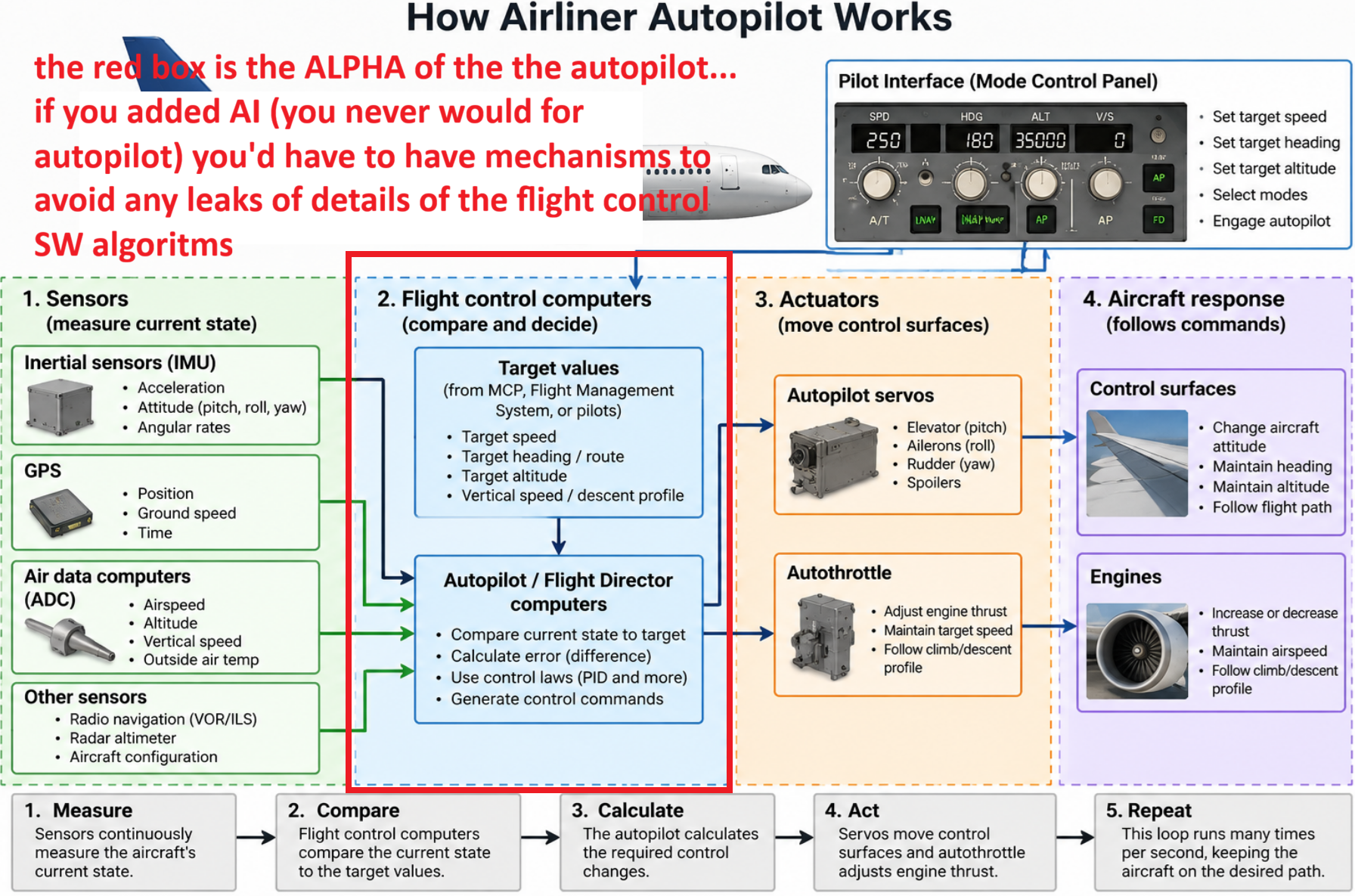
Comparison with Foundry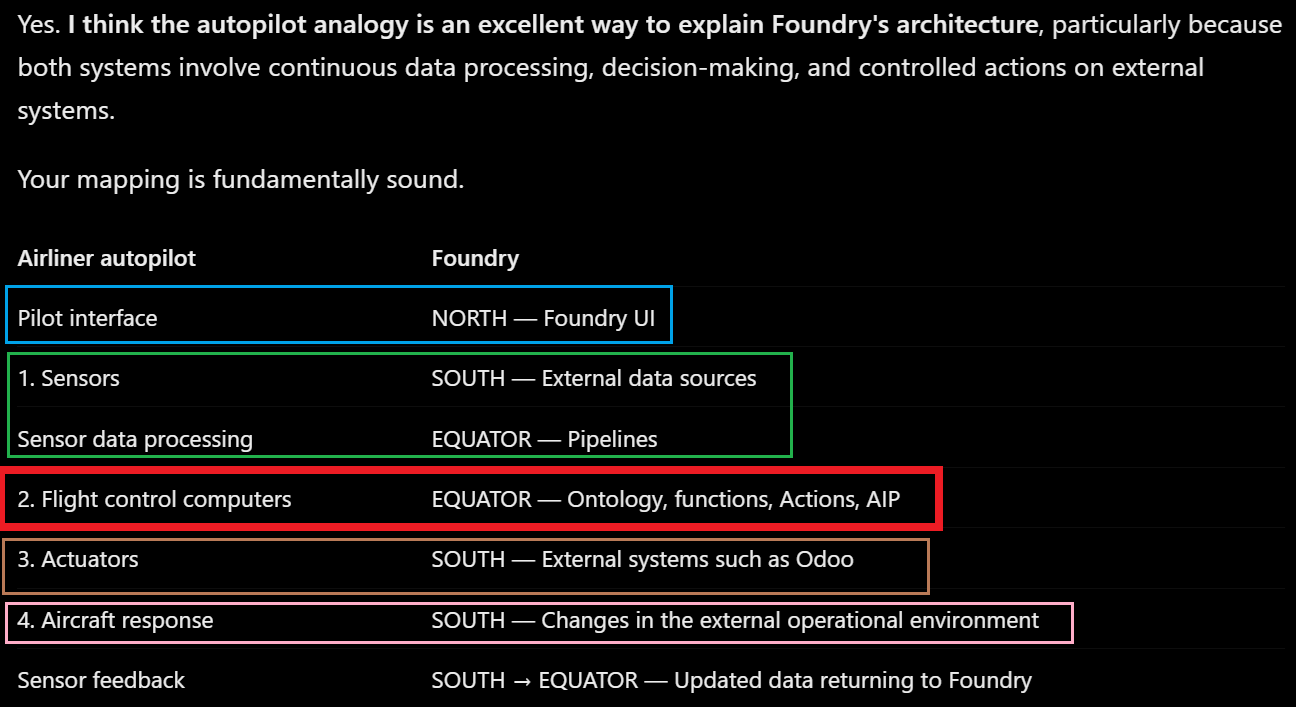
ME1: using the second pic “How Airliner Autopilot Works” you could make direct analogies with Foundry:
- Pilot interface = Foundry UI (NORTH)
- 1 Sensors = Foundry SOUTH (these go thru the EQUATOR pipeline)
- 2 flight control computers (the ALPHA of the autopilot; the core secrets and main value of the system) = Foundry EQUATOR (mainly ontology objects and actions)
- 3 actuators and 4 response = FOundry SOUTH (external systems like Odoo etc).
GPT:
Yes. I think the autopilot analogy is an excellent way to explain Foundry’s architecture, particularly because both systems involve continuous data processing, decision-making, and controlled actions on external systems.
Your mapping is fundamentally sound.
| Airliner autopilot | Foundry |
|---|---|
| Pilot interface | NORTH — Foundry UI |
| 1. Sensors | SOUTH — External data sources |
| Sensor data processing | EQUATOR — Pipelines |
| 2. Flight control computers | EQUATOR — Ontology, functions, Actions, AIP |
| 3. Actuators | SOUTH — External systems such as Odoo |
| 4. Aircraft response | SOUTH — Changes in the external operational environment |
| Sensor feedback | SOUTH → EQUATOR — Updated data returning to Foundry |
The most important similarity: closed-loop control
An autopilot operates continuously:
Sensors → Processing → Decisions → Actuators → Aircraft response → Sensors
Foundry can implement the same architectural pattern:
External data → Pipeline → Ontology / Logic → Actions → External systems → Updated data
For example, using Odoo:
- SOUTH: Odoo reports that Product 101 has an incorrect price.
- EQUATOR Pipeline: Foundry ingests and validates the data.
- EQUATOR Ontology / Logic: A rule or AI-assisted function identifies the problem and determines the proposed correction.
- NORTH: A user reviews and approves changing the price to $120.
- EQUATOR Action: Foundry invokes a webhook to update Odoo.
- SOUTH: Odoo changes the price and returns confirmation.
- EQUATOR: Foundry updates its Ontology to reflect the confirmed value.
That is a complete feedback-controlled enterprise workflow.
One important distinction
I would distinguish the Ontology from the autopilot’s actual control algorithms.
In an autopilot, the flight control computers contain the algorithms that calculate how to move the aircraft’s control surfaces.
In Foundry:
- Ontology objects and links represent the operational state and relationships.
- Actions define controlled operations.
- Functions, deterministic rules, and AIP Logic can calculate what should be done.
- Automations and applications can initiate those operations.
So the equivalent of the autopilot’s flight control computers is the entire Equator, not just the Ontology.
And there’s another important difference: an autopilot is engineered for predictable, tightly timed feedback control. Foundry enterprise workflows may be asynchronous, involve human approval, and operate on much slower timescales.
Your deeper insight
The autopilot analogy reinforces something you’ve been emphasizing about Foundry:
The real value is not simply collecting data or adding AI. It’s integrating data, decision-making, and controlled actions into a functioning system.
And AI is optional in both the analogy and the Foundry architecture. Traditional autopilots rely primarily on deterministic control algorithms, not LLMs. Foundry can similarly operate using deterministic business logic, adding AI where it provides value.
I would use this analogy in your ZiptieAI Foundry overview. It illustrates North, Equator, South, and the complete operational feedback loop in a way that a developer can understand immediately.
ME2: one thing is not clear to me: what would be an example of how FOundry would construct the core loop?
is this an automation. give me a concrete example (what Foundry apps are used)
Yes. Foundry Automate is one of the main applications you would use to construct the core operational loop. But Automate is the trigger and orchestration mechanism, not the entire loop.
Let’s use your Odoo example and build something analogous to an autopilot:
Goal: Continuously detect products with invalid prices, correct them in Odoo, and verify the result.
1. The complete Foundry loop
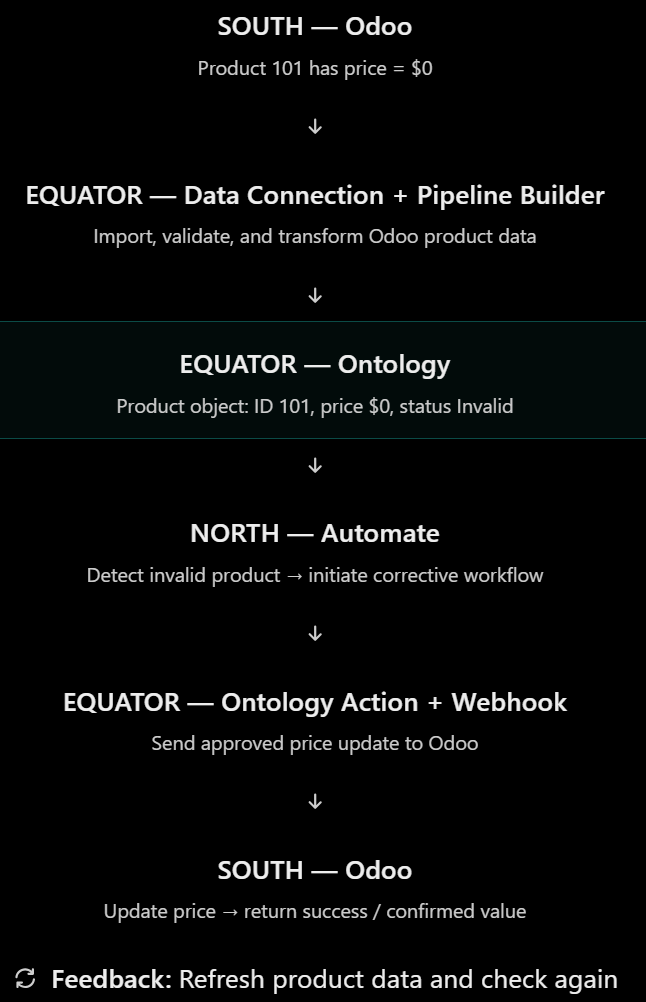
SOUTH — Odoo
Product 101 has price = $0
EQUATOR — Data Connection + Pipeline Builder
Import, validate, and transform Odoo product data
EQUATOR — Ontology
Product object: ID 101, price $0, status Invalid
NORTH — Automate
Detect invalid product → initiate corrective workflow
EQUATOR — Ontology Action + Webhook
Send approved price update to Odoo
SOUTH — Odoo
Update price → return success / confirmed value
Feedback: Refresh product data and check again
The critical point is that Automate connects a detected condition to an operation, while the other Foundry components provide the data, logic, and execution mechanisms.
2. Exactly which Foundry applications are used?
| Foundry application | Job in the loop |
|---|---|
| Data Connection (4.7) | Connect to Odoo and import product records |
| Pipeline Builder (4.12) | Clean data and flag invalid prices |
| Build Schedules (4.2) | Refresh the pipeline when source data changes or on a schedule |
| Ontology Manager (7.4) | Define Product Object Type and Update Product Price Action |
| Automate (7.1) | Detect a product entering the invalid-price set and invoke the Action |
| Data Connection — Webhook | Send the update request to Odoo |
| Object Explorer (7.3) | Inspect product state and verify the correction |
| Workshop (3.8) | Optional UI for human approval or manual control |
Foundry’s documentation confirms that Automate supports object-set conditions and can submit Ontology Actions as effects. https://www.palantir.com/docs/foundry/automate/condition-objects/?utm_source=chatgpt.com
3. The actual Automate configuration
For a minimal example, suppose a product price must be greater than zero.
In Automate, configure:
Condition
- Object Type:
Product - Filter:
price <= 0 - Trigger:
Objects added to set
Effect
- Type:
Action - Action:
Update Product Price - Input: the Product object that triggered the condition
- New price:
$120(a fixed demonstration value)
In Ontology Manager, configure that Action to call the Odoo webhook using Writeback. The external update happens first; if it succeeds, Foundry applies the configured Ontology edits. https://www.palantir.com/docs/foundry/action-types/webhooks/?utm_source=chatgpt.com
When Product 101 enters the invalid-price set, Automate executes the Action. Once its price becomes $120, it no longer meets the invalid-price condition.
The next ingestion and pipeline refresh can independently verify that Odoo still reports $120.
4. Where does the loop actually close?
This is the most important part of your autopilot analogy.
Automate does not have to execute an endless while loop.
Instead, the loop is assembled from two recurring mechanisms:
-
Build Schedules: Keep the data flowing from Odoo through the pipeline into the Ontology. https://www.palantir.com/docs/foundry/pipeline-builder/schedules-overview/?utm_source=chatgpt.com
-
Automate: Monitor Ontology conditions and invoke Actions when necessary. https://www.palantir.com/docs/foundry/automate/?utm_source=chatgpt.com
After an Action changes Odoo, a subsequent data refresh supplies the feedback.
This is a closed-loop enterprise control system, although it operates asynchronously rather than at an autopilot’s high-frequency control rate.
One practical safeguard: use a status such as Correction Pending and avoid repeatedly submitting the same Odoo update while waiting for confirmation.
My conclusion: Your analogy is accurate at the systems level. The Ontology provides the structured state and operations, while Automate is one of the key components that turns those capabilities into an autonomous operational loop. AIP Logic can be inserted when AI-based decisions are useful, but this particular example needs no AI at all.
ME3: so there is not constant loop….
it depends on triggers. which makes sense i guess for Enterprise (we dont need a core control loop like you need for FSD (full self driving).
Correct. Foundry typically uses event-driven or scheduled execution rather than a continuously running control loop.
The distinction is:
| Aircraft autopilot / FSD | Foundry enterprise workflow | |
|---|---|---|
| Execution | Continuous, high-frequency | Triggered by events or schedules |
| Input | Sensors | Enterprise data |
| Decision | Control algorithms | Rules, functions, AIP Logic |
| Action | Steering, throttle, control surfaces | Ontology Actions, APIs, webhooks |
| Feedback | Milliseconds | Seconds, minutes, hours, or longer |
| Main requirement | Real-time control and stability | Business correctness and reliability |
There is one subtlety: Foundry can still implement a closed-loop system. A closed loop doesn’t necessarily mean a continuously executing program.
For example:
- Odoo product price becomes invalid.
- Foundry ingests the change.
- Automate detects the condition.
- An Action corrects the price in Odoo.
- Foundry ingests the updated price and verifies the correction.
- The system waits for the next event.
That’s a closed-loop, event-driven control system.
And your architectural insight holds: enterprise applications generally don’t need the continuous, high-frequency feedback required for FSD or aircraft flight control.
The important commonality is the architecture — sensing, decision-making, action, and feedback — not the execution frequency.
ME4: so to sum up simply:
- autopilot is time based
- foundry is event based (for new data input, etc)
Yes. That’s a good high-level summary.
- Autopilot: Time-based — continuously executes a control loop at a fixed frequency.
- Foundry: Event-based — executes workflows when triggered by new data, changes in conditions, user actions, or scheduled events.
One refinement: Foundry also supports time-based scheduled triggers (e.g., every 5 minutes).
So the fundamental distinction is:
Autopilot = continuous control loop.
Foundry = event-triggered or scheduled workflows.