D1 -- Concepts
This page is the ZiptieAI (ZAI) take on the core concepts introduced in demo D1.
TOC:
- C1 Why self-study Foundry as a private person
- C2 Why ZiptieAI focuses on Foundry for the enterprise
- C3 Why enterprises use Palantir Foundry
- C4 The importance of mastering at least a few “simple” demos like D1
- C5 Why do the ZAI version of demo D1
- C6 ZAI demo 3 phases
C1 Why self-study Foundry as a private person
Foundry is an enterprise platform. And it’s not cheap. So why study it as a private person? Besides the obvious reason for someone who wants to become a Palantir Forward Deployed Engineer (FDE, the same acronym used for Foundry’s excellent AI assistant), there are several good reasons:
- You can get started with a free trial of Foundry (if you are located in certain countries). You’re able to study a serious enterprise platform hands-on for an extended period, rather than just reading architecture diagrams and imagining how such a system works.
- Even if you never work with Foundry professionally, you’re getting hands-on exposure to concepts and workflows that apply well beyond Foundry: raw enterprise data → transformation → operational model/ontology → analysis + applications → actions/writeback → governance → AI inside that controlled system.
C2 Why ZiptieAI focuses on Foundry for the enterprise
ZAI has been all about AI in
- (2) Neural networks,
- (2b) Models,
- (3) Agents, and
- (3b) Workflows.
And now the final culmination in
- (3c) Enterprise platforms. Foundry represents the enterprise-platform stage of ZiptieAI: AI is no longer just a model, chatbot, or agent. It becomes part of governed data pipelines, ontology objects, analysis tools, applications, and actions.
C3 Why enterprises use Palantir Foundry
TOC:
- C3.1 The original problem: Finding needles in haystacks of data
- C3.2 The enterprise problem: Making the enterprise visible and governable
- C3.3 The most recent reason: Keeping AI from becoming an internal “needle” (threat)
C3.1 The original problem: Finding needles in haystacks of data
The original problem Palantir was founded (25 years ago) to solve:
- There is a huge amount of data. Find the important relationships/signals hidden inside it.
versus the broader enterprise Foundry problem:
- Bring the organization’s data and operations into a structured environment where they can be seen, analyzed, acted upon, and governed.
Foundry can
- find signals in fragmented data
- find the needle in the haystack
- connect facts across systems
C3.2 The enterprise problem: Making the enterprise visible and governable
Another more recent central pillar of Foundry is security/governance of the enterprise:
- who is allowed to see what
- who is allowed to act
- what gets logged
- what can be trusted
Below is the simple workflow diagram for this demo D1. Diagrams for other demos will use the same basic structure.
- 1a = local files/manual upload → starting data in Foundry
- 1b = Pipeline Builder cleans, joins, and unions data → output dataset
- 3 = output dataset backs an ontology object type
- 5 = Workshop reads ontology objects and displays them to the user
- 3b = ontology action/write capability is defined
- 5/3b = user executes the action through the Workshop UI
- 6 = security and governance layer surrounding the entire workflow**
Note that D1 does not do the following (other demos may include these):
- Perform a separate analysis step
- Use AI
Diagram 1: Simple workflow diagram for demo D1
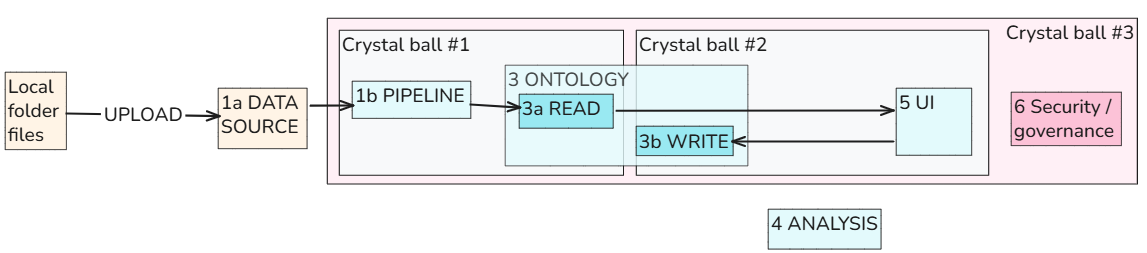
The structures (making the enterprise visible and governable) built into D1 — datasets, pipelines, object types, actions, and Workshop UI — are not just app-building pieces. They are control structures. They make enterprise activity visible, structured, governable, and auditable. This is the practical meaning of the “crystal balls”: Palantir can see and control activity because the enterprise has been modeled through structured data, ontology objects, actions, workflows, and governance.
Diagram 2: The crystal ball in Lord of the Rings (called a “palantir”)
C3.3 The most recent reason: Keeping AI from becoming an internal “needle” (threat)
AI is the ultimate helpful assistant for the Foundry core mission of finding haystack needles.
But AI introduces a whole new set of problems:
- LLMs are probabilistic and can be wrong. They need guardrails, controlled data access, verification, logging, and human approval for important actions.
- As Alex Karp has noted on many occasions, the data sent to external AI models must be tightly controlled to avoid leaking sensitive information.
Foundry has complex governance and control structures specifically designed for managing AI in the enterprise. Understanding these tools , workflows and concepts is crucial for understanding how AI should be used in enterprises (and perhaps your own small business).
The basic workflow to mitigate this new threat:
- AI ↓
- controlled data access ↓
- guardrails ↓
- verification ↓
- human approval ↓
- logging/audit
Diagram 3: AI has benefits and disadvantages
Below is the earlier workflow summary diagram with the addition of AI (D1 does not have AI, but D2, D3, etc integrate AI into the workflow).
Diagram 4: In Foundry AI is embedded into governed workflows (not a separate magic layer floating above the business)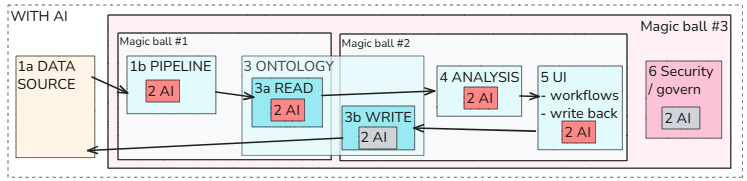
C4 The importance of mastering at least a few “simple” demos like D1
- Foundry is a very sophisticated system that introduces key concepts. You need to understand those concepts. Its kind of like your first computer, your first browser, or your first search engine. Its a whole new world.
- Perhaps the biggest challenges at first are
- Complex dialogs (my biggest challenge was navigating the dialogs).
- Debugging errors (that’s why I spent a lot of time simplifying D1 and splitting into phases).
- This simple demo D1 intros many of those key concepts. If you don’t master the basics in the first demo, you will just get more lost in future demos.
- Even if you stop after just a few demos (D1, D2, D3), you will still have a much better idea about what Foundry really does (and be able to sift through the hype).
C5 Why do the ZAI version of demo D1
- The PAL site has an impressive number of very useful demos and docs.
- The goal of ZAI is to make it easier for you to eventually exploit that gold mine of info.
TOC:
- C5.1 Original PAL demo D1 (for industry experts)
- C5.2 ZAI version of demo D1 (for industry newcomers)
C5.1 Original PAL demo D1 (for industry experts)
TOC:
- C5.1.1 The original doc says to budget 60 mins to do demo D1
- C5.1.2 The original demo included an impressive UI to show whats possible
C5.1.1 The original doc says to budget 60 mins to do demo D1
- It took me days just to get the basic demo running. The main reason was the demo was long and you did not verify it was working until the very end (it did not work).
The Palantir documentation for the demo D1 is available at learn.palantir.com/speedrun-your-first-e2e-workflow.
C5.1.2 The original demo included an impressive UI to show whats possible
The following diagram shows the resulting UI. Only the sections squared in red are included in the ZAI demo version.
Diagram 5: UI for Foundry version of demo D1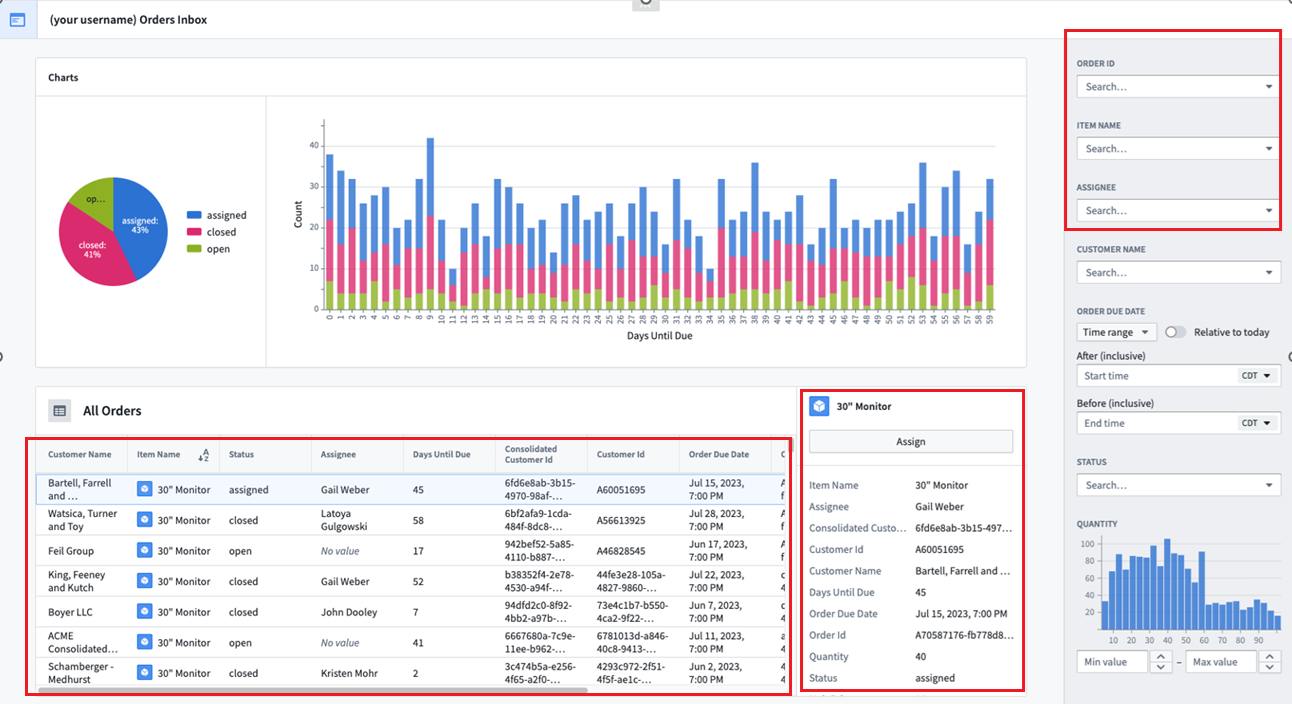
C5.2 ZAI version of demo D1 (for industry newcomers)
TOC:
- C5.2.1 The ZAI focus is on all details (I did the demo myself)
- C5.2.2 Minimalistic demo
- C5.2.3 The 3 demo D1 phases (each ending with a test)
- C5.2.4 Detailed diagram (with numbered steps) (mainly for UI configuration)
C5.2.1 The ZAI focus is on all details (I did the demo myself)
- Step by step with minimal text/diagrams (focuses only on the core stuff).
- The details you need to know to get this working.
- The details that are important for understanding basic Foundry skills.
- Demos of common errors and small changes (with the help of FDE, Foundry’s excellent AI assistant that can even “see” pasted screenshots of dialogs of your setup).
C5.2.2 Minimalistic demo
The following shows the ZAI final UI. The simplest demo possible to get the point across.
Diagram 6: UI for ZAI version of demo D1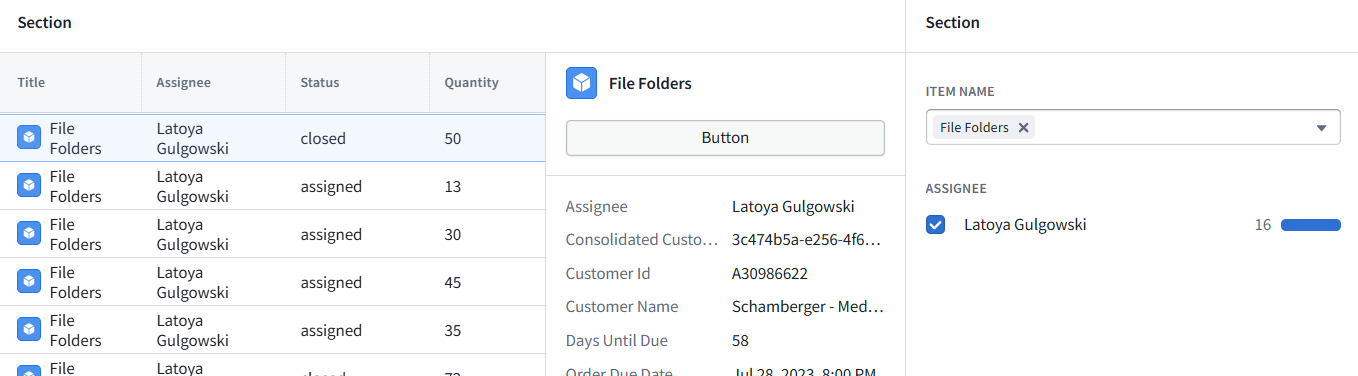
C5.2.3 The 3 demo D1 phases (each ending with a test)
Diagram 7: ZAI demo D1 phases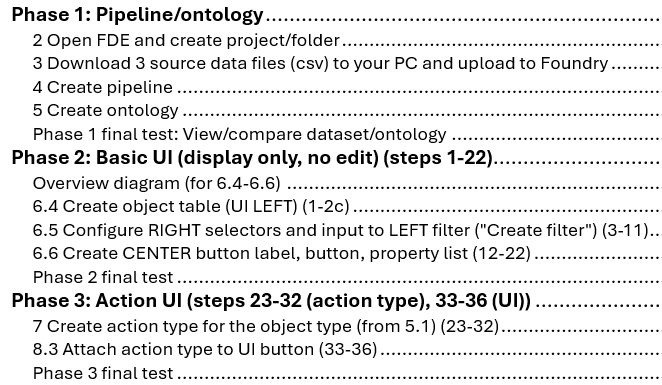
C5.2.4 Detailed diagram (with numbered steps) (mainly for UI configuration)
The diagram below is extremely helpful when tracking your demo progress.
- The numbers in red are the chapter numbers added to the ZAI version of the original Foundry demo doc.
- Text such as “(1-6.4.s2)” means
- ZAI step 1 (36 steps total)
- ZAI section 6.4 (H1/H2 sections are not numbered in the Foundry version)
- s2 = Foundry version Step 2 (the numbering for H3 sections in the Foundry version)
Diagram 8: Main diagram for configuring the ZAI version of demo D1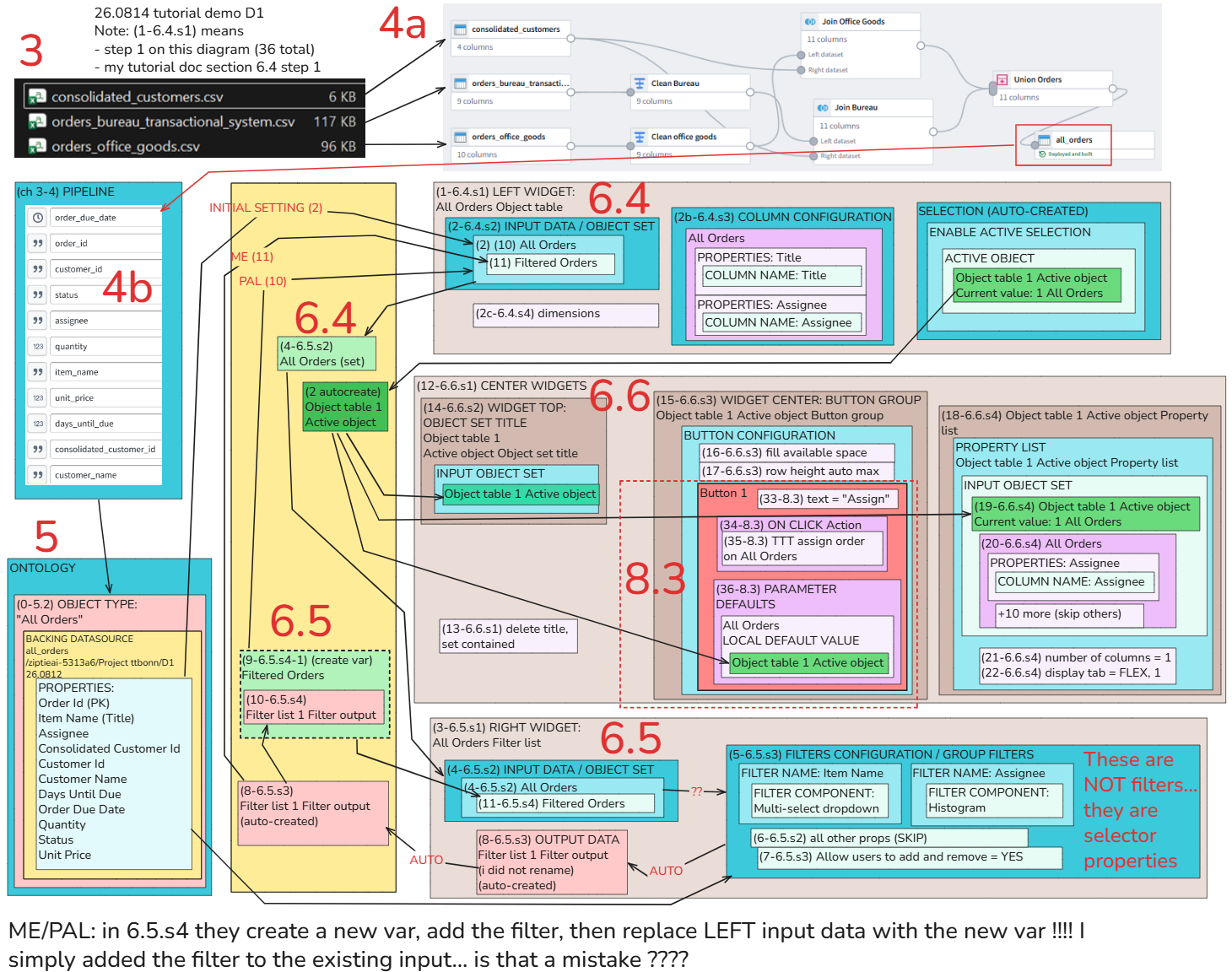
C6 ZAI demo 3 phases
TOC:
- C6.1 Phase 1: Input csv files -> pipeline -> dataset -> ontology
- C6.2 Phase 2: Basic UI for displaying ontology objects
- C6.3 Phase 3: Edit the ontology
C6.1 Phase 1: Input csv files -> pipeline -> dataset -> ontology
Diagram 9: Pipeline/dataset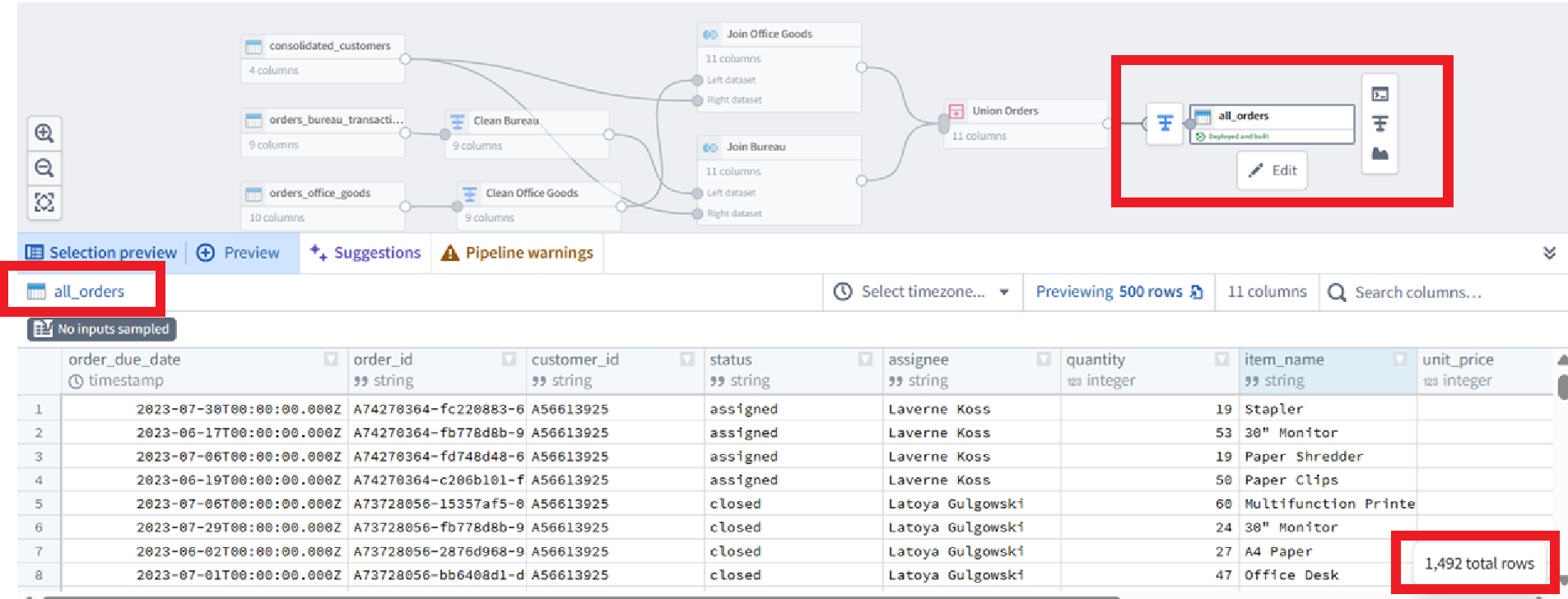
Note: “All Orders” is not a good name for the object type (it should be “Order”). This was my mistake. I will fix this (and many other smaller errors) in a future version of this demo. The important aspect of this demo is that it shows you clearly how to set everything up, and clearly discusses my errors and mistakes (and also mentions where I use AI, which I do wherever I can; I note in this doc if text was AI generated (or just cleaned up)).
Diagram 10: Ontology object type “All Orders” (only one)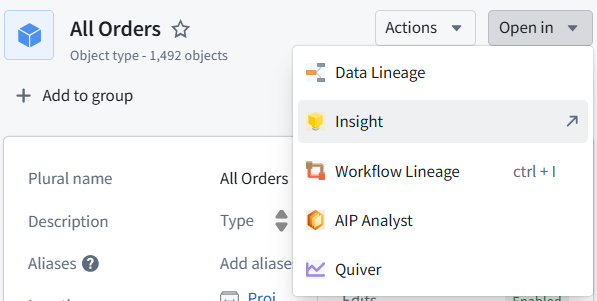
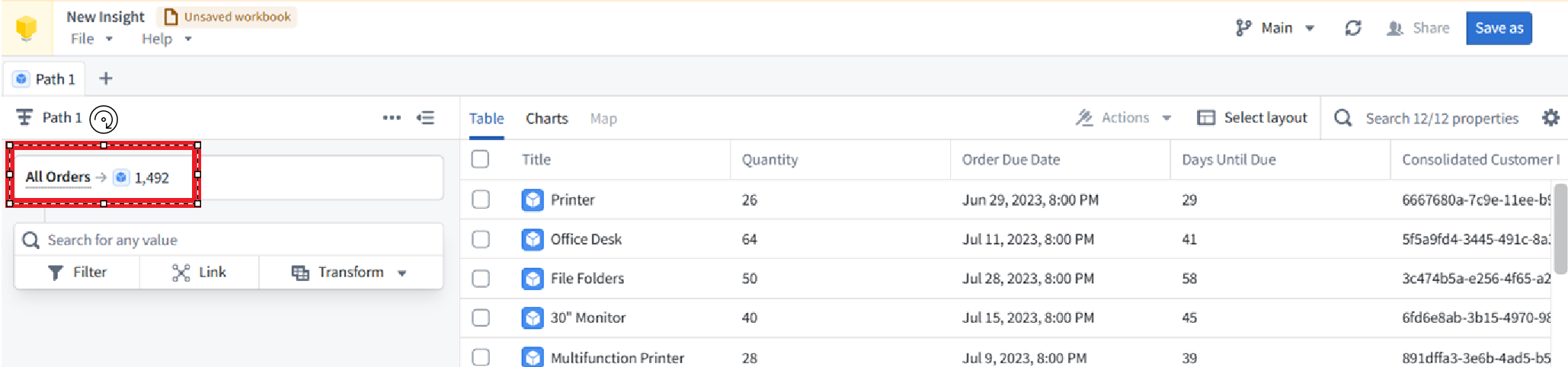
C6.2 Phase 2: Basic UI for displaying ontology objects
- 1 RIGHT panel: Select Item (object) type (Title).
- 2 LEFT panel: View list of objects of that object type.
- 3 CENTER panel: View selected Item (object) details.
Diagram 11: Basic UI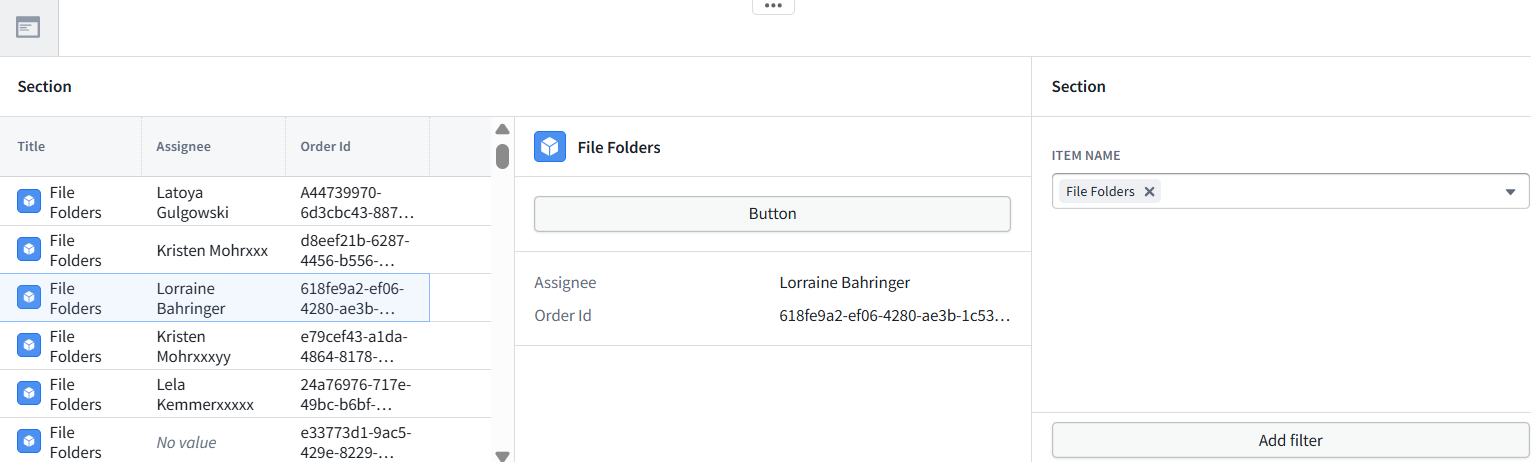
C6.3 Phase 3: Edit the ontology
- Click the button.
- Edit the Assignee.
Diagram 12: Object edit dialog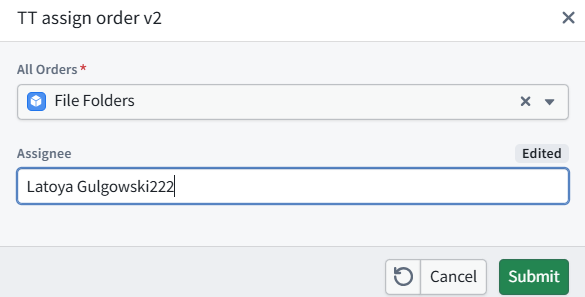
Click Submit.
The change is save in the ontology (but NOT in the dataset or original csv files).
NOTE: In this demo you simply change the Assignee string (not select from the Assignee list). Thats how it was in the original demo, and its good enough for this first demo version.
Diagram 13: Updated object (updated only in ontology, not in dataset)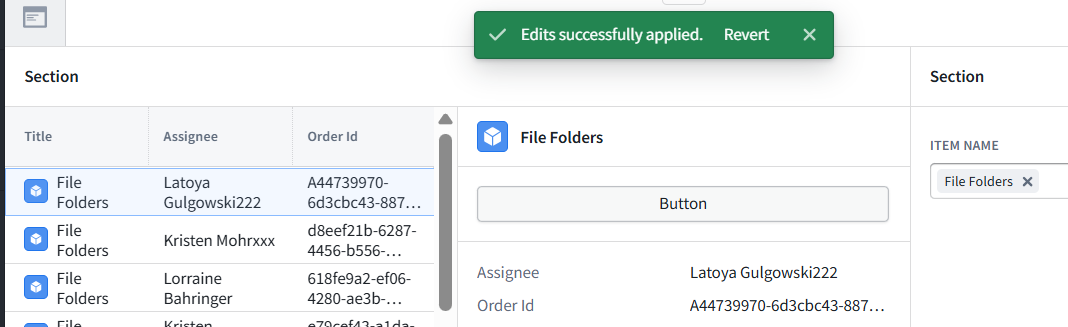
26.0818 (v1 26.0816)