Readme me first
- reloading the page is sometimes required
- relogin after timeout
- no vpn allowed
A few problems I ran into that you might want to watch out for.
- 1 Workshop setup
- 2 Object type limitations
1 Workshop setup 26.0802
See Demo 9 HN (haystack needle) for details.
But when you start to DIY, then things can get tricky. You try to do things that the experts know to avoid but don’t talk about in the documentation. It took me a while to figure out some key configurations details in the D9 demo while building Workshop. FDE gave me a workflow that although it worked (with several fixes), it was too complicated to follow. FDE is a LLM (token generator based on trained token patterns). That means that FDE understands nothing, only computes an answer based on training input. This will sometimes really cause you trouble when you get polished verbiage from FDE that makes no sense (or is incomprehensible to a human). I also ran into a small bug (I think) in Workshop that really confused me (FDE agreed that something was not right and it wasn’t my mistake).
Recommendations:
- Experiment with PAL examples/demos when you can, to get experience within the confines of working examples/demos.
- The DIY docs might be the most helpful in fact because they
- describe unexpected problems.
- use a few small techniques that make things vastly easier to follow (using numbering, unique var names, etc). - Unique names to keep things straight. Numbered steps (not sure why this is not used more; it vastly simplifies these demos).
- have diagrams (useful, accurate, detailed).
The following TOC snippet from #620_pal_9_aip-fde_demo_hn_.docx docx shows how I finally figure out the correct workflow. It was a mess. The final result was quite simple.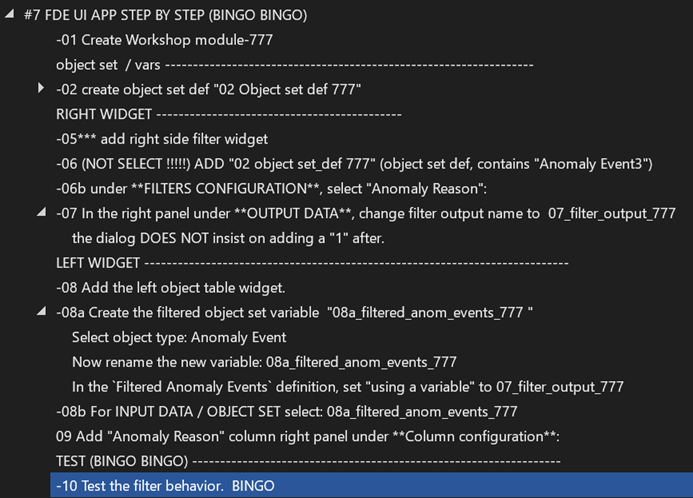
2 Object type limitations
This is something I ran into after a few weeks. I had reached the limit of 60 object types (on the free plan). This problem is a bit of challenge when you hit it, because deleting objects is not simple. You have to solve it though if you want to do more examples/demos. You dont have to do this now, but you need to be aware of it if you hit the limit.
why do ontology objects take so long to compile, and why are they limited to 60 ? they are just objects
Short answer
Ontology objects feel like “just objects,” but in Foundry they are compiled semantic resources with schema, security, links, actions, indexes, and generated app/API metadata. The limits exist because loading/validating too many of them inside one app or workspace can become slow, fragile, and hard to reason about.
Long answer
Because in Foundry, an Ontology object type is not just a plain database object/table.
It looks simple in the UI, but under the hood an object type carries a lot of platform machinery.
Why ontology objects/object types take time to compile
When Foundry “compiles” ontology resources, it is not just saving a schema. It may need to validate and generate several things:
dataset columns
→ object properties
→ primary keys
→ links
→ actions
→ security rules
→ search/index configuration
→ generated APIs / SDK shapes
→ Workshop/Quiver/OSDK usable definitions
So an object type is closer to a semantic API contract than a simple table.
For example, an object type may include:
- primary key definition,
- property definitions and types,
- backing dataset mappings,
- derived/function-backed properties,
- links to other object types,
- action types that can mutate it,
- security / markings / property visibility,
- search/index configuration,
- generated OSDK/API representations,
- Workshop-compatible metadata,
- time series or media-backed properties,
- interface implementations.
That means compiling the Ontology requires checking that all of those things are internally consistent.
Why this feels slow
In a normal database, adding a column might be local.
In Foundry Ontology, changing an object type can affect many downstream consumers:
Ontology object type
    ↓
Object Explorer
Workshop
Quiver
OSDK apps
Actions
Functions
Links
Search indexes
Permissions
Models / pipelines
So Foundry has to protect against breaking those consumers.
That validation/generation step is what feels like “compilation.”
Why there may be a limit like 60
The “60” limit is probably not because Foundry cannot represent more than 60 object types globally. It is more likely a UI/app/workshop/module/session limit or a practical compile/load limit.
If a Workshop app imports too many object types, Foundry has to load all their schemas, properties, links, action metadata, permissions, and generated definitions into the application context.
That can get expensive quickly.
Example:
60 object types
× many properties
× links
× actions
× security metadata
× generated UI definitions
So the limit is probably there to keep:
- Workshop loading time reasonable,
- browser memory reasonable,
- app compile time reasonable,
- generated app metadata manageable,
- dependency graphs understandable,
- security validation tractable.
“But they are just objects”
They are “objects” in the business sense, but technically they are more like:
typed, secured, indexed, API-backed semantic entities
A database row is simple.
An Ontology object type is a contract saying:
“This real-world entity exists in the platform, has these properties, is backed by this data, participates in these links, supports these actions, obeys these security constraints, and can be consumed by apps and APIs.”
That is much heavier.
Useful distinction
| Thing | Lightweight? | Why |
|---|---|---|
| Dataset row | Relatively lightweight | Just data in a table |
| Dataset schema | Medium | Column names and types |
| Ontology object instance | Medium/heavy | Row plus semantic identity and permissions |
| Ontology object type | Heavy | Schema + mappings + links + actions + APIs + app metadata |
| Workshop app using object types | Heavy | Must load object type definitions, variables, widgets, filters, actions |
So when you add many object types to Workshop, you are not just adding data. You are adding a lot of semantic metadata and runtime behavior.
Practical advice
For Workshop, do not add every object type “just in case.”
Add only the object types the app actually needs.
Better pattern:
small focused app
→ 2–8 core object types
→ links/actions only where needed
Avoid:
one giant Workshop app
→ dozens of object types
→ many unrelated workflows
If you hit limits, split the app into multiple modules/pages/apps by workflow.
Example:
Anomaly Review App
  - Anomaly Event
  - Asset / Entity
  - Measurement
  - Investigation Note

Maintenance App
  - Work Order
  - Technician
  - Asset
  - Spare Part
Rather than one monster app with everything.
Short answer
Ontology objects feel like “just objects,” but in Foundry they are compiled semantic resources with schema, security, links, actions, indexes, and generated app/API metadata. The limits exist because loading/validating too many of them inside one app or workspace can become slow, fragile, and hard to reason about.
26.0803 (v1 26.0803)