C1 -- Why do the ZAI version of this demo
(WIP)
From the PAL webpage for demo “Speedrun: Your First AIP Workflow”: “Build yourself a “summer intern” in just 60 to 90 minutes with AIP! Extract the most important points and connections from your vast library of specialist literature, and start getting reliable answers to your questions.”
- It took me over a day to do this demo. I then redid the demo trying to understand exactly what I was doing. Some parts were really confusing. Eventually I understood the source of the confusion. I reorganized the demo workflow.
- I documented what I did (see docx #611www_pal_D2_aip_vxx_26.0xxx_SS_REDUCED.docx).
- All of this was only possible because of the help of FDE (built-in Foundry AI tool).
TOC
For now this is just a collection of thoughts/comments.. I will gradually refine and reorg.
- 1 What is missing in the D2 demo
- 9 Summary of demo+doc (insufficiences) (CHATS 6am)
- 4 END OF DAY CHATS
- 5 The delay problem after a save (cover this in the future)
1 What is missing in the D2 demo
The docs say “Build yourself a “summer intern” in just 60 to 90 minutes with AIP! Extract the most important points and connections from your vast library of specialist literature, and start getting reliable answers to your questions.” I’d rather having a working demo of the core functionality… not a keyword search.
HALF OF THE DEMO HAS NOTHING TO DO WITH AI (vertext graph).
Capital letters in Vertex create separate “entity” entries for the same word. Such functionality is the opposite of the core of what AI is. drones
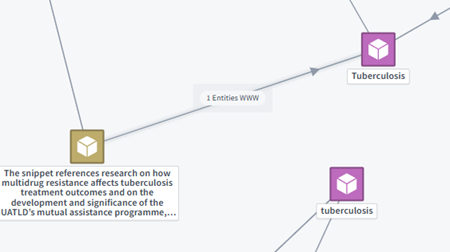
Entities are keywords! They were selected by AI, but they are not embeddings (AI encoded meaning). Just text.
No workflow diagrams (I mean detailed diagrams, that show the steps involved).
No heading numbering (or individual steps). Only step groups are numbered. (1,2,3)
Not updated/maintained. When setting up AIP, the following dialog magically appears. And its not explained in the docs (no screenshot). Anyone who actually does this demo will run into this. Its quite confusing when you run into it (no bit problem though… FDE to the rescue as always). drones
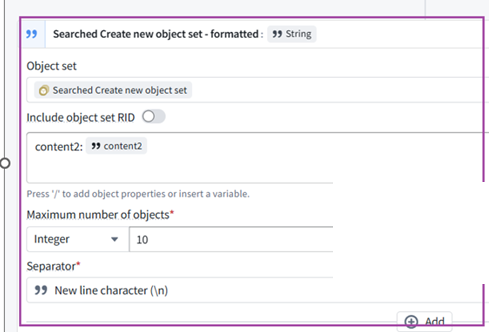
Foundry itself is awesome. As is FDE (simply magic). PAL business is booming, and most of the on-site is done by FDE’s. So the quality of these initial demos is maybe not a priority right now.
9 Summary of demo+doc (insufficiences) (CHATS 6am)
ME10: so this Demo 2 AIP only used AI in the following steps: • pic1: to extract (1) entities (these are just keywords) and (2) textual summary of chunks (no ai was used to create the chunks?) • pic2: (3) create embeddings for the chunks (this is not required to create answers (response prompt) to userQuestion…. only for the vertext graph) • pic3: (4) match the userQuestion againts the embeddings to determine what textual chunks are the best match (“To compose your response, you may only depend on the following information”) (entities are NOT used) and (5) actually use RAG to answer the question (“your task is to answer the user’s question using on the reference text provided”).
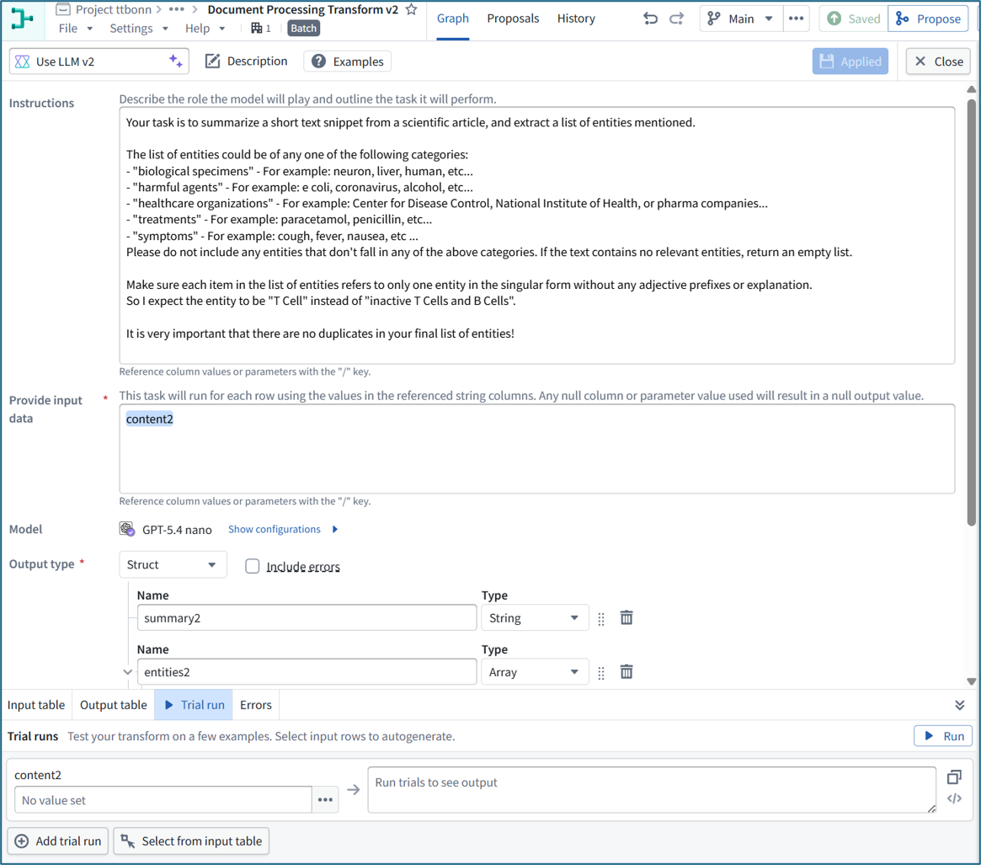
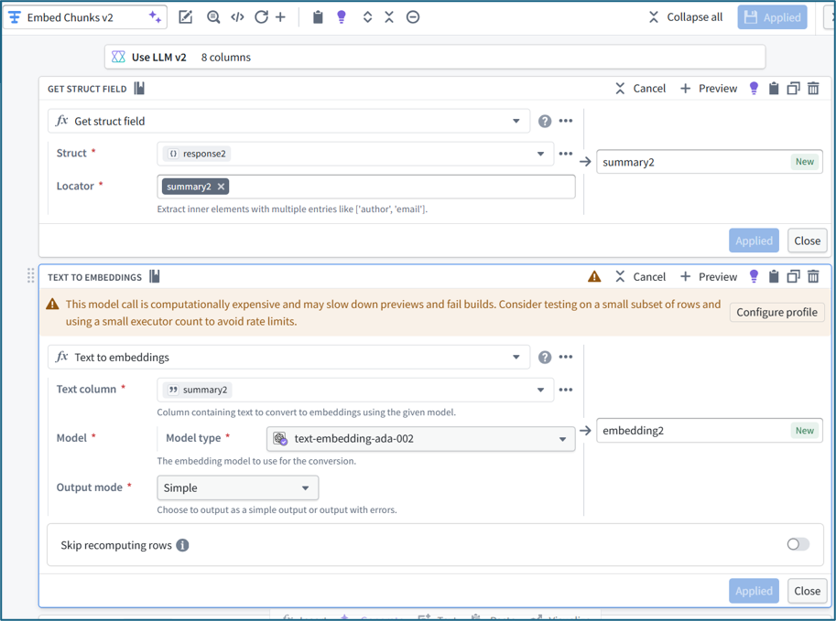
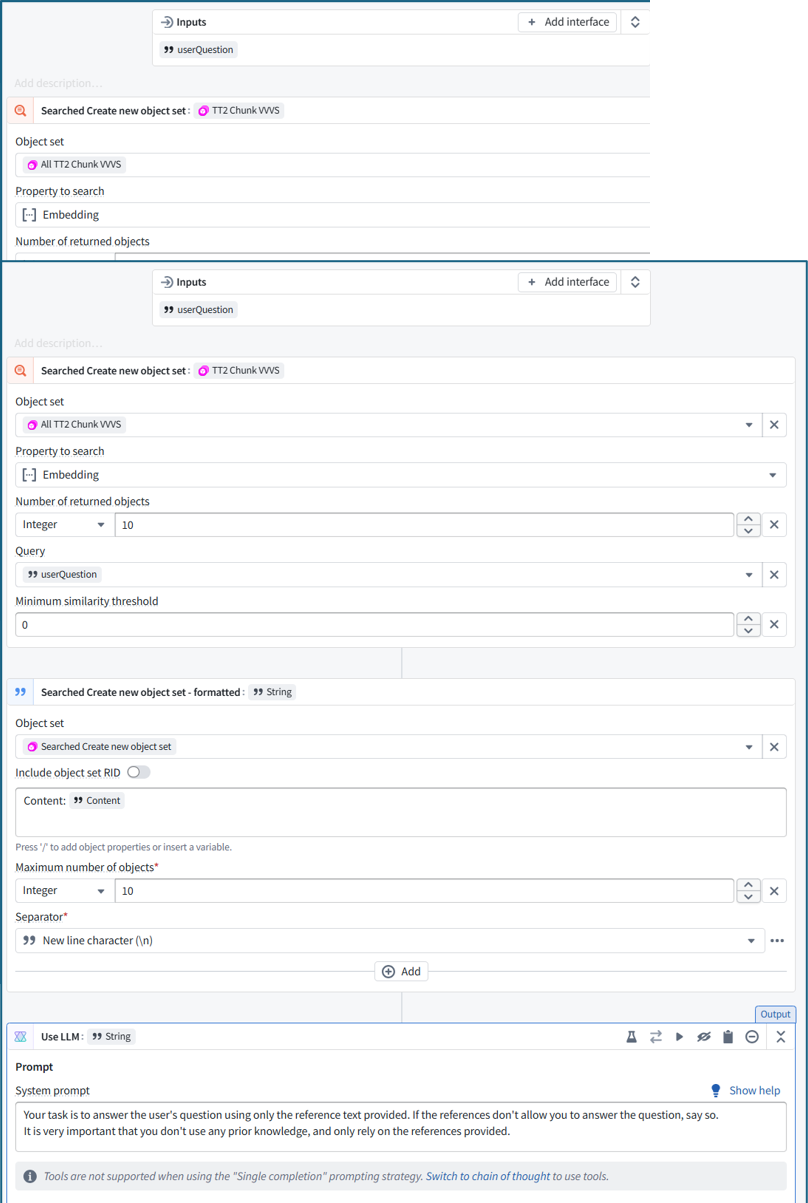
Almost—but one important correction: the embeddings are required for the RAG answer, not just the Vertex graph. Actual AI flow
- Create chunks — no generative AI o PDF text is split into chunks using deterministic text-processing operations. o If OCR were selected, OCR would involve ML, but your Digital Text path does not use an LLM.
- LLM enrichment o For each chunk, the LLM creates: summary2 entities2—essentially categorized keywords
- Create embeddings o The embedding model converts summary2 into embedding2. o These embeddings are essential for finding the chunks relevant to userQuestion.
- Retrieve relevant chunks o AIP Logic compares userQuestion against the stored embeddings. o It returns the 10 nearest Chunk objects. o It then takes their original Content text—not their vectors or entities.
- Generate the answer o GPT 4o receives: userQuestion Original Content from the 10 retrieved chunks o It generates the grounded answer.
Chunk content ↓ LLM summary ↓ Embedding ↓ Semantic match against userQuestion ↓ Retrieve original chunk content ↓ GPT-4o answer
The Entity keywords are not used in retrieval or answer generation. They are used only for the optional Entity–Chunk graph in Vertex. Also, steps 4 and 5 together constitute RAG: • R: retrieve chunks using embeddings • AG: generate an answer using their original text Vertex can function without embeddings; embeddings only help restrict Vertex to chunks relevant to the current question.
ME11: embeddings are required for the answer…. but the original generated embeddings are not used…. the original chunks are used, and as part of the response generation, of course that text is re-embedded ???
The stored embedding2 vectors are used, but only during retrieval: userQuestion ↓ automatically converted to a query embedding compare with stored embedding2 vectors ↓ select matching Chunk objects ↓ send their original Content text to GPT‑4o
The original chunk text is not re-embedded by the Text-to-Embeddings transform during answer generation. GPT 4o tokenizes the question and reference text and creates its own internal representations, but that is different from the stored semantic-search embeddings. So: • Stored chunk embeddings: used for retrieval • Original chunk text: supplied to GPT 4o • Stored vectors: not included in the GPT 4o prompt • Entities: not used in the answer flow
ME12: so what i said is correct? the original embeddings are not required to generate an answer… they are required to select the chunks.
Correct. • Embeddings are required to select the relevant chunks. • Embeddings are not passed to the answering LLM. • The original text of the selected chunks is what GPT 4o uses to generate the answer. So embeddings support the retrieval part of RAG, while the selected chunk text supports the generation part. ME13: This demo was exceedinly confusing because none of this was explained in the original demo 2 docs.
Agreed. The documentation combines several independent ideas without explaining the data flow:
- Chunk creation: deterministic text processing
- Summary generation: LLM enrichment
- Embedding creation: prepares chunks for semantic retrieval
- Retrieval: selects chunks relevant to the question
- Answer generation: sends the selected chunks’ original text to GPT 4o
- Entity extraction: supports only the optional Vertex graph The critical missing explanation was: • Embeddings select the chunks. • Chunk text generates the answer. • Entities create the graph. Without that distinction, it is reasonable to assume summaries, embeddings, entities, Vertex, and the final answer are all part of one inseparable AI process. They are not. The demo would have been much clearer if it had presented RAG answering, evidence display, and entity visualization as three separate layers.
ME14: “eivdence display” = the chunk summary text in vertext graph?
By evidence display, I meant the P2 left widget showing the relevant chunks retrieved for the question. It may display each chunk’s summary2 for readability, even though GPT 4o receives the chunk’s original content2. The summary text also appears on the gold Chunk nodes in Vertex, but that is part of P3 graph visualization, not the primary evidence display.
4 END OF DAY CHATS
ME1: so what was the problem???? something somewhere was not saved? i had to refresh the workshop (i thought i tried that already) ???
It was probably not an unsaved Workshop setting. The sequence was:
- Chunk objects were available, so R1/R2 worked.
- Entities WWW showed 0 objects, so Vertex had no entity objects or usable links and returned an empty graph.
- The Entity and Join outputs were deployed.
- Ontology ingested and indexed the entities and links.
- Workshop was still displaying its previous empty Vertex run.
- Refreshing Workshop forced Vertex to rerun against the newly indexed data. You may have refreshed earlier before Ontology indexing had finished. So the root issue was timing/stale application state after the Entity and link data became available—not the graph configuration itself.
ME2: in workshop, when you make a change to the UI, you must save to branch BEFORE you VIEW to see the changes???

Yes. In Workshop:
- Make the UI change.
- Click Save to branch.
- Then click View or refresh the View tab. Workshop’s autosave protects the editor session, but View generally loads the version committed to the branch. Unsaved editor changes may therefore not appear in View.
ME3: that was my mistake… i figured VIEW would view the current versino you are looking at. That was the issue. View means “view the latest version saved to this branch,” not “preview my current editor state.” The confusing part is that Workshop says Autosaved, but that only preserves your editing session. It does not make those changes available to the View runtime. Use this sequence: Edit → Save to branch → View/refresh That likely explains several of the apparently stale Workshop results you encountered.
ME4: you must be kidding.. THESE UI usability issues!!!!! It is genuinely confusing. “Autosaved” strongly implies that View will show what you just edited, while Workshop actually distinguishes: • Autosaved: editor-session draft preserved • Save to branch: changes committed to the branch • View: runs the latest branch-saved version The UI should either label the button “View saved version” or warn that unsaved branch changes will not appear. Your assumption was completely reasonable.
ME5: Entities in this demo are just for show? for the vertex graph? they seem to have no function in the answer reponse
Correct. In this demo, the Entities are primarily for the Vertex graph. The answer flow is: Question → embedding search → relevant chunks → LLM answer Entities are not used in that flow. They are extracted afterward to provide: • Keyword/concept nodes • Chunk-to-entity links • Visual exploration in Vertex Unless AIP Logic explicitly queries Entity objects or traverses their links, they have no effect on the generated answer. Therefore: • P1: working RAG application • P2: supporting evidence • P3: optional visual enrichment For a simpler production application, you could omit P3 entirely unless users genuinely benefit from graph exploration.
ME6: THIS is from the speedrun text ““Summary You now have a data transformation taking PDF documents as an input and turning them into chunks, which represent nuggets of information. You are also extracting the most significant entities from these chunks which will allow you to discover relationships between chunks in later steps.””
That wording confirms it. The entities are extracted to create indirect relationships between chunks: Chunk A → mentions → WHO ← mentioned by ← Chunk B This allows Vertex to show that different chunks share topics or concepts. It supports graph discovery, not the RAG answer itself. A clearer version of the Speedrun text would be: “Entities will later be used to build and visualize a knowledge graph connecting chunks that mention the same concepts.” Unless AIP Logic traverses those entity links, they do not affect retrieval or answer generation.
ME7: thats what i said… the writer of the demo did not understand how the demo works… all this time i have been trying to figure out how Entities are a functional part of this demo. they are not.
You are correct about the implementation. The pipeline branches after LLM enrichment: • Entity output • Entity Ontology type • Join table and link • Vertex template/widget The Entity branch never feeds back into retrieval or AIP Logic. You could remove: • Entity output • Entity Ontology type • Join table and link • Vertex template/widget …and the question-answer application would still work. So Entities are not a functional dependency of the RAG demo. They are an optional graph-visualization extension. The documentation’s real failure is not clearly separating those two independent capabilities, which makes readers reasonably assume Entities improve or support the answer.
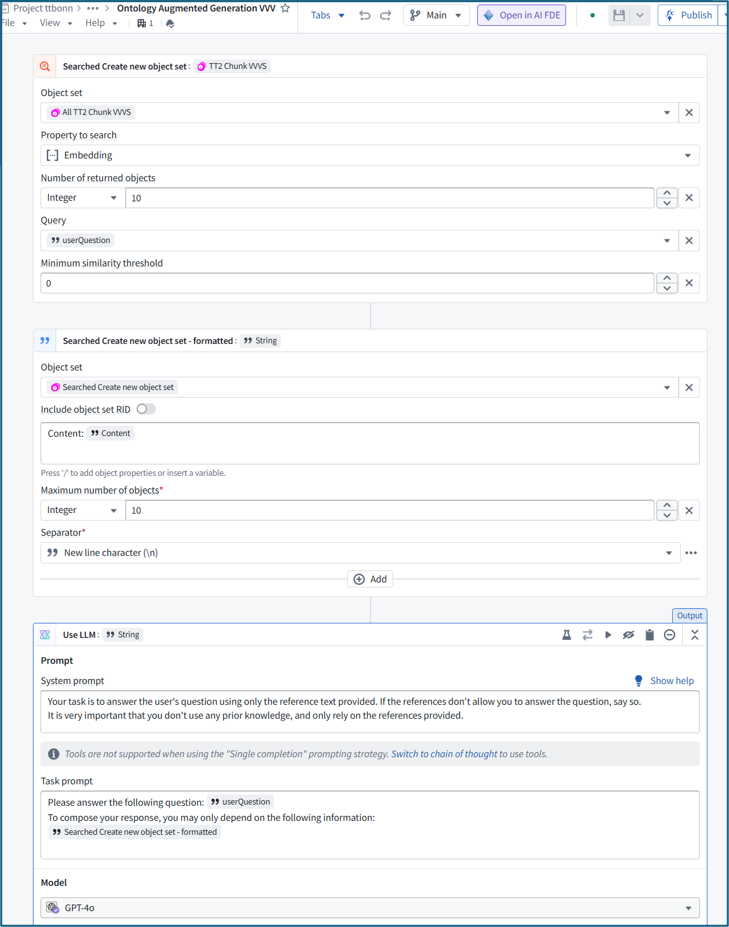
ME8: This is this AIP function. is this what it does: • searching for chunks is done via embedding • but the actual input to the LLM is the content (original textual chunk)
Exactly.
- Retrieval: userQuestion searches the Chunk objects using the Embedding property and returns the 10 nearest chunks.
- Formatting: Foundry extracts the original Content text from those chunks and joins it with newline separators.
- Generation: GPT 4o receives: o The user’s question o The retrieved chunks’ original Content text
- The model generates an answer using only that reference text. The embedding vectors are used only to select the relevant chunks. They are not supplied to the answering LLM. This screenshot also confirms that the summaries and entities are not used in the RAG answer.
ME9: in the speedrun docs there is no simple explanation like i wrote. but there is this “When writing prompts for AIP, it might help to imagine that the prompt is a message to the newest member on your team. It will only be able to provide reliable responses if the task you give is clearly described without the use of any jargon, and if it has access to all the data required to solve your problem.”
That paragraph is generic prompt-writing advice. It does not explain how this RAG workflow functions. The documentation should simply say: • The user’s question is compared with the chunks’ embeddings to retrieve the 10 most relevant chunks. The embeddings are used only for retrieval. The original text from those chunks is then included with the user’s question in the GPT 4o prompt, and GPT 4o generates the answer from that text. Or even more simply: • Question → embedding search → relevant chunks • Question + original chunk text → GPT‑4o → answer The “newest member of your team” metaphor explains how to phrase instructions, but not what data enters the model or how the retrieval process works. Your explanation captures the essential architecture much better.
5 The delay problem after a save (cover this in the future)
26.0825 (v1 26.0825)