Core Foundry Enterprise AI Concepts (reorg'd 26.0930)
This page is the ZAI take on the core Enterprise_AI/Foundry concepts. The content is my original, and is at times perhaps a bit opinionated (and even provocative). And perhaps in a few places based on mistaken assumptions (I wrote most of this without AI assistance). But this initial version is meant to help you think outside the box about AI. ZiptieAI.com is meant as a learning and discovery platform, not as a polished product website.
TL;DR – if you are short on time then go directly C2-3 AI (LLMs) is pattern recognition (which includes a link to the New version of PAL concepts AIPU which includes a link to the TINY DEMO page).
TOC
- SUMMARY (TL;DR): Why has Palantir been so successful recently? (1) PAL was never a participant of the rampant AI hype, (2) PAL’s focus has been on mission (and your enterprise focus should be too), (3) PAL assigns to AI the missions that AI was born to do.
- C1 (1-2) AI can be a blessing or a curse for your enterprise. Foundry makes it much more of a blessing. For specifics, skip to sections 8, 9.2, 9.3. The following describes the example of how the PAL AI system in a Chinook copter in Caracas (and one very brave pilot) made it possible for the copter and crew to make it home. Note that the principles for this example of AI could be used in many fields (finance, medicine, farming, etc).
- 1 What AI can do FOR your enterprise. How AI can help you win: (1) AI’s pattern detection can be applied to a lot of enterprise work (similar to the military mission) and (2) AI + (external) agent (code like Python) can automate a lot of enterprise work (main execution loop, calling external tools, etc).
- 2 What AI can do TO your enterprise. Much of how AI can help you win (above) can also be used against you. LLMs can see your data flows, so they can replicate your your main app (ALPHA) and/or deny your SOV (force you to use their LLM).
- C2 (3-5) What exactly are AI, SOVereignty, and ALPHA?
- 3 AI (LLMs) is pattern recognition (not intelligence) (pattern recognition that requires getting training data by any means necessary). Has a link to New version of Core LLM concepts (26.0929 V1; includes code from TINY DEMO PAGE).
- 4 What are SOV, ALPHA. (2) Alpha = your company’s business model, workflows, secrets, and (3) SOV = your independence from a specific AI LLM provider.
- 5 How AI steals SOV/ALPHA. (imagine if in the early DOS/WIN days, WIN had to adhere to a specific programming interface; any OS that supported that I/F could be used; but thats NOT what happened). WINDOWS intentionally locked you into their monopoly. LLM shops are trying to do the same.
- C3 (7-8) Know the difference between AI scammers and your AI allies (a Frontier AI LLM provider can be both).
- 7 AI hype and scams. Recognizing the AGI distraction, monopolists, globalists, and their empty promises.
- 8 Your AI allies. (1) PAL Foundry is not after your data. It was a system that focused on core intelligent workflows (agents) long before usable AI appeared. And (2) ZAI is not selling you anything. THe author of ZAI only wants to use hands-on demos to gain deep AI insight and to document it all (and make it public). The initial impetus came when I first read statements from the great AI gurus about AGI.
- C4 (9) Historical overview of SOV/ALPHA. Before LLMs and (now) with LLMs for the enterprise and (future?) the PC.
See also
- 2.2x CONCEPTS (DEEP DIVE) – ZAI Foundry demos for more info (describes concepts for the 7/8 demos).
- Sovereignty (ALPHA) = Who ultimately controls the data, models, application, workflows, decisions, and operational future?
- HACK
- NOTES: make YT intro for this page; upload to git + LIN; This page was rewritten during the past 5 weeks while on vacation with no internet or AI-assistance; many of the diagrams are crude drafts created in MS Paint; they will be eventually updated. OLD: pal_concepts_AI NEW AIPU 26.0929 V1 pal_concepts_AIPU
SUMMARY (TL;DR): Why has Palantir been so successful recently?
- (1) PAL was never a participant of the rampant AI hype
- (2) PAL’s focus has been on mission (and your enterprise focus should be too)
- (3) PAL assigns to AI the missions that AI was born to do
(1) PAL was never a participant of the rampant AI hype
PAL was founded 25 years ago, long before the current AI boom. Palantir was never a part of the AI hype (hype = “AGI will soon be smarter than humans” (Musk), “AI already has emotions” (Hinton), etc etc).
- PAL always has focused on
- real intelligence (the ALPHA algorithms of the enterprise “agent”)
- Since the advent of AI, PAL also focused on
- AI as a helpful assistant
- Sovereignty (independence) from any specific AI model
True intelligence (the “agent” in red) and helfup assistant (the “AI” in grey). AIP (AI Platform) provides the functionality required to safely use external AI in Foundry.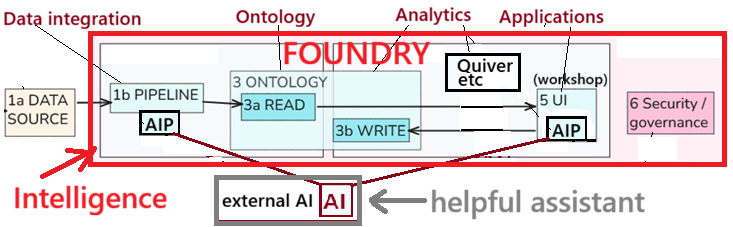
(2) PAL’s focus has been on mission (and your enterprise focus should be too)
PAL’s focus has always been on “mission”, and that fits in perfectly with the focus your enterprise should have when using AI. It’s a war out there, and sometimes its hard to distinguish friend and foe.
Excellent YT video intro to Palantir (c401-2026.0303-best-partner-anduril.mp4 @830)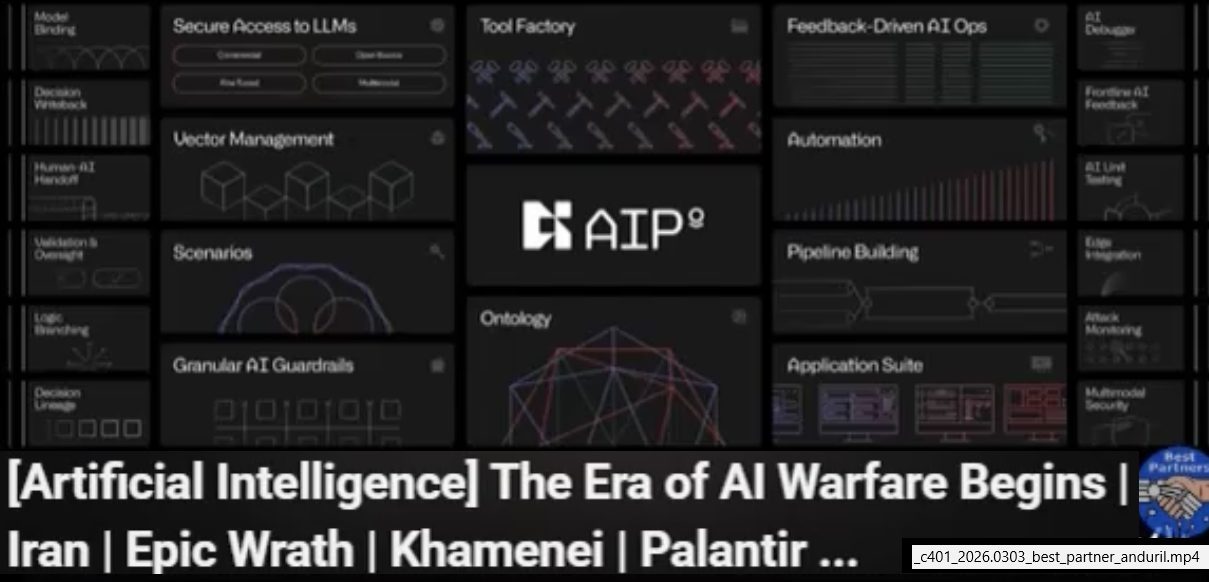
(3) PAL assigns to AI the missions that AI was born to do
Understanding that AI has no real intelligence is critical so that you can focus on the missions that AI can do a million times better than an intelligent human.
PAL assigns to AI the missions that AI was born to do (such as multi-language OCR and translation) (c401-2026.0303-best-partner-anduril.mp4 @1000)
1 What AI can do FOR your enterprise (help you WIN)
AI can help you win:
- (1) AI’s pattern detection can be applied to a lot of enterprise work (similar to the military mission)
- (2) AI + (external) agent (code like Python) can automate a lot of enterprise work (main execution loop, calling external tools, etc).
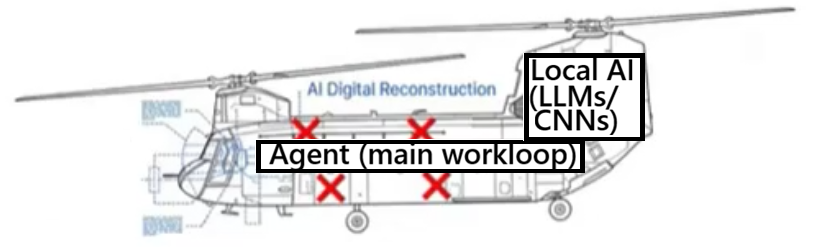
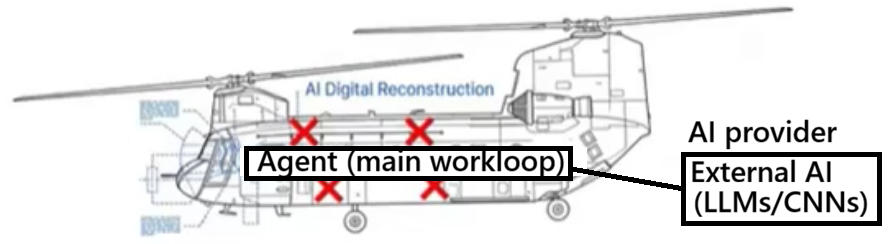
What exactly is an enterprise? In the diagram below the enterprise is a helicopter! (see section 1 for details).
- This is an intentionally unusual example, added to show you that AI is not just limited to creating tokens.
- When the copter was hit and the X marked systems failed, action was taken as suggested by an AI system that input the status of all copter systems.
- Result: The copter and crew made it home.
- AI has absolutely no intelligence (its pattern recognition), but if AI can do this for a copter, imagine what it can do for your enterprise.
THE MOST IMPORTANT LESSON ABOUT THIS DEMO: I am just guessing about how the copter AI system works. But its a good guess. Because I understand (hands-on) the core of how AI works
NOTE: The copter AI could be remote, but hosted by a trusted source (and accessed via a secure connection).
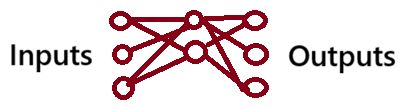
NOTE: LLM TF only uses a single output for the next token. Its important to remember, however, that a NN can have any number of inputs, outputs, and layers (need a better pic TODO). It the copter example, there would be many inputs (from various sensors) and many outputs (what flight params to adjust).
Details about the Chinook incident
- A Chinook was hit in Caracas, the pilot hit by 4 bullets.
- The AI system (NN) had been trained with data for many scenarios of failed components/sensors, etc.
- This meant the inputs for lots of system components could be fed constantly into the NN, constantly generating a single classifier for the current state.
- That single classifier could be decoded to determine what (if any) action needed to be taken on various components.
- A massive number of various scenarios were programmed (trained) into the NN.
- The training resulted in a NN that would probably generate the correct answer for an input that was not trained into the NN. This is the true magic of the NN… that (1) you can auto-program with training SW and (2) previously unseen combos of inputs will result in a valid answer.
- WHen the copter was hit and the X marked systems failed, action was taken according to NN output and saved the mission.
- To do this without a TF would have require a massive amound of (1) manual analysis and (2) manual procedural programmming. Proc code would have run in big loops (not like the straight-shot) would have run the risk of sufficient combo coverage.
- This is the “magic” of AI: (1) Not requiring any real intelligence, (2) just straight-shot processing of inputs through the TF.
2 What AI can do TO your enterprise (you LOSE)
Much of how AI can help you win with (above) can also be used against you.
- LLMs can see your data flows, so
- LLMs can replicate your your main app (ALPHA) and/or
- deny your SOVereignty (force you to use their LLM).
DOS/WIN replaced many apps, but not because they were better, but because DOS/WIN owned SOV.
Imagine the AI is remote (not on the copter) (diagram below). This is similar to the AI used in most enterprises.
- The AI provider can now use all of you AI prompts to reconstruct your business (in thish case secret business).
- Of course this is not allowed for military applications. But then why for your enterprise?
3 AI (LLMs) is pattern recognition
For details see page Core LLM concepts (new version of concepts 26.0929 V1). This includes code from TINY DEMO PAGE.
(left) Real intelligence (the human brain) and (right) the clocked binary algorithms that compute tokens (the core of LLM AI)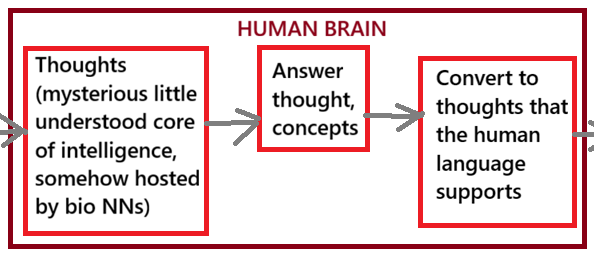
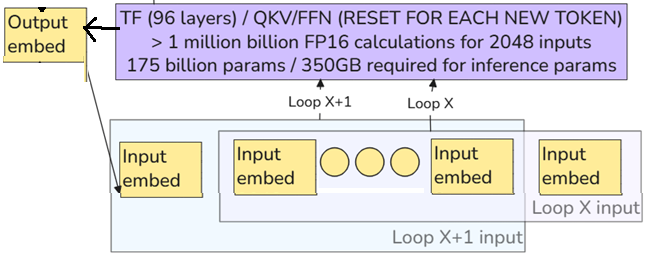
AIPU internal circuit reqs (shows the magnitude of the pattern matching algorithm task)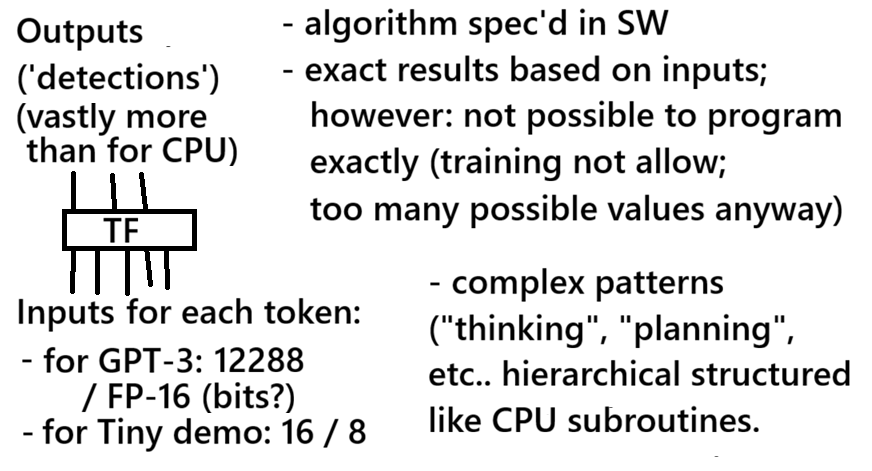
4 What are SOV, ALPHA
- Alpha = your company’s business model, workflows, secrets, and
- SOVereignty = your independence from a specific AI LLM provider.
The DoD has resources to use local models for their Palantir systems. Your enterprise may not have such resources – you probably need to use external (not under your control) LLMs. thats a problem. A very big ALPHA/SOVereignty problem. PAL Foundry solves (or manages) those ALPHA/SOV problems.
A possible historical comparison would be SOV/ALPHA for the Windows OS.
- Early in Windows history
- SOV: You depend on Windows
- ALPHA: Your app (if Windows needs such an app) quickly becomes a part of Windows.
- Later in Windows history
- SOV: Windows is just one of many OS’s. Dev tools allow apps to be created for multiple OS’s (giving users more SOV over choice of OS).
- ALPHA: With the advent of server/client architectures, ALPHA stays on the server. Detecting the server ALPHA on the client side becomes a lot more difficult (kind of like what happens Foundry forces an enterprise to keep ALPHA on the enterprise server, away from LLM prompts).
ALPHA: A chinese official leaked ALPHA (this would not happen had they been using Founddry).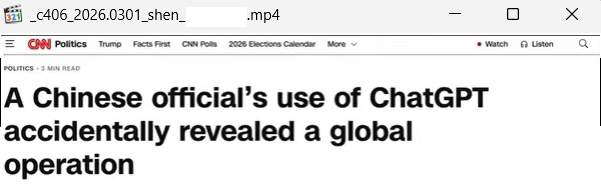
SOV: Palantir AIP provides sovereignty in model requirements (@600).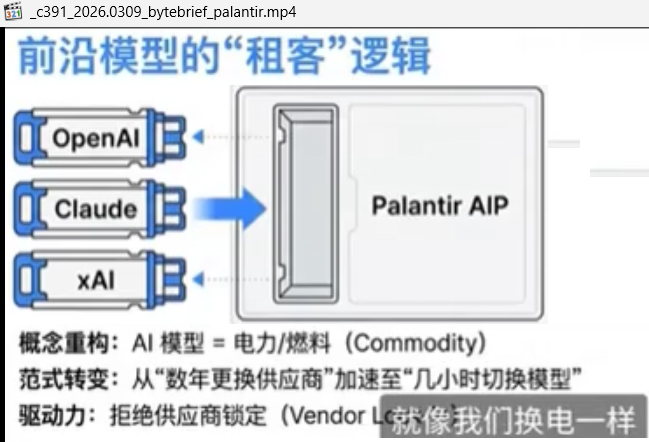
5 How AI steals ALPHA/SOV
Imagine if in the early DOS/WIN days, WIN had to adhere to a specific programming interface; any OS that supported that I/F could be used. But thats NOT what happened. WINDOWS intentionally locked you into their monopoly. LLM shops are trying to do the same.
- 5.1 Stealing ALPHA. A pattern matching algorithm needs the patterns of others to survive. Just like a search engine wants to crawl the universe.
- 5.2 Stealing SOV. If you stored some of your UNIQUE ALPHA in LLM1, then switching to LLM2 wont work if LLM2 responds to your high level prompts differently.
- 5.3 Demos (FIX THESE OR DELETE)
5.1 Stealing ALPHA
An example of stolen ALPHA: Cursor (right upper) was using Claude (left lower) as a remote LLM; not long after that Claude came out with its own version of Cursor (Claude Code) (c375-2026.0316-best-partner-cursor.mp4).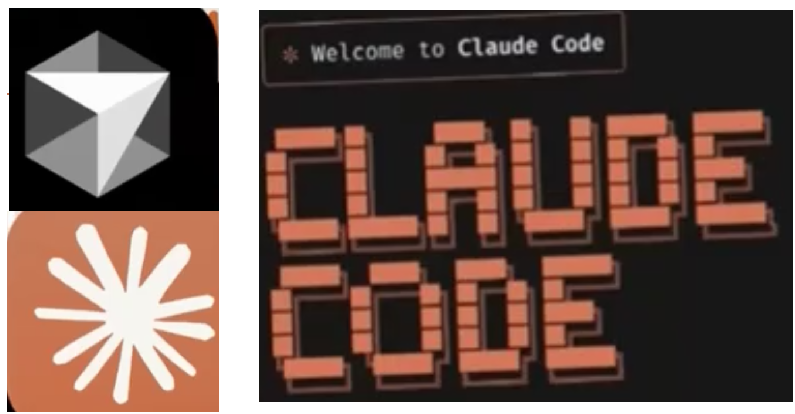
Frontier LLMs need training (pattern matching) materials to stay on the frontier. Because a pattern matching algorithm needs the patterns of others to survive. That includes your enterprise ALPHA that the LLM can resell to the world for the cost of generating tokens.
Your procedural logic (extAgent)
- is far more intelligent and reliable than the simulated “thinking” of LLMs (that is based on pattern recognition and training)
- because the intelligence of a human was used to program a procedural spec in the extAgent.
The definition of ALPHA:
- “ALPHA” = Alex Karp’s term for your core biz logic.
- The core logic for your business is not in the AI, but in your business processes. Your core business logic/ideas are intelligently encoded hard logic, not patters “learned” by an LLM during automated “training”.
- The core procedural code (pipeline, ontology, analysis) is your secret. You may use external LLMs as assistants, but you never give them enough to steal your ideas.
The definition of ALPHA by Alex Karp
(left) If you migrate too much of your ALPHA to an LLM, then (right) that LLM may end up offering your ALPHA to sell tokens.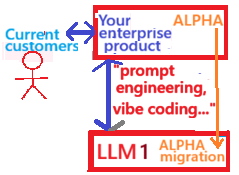

5.2 Stealing SOVereignty
If you stored some of your UNIQUE ALPHA in LLM1, then switching to LLM2 wont work.
In diagram above in 5.1 “prompt engineering… vibe coding..” this means that your enterprise is defining increasingly higher level prompts that are interpreted in a specific way by LLM1. INevitably you start to adjust your enterprise side to the specifics of LLM1. Switching to LLM2 will probably results in unexpected responses.
- The more your enterprise sends your ALPHA to an LLM, the more you are risking not only having ALPHA stolen, but loosing SOVereignty.
- From the very beginning their goal is to lock you into their LLMs.
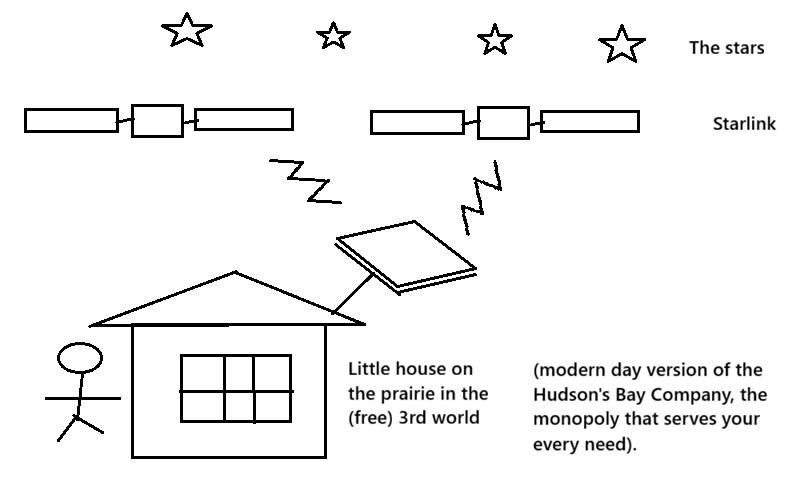
- Note that Musk might be taking a unique tactic to deny SOV. Musk might be able to use his control over StarLink to force customers to use Grok.
(55-222)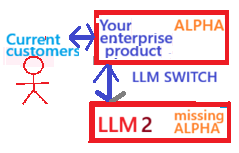
5.3 Demos (FIX OR DELETE)
(1) Practical: Mining (Foundry demo)
This Foundry demo possibly shows one way to get workflows from data. I am not sure this applies to AI stealing ALPHA.
If ALPHA is leaked to the LLM, then something like the following might occur:
- At first the ALPHA would be stored as RAG.
- The ALPHA is trained into the next model. This would not 100% replicate the original business practices, but make a pretty quick and good v1.
ALPHA mined from plagiarized prompt submissions? (screenshot from Mining demo D5)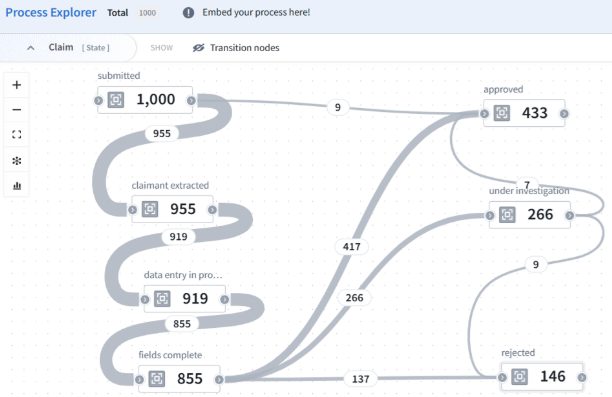
(2) Theoretical: Humanoid FSD (Change this to a better example or delete)
Imagine you hire a humanoid AI robot as a taxi driver. And that humanoid sends AI requests to an external AI lab (the humanoid is basically an external agent to an LLM; let assume for the simplcity of this demo that the humanoid does all visual object recognition (etc) locally).
You use this taxi driver to run some kind of specialized delivery business. And business is good. You found a niche market that is scalable and profitable. The driver gets commands from you, but has to access the remote LLM to “understand” these commands.
You dont realize it, but the LLM quickly learns everything about your business. And its only natural that the Frontier lab starts wondering about offering such an intelligent taxi driver as an integral part of its model.
You humanoid was a Trojan horse who gave you business ALPHA to an AI titan.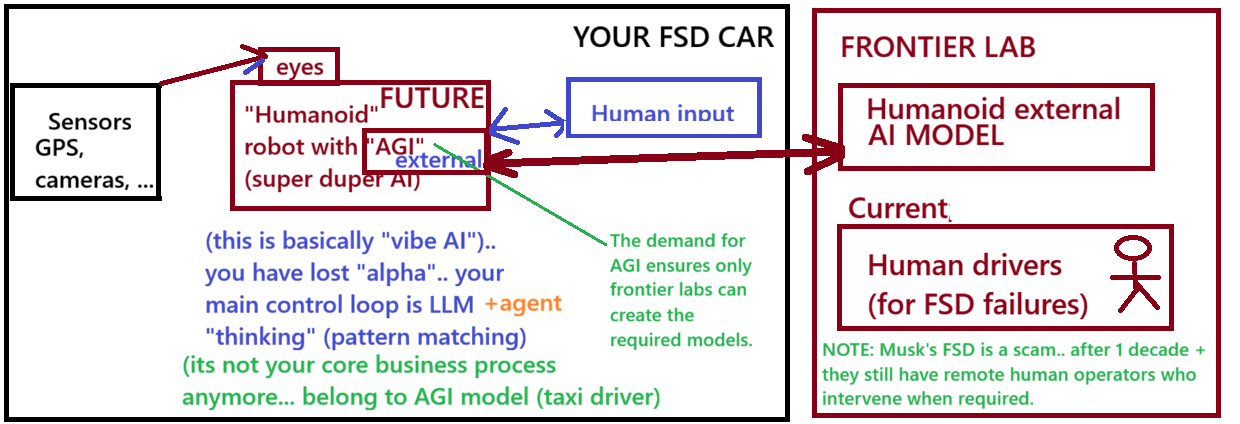
7 AI hype and scams
- 7.1 The AGI distraction
- 7.2 The monopolists
- 7.3 Those pushing the technological global new age
- 7.4 Empty promises… and customers don’t seem to care?
7.1 The AGI distraction
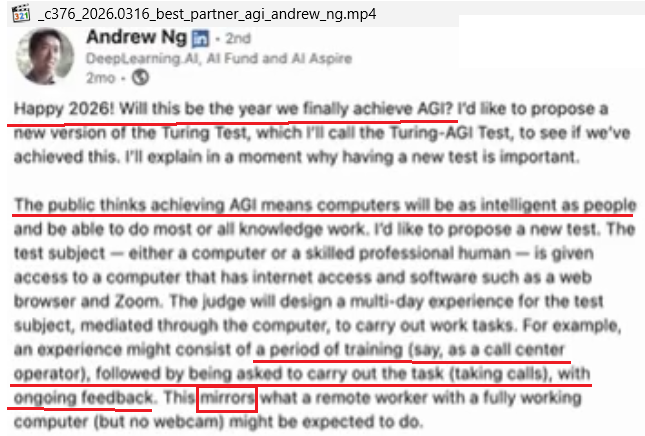
Below is an example of typical AGI hype… from one of AI gurus I trust the most. The more I understood how AI really worked, the more I lost trust in the AI gurus. I find it hard to be believe that these people confuse computational probabilities (AI) with human intelligence (in this example, Andrew is confusing automation with AGI intelligence). I think their ideas are simply whatever is most profitable for them (nothing bad in that, but just be honest about your motives).
Andrew says below “Will this be the year 2026 of AGI?”. He then talks about a computer will pass the AGI test if it can carry out the work task as well as a skilled human. Am I missing something, because this whole topic of AGI being achieved by some test reminds me of my classmates and I remarking in Junior High school (50 years ago) that calculators were already smarter than humans because they could do complex math so well. So now 50 years later AGI is achieved if some binary calculator can pass some test? Do these people have even the slightest idea of what is of intelligence?
- LLM shops want you to believe that LLMs are intelligent so that you Become totally dependent on their wares (why bother thinking about anything if a super-duper AGI is going to be doing all the thinking for us all?).
- This benefits LLM shops at the expense of those who made plans based on such baseless claims (ADD LINK TO BESTPARTNER _c376-2026.0316-best-partner-agi-andrew-ng.mp4 WHERE SAID THAT CEO’S ACTUALLY STARTED STOPPING INVESTING BECAUSE AGI WAS GOING TO TAKE OVER).
- NO NEED FOR PAL TYPE SYSTEMS, or FOR ALPHA/SOV. You just take one LLM (whoever is promising AGI) and it will do everything for you.
AGI is not just a buzzword, its a New Age… and nothing matters but getting there ASAP
- We are doing something sooooo revolutionary, a new age of aquarius… uh, of AI. anything that can push this forward is great… and if you give us a lot of money and we dont reach it, then give us more.. the goal is everything (for you; for us its the money along the way)
- SOV: no problem, just trust us
- FINAL RESULT: You will own nothing (no ALPHA) and be happy (doing vibe coding and paying for output tokens)
7.2 The monopolists
I saw a great video of Peter Thiel from about 10 years ago where he was letting the cat out of the bag about his approach to business: Monopolies. Focus on something that you can monopolize. Smart.
Musk’s Skynet (Starlink) might be planned as the ultimate AI monopoly. He will do a great job to convince you
- (1) no SOVereignty? no problem, just trust us, you only need our LLMs;
- (2) You lost your ALPHA? No problem, you will own nothing and be happy”.
StarLink is probably also a Trojan Horse whose real goal is some kind of monopoly and ensuring extraction (and resale) of ALPHA. A better name might be “PlagiarizeLink”. The new omnipresent AI in the sky. Being able to listen in to all the chats about business processes. It would be interesting if Musk could pull off what MS did 40 years ago (create a world wide monopoly). As with FSD, he will promise the world and deliver far less (and become super rich in the process).
7.3 Those pushing the technological global new age
Meanwhile, Musk’s advances are help copycat nations make very progress (Musk’s Tesla factory in China was a great gift to the CCP, not unlike Fauci’s gift of bioweapons tech in Wuhan; both were for the same reason: money). Building a high tech battery-powered car shop in China. What could go wrong? All that high tech xfer. Now Musk is leaving China, and Chinese battery-powered cars are taking over much of the world. I recently saw where Elon and his mother had nothing but good to say about China. Nice job Elon.
Jensen Huang is also a staunch supporter of selling to the Chinese. If you think this does not affect you, think again. The baseline tech that Musk and Huang transfer to China form the basis of technical and military advancements higher up the food chain. The EU is being flooded with Chinese EV cars, and Germany’s traditional auto makers are paying the price.
7.4 Empty promises… and customers don’t seem to care?
Musk has been promising FSD for a decade, and still has not delivered. Tesla has an army of human service engineers to help any Tesla that gets “stuck” in some kind “does not compute!” situation. FSD is still a pie-in-the-sky wish. he has not delivered, but he has sold a lot of “FSD” cars, and no Tesla owners seem to hold it against him (I guess Musk did his best)
- Its natural human behavior for his fans to forgive the real life Tony Stark for not delivering, focusing instead on what he has delivered, in the belief that all great achievements dont always occur on time.
- This is similar to how the Gates discovered that people were very forgiving of the shortcomings of his OS if they believed he’d eventually get it right.
Andrew Ng warned that if AI made too many promises and did not deliver, then they might lose their funding. Ng is my favorite Guru, but even he is in the end focused 100% on the health of the AI business.
8 Your allies
(1) PAL Foundry is not after your data. It was a system that focused on core intelligent workflows (agents) long before usable AI appeared.
A magician and his Palantir; in real life Palantir is the real thing.
(2) ZAI is not selling you anything. ZAI only wants to use hands-on demos to gain deep AI insight and to document it all (and make it public). The initial impetus for ZAI was a reaction to the shameless hype from the great AI gurus about AGI (which I saw as one of the main reasons to create this website).
Zip-tied AI.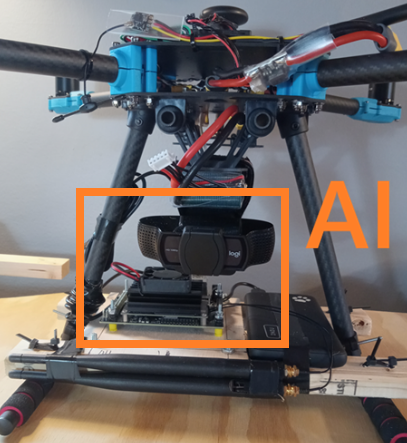
9 SOV/ALPHA past/present/future
TOC
- 9.1 (PAST) ALPHA/SOV Before LLMs. Microsoft used Windows to extract ALPHA (40 years ago). Microsoft did all it could do to steal your alpha and sovereignty. The goal was a monopoly (the same for AI shops now).
- 9.2 ALPHA/SOV with LLMs for Enterprise. AI APIs LLMs and Foundry (5ya). AI is tracking far more than your clicks and your searches. You even start using it for business processes and intel. But you are not appreciating what the token sellers are up to.
- 9.3 ALPHA/SOV with LLMs for the PC?. Jensen was thinking about PCs with NVidia built in. What ZAI suggests is (1) new open HW PC standard, (2) with built in Foundry type system to protect SOV/ALPHA.
9.1 (PAST) ALPHA/SOV Before LLMs
SOV/ALPHA were issues long before AI (and Palantir existed long before AI). THe goals were to steal your alpha and sovereignty and monopolize. Then and now.
TOC
- 9.1.0 Mainframes (60ya)
- 9.1.1 Microsoft used Windows to extract ALPHA (40 years ago). Microsoft did all it could do to steal your alpha and sovereignty. The goal was a monopoly (the same for AI shops now).
- 9.1.2 Browser + URLs [REST API].
- 9.1.3 Client/Server [REST API] (20ya). The basis of networking and remote access. Data security becomes a real problem.
- 9.1.4 Google Search . AI APIs for AI search engines (20ya). The Google search revolution based on language models. AI started tracking you and stealing your data in real time.
9.1.0 Mainframes (60ya)
HW was everything in the mainframe era. Its interesting that with the PC, IBM allowed MS to keep the SW ownership. IBM was HW focused, and let the HW become open standard because they thought the PC would be nothing.
Were ALPHA/SOV a problem back then? Need to chat with GPT about this… It think
- SOV was a problem, but there was no solution. You were locked into certain HW.
- ALPHA was not a problem. There were just a few (American) providers. Those problems started with the internet (the East German hack of a computer being one of the first examples)
9.1.1 Microsoft used Windows to extract ALPHA (40ya)
ALPHA/SOV was an issue way back with WINDOWS 40 years ago. To run an app, you bought an install disk, then installed on PC with (DOS/)Windows. Microsoft could do this in their dev labs, and analyze in detail all the calls to the OS and libraries. And easily replicate any product that they felt needed to be a part of Windows. MS apps would be ready for any upcoming Windows updates, which unfortunately would have small changes that lessened the performance of competing apps and required extra time and effort to fix._
There was no safe alpha for app/agent in consumer PC market. anyone could (1) buy the app, (2) install on OS, and (3) (especially Microsoft) reverse engineer the workflows with the help of OS calls.
Agent (app) on Win OS on PC; the red line is where ALPHA is lost.
One I (vaguely) remember was WordPerfect. They came out with an excellent word processor for Windows (DOS?). This was an excellent product who core functionality and workflows were quite easily extracted by those who build the OS that the app was dependent on. Soon MS came out with their own WordPerfect: Microsoft Word. Word was a mess, some chaotic implementation that MS bought from someone else, but MS added an extra layer with a WorkPerfect style UI and workflows. When MS changed their OS, MS.Word was already ready to go. Others like WordPerfect had to play catch up. Because the OS was the “HOME” of consumer. It was a business that made Gates very wealthy.
How Microsoft did it back then
MS controlled the operating system. For some reason IBM when they came out with the PC they thought the OS was not important, and licensed it from MS. That made Gates the richest man in the world. The OS was the LLM of that time. That incredibly complex piece of binary logic HW/SW (HW was from Intel, the Nvidia of the day) that everyone was dependent upon as the basis for running their apps. The OS had a Kernel (compare roughly to an LLM transformer) and a bunch of SW surrounding the Kernel that controlled the kernel and interfaced with the external world. Comparable to the LLM internal agent that surrounds the TF.
OS (=> LLM)
The apps back then were the equivalent of the (external) agents of today. They contained the core business logic that defined a product. It wasn’t really possible to take the app code and reverse engineer, but MS did not have to. They knew the OS inside and outside (like the Frontier labs know their LLMs), so all they had to do was scan what the app was sending/receiving to/from the OS and the reverse engineering was easy.
App (=> “extAgent”)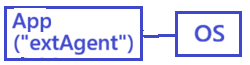
9.1.2 Browser + URLs [REST API]
- The browser is the agent. Stateless. Very little “ALPHA” on the app/agent (browser).
- The revolutionary part: the plumbing used to connect browser/server. That plumbing would form the basis of client/server REST connections.
The REST API (with URL and DNS) was a revolutionaryly simple way to connect 2 computers.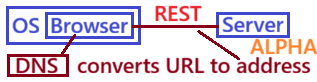
9.1.3 Client/Server [REST API]
Client/Server browser-based apps/agents.
Client/Server (REST apps/agents).
9.1.4 Google Search
Google has a whole ecosystem built around those that use its search engines. In a way, AI is just a souped-up version of a search engine (google hit the jackpot by basing its search not on keywords, but on the AI-version of the real meaning of words and sentences; the core of AI is the LLM that converts keyword (token) input into real “machine” language QKV representations of meaning for effective pattern matching).
Client side agent inside browser; there is a risk of ALPHA leakage in chats.
Client side agent running in OS; high risk of ALPHA leakage.
9.2 ALPHA/SOV with LLMs for Enterprise
AI APIs LLMs and Foundry (5ya). AI is tracking far more than your clicks and your searches. You even start using it for business processes and intel. But you are not appreciating what the token sellers are up to
PAL Foundry offers solutions (on RAILS, similar to REST API CONTROLS). Foundry is a modern enterprise platform that is the best solution for avoiding ALPHA loss (and the perfect culmination of ZipteiAI’s AI focus).
The solutions are primarily (1) ALPHA governance and (2) LLM sovereignty
TOC
- 9.2.1 Enterprise + ext LLMs = (REALLY BIG) PROBLEMS
- 9.2.2 Foundry + internal model
- 9.2.3 Foundry + ext LLMs provides (1) ALPHA governance and (2) LLM sovereignty. Foundry stops the steal.
9.2.1 Enterprise + EXT LLMs = (BIG) PROBLEMS
- PAL was the first to alert to the problem of ALPHA when using external LLMs in enterprise (Alex Karp’s “Alpha” concept discussions)
- When you start using external AI (external Frontier models) as assistants, then you have to take special precautions so that these Frontier labs can not
- (1) steal your enterprise intelligence and
- (2) integrate into their model or
- (3) sell to others (in the form of tokens).
Access to external means severe risks for ALPHA leakage.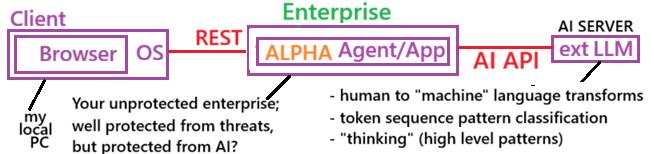
9.2.2 Foundry + internal model
This is the ideal solution.
- The model is internal so no sensitive prompts are sent outside the enterprise.
- You are using Foundry for governance and “hot swapping” of LLMs.
- Foundry provides the tools to create your own models, so if you wanted you could switch to custom models. Note that locally trained and deployed model is a lot of work. And for a lot requirements for AI in an enterprise it would be overkill.
The real solution for AI security today are internal models (shown below) (ideally with a Foundry installation, which provides governance and supports “hot swapping” of LLMs). Foundry can also be used to create your own models (the problem with this solution: locally trained and deployed models are a lot of work; for a lot requirements for AI in an enterprise it would be overkill).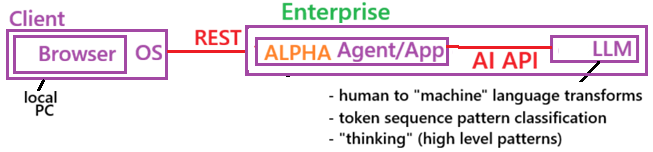
9.2.3 Foundry provides (1) ALPHA governance and (2) LLM sovereignty
- on RAILS, similar to REST API CONTROLS
- governance that secures ALPHA
- SOV that provides hot-switching of LLMs
9.2.3 The practical solution: Foundry in the enterprise (Foundry provides (1) ALPHA governance and (2) LLM sovereignty) and external LLMs.
- EXAMPLE: Keeping alpha using Foundry (D2 example). In D2
- AI usage:
- 3 difference models are used.
- 2 models in the pipeline to prepare the dataset.
- 1 model in the AIP logic in the UI to call the LLM that answers a question based on pipeline data.
- No model gets the whole picture.
- Models only get the grunt work (doing what transformers do best: pattern recognition)
- The “thinking” is real in such an algorithm, becuase a human specifically wrote the logic
- This is the opposite of how “thinking” is simulated in LLM’s.
- AI usage:
9.3 (D) ALPHA/SOV with LLMs for the PC? (AI API v3a / v4a)
- 9.3.1 PC + LLMs = (BIG) PROBLEMS
- 9.3.2 (D) (FUTURE) ALPHA/SOV for the PC?
9.3.1 PC + LLMs = (BIG) PROBLEMS
Its hard to estimate the SOV/ALPHA risk for AI on a PC, because the threat occurs on the AI side (nothing is changed on the PC). The AI will also steal non-traditional secrets. SOV is hard to quantify.
AI is a significant (non-traditional) risk for SOV/ALPHA on a PC.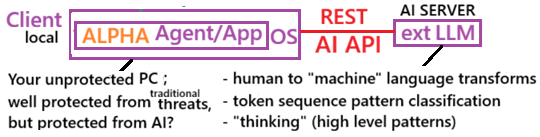
9.3.2 (FUTURE) ALPHA/SOV for the PC?
Its hard to estimate the SOV/ALPHA risk for AI on a PC, because the threat occurs on the AI side (nothing is changed on the PC). The AI will also steal non-traditional secrets. SOV is hard to quantify.
I read something about how Jensen Huang wants PCs built that host his HW. But we need
- Open standard HW.
- A PAL-type system to protect ALPHA/SOV.
Foundry protection on a PC?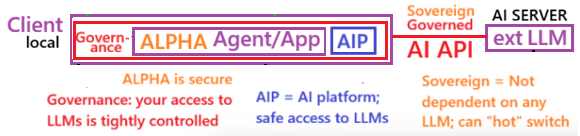
26.0930 (v1 26.0804)