3c Enterprise
This Enterprise section focuses on Palantir Foundry (reorganized 26.1120).
- Foundry is an excellent enterprise framework (with integrated AI) with lots of demos.
- Foundry offers a generous free trial version.
To learn Foundry:
- Use Foundry’s FDE AI assistant constantly.
- Follow the ZAI learning path (consider using ZAI MS Word docx’s as a template for your own study notes).
- Repeat, repeat, repeat. It takes weeks to master the basics (UI, workflows, terminology, core concepts, etc). ZAI substantially minimizes this learning curve.
TOC
- 1 Concepts (rewritten 26.1117)
- 2 Foundry free tier sign up
- 3 Core ZAI hands-on tutorials (do these start to finish)
- 4 ZAI versions of Foundry demos
- 5 Project/doc sources (Foundry and ZAI)
1 Concepts (rewritten 26.1117)
General concepts:
- Foundry is a modern enterprise platform for data integration, ontology, analytics, applications, AI assistance, and governance.
- Foundry represents the logical culmination of ZiptieAI.
- Foundry takes a very practical no-nonsense approach to AI in the enterprise (Foundry was a market leader over 20 years ago, long before AI).
- Palantir offers a generous Foundry free trial.
- Foundry’s built-in AI assistant (FDE) makes hands-on self-study practical.
Click on the heading above for programming concepts.
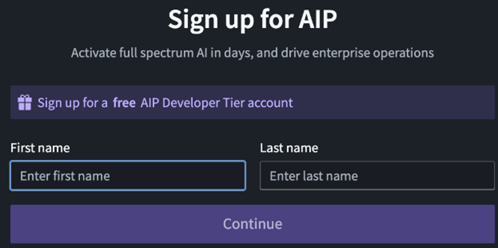
2 Foundry free tier sign up
I did not record how I signed up, and its not a process I can repeat. But I can tell you the following:
- You must be in a country that PAL supports (thats only a few countries).
- You can NOT use a VPN.
- You must have a passport or some picture ID of good enough quality for facial recognition verification. My passport is almost 10 years old, but it still worked.
- You need a camera on your PC to take a pic of yourself. PAL will compare your ID and the pic.
- I think you need a mobile phone number (and email).
3 Core ZAI hands-on tutorials (2)
These tutorials are the most effective method to learn core Foundry skills:
- 3.1 FDE (and other prerequisite skills) (26.1120).
- 3.2 Foundry QS0: Detect/analyze haystack needles (start with Foundry example) (26.1119).
- Quick realistic real-world demo (finding matching intelligence records in a large set of data) without AI (Palantir’s original mission; Palantir was founded 25 years ago, long before AI).
- Intros haystack datasets, pipeline (that detects needles), and objects/maps/UI for display of needles.
- 3.3 Foundry QS1: Detect/analyze haystack needles (start from scratch) (26.1113).
- A non-realistic demo that focuses on mechanical details.
- Intros AI, actions, automation/scheduling, and governance.
- 3.4 Foundry deep dive (DD) (WIP).
- Intended as simple intro to all of the Foundry functionality/tools that were not introduced in QS0/QS1. Goal is the piecemeal intro of the missing pieces.
- After this, you can continue in section 4 doing (ZAI versions of) Palantir Foundry speedruns, demos, examples, etc.
- 3.5 (WIP) DIY (do-it-yourself) demos (26.1121)
3.1 FDE (and other prerequisite skills) (26.1120) (2.0)
Single source docx #685 (WIP) for FDE webpages (markdown and PNG’s are extracted by ChatGPT).
- Knowing how to use FDE (Forward Deployed Engineer, Foundry’s excellent AI assistant) is the most important skill you will learn.
- However, its also critical to understand FDE’s limits: My first 2 attempts to create a QS (my mistakes are instructive). I relied too much on FDE AI. Both tutorials worked, but the result was not something to use as a tutorial. Human intelligence and AI make a great team. But the human has to be in control. You need to reach a minimal level of expertise with Foundry so that you are always in control. Thats why you still ZAI to guide you through the basics.
- There are also several other things to be aware of before you start creating Foundry apps.
The FDE error that you will run into sooner or later (a show stopper; without FDE you are going nowhere)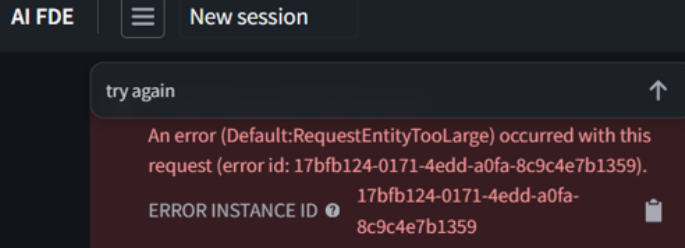
Its important to master the UI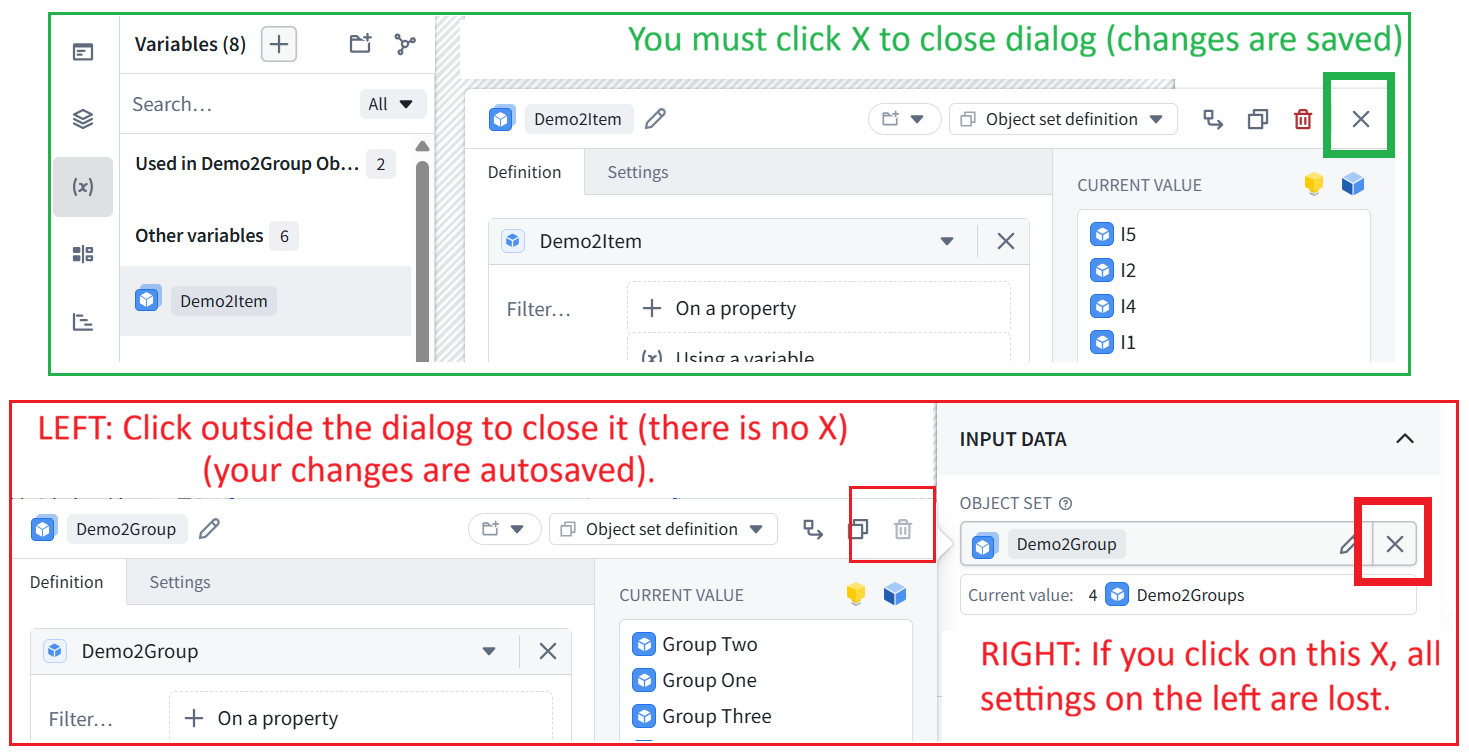
3.2 Foundry QS0: Detect/analyze haystack needles (start with Foundry example) (26.1119) (2.1)
Single source docx #686 for QS0 webpages (markdown and PNG’s are extracted by ChatGPT).
In QS0 you install a Foundry “needle in the haystack” real-world Example, then rebuild it yourself.
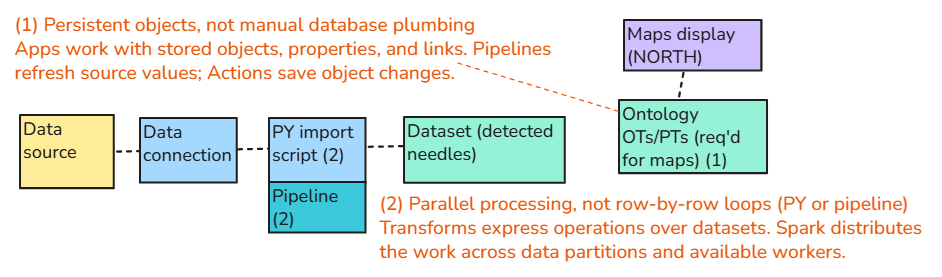
- The haystack: a collection of data records imported into Foundry.
- The needle: any record whose text or numeric properties match criteria expressed in a user prompt.
QS0 uses a real world example, but is a simpler demo than the next QS1 (that focuses on the mechanics of Foundry):
- Ch1: First steps (sign up/in, FDE)
- Ch2: PAL Example (real-world) install. The large and complex (haystack) dataset demonstrates the power of PySpark.
- Ch3/4: Pipeline (no-code) filters out the chaff (everything but the needles). Input 2 raw datasets (haystack, 5K rows) and outputs (needle, 4 rows) dataset.
- Ch5: Very basic ontology (a single object type, no actions, no links).
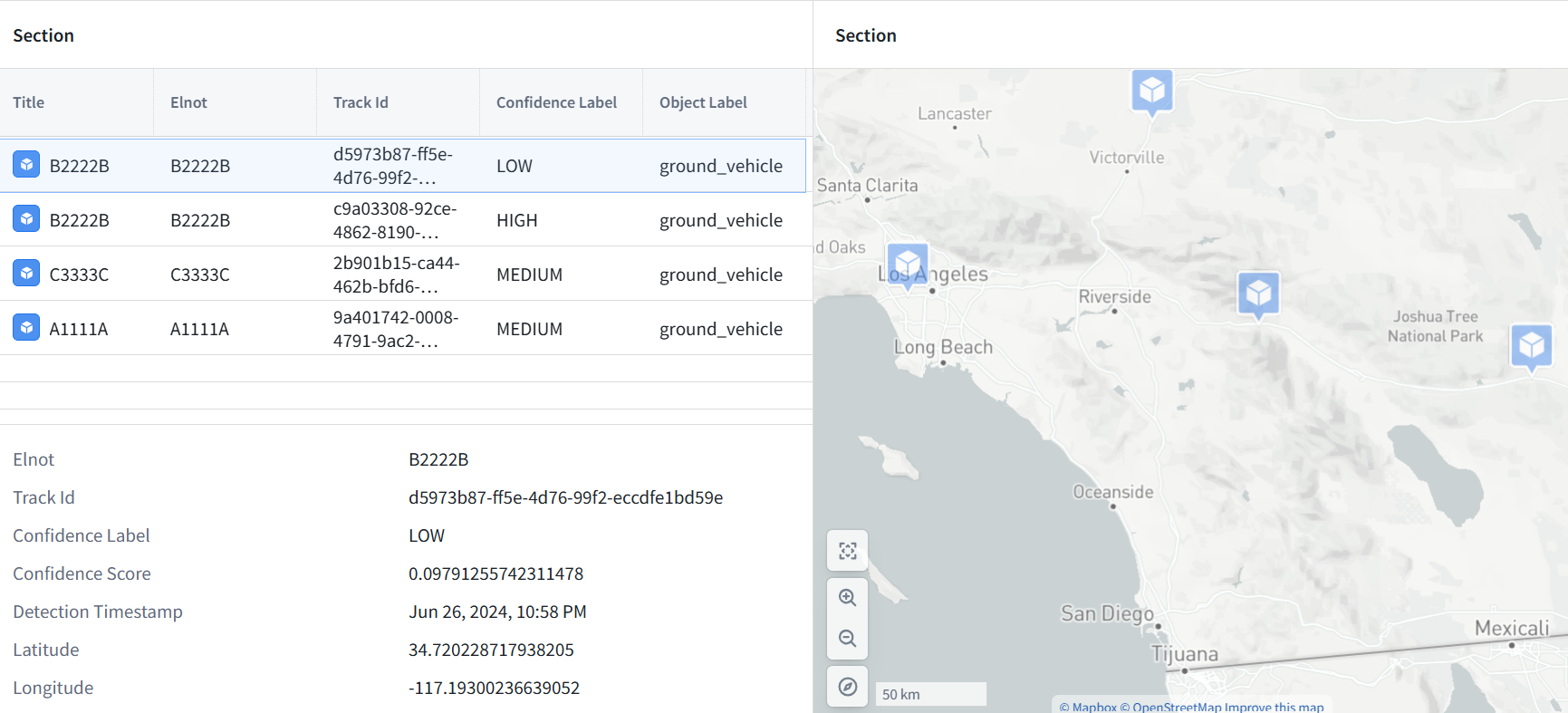
- Ch6. Display the needle dataset in the Maps tool.
- Ch7. Create a custom UI to display the needle dataset (display only; no actions in QS0).
3.3 Foundry QS1: Detect/analyze haystack needles (start from scratch) (26.1113) (2.2)
Single source docx #693 for QS1 webpages (markdown and PNG’s are extracted by ChatGPT).
QS1 is also a “needle in the haystack” demo (using Foundry to identify records that match user-defined criteria), but
- Ch1: MockAPI (very simple external datasource that you control).
- Ch2/3/4: AI. MockAPI records are very few and simple. But the messy human language content is not simple for a computer without AI. This is core reason AI is used in Foundry.
- Ch5/6: Actions. AI calls actions to create ontology objects.
- Ch7/8/8a: Automation (scheduling dataset updates and updating objects).
- Ch8b: Governance (access control, monitoring (especially of AI), etc).
How QS1 differs from QS0:
- Focuses on Foundry mechanics and workflows (a small dataset, not a real-world search demo).
- Python scripts replace the pipeline.
- Actions, AI (AIPL and functions), automation and governance.
Automation (Foundry checks for updates in the external data source)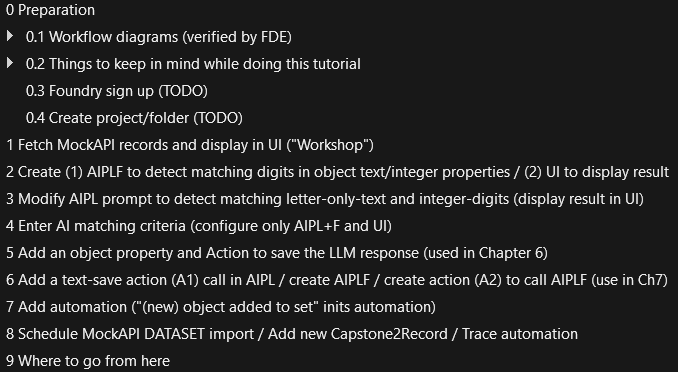
Example workflow diagram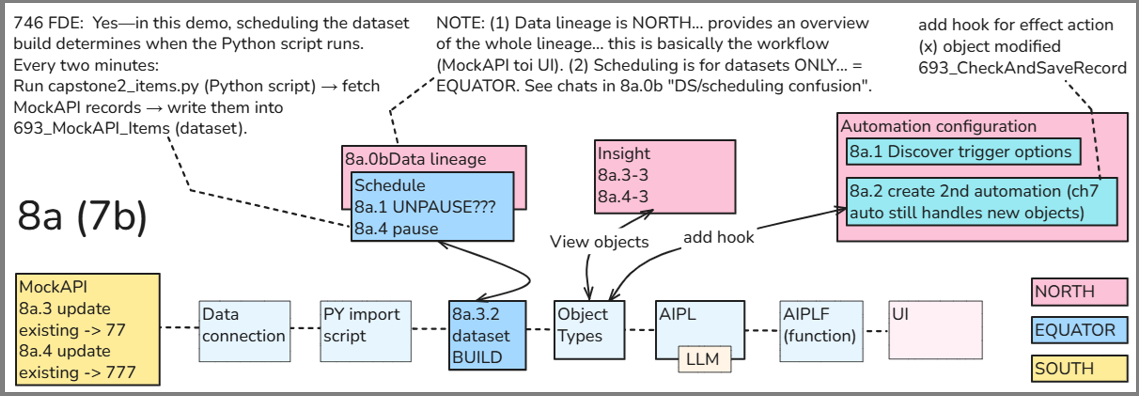
3.4 Foundry deep dive (DD) (26.1117 WIP) (2.2a)
The goal of QS0 and QS1 was to intro the basics with a simple goal — find the “needle in the haystack”. The goal of DD is to introduce the general “mechanics” of how Foundry works. The plan is to reference official PAL speedruns, demos, and examples in the DD.
Foundry deep dive master diagram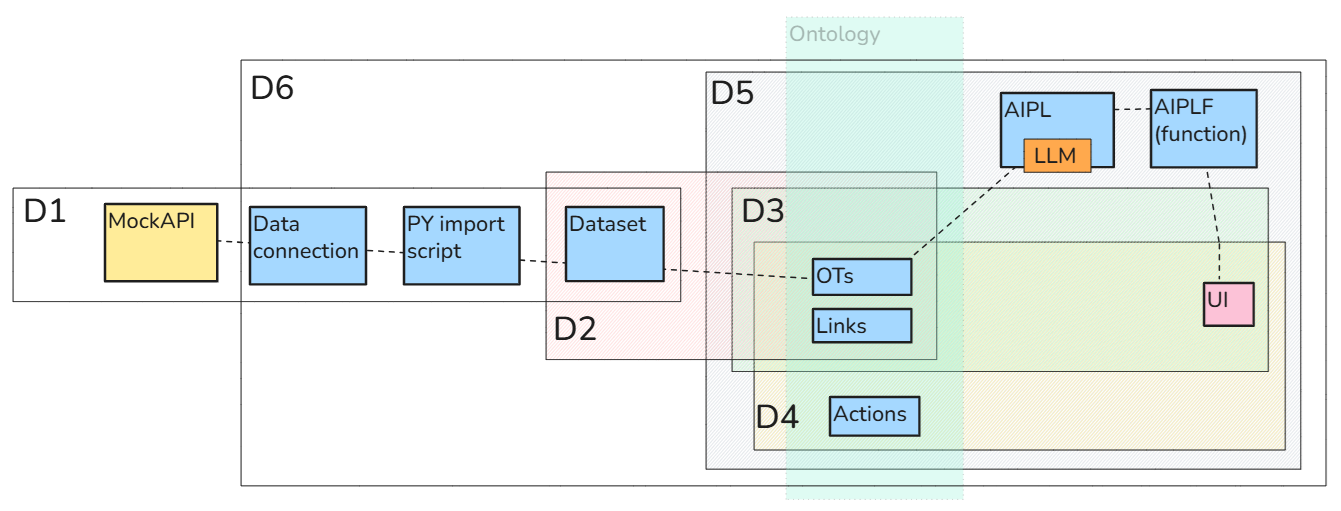
3.5 (WIP) DIY (do-it-yourself) demos (v1 26.1122)
The official demo supplies inspiration; DIY demos isolate and teach the mechanism.
- Section 4.3 catalogs the official Palantir demos.
- This section will contain demos
- inspired by those official demos
- but created from scratch
- and are minimized in scope and complexity as much as possible (while still demonstrating the target concepts)
There is current only 1 demo of this type (started from and built with the sole assistance of FDE).
- #620_pal_DIY9_aip-fde_demo_hn_.
DIY9 UI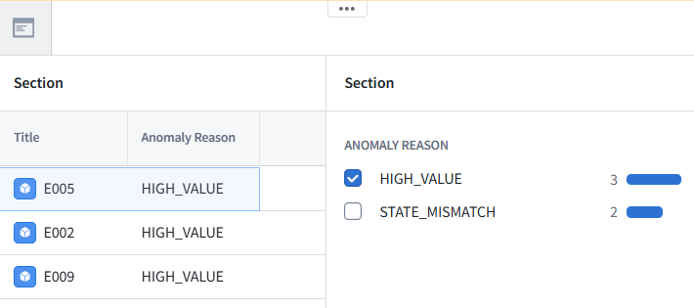
Diagram of UI connections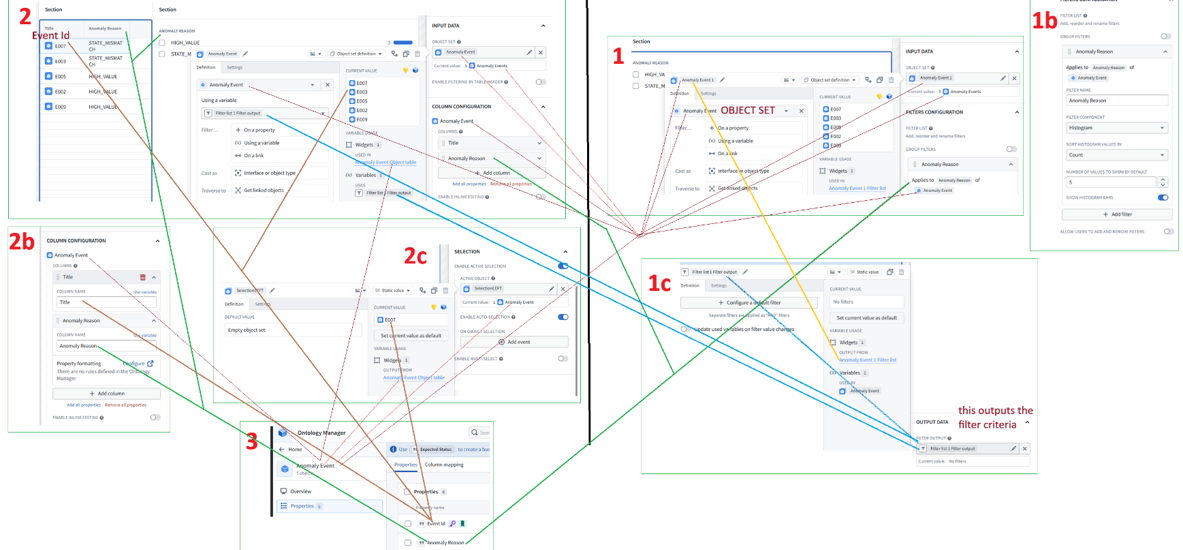
4 ZAI versions of Foundry demos (2b)
The second set of ZAI tutorials are based on Palantir demos:
- 4.1 ZAI versions of the core ~8 Foundry getting started demos. The core demos (speedruns) meant for beginners. (2b.4)
- 4.2 ZAI versions of PAL Examples (installable). Real-world demos. ZiptieAI uses one of these demos as the very first demo for beginners. (2b.5)
- 4.3 PAL demos master list (added 26.1121)
4.1 ZAI versions of the core ~8 Foundry getting started demos (2b.4)
Main diagram for demo D3 (Core workflow + Automation + AI external)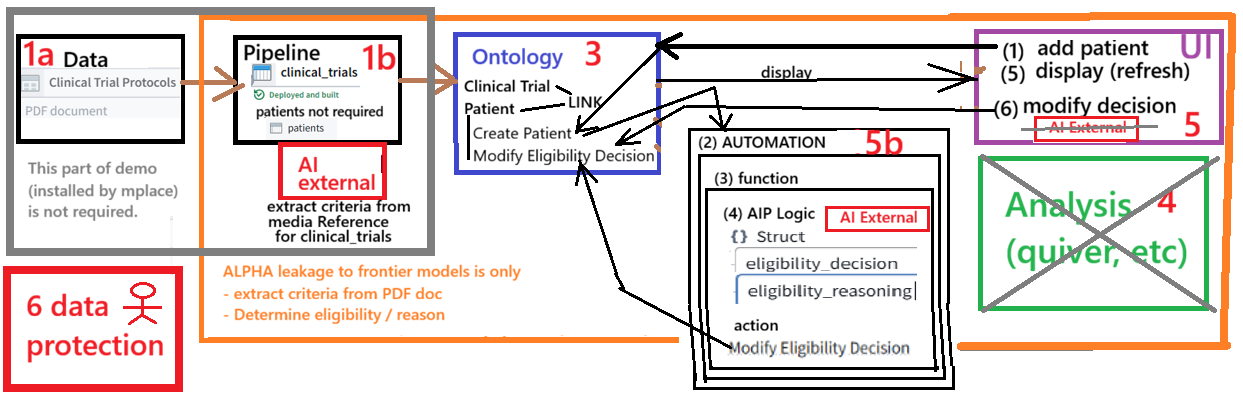
4.2 ZAI versions of PAL Examples (installable) (2b.5)
FULL-FEATURED BUSINESS APP (WITH INSTALLER). I originally planned to focus on examples These are complete demos that auto-install. The big advantage is that you start out with a (usually) working version that you can modify piece by piece. Examples are complete (usually more complicated) and have an installer that allows you to start with a (usually) working version that you can modify. ZAI adds a few extra steps:
- Install a second (experimental) example
- Modify that example at your own pace
For example E11: Palantir Foundry example “Integrate GeoSpatial data with Gaia” (26.0728). The ZAI docx for this example shows how to (1) install the excellent PAL example and then (2) replicate that example (reusing only the original example data; you recreate everything else).
Geospatial example: Input 2 sets of intelligence data (ELINT and ATR GEOINT), find ~3 million matching entries, sift through the 3 million to find 4 entries of interest, display the 4 entries on a map.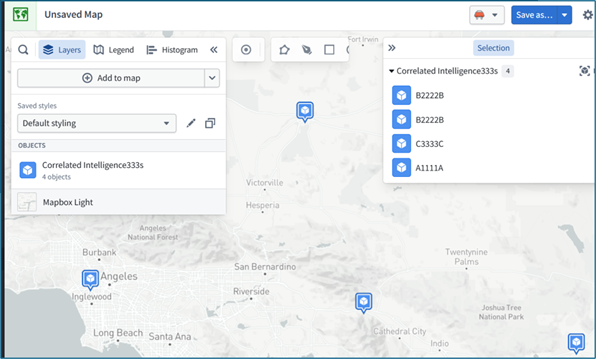
4.3 PAL demos master list (V1 26.1121)
- I created this list 4 months ago.
- This list has a hyper-linked TOC to all demos.
- They are organized by the PAL-defined Foundry user roles.
- I merely made much easier to search (and include in prompts to AI).
5 Project/Doc sources (3)
- 5.1 ZAI doc sources (docx, gdrive, this site, etc) (3.1)
- 5.2 PAL project/doc sources (3.2)
palantir.com/docs/foundry (this section provides an overview of Palantir Foundry docs)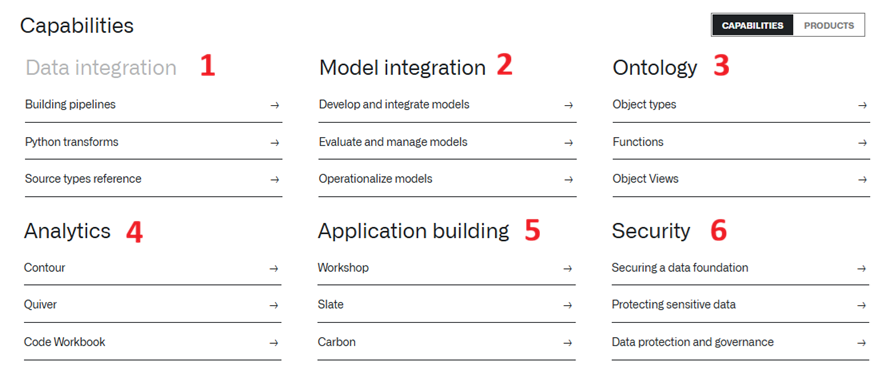
26.1121 (0814, v1 26.0702)