2.2b ZAI versions of the core ~8 Foundry getting started demos
This is currently (26.0914) the Main focus of (1) ZAI “3c Enterprise” and (2) ZAI in general:
This page describes
- the ZAI versions of 7 Palantir Foundry hands-on demos (“speedruns”) and
- 1 original ZAI demo (created with the help of FDE/GPT)
The target audience
- Do-it-yourselfers, hands-on learners. Those like myself who want minimal text/diagrams and maximum useful info for getting hands-on experience.
The goal
- Demo the Foundry core concept “ALPHA”/sovereignty (that Alex Karp has been talking about a lot recently).
- Demo other Foundry concepts (data protection, etc; my own take)
- Maximize ALPHA/sovereignty / Data protection (within performance/cost/complexity limitations)
These concepts extend to non-Palantir AI dev:
- The value of Foundry is
- Foundry forces compliance with safe AI practices. Foundry makes you think about the requirements for enterprise AI.
- Palantir leadership (such as Alex Karp) are very verbal about some very real problems with AI in the enterprise. They are the only ones exposing the real issues, the hype (while minimizing their own marketing hype).
- The drawbacks of Foundry are
- Overly complicated demos that dont stay laser-focused on the topics Alex talks about or on the main point of the demo.
- UI, terminology, and docs that leave you in confusion.
Future goals
- Create a set of “minimalized” ZAI Foundry demos that demo key concepts (especially ALPHA).
- Create a set of “minimalized” ZAI demos (not Foundry-based). I love working with Foundry, but
- I am not sure I can make a job out of it.
- The required mental overhead for working in Foundry is not insignificant.
- Foundry is specialized and (from what I have read) expensive.
- The lessons learned can be applied to AI projects not built in Foundry.
See also (these pages are very outdated … I will update later)
- PAL demo strategy.
- Important info about doing these demos. The advantages of website tutorials over Youtube videos (at least for beginners) and the critical importance of FDE (Foundry’s built-in AI chat tool).
TOC
HANDS-ON DEMOS (WIP)
- DEMOS 1) NO AI. These demos show that you dont need AI to do analysis (this is the safest option for sovereignty if viable).
- (1) DIY9 (from ZAI/FDE/GPT) (NO AI)
- (2) D1 (from PAL) (NO AI)
- DEMOS 2) Data protection (NONE). NONE = There are so far no specific demos for this functionality. But Data Protection is always there.
- DEMOS 3) AIP external (Agentic 1) (no automation; sovereignty risk via AI calls). You are using external LLMs. Processing occurs whenever data changes (there is no central loop running).
- (3) D2 (from PAL)
- DEMOS 4) Automation (Agentic 2) (AI external; major sovereignty risk via automated AI calls). You have automation which watches for data changes and then invokes actions (and AI). Major sovereignty risks.
- (4) D3
- (4b) D3b — Protecting agents that use external AI models (TODO)
- DEMOS 5) ALPHA – Mining (how frontier models steal your “alpha”). This demo is primitive and uses black box Foundry functionality (“mining”), but Frontier model labs are certainly experts at such techniques.
- (5) D5. This demo “mines” (extracts the alpha of) the workflows based on example data.
- (5b) D5b (FUTURE) (C5c): Demos for Maximize ALPHA/sovereignty / Data protectio (within performance/cost/complexity limitations)
- DEMOS 6) AIP internal (Agentic 3). The best solution. Calls to AI are only to internal models. These demos show how to create and deploy your own model using Foundry.
- (6) D3c
- (7) D8a
DEMOS 1) NO AI
Foundry’s core value proposition predates generative AI. It integrates data from different systems, represents entities and relationships through the Ontology, and helps users discover patterns, anomalies, connections, and business processes that are difficult to see in isolated datasets. In these demos, the LLM is an optional analytical assistant; the underlying data integration, Ontology, analysis, applications, and Actions remain useful without it.
Palantir emerged in the post-9/11 period with the broader objective of helping organizations connect signals across fragmented data and identify unusual patterns relevant to security and intelligence. The same architecture is now applied to commercial and operational problems.
(1) DIY9 (from ZAI/FDE/GPT) (NO AI)
DIY = do it yourself. Create your own demo.
SEE ALSO: 3.1 D9 (TO-UPDATE, DIY) = Haystack needle demo.
- All of the analysis is in the UI
- UI right widget: You select multiple property column VALUES for a single object type property (this is an object type property value selector; it has nothing to do with filtering).
- UI left widget: Displays objects whose property column values match selected property values.
- Classification of the demo:
- [1] Analytics (objects displayed based on selected object type property values)
- [2] Data protection (this is not something you setup; but Foundry controls restricts access to data for enterprise staff)
- Other aspects of this (very simple) demo:
- DIY = Do it yourself. I did this from scratch by chatting with FDE/GPT. This is a very important aspect of this demo, showing that this is possible.
- NO AI.
Functional overview (maybe I should not have crossed out governance; it is very important and always active, but you did not have to set it up)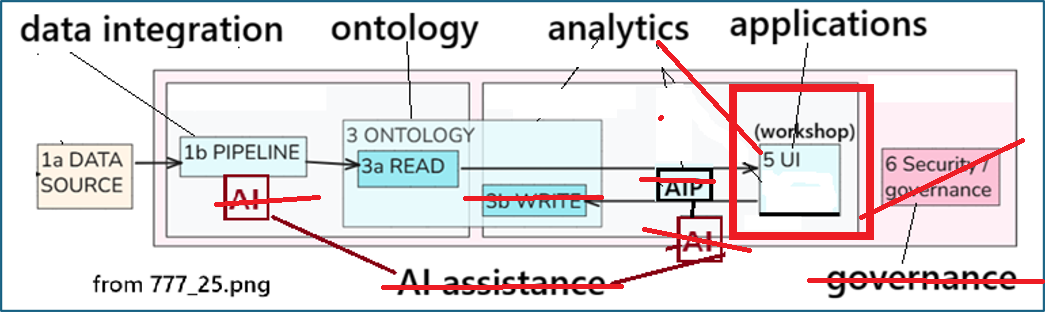
A simple diagram of the UI config (the PAL demos do not have such diagrams)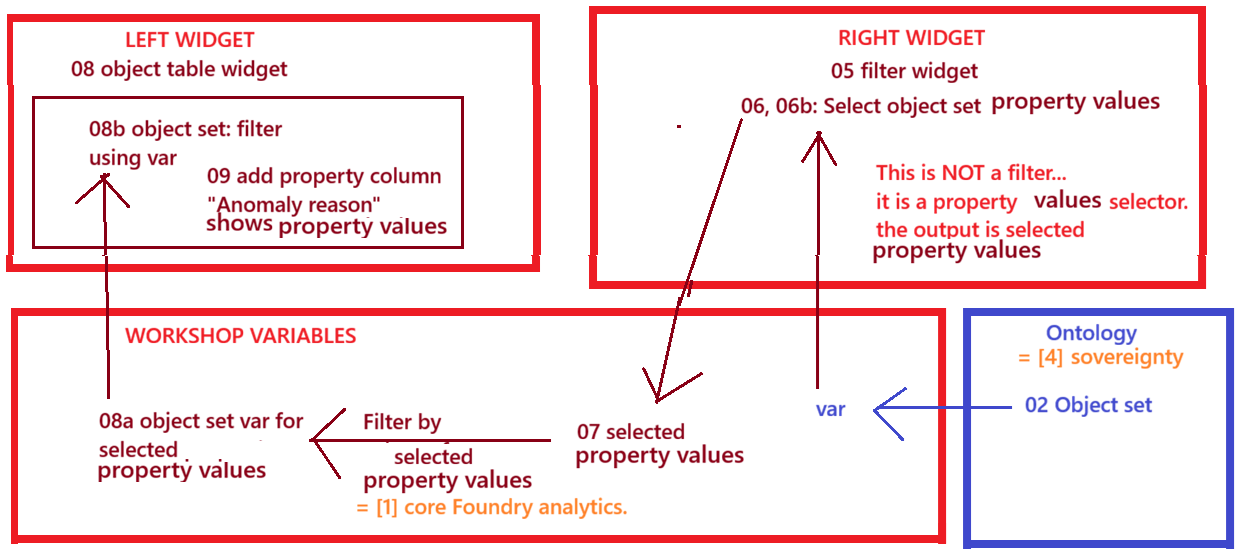
Resulting UI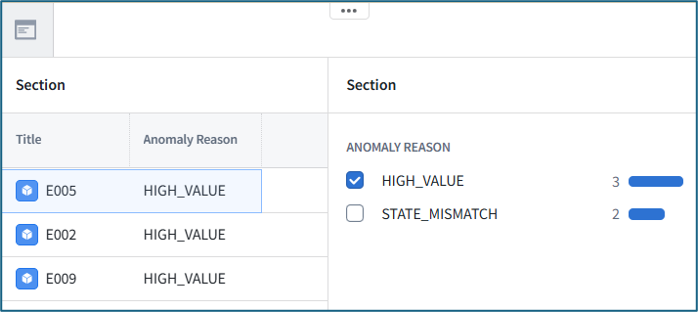
(2) D1 (from PAL) (NO AI)
SEE ALSO: 1.1 D1 = “Speedrun – Your First End-to-End Workflow” (26.0818).
- The action is called from the UI
- Classification of the demo:
- No analysis, just pipeline transforms and ontology action.
- [2] Data protection (access to the action is controlled.
- Other aspects of this demo:
- D1 is far too complicated for what it demonstrates (it is also the first demo on the PAL site).
- You create the demo from scratch by following the demo instructions (whose H1/H2 headers are not numbered on the PAL site; this significantly complicates the demo).
- ZAI splits the demos into 3 phases (this makes the demo much easier to finish and understand).
- NO AI.
D1 Main workflow diagram (simplified) (for details about this workflow see D1 workflow chats)
Action defition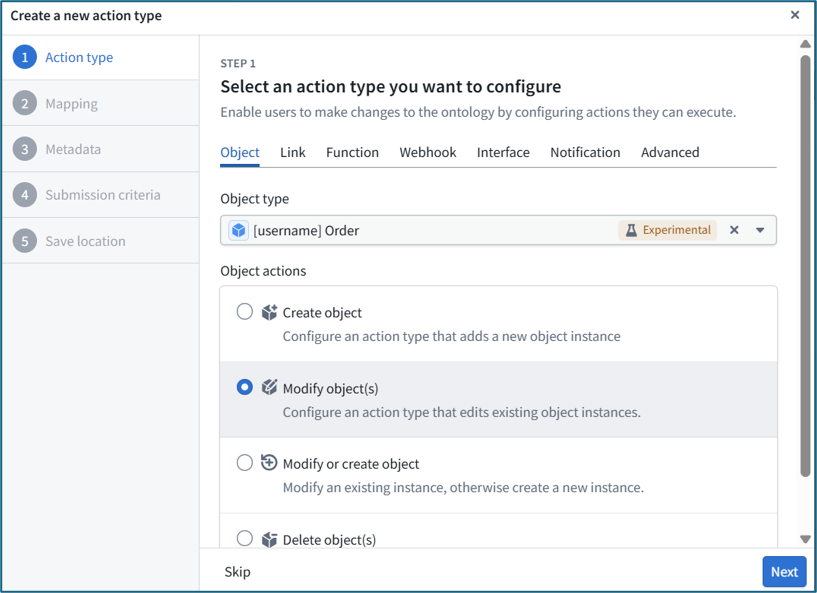
Action reference in the UI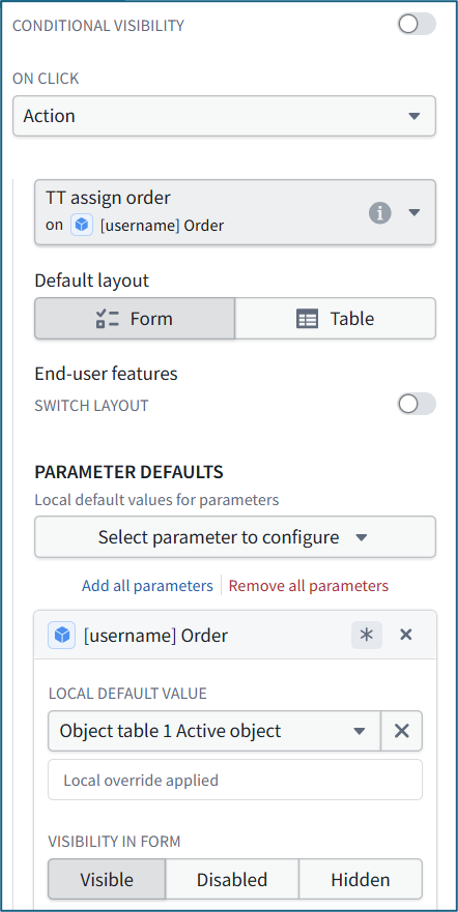
Upper left: Orignal order. Upper right: After reassigning to different employee. Below: Changes saved to data.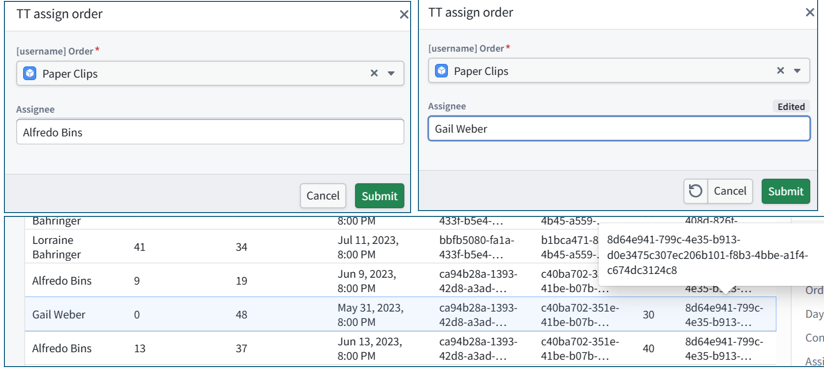
DEMOS 2) Data protection (no demos yet)
DEMOS 3) Agentic 1 (AI external / no automation) (sovereignty risk via AI calls)
(3) D2 (from PAL)
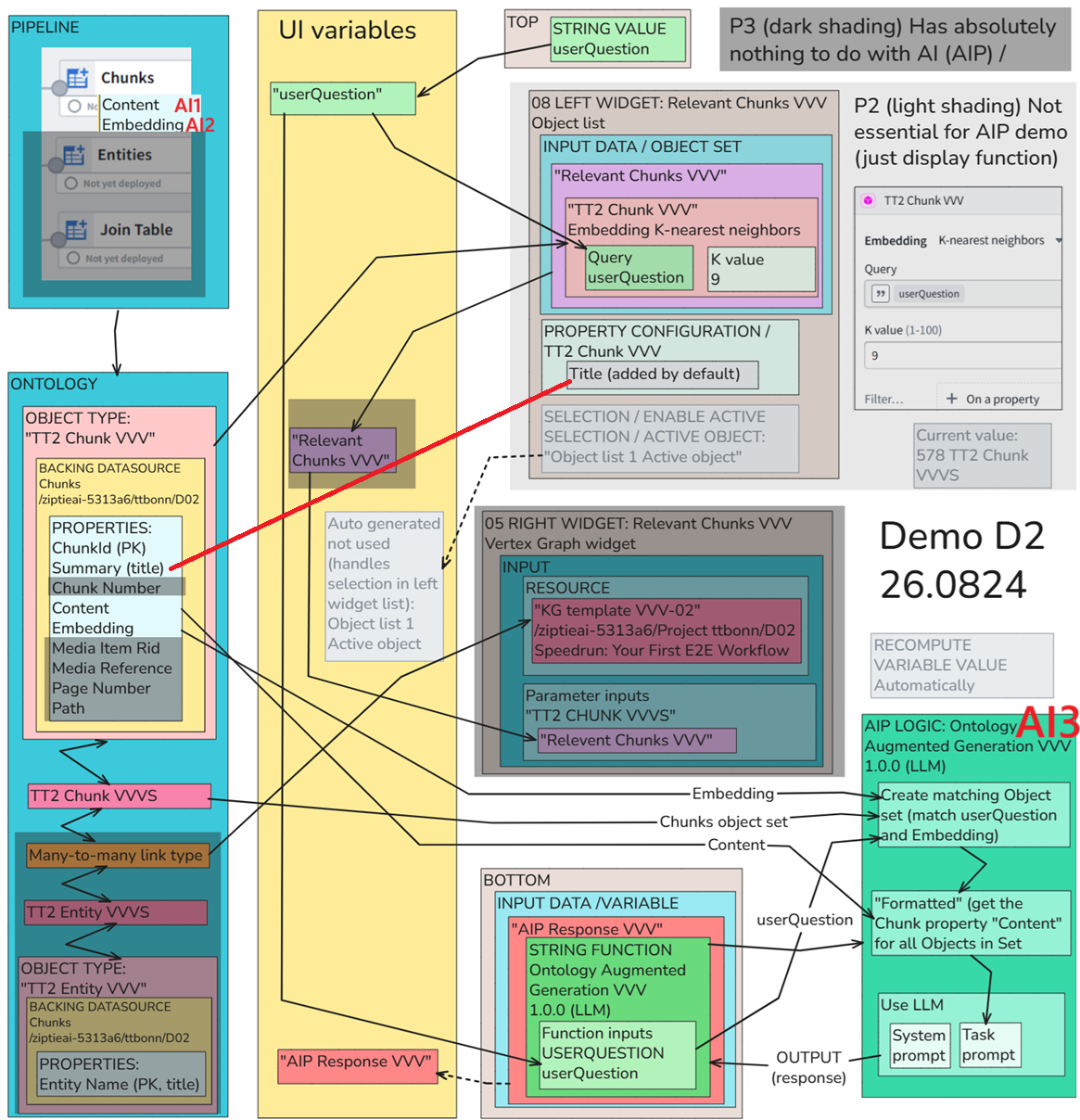
Your first app with AI. This demo was way too complicated. You can save a lot of time by following the ZAI version of the demo (and skip part 3 of 3 that has absolutely nothing to do with AI, but requires a lot of effort).0
See also: 1.2 D2 (WIP) = “Speedrun – Your First AIP Workflow” (26.0828).
In this demo you use ai 3 times (and each time a different model)
- 1 Summarize text chunk
- 2 Create embedding of summary (embedding)
- 3 Send selected text chunks to LLM to answer question (RAG)
NOTE: Selecting the text chunks using the embedding does not involve AI. The comparison is done in AIP_logic.
D2 (AI external (3) / no automation)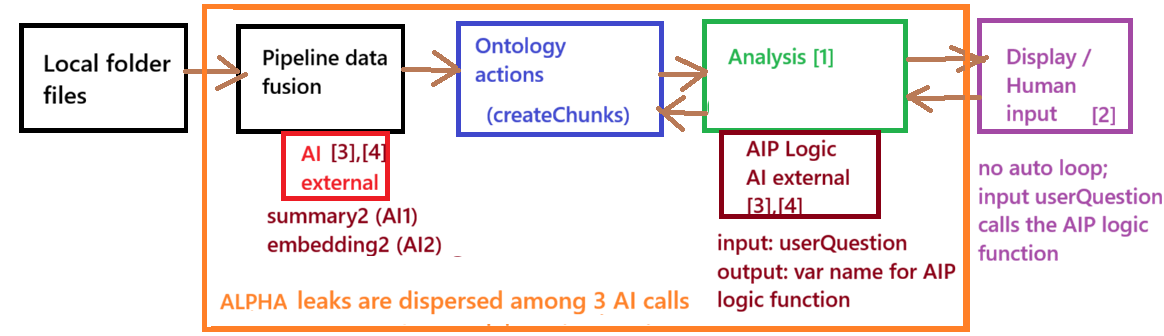
Diagram below shows more detail:
- Use AI (external models) to clean up extracted chunks of text from PDFs, to extract text keywords (“entities” in the demo) from the chunk, to match a question to chunks via embeddings (machine language representation of the question/chunks meanings (not keywords)), make a RAG call with the question/chunks to answer the question.
- About half of the demo has nothing to do with AI (the ZAI version splits the demo into 3 phases; phase 3 is the no-AI part; you can skip it).
Demo D2 first AIP workflow (ZAI) diagram (26.0828) (3 different AI models are used)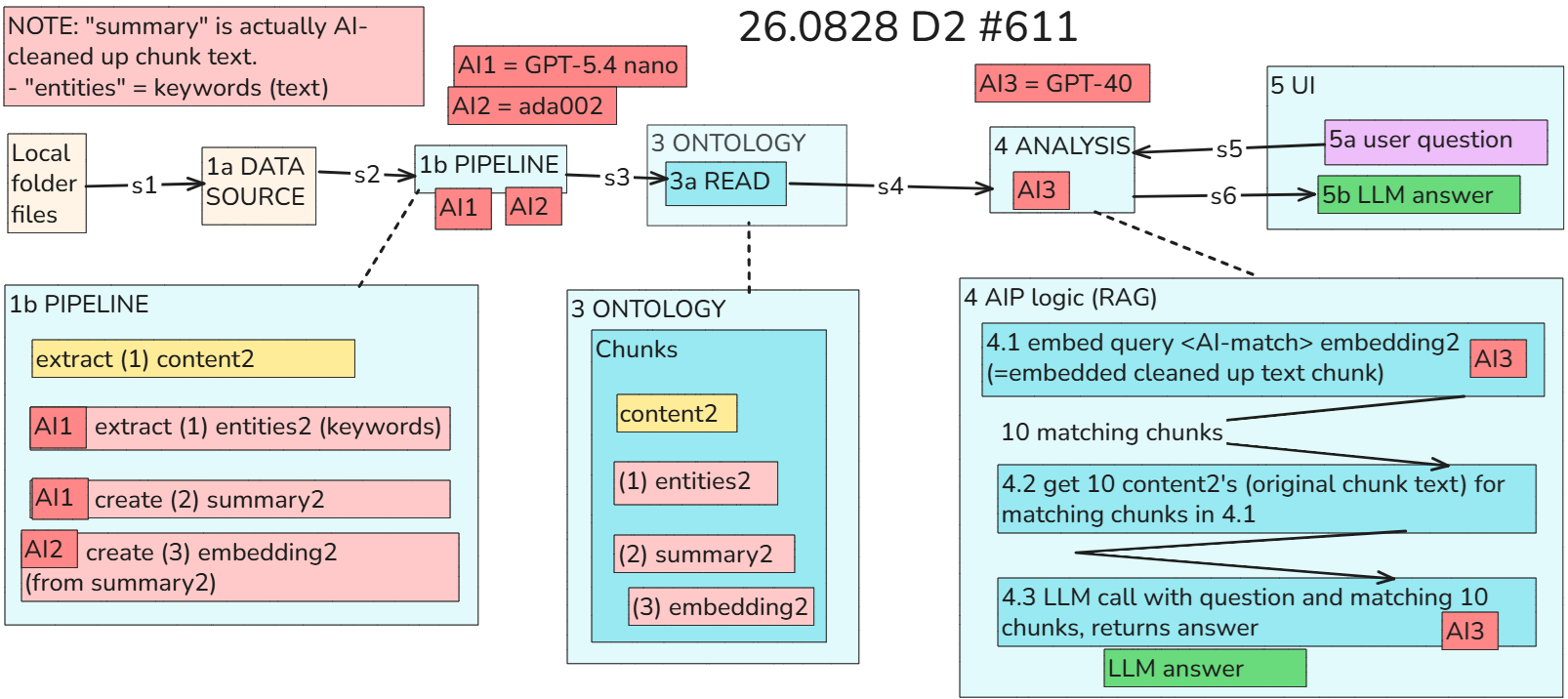
This is the diagram you really need when doing the demo. A diagram of the configuration steps for demo D2 (I spent days on my initial attempts to recreate D2 without this diagram; with this diagram its fairly simple; its even simpler if you do it in 3 separate phases as described in the latest version of the docx and if you simply ignore the shaded out parts of the demo).
DEMOS 4) Agentic 2 (AI external + automation) (major sovereignty risk via automated AI calls)
(4) D3
See also: 1.3 D3 (WIP) = “Speedrun: Your First Agentic AIP Workflow” (26.0902).
This demo builds the first autonomous operational agent in this sequence.
- (1) A new Patient is added through the UI and written to the Ontology.
- (2) Automate detects that the Patient entered the monitored object set.
- (3)(4a) AIP Logic evaluates the Patient against the selected Clinical Trial.
- (3)(4b) The governed Action automatically writes the initial eligibility decision and reasoning.
- (5) Staff review the result and may manually adjust the eligibility decision through the UI. This last step is important: Automation makes the initial operational decision, but staff retain oversight and can override it through a governed Action.
D3 xxx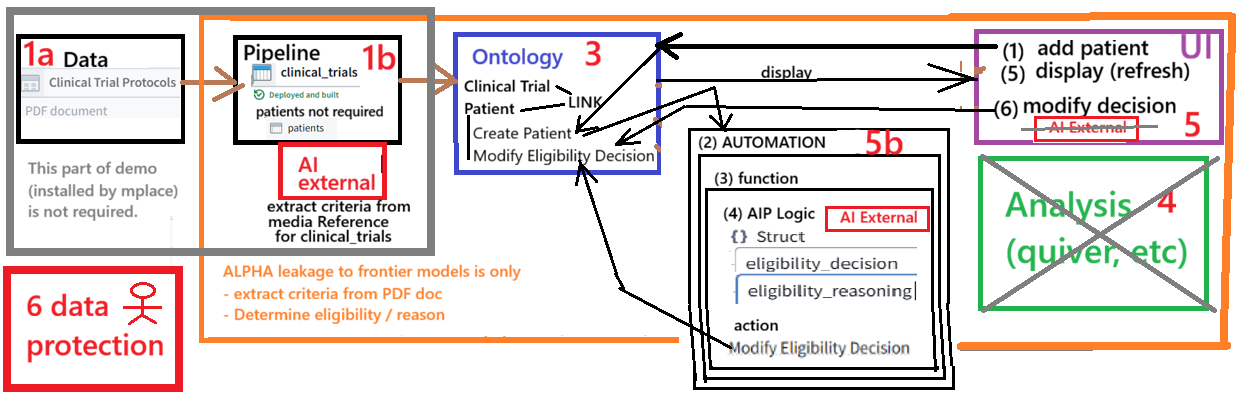
D3 xxx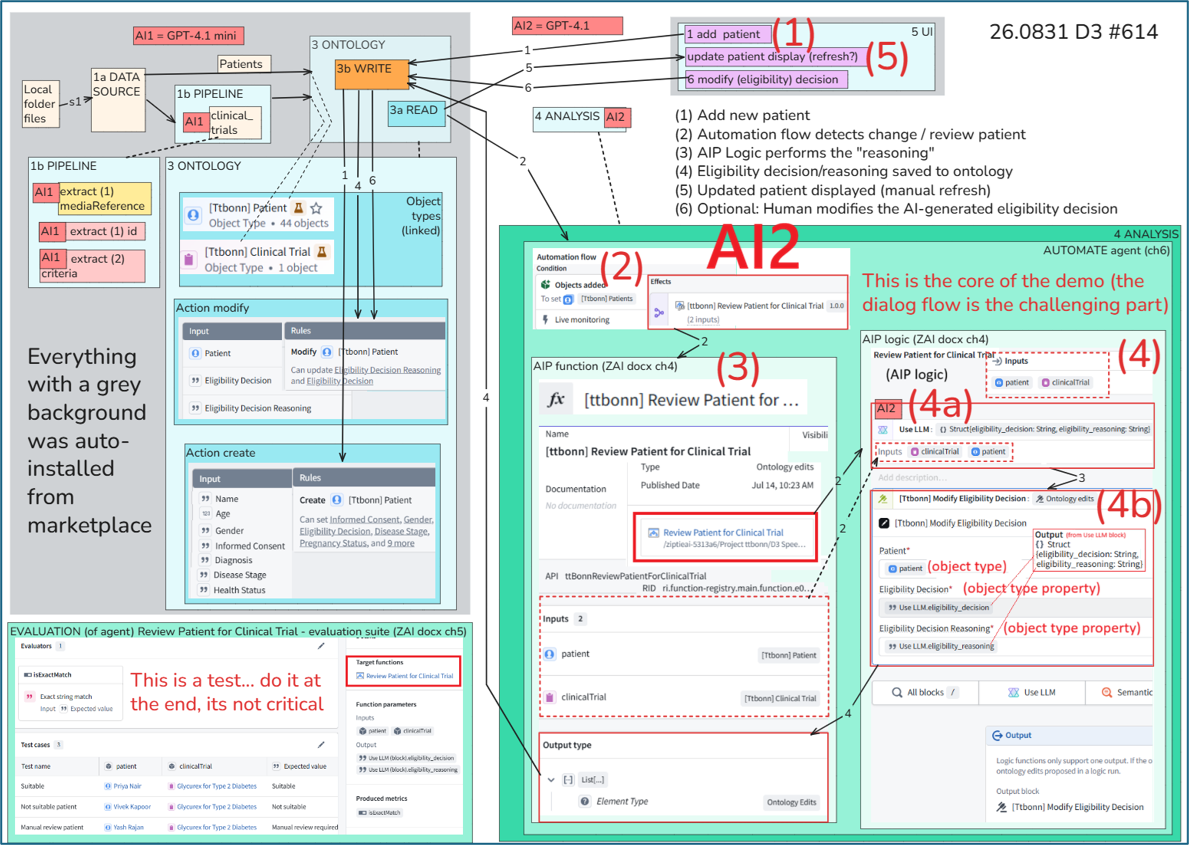
D3 xxx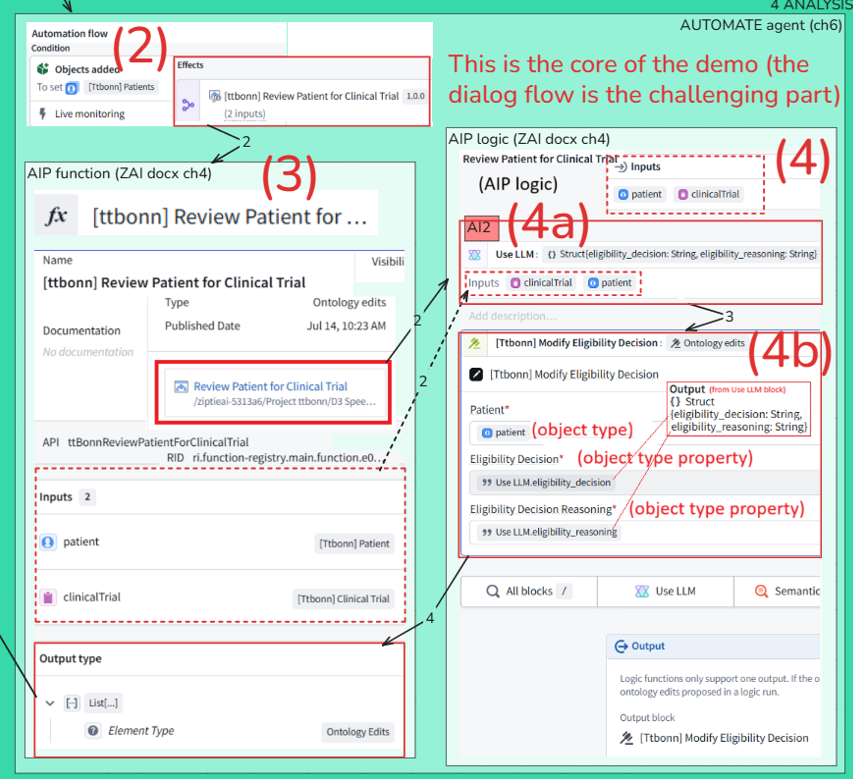
D3 xxx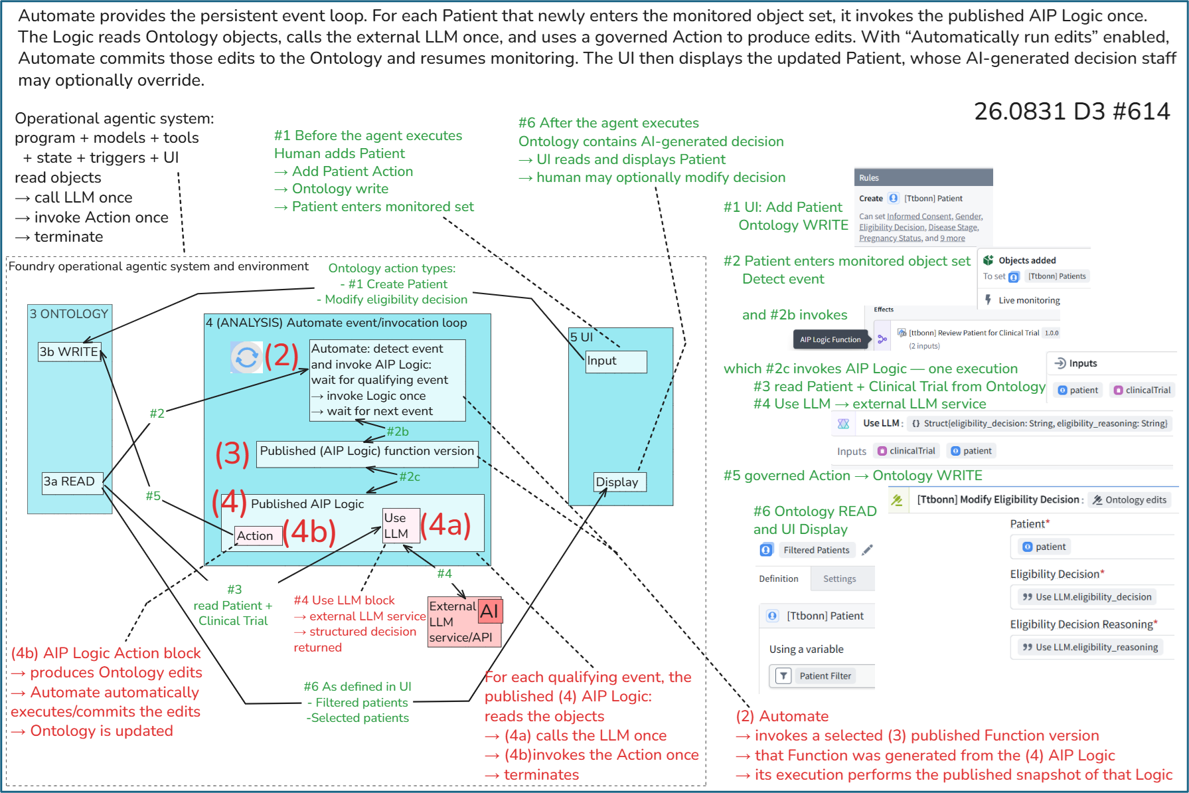
Both D2 and D3 send enterprise data to external LLMs—why does Palantir call D3 the first “agentic” demo? (26.0902)
Follow the above header link for details. See also the complete chat with FDE/GPT.
My own simple explanation (refer to diagram below)
- Demo D2 made calls to external LLM. That is (in my opinion)
- an AI agent
- that shares internal data with an external LLM.
- However, D3 (the next demo) does several things that D2 did not:
- (3)(4) Foundry AIP_Logic (a no-code function definition) calls an LLM like D2, but it also modifies the ontology (core objects)
- (2) Foundry Automation (event-driven automation service) provides a main loop that automatically processes (in D3 this means calling API_logic) any incoming onotology data changes.
[3] Demo D3 Foundry agent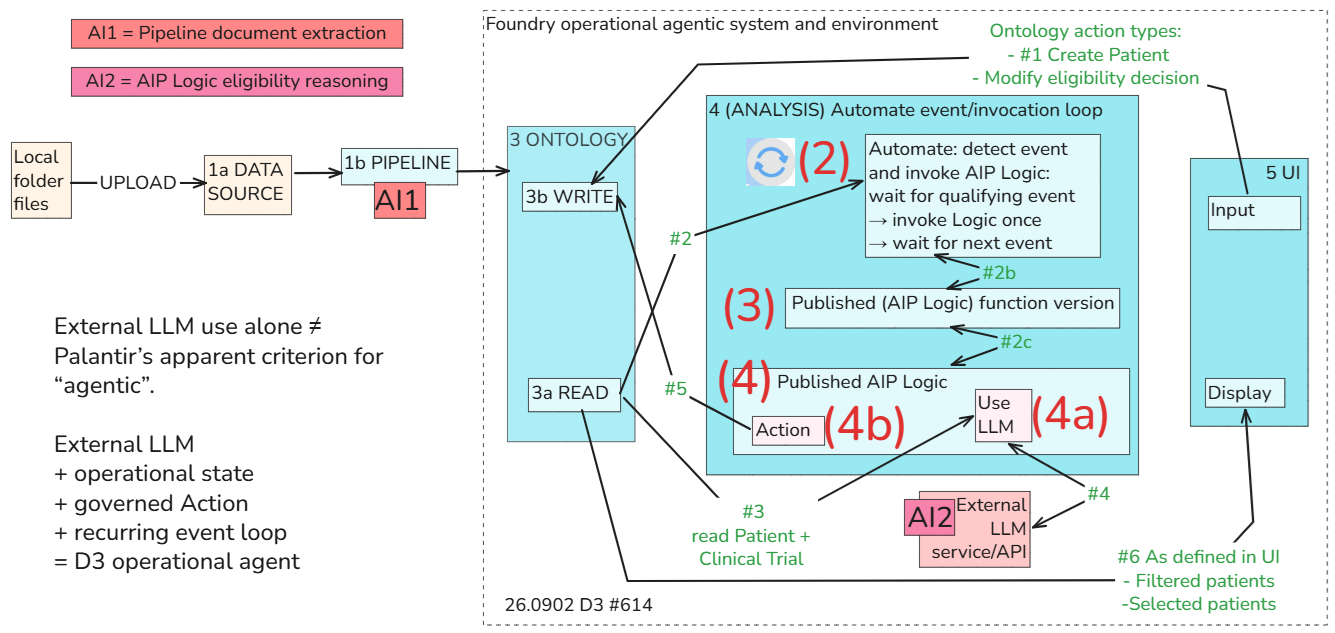
(4b) (TODO) D3b — Protecting agents that use external AI models
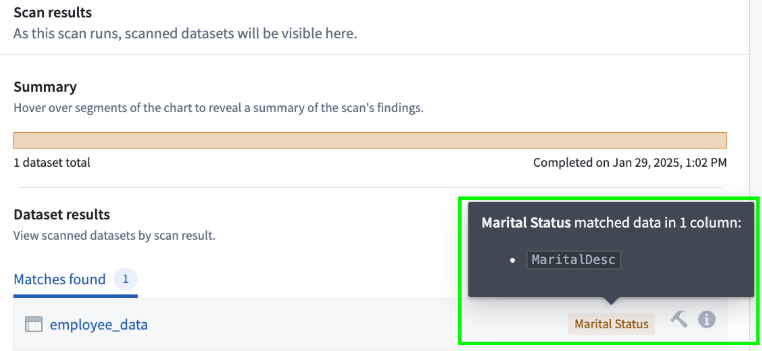
Extend D3 with controls for both sides of the agent boundary: the enterprise data sent to an external LLM and the Ontology changes produced from its response. Proposed topics include sensitive-data detection, minimization and redaction, approved model access, prompt-injection defenses, output validation, constrained Actions, human approval, automation-loop safety, evaluation, monitoring, and rollback.
The objective is to determine which risks Foundry controls actually mitigate and which risks remain with the external model provider.
D3b is specifically about adding safety controls to the external-model D3 agent:
- controlling data sent to the model;
- detecting or minimizing sensitive content;
- validating model responses;
- constraining Actions;
- adding approval, monitoring, and rollback.
It should be referenced from the external-model section, but its primary home is now 2a Data Protection and AI Security.
DEMOS 5) ALPHA (Mining)
(5) D5 (TO-UPDATE): Speedrun: Mining Your First Business Process (26.0718)
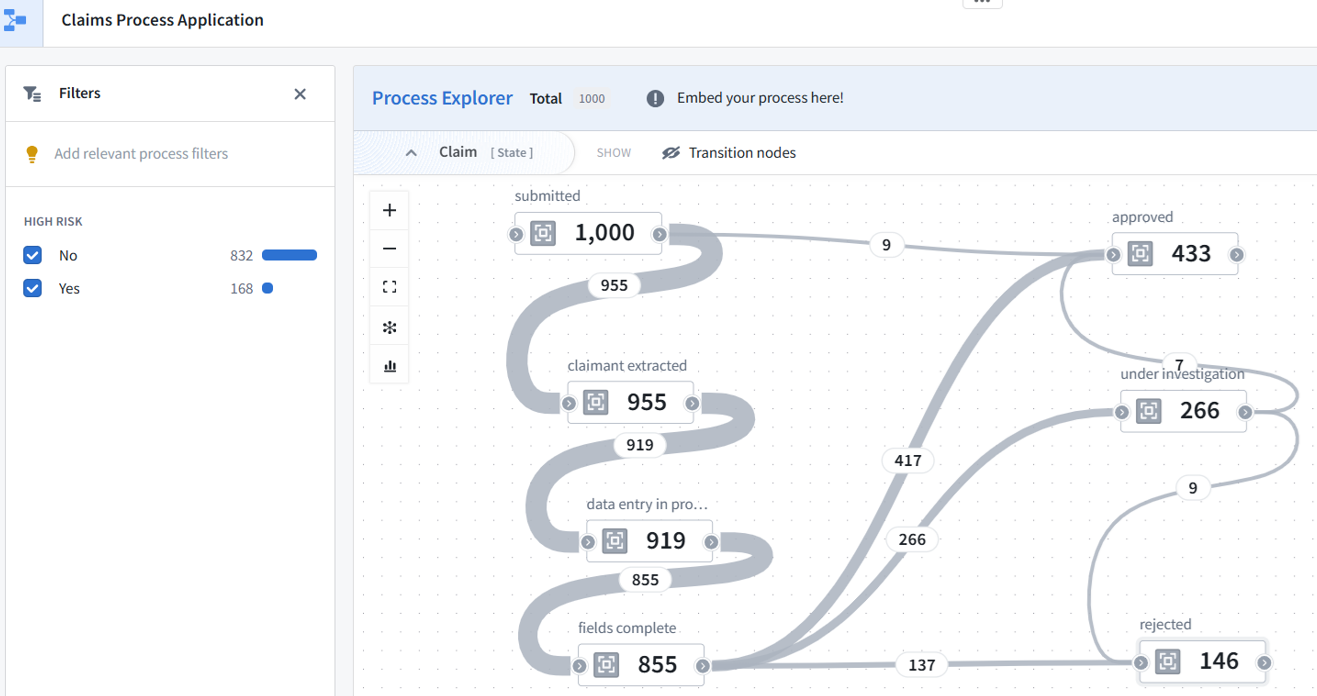
FDE: The demo starts with claims, customers, and claim-history logs. After ingesting these datasets into Foundry, the data is modeled as Ontology objects such as Customers and Claims. Machinery then uses the process logs to reconstruct how claims move through the business process over time. Once the process map is built, you can inspect where claims get stuck, identify why some remain unresolved, and embed the process view into an interactive application.
(5b) D5b (FUTURE) (C5c): Demos for Maximize ALPHA/sovereignty / Data protection (within performance/cost/complexity limitations)
(FUTURE) Comparative demos that hold the business task constant while changing who controls the model, data, RAG system, application, and operational decisions. These experiments examine data egress, model replaceability, provider dependency, continuity, and whether the organization retains control of its proprietary knowledge, Ontology, workflows, Actions, and outcomes.
The distinction can be demonstrated clearly:
-
Secure but not sovereign. A well-protected vendor system that the vendor ultimately controls.
-
Sovereign but insecure. A completely self-hosted system with weak permissions and poor security.
-
Secure and sovereign. A company-controlled system with strong protection and governance.
Topics include
- internal versus external models;
- data and model location;
- ownership of the application and Ontology;
- provider dependency;
- model replaceability;
- RAG and memory placement;
- operational continuity;
- control of outcomes and customer relationships.
The chat in the title link above describes a set of future demos (FDE generated list):
- 1 Define and measure sovereignty
- 2 External model with provider-controlled application
- 3 Foundry-controlled application with external model
- 4 Replace the external model with an internal model
- 5 Compare external, internal and provider-hosted RAG
- 6 Model-provider outage and model replacement
- 7 Agent Action, approval and decision sovereignty
- 8 Final sovereignty scorecard
DEMOS 6) Agentic 3 (AI internal)
(6) D3c (TODO) — Rebuild the protected D3 agent with an internal AI model
Replace D3b’s external LLM with an approved model deployed within the organization’s controlled environment. Optionally add RAG over governed internal sources, then compare external and internal implementations for confidentiality, accuracy, latency, cost, access control, deployment, and operational maintenance.
An internal model can reduce third-party data egress, but it does not eliminate prompt injection, excessive data access, unreliable outputs, or unsafe agent Actions. The D3b controls therefore remain relevant.
D3c sits at the intersection of:
- internal models;
- agent security;
- data egress;
- governed Actions.
Because it is explicitly a protected D3 agent, placing it after D3b in the security section creates a useful comparison:
(7) D8a (WIP) — Deep Dive: Model integration (26.0905)
Demo D8 explores how a traditional machine-learning model can be trained, deployed, and used for inference inside Palantir Foundry. The demo first examines Foundry’s Model Studio and model-management workflow, then creates a project and trains models using two approaches: Model Studio and a Jupyter notebook. Finally, the trained model is deployed and connected to an interactive application for inference. The demo therefore follows much of the model lifecycle: data → training → model → deployment → inference → application.
FDE VERSION: 2.1 D8a — Understanding models in Foundry
Identify the model resources, deployment options, input/output contracts, and differences among external APIs, imported models, internally hosted models, and custom-trained models.
Topics:
- model versus model endpoint;
- external versus internally deployed;
- pre-trained versus custom-trained;
- batch versus live inference;
- model versions and dependencies.
Training of the internal model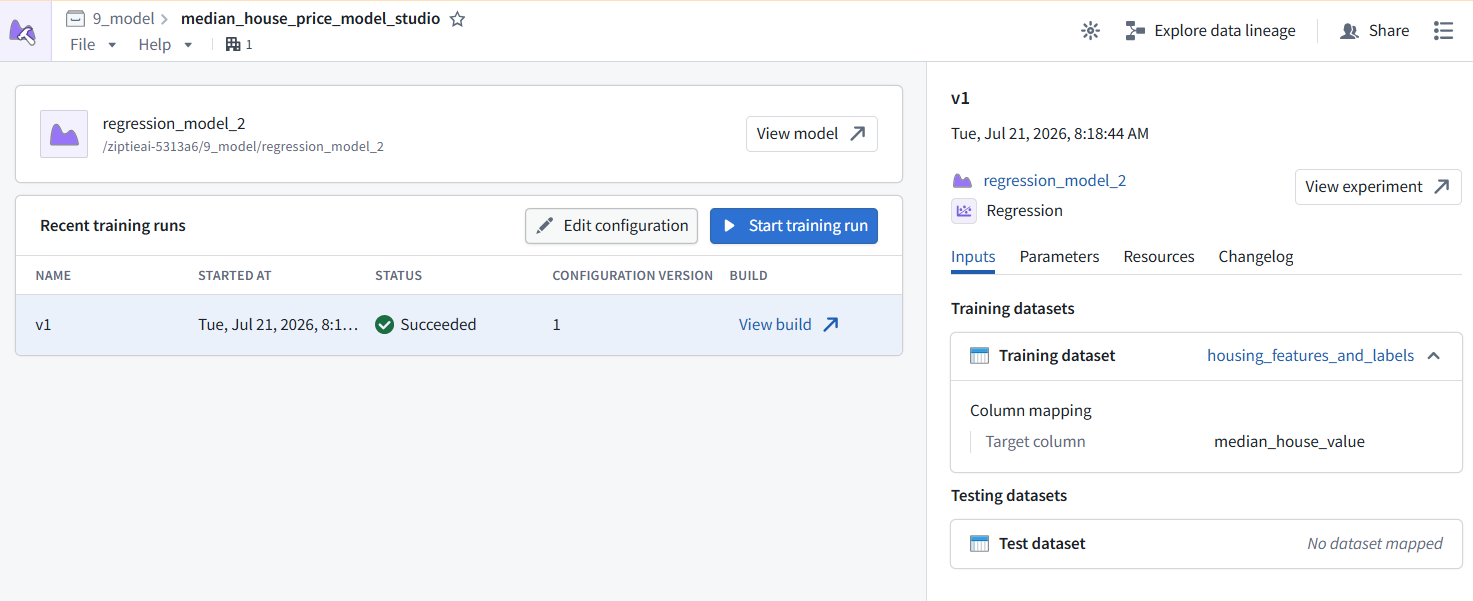
I worked out the structure of this section with FDE/GPT on 26.0905… I will continue working on it from 10 Oct 2026.
TOC2 (LAX-HK)
THIS IS D8 / xxx = i did not do in D8
[0,1] INTRO/SETUP
- BLAH - 2.1 D8a — Model integration concepts
[2] TRAIN/RAG/TUNE
- OR JUST USE EXISTING 2.2 D8b — Use an existing internal model (from demo d3 (d2?))
- (2a) D8c Train (submit to objective)
- 2.5 D8e — Build RAG with an internal LLM
- 2.6 D8f — Fine-tuning, if needed / Adapt a model to a specialized task
[3,4] INFERENCE/EVAL/EXPERIMENT
- XXX evaluate a custom model (D8-1,D8-2)
- live inference BINGO (2.4 D8d — inference (D8-3,4,5)) and
- xxxBatch
- xxxno-code-batch inference
[5] DEPLOY/PROD
[6] GOVERN/MONITOR (IS THIS 2a “data protection and ai security??? NONO)
- 2.7 D8g — Govern and monitor internal models
2.2 D8b (TODO) — Deploy and call an existing internal model
Import or select an existing model, deploy it within the controlled environment, test its inference interface, and call it from a simple Foundry workflow.
This should be the smallest end-to-end internal-model demo:
- Input → internal model → prediction
2.3 D8c (TODO) — Train a custom model
Prepare training data, select features and labels, train candidate models, compare evaluation metrics, and register the selected model version.
Start with a conventional classification or regression model rather than an LLM. It provides a much clearer introduction to:
- training and validation data;
- feature engineering;
- overfitting;
- metrics;
- model selection.
2.4 D8d (TODO) — Operationalize model inference
Use a published model for batch inference in a pipeline and live inference from a Function or application. Compare the latency, scale, output, and deployment requirements of both approaches.
This connects modeling back to your standard workflow:
- Pipeline → batch predictions → dataset/Ontology
- UI or Function → live prediction → response/Action
2.5 D8e (TODO) — Build RAG with an internal LLM
Index governed internal content, retrieve only authorized context, send that context to an internally deployed LLM, and return a grounded response with source traceability.
Topics:
- document extraction;
- chunking;
- embeddings;
- semantic retrieval;
- permission-aware retrieval;
- context minimization;
- prompt injection;
- grounded answers and citations.
Fine-tuning should be a separate optional demo because it is not the same as RAG.
2.6 D8f (TODO) — Adapt a model to a specialized task
Where supported and justified, fine-tune or otherwise adapt a model using governed training data. Compare the adapted model with prompting and RAG before deciding whether the additional complexity is worthwhile.
This should be optional. Many use cases need prompting or RAG, not LLM fine-tuning.
2.7 D8g (TODO) — Govern and monitor internal models
Manage model versions, approvals, deployment promotion, access controls, evaluation thresholds, drift, monitoring, rollback, and retirement.
This is the internal-model equivalent of your Function versioning discussion.
Other demos
Duplicate or unimportant demos (or demos I could not get to work).
- 4.1 D4: Palantir ontology function “speedrun” (quick start) (26.0717).
- At the end of this page is good demo of how FDE/GPT5.5 fixed a problem with the demo.
- #615_.docx
- Speedrun
- 4.2 D6: Deep Dive: Building Your First APPLICATION (xxxPipeline???) (26.0719).
- Some of this failed. FDE/GPT/OPUS could not fix.
- Outdated (2+ years) demo? MAKE THE DEMOS SIMPLER AND KEEP THEM UPDATED.
- #617_.docx
- Speedrun
- 4.3 D7: Deep Dive: Building Your First Pipeline (26.0720).
- 4.4 DD19: Deep Dive: transform_data_w_code_repos (26.0805).
Yes—the structure and core conceptual progression are sound.
It moves logically through:
Sovereignty motivation
→ understand model integration
→ deploy an existing model
→ train a custom model
→ operationalize inference
→ add governed RAG
→ consider fine-tuning
→ govern and monitor models
→ use an internal model in the protected D3 agent
Specific structural strengths:
- 2.0 explains why internal models matter.
- D8a–D8g decompose an otherwise oversized model-integration topic.
- RAG and fine-tuning are correctly treated as separate concepts.
- Governance follows deployment and adaptation.
- D3c works well as the capstone, integrating the model work with the earlier agent and security work.
- The existing D8 deep dive can initially serve as the umbrella/starting demo; overlaps can be separated later.
The only broad concept to revisit later is the exact meaning of internal, local, and sovereign—they are related but not automatically equivalent. Likewise, the interpretation of Karp’s claims should eventually be distinguished from what can be independently demonstrated. Neither issue requires changing the current structure.
(1) the ZiptieAI webpage for D8 (my original ) is below.
i have been working on this demo past few days… the source for the demo is not a speedrun, but the PAL website.. so there a lot of jumping around, differrent options, very difficult to follow….
so what you have given me is basically a straight path through the whole topic? and after i get back from xxx we can work together to match up the website docs with your path?
1. D8 structure
Yes. The D8a–D8g sequence I suggested is a coherent, straight learning path through the larger subject. It is a proposed curriculum, not a claim that Palantir’s current Model Studio pages already present the material that way.
Your existing D8 work maps into that path reasonably well:
| Current D8 material | Proposed path |
|---|---|
| D8.1 Goal | Overall orientation |
| D8.2 Model Studio | D8a: model-integration concepts |
| D8.3 Project | Setup shared by later demos |
| D8.4 Train in Model Studio | D8c: custom-model training |
| D8.5 Train in Jupyter | D8c: alternative training approach |
| D8.6 Inference app | D8d: deployment and live inference |
| D8.7 Summary | Transition to operational inference |
Your present demo already covers a substantial vertical slice:
Understand infrastructure
→ create project
→ train model
→ deploy model
→ call model from application
The later proposed demos add topics that the current D8 does not fully cover:
- starting from an existing model;
- batch and streaming inference;
- internal LLMs;
- governed RAG;
- model adaptation/fine-tuning;
- model governance and monitoring;
- integration into the protected D3 agent.
After you return, we can map the Palantir pages and your existing screenshots onto that sequence, identify overlaps and gaps, and decide whether to split the current D8 document into D8a, D8b, D8c, and so forth. There is no need to restructure it before your trip.
2. Account lifespan
The information you found is reassuring, but I would distinguish the two claims:
- Developer Tier lifespan: the claim that it is available indefinitely appears to mean there is no ordinary fixed 30- or 60-day trial expiration.
- User inactivity: after approximately 30 days without login, the user may be marked inactive and security tokens disabled. If the official policy applies to your tenant, an interactive login should reactivate the user rather than requiring the account to be recreated.
Therefore, after xxx away, the likely sequence is:
No login for more than 30 days
→ user marked inactive
→ existing account/resources remain
→ next successful login reactivates user
The Reddit source is not authoritative, and program terms can change, so it is not an absolute guarantee. However, your account already remaining available for approximately two months is consistent with it being a Developer/Learning tier rather than a short fixed-duration trial.
Before leaving:
- retain your DOCX files, Markdown, and screenshots locally;
- make sure you have working MFA and recovery access;
- record the Foundry organization and login method;
- pause any Automations you do not want running during your absence;
- do not attempt to access the account over a connection you consider unsafe.
On the evidence available, five weeks of inactivity is more likely to cause a reversible inactive status than deletion of your account and projects.
26.0915 (v1 26.0725)